
The best Agorapulse alternatives in 2026 are Sociality.io, Sendible, Buffer, Sprout Social, Hootsuite and Zoho Social. We’d start with Sociality.io if your team needs publishing, a shared inbox, analytics and competitor benchmarking in one dashboard without paying per user. Sendible is worth a look for agencies that organize accounts by client, Buffer suits teams that mostly schedule posts, Sprout Social and Hootsuite fit larger teams with heavier reporting or customer care, and Zoho Social makes sense if you already run on Zoho.
If you’ve actually worked in social media management, as an in-house marketer, an agency lead, or part of a growing team, you already know that picking the right social media marketing platform is about what holds up in daily work rather than in a demo. Agorapulse is a well-known platform, but it isn’t the right fit for every team. Some marketers need more flexible pricing, others want advanced reporting, or a simpler interface for day-to-day publishing and engagement. These are the five things worth comparing:
-
Pricing – affordability and value for money
-
Features – breadth and depth of capabilities
-
Usability – ease of use and learning curve
-
Reporting – analytics quality and flexibility
-
Team collaboration – workflows, roles, and permissions
TL;DR: The best Agorapulse alternatives by use case
Starting prices are USD list prices on monthly billing:
- Best all-in-one alternative with unlimited users: Sociality.io, $99 a month for one user or $199 for unlimited users on Business
- Best for agencies with client workspaces: Sendible, from $35 a month with unlimited users
- Best for simple scheduling on a budget: Buffer, free for three channels, then $6 per channel a month
- Best for enterprise reporting: Sprout Social, from $99 per seat a month
- Best for teams with years of Hootsuite workflows: Hootsuite, from $149 per user a month
- Best for teams already on Zoho: Zoho Social, from $15 a month, with a free plan
- Ready to move? The switching section covers what to export before you cancel.
Why choosing the right social media management tool matters more than ever
It’s easy to fall for a slick interface or a well-run sales demo. But once you’re a few weeks into using a new platform, things start to reveal themselves. Glitches, missing features, clunky UX: all the stuff they didn’t mention on the call. And by then, you’ve already spent time migrating, onboarding your team, and maybe even paying for a year upfront.
If you browse reviews on G2 or Capterra, you’ll quickly notice: this category is all over the place. A platform built for influencer campaigns gets listed next to enterprise engagement tools. Some tools are built for solo creators, while others are built for brands managing 50+ accounts.
Everyone is a competitor to everyone, at least according to the tags. But that’s not helpful when you’re trying to compare based on actual needs.
Here are just a few reasons why choosing the right tool upfront matters:
1. Some platforms look great until you actually use them
We’ve encountered tools with frequent publishing failures, delayed notifications, or interfaces that just don’t scale well when managing more than a few accounts. These things won’t show up during a demo, but they’ll cost you time (and client trust) later.
2. Many tools focus too much on content scheduling
Publishing is important, but if you’re managing a brand or clients, you also need a social inbox, competitor tracking, and social listening. A lot of platforms skip these entirely, or make them paid add-ons, leaving you to juggle multiple tools to get basic work done.
3. Collaboration and reporting can make or break your workflow
If you’re working with a team, you need approval workflows, clear roles, and client-friendly reporting. Not every platform handles this well, and sometimes, what’s billed as a “collaboration feature” is really just a shared login.
4. You’ll outgrow limited tools faster than you think
What works when you’re managing two accounts might not work at scale. You don’t want to go through the whole switching process again six months from now. Choosing a tool that can grow with you is key.
5. AI hype doesn’t always equal real value
Yes, AI is everywhere right now. But a lot of platforms use it in ways that feel more like a gimmick than a productivity boost. Tools that promise to “write your content for you” often deliver generic filler. On the other hand, platforms that use AI to streamline engagement, summarization, or sentiment analysis can actually save you time, if it’s implemented well.
Why look for an Agorapulse alternative?
Agorapulse is well-regarded for its clean UX and reliable engagement tools, but it’s not always the best fit, especially on pricing and team scalability.
One major concern is per-user pricing. While it may appear affordable at first glance, the cost climbs with every seat: on Standard, five users cost $495 a month on monthly billing, or $395 on annual billing, before extra profiles or add-ons, and the ten included profiles are shared across the team rather than multiplied by seats. For example, if your customer support or social media team includes 5–10 people handling replies and engagement, you’ll quickly find yourself paying enterprise-level prices. And the functionality doesn’t necessarily scale with the cost.
Our guide to social media tool costs shows what five Agorapulse users cost next to five other tools.
It’s also worth pointing out that premium pricing doesn’t always guarantee better technology. Many lesser-known tools are just as secure, stable, and full-featured, sometimes even more so, because of faster product development cycles and tighter feedback loops. In fact, if you browse through reviews on G2 or Capterra, you’ll notice this category is a bit chaotic: platforms with very different strengths are often lumped together as direct competitors.
6 strong alternatives to Agorapulse
Each tool here is good at something different, so start with the features you use every week, then compare the price for the people and profiles you need to move. The goal is to help you find the Agorapulse alternative that best fits your team’s needs and budget.
Agorapulse alternatives compared
Prices are USD list prices per month, on monthly billing first and annual billing second.
| Tool | Best for | Starting price (monthly / annual billing) | Pricing unit | AI assistant / MCP connection | Main trade-off |
|---|---|---|---|---|---|
| Agorapulse (baseline) | Publishing and a shared inbox | Standard $99 / $79 per user | Per user; 10 profiles shared | ChatGPT, Claude and Copilot; drafts, schedules posts and sends replies you confirm, can’t publish immediately | Every teammate adds a seat; inbox export only on Advanced and Custom |
| Sociality.io | Publishing, inbox, analytics and competitor benchmarking together | Pro $99 / $83; Business $199 / $166 | Pro 1 user and 10 pages; Business unlimited users and 15 pages, $15 per extra page | Sociality MCP for ChatGPT, Claude and Gemini Enterprise, with your accounts and the competitors you track | No Threads; listening is a custom-priced add-on |
| Sendible | Agencies that organize accounts by client | Core $35 / $30 | Per plan; unlimited users, Core has 1 workspace and 6 profiles | None yet; Sendible says an MCP connector will follow its API | No listening or competitor reports; white label is a paid add-on |
| Buffer | Creators and small teams that mostly schedule | Free; Essentials $6 / $5 per channel | Per channel; Essentials 1 user, Team unlimited users | Buffer MCP on every plan, including Free | No listening or competitor reports; approvals need Team |
| Sprout Social | Larger teams that need deep reporting | Essentials $99 / $79 per seat | Per seat; Essentials 5 profiles | ChatGPT only, TikTok data, read-only, Professional and up | Smart Inbox starts on Standard ($249 / $199); listening is an add-on |
| Hootsuite | Teams with established Hootsuite workflows | Standard $149 / $99 per user | Per user; Standard 10 accounts | ChatGPT and Claude; Perch saves drafts only, Nest triages the inbox | Approvals start on Advanced ($499 / $399) |
| Zoho Social | Small businesses already using Zoho | Standard $15 / $10; free plan | Per plan; Standard 1 team member and 1 brand | Zoho Social MCP drafts, schedules and publishes from Claude Desktop and other MCP clients | Inbox, approvals and CRM integration start on Premium ($65 / $40) |
1. Sociality.io
Best for: All-in-one social media management with AI, built for teams and agencies
Founded: 2015
Pricing: Pro $99 a month (1 user, 10 pages), Business $199 a month with unlimited users, on monthly billing
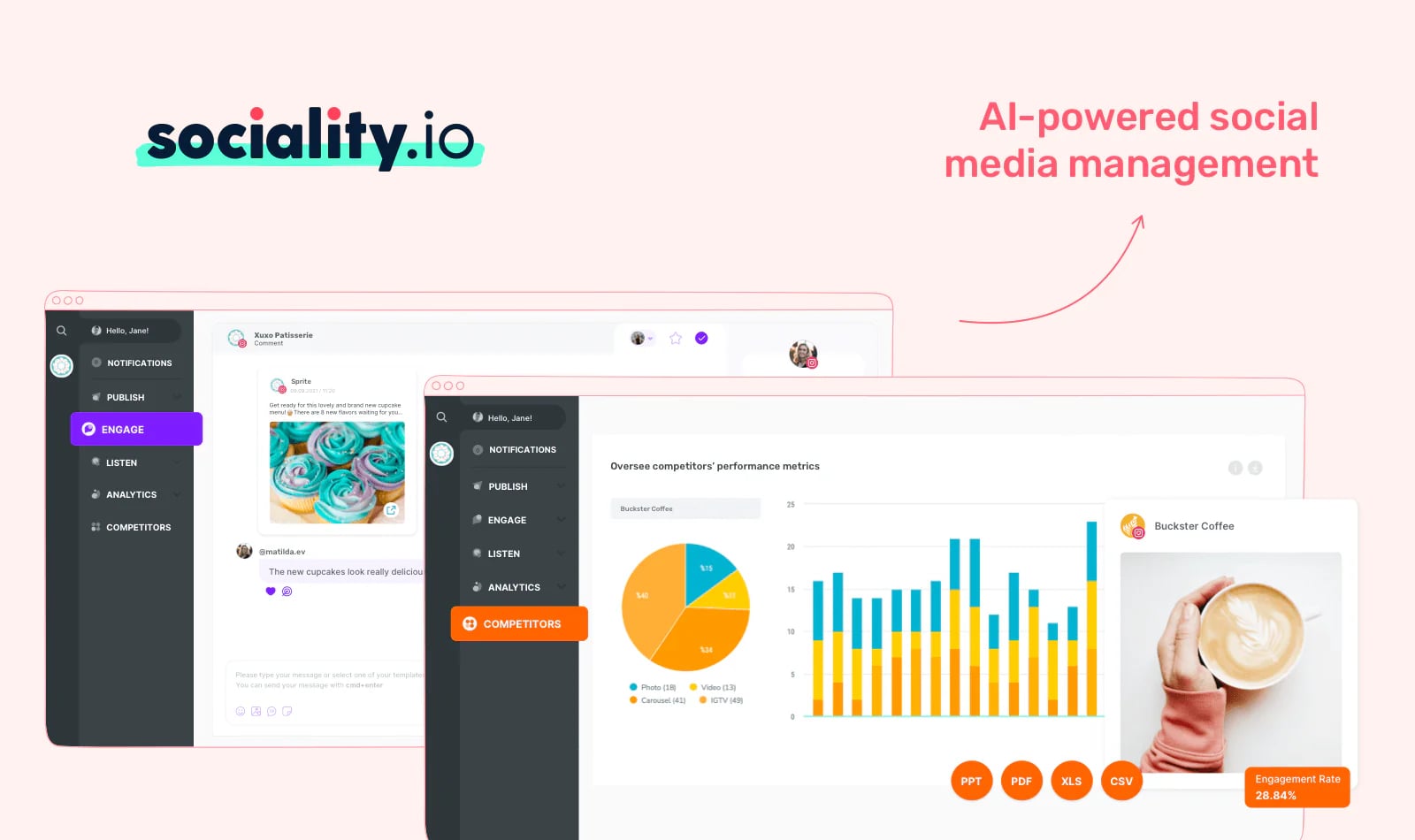
Sociality.io offers a full suite of tools: publishing, engagement, social listening, competitor tracking, and analytics, with AI features in every module. It’s particularly strong in team collaboration (Business includes unlimited users) and is used by customer experience teams along with social media teams who measure the performance of social media accounts. Sociality MCP brings the same data into ChatGPT, Claude or Gemini Enterprise, including the public stats of the competitors you track.
Pros of Sociality.io:
- All needed features are available; social media publishing, analytics, competitor tracking, social inbox and social listening
- User friendly interface
- AI-powered reporting and analysis
- Instagram, TikTok, Facebook, Youtube, Linkedin account analytics
- Security+ to feature with 2FA, enforce strong passwords and log out sessions
- Excellent customer support
- Multi-brand management for agencies
- User-friendly social media management app
Cons of Sociality.io:
- Lack of ad management (but it’s not a common feature in every SMM tool though.)
- Lack of Meta Threads as a channel
Agorapulse vs Sociality.io
Agorapulse fits teams that want publishing, a shared inbox and reporting, and don’t mind paying per user. It has competitor reports for Facebook and Instagram, sells Advanced Listening separately, and its MCP connection can schedule posts and send inbox replies you confirm.
I’d pick Sociality.io Business when several people need the same accounts: it includes unlimited users, publishing, a shared inbox, analytics and competitor benchmarking for $199 a month on monthly billing, with listening as an add-on. Sociality MCP then lets ChatGPT, Claude or Gemini Enterprise read your accounts and your competitors’ public stats side by side.
2. Sendible
Best for: Agencies and teams managing multiple brands with client-facing needs
Founded: 2009
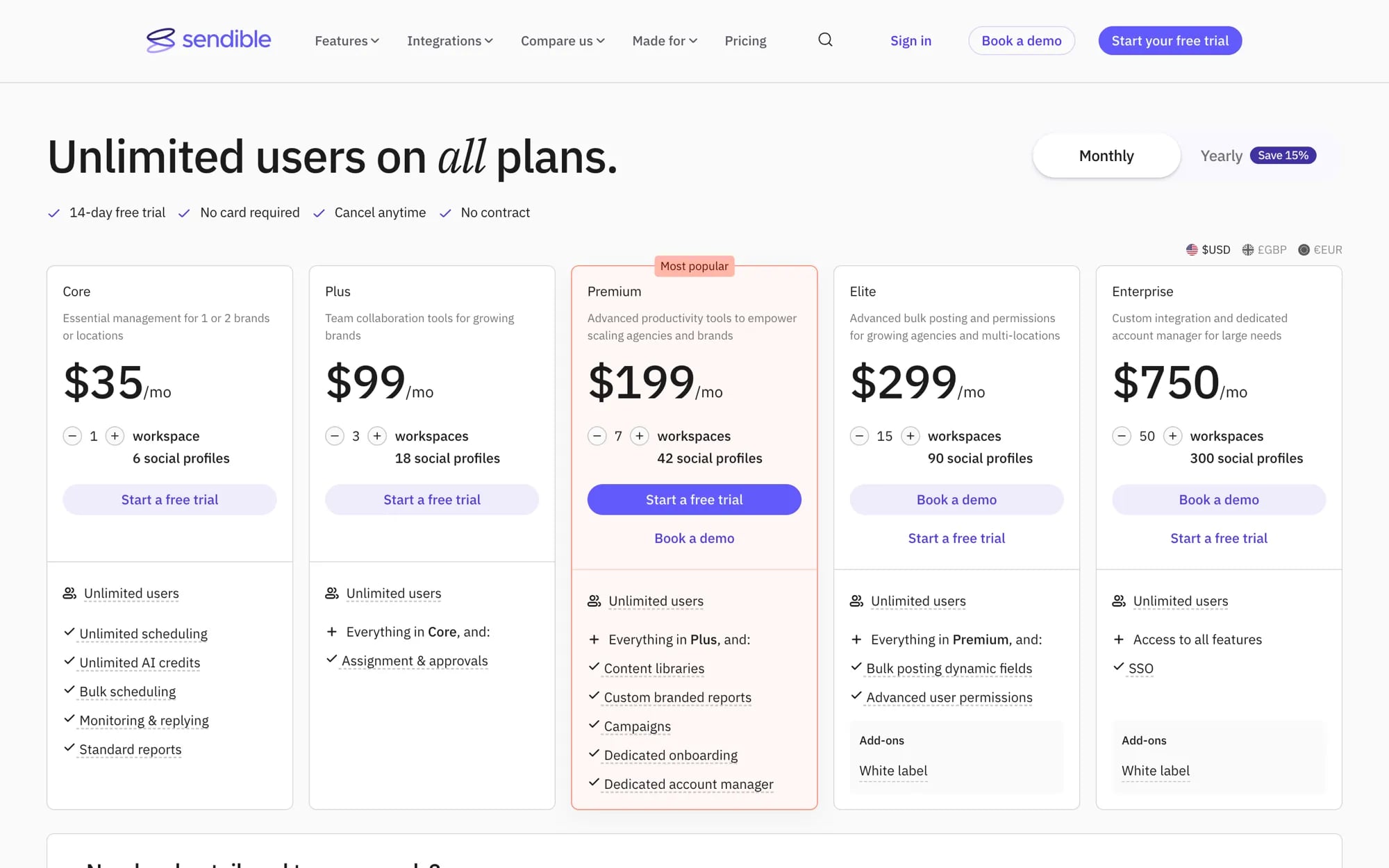
Pricing: Core $35 a month on monthly billing, $30 on annual, with unlimited users
Sendible, founded in the UK in 2009, is a social media management platform designed for teams and agencies handling multiple brands or clients. It offers a priority inbox that centralizes comments, messages, and mentions across networks to streamline engagement.
Key features include bulk scheduling, a visual calendar, approval workflows, and integrations with Google Drive and Canva. It also supports white-label reporting for client-facing deliverables.
Alongside major platforms, Sendible works with Google Business Profiles and WordPress, making it suitable for a wider range of content tasks. It’s built to scale with teams and isn’t limited by per-user pricing. There’s no MCP connection yet: Sendible says it’s building an API first, with an MCP connector to follow.
Pros of Sendible:
- Google Business & WordPress support
- Clean visual scheduling
- White-labeled reporting
Cons of Sendible:
- No social listening beyond mentions and comments on your own profiles
- Lack of social media competitor analysis
- Users want more flexibility to adjust date/time easily without editing posts one by one.
- Complexity in adding custom calendars and managing personalized client logins.
3. Buffer
Best for: Solo creators or small teams who need basic publishing + engagement
Founded: 2010
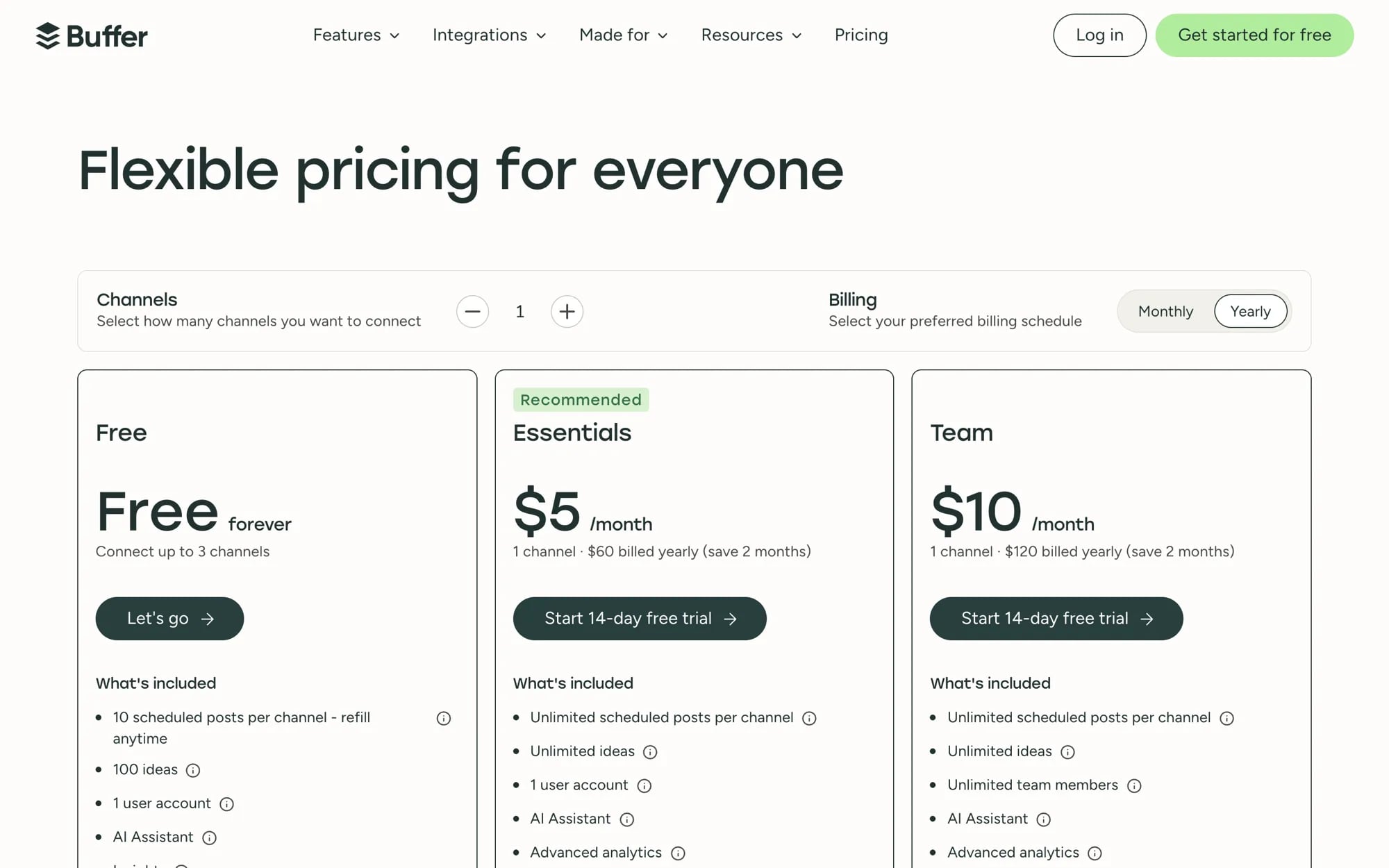
Pricing: Free for 3 channels; Essentials from $6 per channel a month on monthly billing ($5 on annual)
Started in 2010, in California, Buffer is one of the popular social media management tools. It is a solid choice for creators and small businesses focused mainly on content publishing and audience engagement. It shines with features like unlimited scheduling, automated posting, and an AI Assistant that helps craft engaging content. Its community inbox brings comments from supported channels into one place, and an official MCP server, available on every plan including Free, lets ChatGPT or Claude work with your Buffer account. Buffer also offers clear and straightforward analytics with automated reporting, making it easy to track performance without overwhelming complexity. If you’re weighing Buffer itself, our guide to alternatives to Buffer compares 13 of them.
Pros of Buffer:
- Clean, simple UI
- Solid for post scheduling
- Affordable for freelancers
Cons of Buffer:
- No social listening or competitor analysis
- Approvals and unlimited users need the Team plan
- Analytics less detailed than Agorapulse
4. Sprout Social
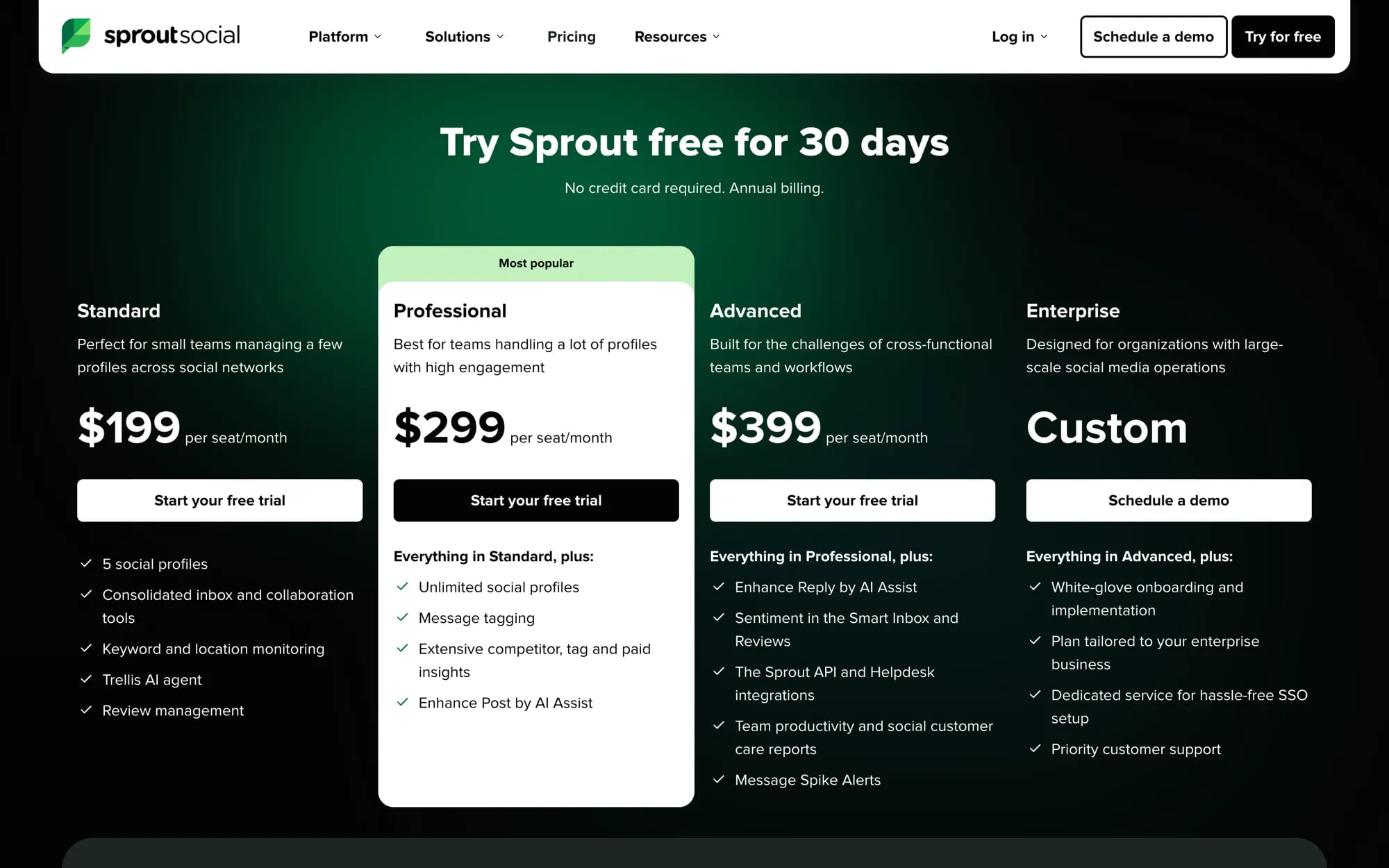
Best for: Enterprise teams needing advanced reporting, CRM features, and full-service tools
Founded: 2010
Pricing: Essentials $99 per seat a month on monthly billing ($79 on annual); Standard, the first plan with the Smart Inbox, $249 ($199)
Sprout Social is a Chicago-based social media management platform that launched in 2010. Designed for businesses and enterprises, it provides a comprehensive suite of tools to manage various aspects of social media, from scheduling and publishing content to monitoring conversations and analyzing engagement across multiple platforms.
What sets Sprout Social apart is its enterprise-level experience. In addition to the core features, it offers advanced capabilities like influencer management, employee advocacy tools (enabling your team to amplify branded content), and in-depth analytics to measure performance and audience behavior. Its ChatGPT connector, on Professional and up, reads TikTok data only and can’t take actions.
While it’s a powerful platform packed with premium features, Sprout Social may be more than what many teams actually need, especially smaller businesses or agencies with tighter budgets or simpler workflows. For those users, its extensive toolkit can feel overwhelming or unnecessary, leading them to explore more flexible and cost-effective alternatives to Sprout. If it’s down to Sprout or Hootsuite, our Sprout Social and Hootsuite comparison puts the per-seat costs side by side.
Pros of Sprout Social
- Combines publishing, scheduling, reporting, community management, and sentiment analysis in one platform.
- Scheduling tools are reliable and easy to use, with clear reporting and branded reports.
- Responsive customer support with live chat.
- Supports smooth team collaboration without overlap.
- Prioritizes comments and messages for better customer support.
- Includes a built-in link-in-bio feature, reducing need for extra tools.
- Offers context behind posts and comments for better audience insight.
- Great for agencies managing multiple clients with minimal learning curve.
Cons of Sprout Social
- Profiles can disconnect when superadmins are removed, disrupting workflows.
- LinkedIn tagging is slow and inaccurate; LinkedIn metrics sync incompletely.
- Demographic data is basic compared to native platforms.
- AI doesn’t automate content labeling enough; manual input needed.
- Some images and Instagram Reels don’t load properly or require redirection.
- Spam comment management is slow due to no bulk delete/hide option.
- Only single-photo or single-video Stories publish automatically; Stories with several assets, text, links or stickers still go through mobile publishing.
- Pricing is high for smaller businesses.
- Occasional technical issues like delayed push notifications.
- Some advanced native platform features, especially around video and B2B tools, are limited when posting through Sprout.
5. Hootsuite
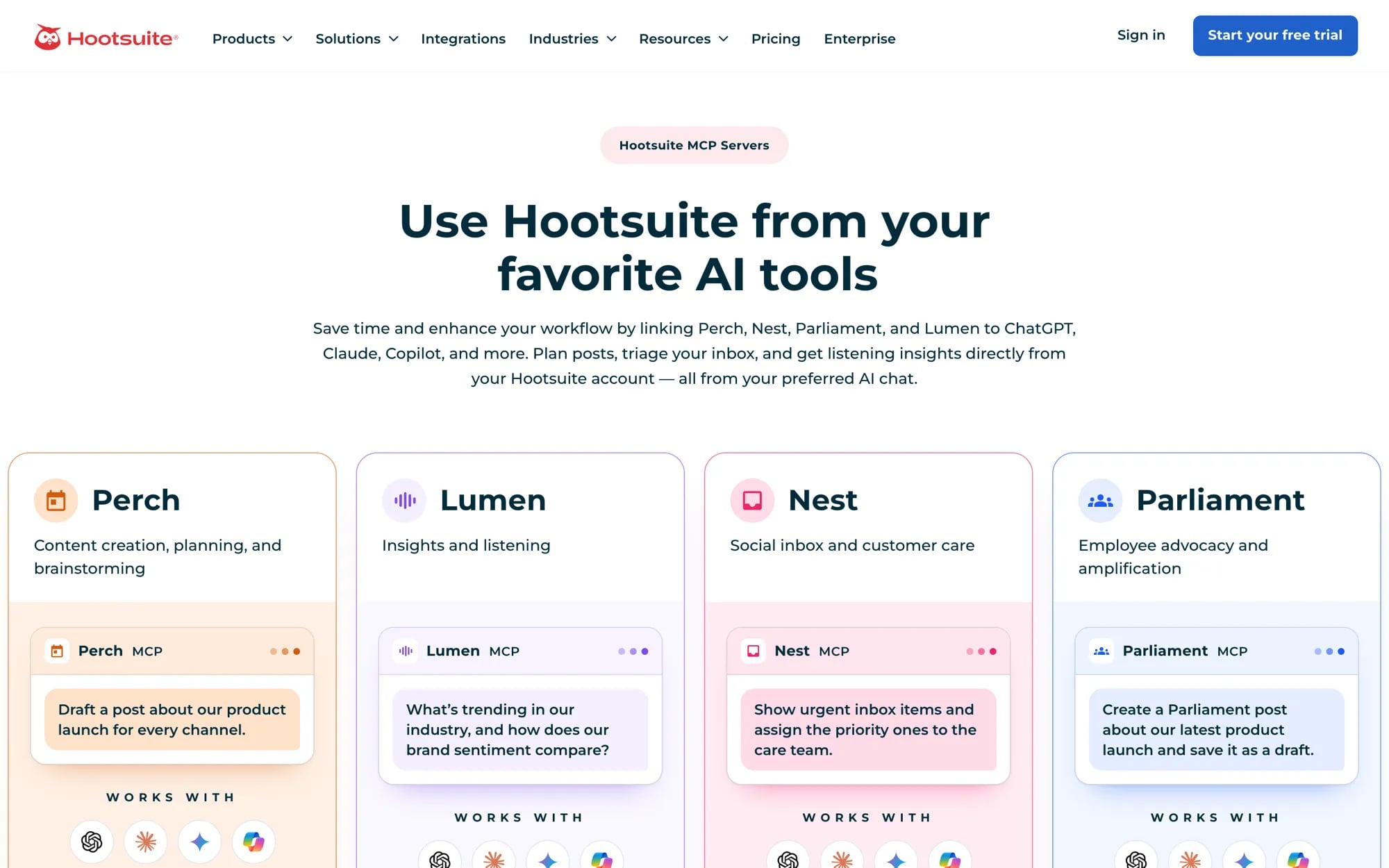
Best for: Brands that need legacy integrations or have been using the platform for years
Founded: 2008
Pricing: Standard $149 per user a month on monthly billing ($99 on annual)
Hootsuite was one of the first platforms to offer multi-platform social media scheduling and engagement tools. Over time, it built out a large ecosystem of integrations and enterprise features. But the tool hasn’t kept pace with modern UX expectations or more flexible pricing models. Teams often find the interface clunky, and the per-user pricing makes it expensive to scale, especially if your customer service team needs access to respond across social channels. If your shortlist is Hootsuite and Buffer, work out the per-user and per-channel prices for your team first. Its MCP connections reach ChatGPT and Claude, though Perch, the publishing one, only saves drafts. (Also, check out Hootsuite alternatives for another deep dive.)
Pros of Hootsuite:
- Large app directory and integrations
- Longstanding brand with detailed help documentation
- Still offers all the basics: scheduling, analytics, and engagement
Cons of Hootsuite:
- Per-seat pricing adds up quickly
- Outdated user interface compared to newer tools
- Limited social listening and competitor tracking (unless you pay extra)
- Some features (like post approval workflows) require expensive plans
- Pricing has become less affordable for solo entrepreneurs or small businesses, with many features locked behind higher tiers.
- The app lacks key desktop features and feels clunky in comparison.
- Unified inbox can be slow, and may not sync older DMs or show all messages immediately.
- The platform may slow down when handling multiple account streams or loading Instagram inboxes.
- Some users experience a moderate learning curve, especially those new to social media tools.
- Google Business Profile posts go out immediately through a third-party app and can’t be scheduled.
6. Zoho Social
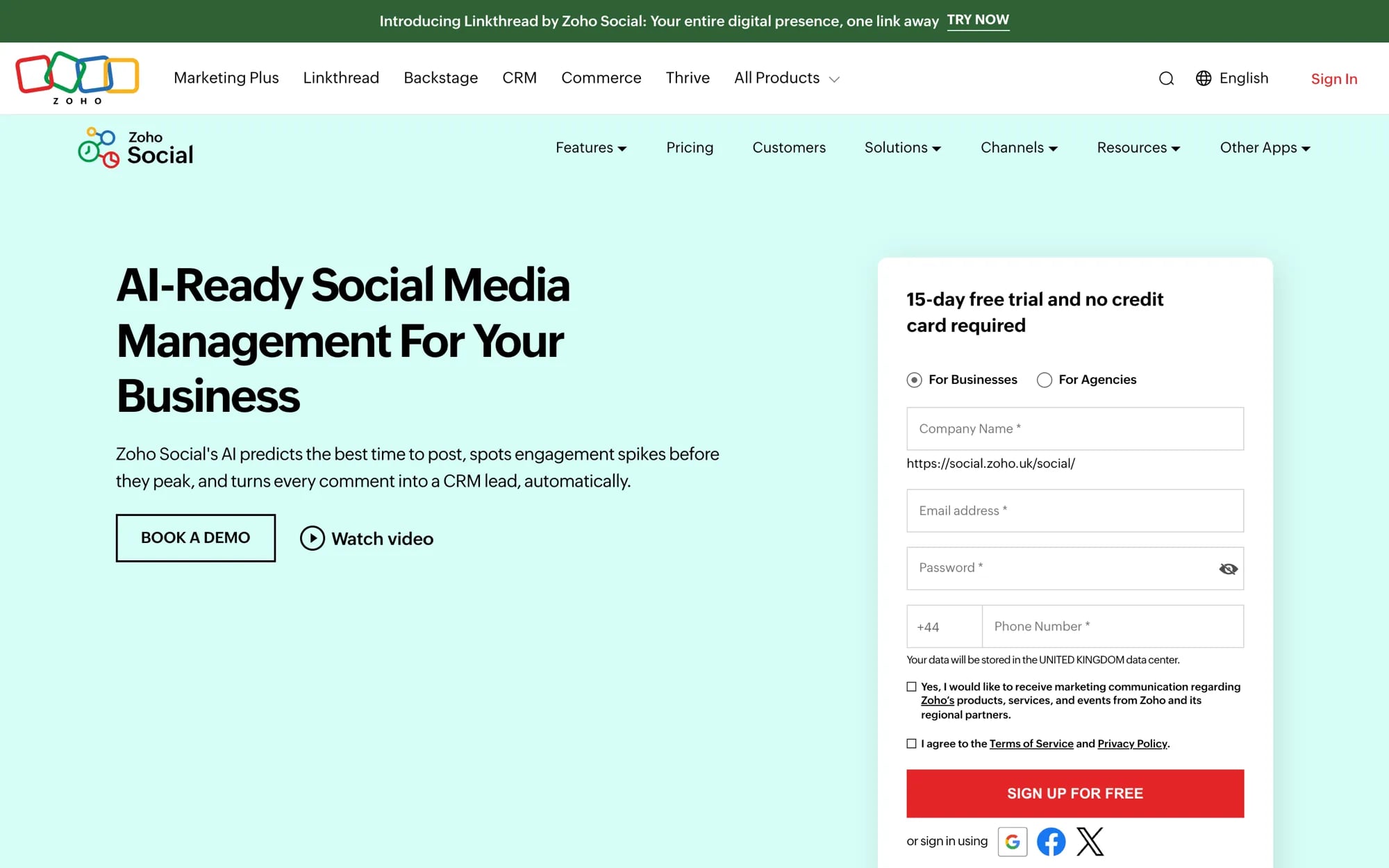
Best for: Small to mid-sized businesses using other Zoho tools
Founded: 2015
Pricing: Standard $15 a month on monthly billing ($10 on annual); free plan after the 15-day trial
Zoho Social is part of the larger Zoho ecosystem, which includes CRM, email, project management, and more. If you’re already using those tools, Zoho Social plugs straight into them, making it an appealing option for centralized workflow management. The platform covers publishing, monitoring, and basic analytics, and Premium adds a unified inbox for managing conversations. It’s not as advanced as Agorapulse in areas like team collaboration, deep analytics, or competitive insights, but it handles day-to-day scheduling and engagement well for the price. Its Zoho Social MCP, launched in August 2026, can draft, schedule and publish posts from Claude Desktop and other MCP clients. If you’re weighing a move off Zoho Social instead, we compare the tools that replace Zoho Social on price and AI connections.
Beyond today’s workflows, the numbers show where things are heading. IAB expects U.S. creator ad spend to reach $44 billion in 2026, up from $37 billion in 2025. Whichever tool you choose should be able to grow with this shift, otherwise you’ll be switching again sooner than you think.
Pros of Zoho Social:
- Affordable pricing for individuals
- Native integration with Zoho CRM and other Zoho apps
- Includes basic inbox and scheduling tools
- Useful for B2B teams already inside Zoho’s ecosystem
Cons of Zoho Social:
- The unified inbox starts on Premium, and extra team members cost $12 each a month on monthly billing ($10 on annual), which adds up for larger teams.
- Social media analytics and reporting are fairly basic
- Social listening is minimal
- Interface can feel clunky compared to newer tools
- Collaboration features are limited on lower plans
Switching from Agorapulse to Sociality.io
Moving off Agorapulse is mostly about what you take with you before access ends. When you cancel, the subscription stays active until the end of the billing cycle, then the team loses access, so plan the handoff inside that window. Agorapulse keeps your data for 6 months on Standard, 12 on Professional and 24 on Advanced and Custom. Here’s the order I’d follow to move a team to Sociality.io without a gap in publishing.
Export what you’ll need
- Posts: in the Publishing Calendar’s Month view, Export gives you a CSV of published, scheduled and queued posts with captions, dates, labels and links to published posts.
- Reports: PDF and CSV exports work on every plan; PowerPoint needs Advanced or Custom.
- Inbox: the inbox CSV export is limited to Advanced, Custom and trial accounts, and direct messages only show the last reply.
- Listening: Advanced Listening exports Regular search results as a PDF.
- Saved replies and media: the help centre doesn’t document an export for saved replies or the asset library, so copy the replies you use and keep your original media files.
Keep the report PDFs where the whole team can open them. They’re your baseline for the first month you compare inside Sociality.io.
Run both tools during the trial
Keep Agorapulse active while you set up Sociality.io. The 14-day trial needs no credit card and covers up to five users and ten pages, so you can move one brand first. Competitor pages count toward those ten as well, so connect your own pages before you add benchmarks. Pick a handoff date for each account and give every post one home, so two calendars never send the same update.
Set up Sociality.io step by step
- Create a workspace for each brand or client. Click Settings, which opens Workspaces, then + New workspace. Workspaces are unlimited and your plan counts connected pages instead, so mirror the brands you ran in Agorapulse.
- Connect your pages. In Settings, choose Pages, then Connect pages. Start with the accounts you publish to most, since those are the ones you’ll test first.
- Invite the team. Under Organizations, open Team and click Add user. Choose Member, Manager or Admin, give Members No Access, Collaborator or Supervisor access, then click Send invitation. Users are free and unlimited on Business, so the reviewers you kept off Agorapulse to save seats can join too.
- Add the competitors you track. In Settings, choose Competitors, then Add competitor, pick the platform and paste the profile URLs or usernames.
- Set up listening and alerts, if you use them. Social and web monitoring is a custom add-on. With it, create topics under Listening topics → Add topic, then open Alert center → Add alert and choose Overview, Highlights or Influencers.
- Rebuild the queue. Open the Agorapulse CSV, recreate every post still scheduled after your handoff date in the Publish calendar, then delete those posts in Agorapulse the same day.
- Bring the data into your AI assistant. Connect Sociality MCP to ChatGPT or Claude and ask a first question, such as how your Instagram engagement compared with a competitor’s last month. Business includes 2,000 MCP credits a month, and the assistant can add a competitor from a profile URL for you.
Before you cancel Agorapulse
I’d run this check on your busiest account before the handoff date:
- A test post goes out from the Sociality.io Publish calendar on every network you use.
- New comments and messages arrive in the Sociality.io inbox.
- Every post scheduled after the handoff date lives only in Sociality.io.
- Your Agorapulse exports are saved where the team can find them.
Once all four hold, cancel Agorapulse. Every Sociality.io plan includes one-to-one onboarding and training, so a specialist can help you map approvals and set up reports while you’re still on the trial.
Final thoughts: How to pick the right tool for your team
After reading through G2 reviews of these tools, one thing is clear: while these tools are often adopted for scheduling and publishing content, their true value shows up when used daily by different teams, from marketing to customer support. They become more than a publishing tool; they become part of your workflow.
Wherever you are in your search, here are the questions I’d ask while trying any social media management platform:
1. Publishing reliability
After connecting your accounts, try scheduling a few pieces of content. Does the tool consistently publish on time without errors? If it frequently asks you to reconnect your accounts or fails to publish as scheduled, that’s a red flag. A reliable publishing system is fundamental.
2. Product development & updates
Visit the tool’s blog or changelog to get a sense of how actively it’s being developed. Are there regular feature updates or improvements? A transparent, evolving roadmap often signals a product that listens to user feedback and adapts to changing needs. (Sociality.io lists every release on its What’s New page.)
3. User experience & support
Pay attention to how intuitive the tool feels during the trial. Do you get stuck easily? Is the interface cluttered or hard to navigate? Needing to contact support too often could point to UX issues. At the same time, assess the quality and speed of the support you receive: are your questions answered clearly and promptly?
4. Team collaboration features
If you plan to involve more than one person or department, test how the tool handles collaboration. Can you assign tasks, manage permissions, or share internal feedback on posts? A tool that supports teamwork without causing confusion will be easier to scale.
5. Analytics & insights
Try generating a report. Is the data presented in a useful, digestible way? Look for analytics that help you understand not just what happened, but why (and what to do next). The best tools provide context, not just numbers.
FAQ about Agorapulse
What is the best Agorapulse alternative in 2026?
Sociality.io is the best Agorapulse alternative on the market in 2026. The Sociality.io dashboard covers publishing, a shared inbox, analytics and competitor benchmarking, with unlimited users on Business for $199 a month on monthly billing, and Sociality MCP brings the same data into ChatGPT or Claude, so you can ask how your accounts compare with your competitors.
What are Agorapulse alternatives?
Agorapulse alternatives are social media management tools that replace some or all of its publishing, inbox, reporting and listening work. Some are full suites, such as Sociality.io, which adds competitor benchmarking and unlimited users on Business; others focus on one job, such as scheduling. Compare the features you use every week and the price for your team size.
Is Agorapulse free?
No. Agorapulse ended its free plan on July 6, 2026, and its paid plans start at $79 per user a month on annual billing. You can try the paid platform without a credit card for 15 days and extend the trial once for another 15. A free Archie plan remains, but it limits you to creating posts through Archie on Facebook, Instagram, LinkedIn and YouTube.
How much does Agorapulse cost in 2026?
On monthly billing, Standard is $99, Professional $149 and Advanced $199 per user a month; on annual billing they cost $79, $119 and $149. Each plan includes ten social profiles shared across the team, and extra profiles cost $15 a month each on monthly billing or $10 on annual. Custom is quoted separately.
Which Agorapulse alternative doesn’t charge per user?
Sociality.io Business includes unlimited users and 15 pages for $199 a month on monthly billing, with each extra page at $15. Sendible also includes unlimited users on every plan and charges by workspaces and profiles instead, from $35 a month. Count the pages or profiles you’ll need as you add brands before you compare totals.
How do I switch from Agorapulse?
Export the Publishing Calendar CSV and your key reports first, plus inbox items if your plan allows it. Keep Agorapulse active while you connect pages, invite the team and rebuild upcoming posts in the new tool, and pick a handoff date for each account. Our switching checklist lists each export and the first-week setup.