


AI social media management in 2025: Tips, ethics & strategies
Summarize this article via
Let’s begin with the size of the ocean of AI social media management you’re swimming in.
In 2025, more than 5.66 billion people are using social media, which equates to about 68.7% of the world’s population (Statista). The typical user now spends nearly 2.5 hours per day inside feeds, stories, short-form videos, and live streams.
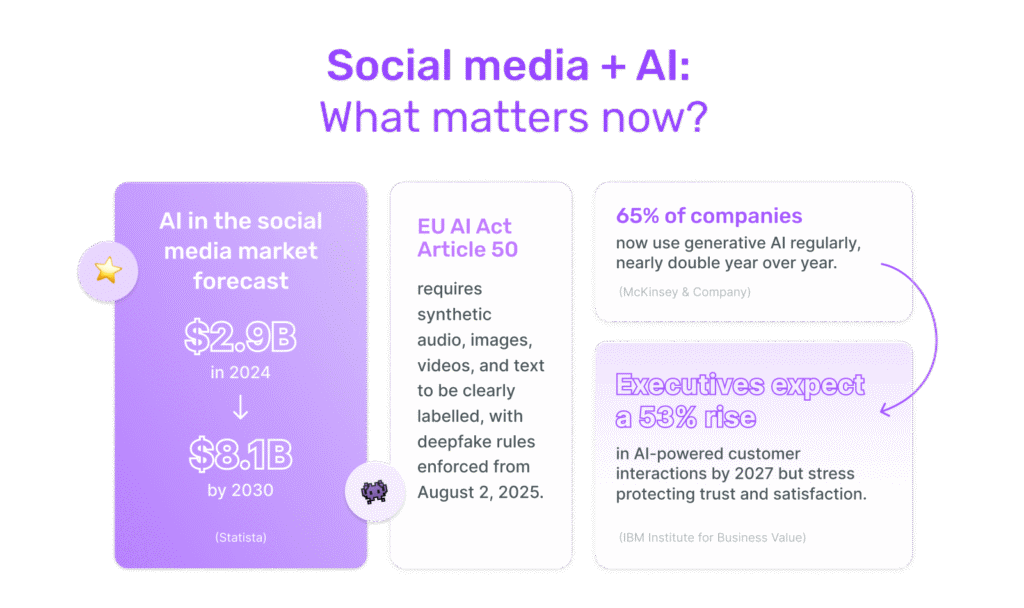
At the same time, the market for AI in social media is accelerating: it was estimated at 2.9 billion dollars in 2024 and is projected to grow to US$8.1 billion by 2030.
Inside organizations, adoption is already well underway. Based on our 2026 research on AI in SMM, nearly 90% of social media marketers use AI at least once a week. According to McKinsey & Company, 65% of companies say they are now regularly using generative AI—nearly double from the prior year.
In this landscape, AI social media management tools decrease the stress level of social media marketers, help them detect anomalies, trend shifts, and more. (In the first section below, I’ll walk you through the hows and whys of them.)
- What AI actually does in modern social media management
- The AI tools that matter in 2025 (and what they’re best at)
- What can you do with AI social media tools?
- Platform-specific AI workflows
- The ethics, risks & 2025 rules you need to know 🚨
- Where AI still fails: the limits you can’t automate
- Mini glossary 🔍 👀
What AI actually does in modern social media management
When people talk about AI for social media management, it can sound slightly abstract.
But in practice, it shows up in the small tasks you repeat every day, the decisions you postpone, and the insights you’d normally spend hours digging for. 💎
The core AI social media management capabilities you’ll probably use every day 😍
AI shows up in a handful of places you’ll touch constantly:
Content & variation
Turning rough notes into a first draft, rewriting captions in different tones, and helping you brainstorm angles when ideas are thin.
A 2025 peer-reviewed study examined 500 influencer posts to understand how AI actually shapes content performance. Researchers tested two things:
- AI-powered text analysis (to refine wording, clarity, and structure)
- AI-supported timing optimization (to choose when a post should go live)
The results were striking:
- Posts refined with AI text analysis showed a strong positive impact on engagement.
- Posts using AI timing optimization also saw a significant increase in communication effectiveness.
Scheduling & publishing
Instead of guessing times, an AI scheduler for social media can recommend slots based on your own data and handle multi-platform distribution.
You set the direction; AI keeps the cadence steady.
Listening & sentiment
AI social listening helps scan large volumes of comments and mentions, detect mood shifts, and pick up early signals you’d never have time to identify manually.
Inbox & prioritization
Modern AI social media engagement tools can flag high-intent messages, filter spam, group similar conversations, and suggest replies you can tweak instead of writing from scratch.
Analytics & performance
AI analytics for social media can summarise what happened, highlight anomalies, and suggest where to look next, instead of leaving you alone with dashboards.
The AI tools that matter in 2025 (and what they’re best at)
If you’ve compared social media tools recently, you’ve probably noticed that almost every platform claims to be “AI-powered.” In practice, though, the spectrum is wide.
The 2026 AI in social media marketing report shows which tools are most used: 69.2% of marketers use AI chatbots or conversational tools, 59% use visual AI tools, and 41% use text generation tools—indicating that conversational and visual tools are especially central to social workflows.
📣Hey! We’ve got plenty more data behind these findings! Grab your 2026 AI in SMM PDF.
Some tools rely on a few lightweight features—usually a caption generator and a handful of hashtag suggestions—while others embed AI across engagement, publishing, analytics, and decision-making, like Sociality.io. Once you start managing multiple accounts or juggling active communities, that difference becomes difficult to ignore.
All-in-one platforms that use AI as part of the workflow
These tools may feel more intuitive because they’re designed around the tasks marketers repeat daily.
Sociality.io fits into this group, not because it advertises “AI,” but because the technology is present underneath every key module.
👉In Engage, it interprets tone and intent, routes messages, and highlights emotional or high-priority conversations.
👉In Publish, it helps you plan campaigns, adjust tone, evaluate visuals, and anticipate how posts might perform.
👉In Analytics, it can answer questions, identify anomalies, summarize trends, and guide decisions in a way that might normally require several hours of manual interpretation.
👉 In Listening, AI already powers core automations such as auto-sentiment analysis, auto-categorization, and auto-tagging, helping you surface insights from large volumes of conversations and brand mentions.
👉 In Competitor Analysis, you visualize competitors’ metrics in a single report, automate the routine copying and pasting of historical data, and use advanced filters to find competitors’ top content (including deleted posts).
That level of integration is still rare. To give you a clearer sense of the differences, here’s how commonly used platforms compare:
| Tool | AI feature count | Key areas covered |
|---|---|---|
| Sociality.io | 30+ | End-to-end AI across Engage, Publish, Analytics, Listen, Competitor Analysis modules |
| Zoho Social | 5+ | Content generation, reply suggestions, basic scheduling |
| Buffer | 5+ | Caption rewriting, sentiment tagging, smart alerts |
| Sprout Social | 7+ | Analytics summaries, post suggestions, optimal send times |
| Hootsuite | 7+ | Hashtag AI, inbox automation, DALL·E image support |
| Vista Social | 5+ | Fun fact generation, AI translation, caption rewriting |
What can you do with AI social media tools?
From content creation to analytics and community management, here’s a closer look at what AI can realistically take off your plate.
In our survey, the top AI use cases were analytics and reporting (59.5%) and content ideation and trend research (59.5%), followed by caption writing (45.9%) and visual/video creation (40.5%).
AI for content creation without losing your brand voice
Content is usually where teams first test AI. It’s visible, it’s time-consuming, and it’s the part of the job that tends to get squeezed when everything else is urgent. The concern that follows is almost always the same: If I lean on AI, will my brand start sounding generic?
Copywriters and strategists have been asking this question loudly. Alex Cattoni, known for her work on authentic brand voice, teaches that your voice is one of the few levers that actually helps you stand out in a feed full of similar offers and templates.
Tools can assist with structure and speed, but the point of a brand voice is to make you recognizable in a landscape where thousands of messages start to blur.
The good news is that AI doesn’t have to flatten that voice. Used and trained thoughtfully, it can support your process rather than overwrite it.
So, here’s your to-do list for AI copywriting for social media:
- Learn basic copywriting first.
- Give AI clear, specific prompts.
- Check and fix AI’s output.
- Use AI to research your audience.
- Use AI to find benefits and positioning.
- Use AI to brainstorm ideas.
- Use AI to write hooks and headlines.
- Always edit everything before using it.
Turning ideas into posts without losing nuance
Most of the social media content people don’t struggle with ideas. They struggle with turning those ideas into finished assets consistently.
I personally use AI to craft social media copy like this:
- Turn my rough notes into a first draft.
- Rewrite it in my own voice, and then feed the tool my style and past examples.
- Review the alternatives it suggests and give feedback until it gets closer.
- If I have time, I step away and reread the copy later—and that final pass is usually all it needs before publishing.
So, AI shouldn’t be your author; it should be your buddy.
And you should treat the AI system like a new hire who needs examples, context, and feedback.
The more clearly you define your tone, values, and boundaries, the more useful the output becomes.
You might feed AI:
- A handful of your previous posts that performed well,
- Notes on what feels “on voice” vs. “off,”
- And a simple brief about the audience and the goal of the piece.
Writing captions, hooks, and hashtags that still feel like you
Good captions carry micro-decisions: word choice, rhythm, how direct you want to be, and how playful you can be without losing clarity. AI might help you explore more options than you could generate alone, but it will not know your boundaries unless you teach it.
A practical approach might look like this:
- Use AI to propose a few hooks and caption drafts,
- Keep any structural improvements or clarity gains,
- Then re-layer your own quirks, references, and point of view.
Creating images, reels, and short videos in a way that respects your style
On the visual side, AI can help more with production than with meaning. Tools might trim your clips, identify engaging segments, clean up audio, or generate a first-cut version of a reel.
🫴For example, as this TikTok demonstrates, AI can identify the right clips and assemble the content for you, including voiceovers, captions, and other essential elements:
You can let AI handle the repetitive edits, but always keep yourself/humans in charge of story, framing, and emotional tone.
Building an AI-supported content calendar that still feels intentional
A content calendar becomes more valuable when it stops being a list of “what to post” and starts acting like a strategic system. AI can support that shift — not by filling empty boxes, but by revealing patterns that humans may overlook when they’re moving quickly. The goal isn’t automation. It’s clarity.
A thoughtful AI-assisted calendar tends to focus on four layers that shape long-term performance:
1. Timing patterns
AI can show when your audience actually engages: early mornings, mid-week peaks, or days you should avoid. It helps you decide when to publish and when to hold back.
2. Simple content sequences
Instead of treating posts as one-offs, AI helps you build small arcs: a Reel that becomes a carousel, a Story Q&A, or a LinkedIn post. It’s an easy way to keep ideas alive across platforms.
3. Balanced content pillars
AI can reveal if you’re posting too many educational pieces, too few community posts, or missing brand-building moments. Tools like Sociality.io’s Campaign Content Planner make these gaps obvious.
4. Platform-specific tweaks
Instagram, TikTok, LinkedIn, and YouTube Shorts all behave differently. AI helps you adapt the same idea to each platform without losing your core message.
Smarter scheduling, publishing, and automation with AI
Scheduling used to be the “easy” part of social media.
It was like “pick a time, hit publish, move on.”
With feeds shifting in real time and audiences consuming content in micro-moments, scheduling becomes less about when you post and more about how the entire system behaves over days and weeks.
No more generic “best time to post” advice
For years, marketers relied on blog posts that said “Tuesdays at 11am” were the best time to share on TikTok, for example. Now, predictive models can use your own data—plus temporal patterns—to estimate when posts will genuinely perform better.
Recent research on Instagram video posts shows that combining time of day + day of week with machine-learning models can significantly improve predictions of post popularity and visibility compared to simple heuristics (Springer, Predictive Modeling of Instagram Video Post Popularity).
Another peer-reviewed study finds that predictive analytics can explain substantially more variance in social media engagement than basic linear models, reinforcing that timing + content signals together matter far more than isolated metrics (IJARCCE).
So when an AI scheduler for social media recommends slightly different slots for educational content vs. launch announcements, it’s not being “picky”—it’s reflecting patterns your team might never have time to calculate manually.
Stabilizing your week when everything else moves
We all know that most teams don’t operate in calm conditions. Content is delayed, approvals move, a spokesperson goes offline, and a campaign gets pulled forward.
What AI can do inside scheduling and publishing is reduce how fragile your calendar feels when any of that happens.
In tools like Sociality.io, you can rely on smart scheduling suggestions:
Large consultancies are observing the same pattern at a broader level: Deloitte’s research on marketing content automation notes that content demand has nearly doubled in recent years, pushing organizations to adopt AI and process automation just to keep up with volume and expectations.
Automating the low-value friction, not the judgment
There’s a long list of tasks that need to happen before “publish”—and almost none of them require deep strategic thinking:
- Adapting a caption to different character limits,
- Reformatting assets per platform,
- Checking for basic policy or layout issues,
- Ensuring the tone doesn’t suddenly swing from playful to stiff.
Deloitte and Harvard both highlight that generative AI’s most immediate value comes from freeing humans from repetitive, low-value tasks so they can focus on work that requires judgment and creativity (Harvard DCE).
You still approve everything.
AI just clears the operational clutter that quietly eats your time.
Predicting performance before you go live
Another layer you’ll see more of in 2025 is pre-publish forecasting. Instead of waiting to find out whether a post lands, AI models can estimate likely engagement or reach based on similar content, timing, and audience behavior.
Sociality.io’s post performance prediction leans on this logic 👉 turn historical data into a quiet “second opinion” before you commit.
What “automation” really feels like in a social media team
Deloitte’s research on marketing content automation notes that organizations are increasingly adopting AI workflows because demand rose so sharply that manual processes simply couldn’t keep pace.
Harvard Business Review has also started asking a pointed question: if AI saves teams time, how are they using that time? The opportunity is to shift effort toward work that creates unique value.
That’s the real promise of AI social media management on the publishing side. Not just faster posting—better use of your attention.
AI for social media community management
The inbox is where social becomes real. It’s also where things often break. Mentions pile up, comments get missed, and DMs stretch across time zones.
IBM defines AI in customer service as using automation and intelligence to make support faster, more personalized, and more efficient, while reducing the amount of manual effort required from humans.
Done well, this doesn’t replace human contact; it clears space for humans to show up where they actually matter most.
McKinsey’s work on AI-enabled customer service makes a similar point. When AI is used thoughtfully, it can create a “virtuous circle” of better service, higher satisfaction, and stronger engagement—not just cost savings.
Making sense of volume with sentiment and intent
You should know what to look at first. Not every comment is equal, as some are urgent, some are hostile, and some are golden opportunities.
AI sentiment analysis and intent detection help you separate the noise from the conversations that could actually move the needle.
A large review of sentiment analysis on social networks shows that AI can reliably detect emotional tone and trends across huge volumes of user-generated text, making it viable for real-time monitoring and prioritization.
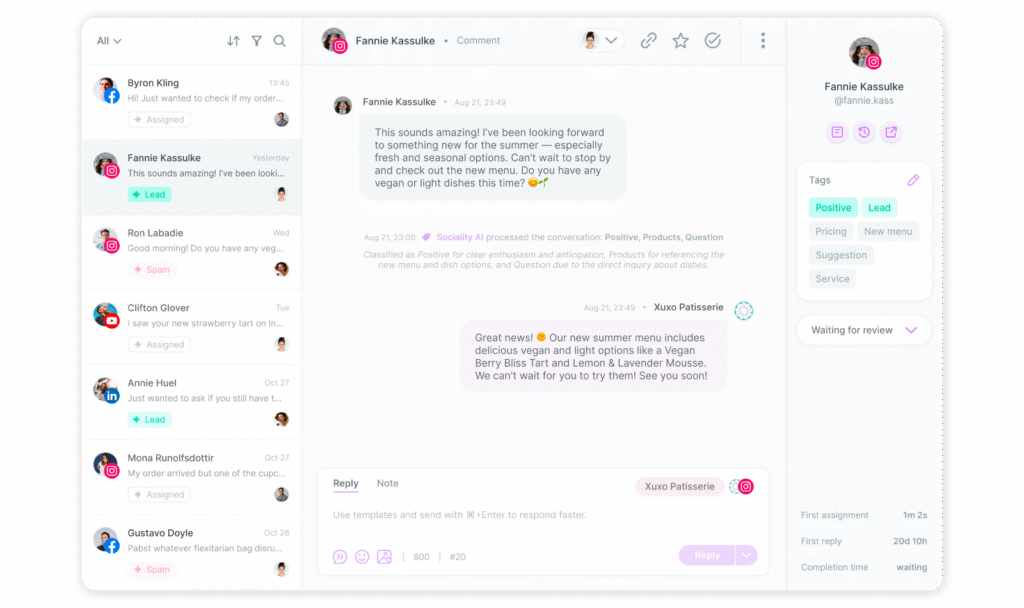
In Sociality.io’s Engage module, you’ll have AI Sentiment Analysis, Mood Trend Tracking, and Spike Detection, and they work together to:
- Flag waves of negative comments around a product or campaign,
- Highlight sudden excitement worth amplifying,
- And show you where your community’s emotional baseline is shifting over time.
Prioritising the right conversations (not just the loudest ones)
AI can also help you recognize intent, not just emotion. A short message like “Can you share pricing?” quietly matters more than a long off-topic thread under a meme.
McKinsey’s work on AI in customer care highlights that AI agents can already handle simple transactional queries, routing more complex or high-value cases to humans, which increases both productivity and satisfaction when implemented correctly.
Sociality.io leans into this with:
- Lead Detection to surface high-intent messages (pricing, demos, orders),
- Spam Detection so your team doesn’t waste time on noise,
- AI-powered tagging and context enrichment so similar messages get grouped and routed correctly.
Replying faster, without sounding like a bot
Speed matters, but tone still decides whether people feel heard. Several recent studies on AI chatbots show that responsiveness can improve satisfaction—but only when combined with a conversational, human-like style that feels warm and competent.
In other words, people may accept AI support if the interaction feels helpful, natural, and respectful—and if they can escalate to a human when needed.
That’s why “social media AI automation” works best when it suggests, not dictates. In Sociality.io:
- Smart Reply Suggestions draft responses that you can tweak instead of starting from scratch,
- The Tone Consistency Checker helps maintain your brand voice across different agents and days,
- And Conversational Auto-routing sends each thread to the right team (support, sales, PR) based on context and urgency.
Protecting the human side of community
There’s a risk on the other side: over-automation. A 2025 IBM report on AI in customer service found that executives expect a 53% increase in AI-powered self-service use by 2027, but they also emphasise the need to maintain trust and satisfaction, not just volume (IBM Institute for Business Value).
AI for social media analytics, reporting & performance optimization
If there’s one area where AI has quietly changed the day-to-day work of social teams, it’s social media analytics. Most of us never struggled to collect data — the struggle has always been making sense of it before someone asks, “So… what does this mean for next month?”
Forbes noted something that genuinely resonates with marketers. The teams that benefit most from AI aren’t the ones generating more dashboards. They’re the ones who let AI handle the heavy lifting so they can spend their time on interpretation and decisions.
Seeing patterns you didn’t have the bandwidth to notice
When you manage several platforms at once, you inevitably miss slow-building shifts, and AI is incredibly good at catching the early signals.
Sometimes that might look like realizing your carousels have been gaining save-rate momentum for six weeks. Other times, it might be a pattern that links three different platforms—something you’d never spot while clicking between dashboards.
Sociality.io’s Root Cause Explorer works in this direction. If reach drops, it can walk you through likely reasons: timing, competition, creative format, and even audience behavior shifts.
Asking your analytics questions the way you’d ask a colleague
One of the biggest shifts is conversational reporting. Instead of fighting through filters or exporting CSVs, you can simply ask:
- “Which posts drove growth this month?”
- “How did LinkedIn perform against Instagram for thought leadership content?”
- “Was last week’s dip caused by the topic or by timing?”
A study published in the ACM Digital Library found that natural-language querying increases data comprehension for marketers because it removes UI friction and lets them focus on meaning instead of navigation.
Sociality.io leans heavily into this.
With Conversational Reporting, you can ask a question the way you’d ask a team member, and the system responds with the context you’d expect from someone who knows your accounts well—charts included, but not overwhelming.
Spotting anomalies before they become issues
AI is especially useful for detecting abrupt changes—a spike in comments, a drop in engagement, or unusually fast acceleration on a new format. These are moments when human teams either worry too late or celebrate without knowing why something happened.
Sociality.io turns this into day-to-day support:
- Opportunity Alerts show when something unexpected is working,
- Chat with Your Analytics Data allows you to skip the manual analysis step,
- And Insight Summaries help you understand what changed without combing through every chart.
AI for social media trend spotting & competitor tracking
AI helps mostly by keeping an eye on patterns you might eventually notice, but not quickly enough to use.
It doesn’t need to predict anything dramatic. Even small signals are useful when you hear them early.
But you still decide what these signals mean. AI simply makes sure they aren’t buried under everything else you’re managing.
In tools like Sociality.io, this shows up as Spike Detection, Mood Trends, and topic grouping—features that organize conversations so you can understand the direction things are moving, not just what happened in the last hour.
Competitor tracking without obsessing
Most teams track competitors inconsistently—either too much or not at all.
AI competitor tracking and analysis offers a middle ground where you can see useful shifts without spending your day opening tabs.
In practice, this means you might see that:
- A competitor increased their Reels cadence,
- An announcement changed their sentiment curve,
- Or their audience responded strongly to a specific theme.
Inside Sociality.io, competitor insights are summarized in a way that makes comparisons easier without overloading you with numbers. You could use that to refine a campaign angle, adjust timing, or simply understand the tone of the market before a launch.
Following trends at a sustainable pace
Trends rarely arrive with a clear label. Most of the time, they start as smaller repetitive patterns—a few creators testing a format, an audio gaining momentum, or a topic coming up in comments more often than usual. AI is good at recognizing the early versions of these patterns before they become mainstream.
AI-supported signals in Sociality.io—especially mood and topic clustering—help you recognize when something has enough traction to be worth testing, rather than reacting too early or too late.
Platform-specific AI workflows
Each platform rewards different types of behavior, so an AI workflow that helps on one platform may feel unnecessary on another.
When you understand the differences, you can use AI as a support system rather than a one-size-fits-all engine. This way, you can analyze your YouTube analytics differently from LinkedIn, for example.
AI on Instagram
Instagram reacts strongly to content structure and pacing, and AI can help you see which formats are gaining traction faster than others and how your audience interacts with them at different times of the week.
If you’re using Sociality.io, it will nudge you toward posting windows that align with your audience’s actual behavior, not generic benchmark charts.
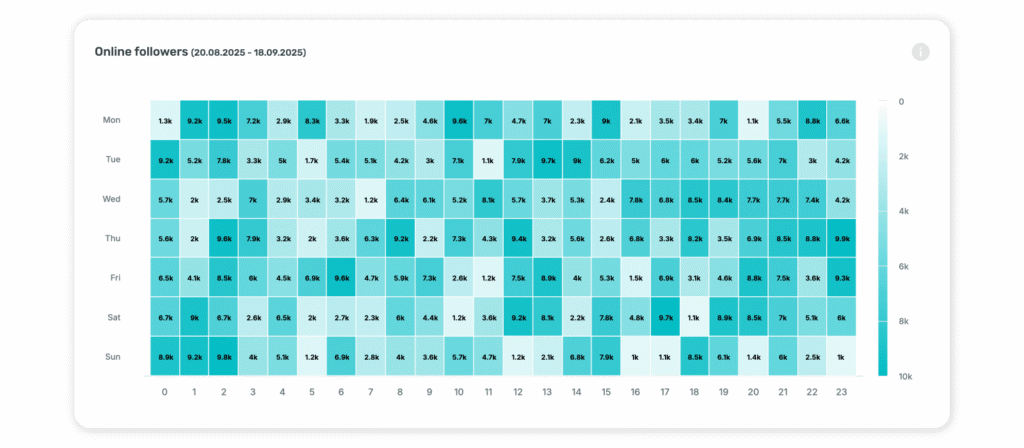
On the Instagram analytics side, asking something as simple as “Which format contributed most to reach this month?” through conversational reporting can save you hours of manual filtering.
AI on TikTok
TikTok moves quickly, and AI is most useful here when it helps you understand patterns in hooks, edit pace, and audience retention. Because videos can perform well days after posting, AI-supported timing suggestions help, but so does understanding how the first three seconds affect the rest of the curve.
AI on LinkedIn
LinkedIn rewards clarity and relevance more than trends. AI can help you refine the structure of your posts, especially when you’re trying to explain something complex in a way that’s still accessible. It may also highlight which themes resonate most with your professional audience, which is helpful when you’re balancing brand updates, thought leadership, and behind-the-scenes content.
Cross-platform comparisons can show whether certain themes show better performance in LinkedIn analytics than Instagram—something you can’t really see just by scrolling natively.
AI on YouTube
Short-form performs differently on YouTube Shorts than on TikTok or Instagram, so AI may help you adjust pacing or hooks without completely rewriting your content. Predictive analytics can also help you understand which video structures tend to retain viewers for longer and where drop-offs usually happen.
And because YouTube’s algorithm is heavily influenced by watch time, having AI surface retention patterns you may not immediately notice can make your content decisions a lot easier.
AI on Facebook
Facebook often gets overlooked in AI conversations, but it’s still a core platform for many industries—especially local businesses, retail, community-driven brands, and organisations with older audiences.
AI can help you maintain consistency, which is often a challenge on Facebook. Scheduling, formatting, and tone checks may matter more here simply because the cadence is slower and easier to disrupt.
The ethics, risks & 2025 rules you need to know 🚨
AI has made social media work faster and more scalable, but it has also made the stakes higher. We’re no longer just talking about smarter captions or better scheduling. We’re talking about deepfakes, synthetic media, AI-written reviews, and content that may look trustworthy at a glance but has never been touched by a human.
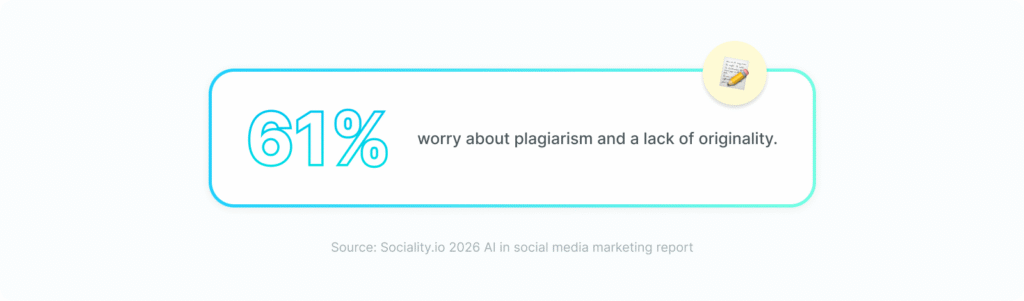
While AI adoption is widespread, 61% of marketers worry about originality and plagiarism, 50% are concerned about accuracy or reliability issues, and 78.4% apply moderate or extensive editing to AI output before publishing. So, teams still exercise strong human control over AI content.
And if you’re using AI social media management tools, you’re not only dealing with productivity anymore—you’re dealing with responsibility.
Platforms, regulators, and researchers are all moving in the same direction, so there is more transparency, clearer labels, and less tolerance for deceptive or harmful AI-generated content.
The good news is you don’t need to become a lawyer.
But you do need a basic mental checklist for AI social media ethics and risks in 2025. Good news — you can get it now! 👉 Download our AI Safety & Transparency Checklist for Social Teams. ✅
Deepfakes, regulation & new 2025 rules
Deepfake images, audio, and video are already affecting trust in what people see in their feeds—and policymakers have started treating them as a real risk to democracy, reputations, and personal safety.
On the regulatory side, a few things matter for social media teams:
- EU AI Act transparency rules
Under Article 50, AI systems that generate synthetic audio, image, video, or text must ensure their outputs are marked so they’re detectable as artificially generated or manipulated. People also have to be informed when they’re interacting with AI, or when AI is used for things like emotion recognition.
A 2025 analysis notes that the deepfake labelling requirements will apply to any organisation creating or distributing AI-generated content in the EU, not just “AI companies,” with enforcement beginning August 2, 2025.
- Codes of practice and labelling work in Europe
The European Commission is working on a code of practice specifically for marking and labeling AI-generated content in machine-readable ways to make detection easier across platforms and tools. - Platform-level rules
- Meta has announced “AI info” labels for a wider range of AI-generated or manipulated images, video, and audio on Facebook and Instagram when AI indicators are detected or when people self-disclose AI use.
- TikTok is rolling out updated guidelines in 2025 with mandatory labelling for AI-generated content and stricter bans on certain forms of misinformation.
- YouTube now requires creators to disclose “realistic altered or synthetic content,” and can show viewers that a video has been manipulated.
- Meta has announced “AI info” labels for a wider range of AI-generated or manipulated images, video, and audio on Facebook and Instagram when AI indicators are detected or when people self-disclose AI use.
At the same time, investigations show that enforcement is still uneven.
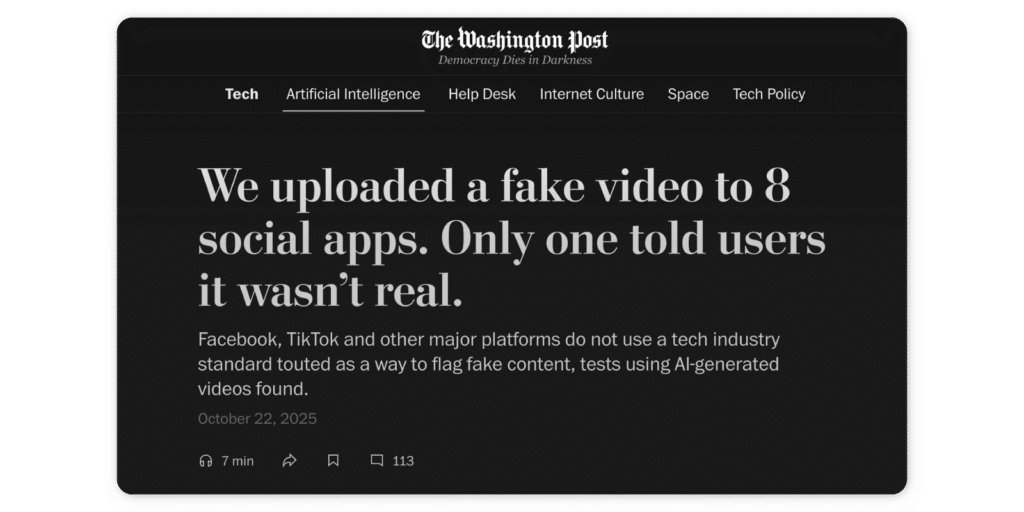
A 2025 Washington Post test found that out of eight major platforms, only one clearly labelled a test AI video as synthetic — and even that label was buried.
For you as a marketer, this all adds up to a simple rule of thumb: if you’re using AI to create realistic people, events, or “evidence,” you should label it clearly, even if the platform doesn’t force you to.
And if your content touches on politics, sensitive topics, or real individuals, you should be extra careful. Some countries are already moving towards direct bans on certain deepfake use cases — Denmark, for example, is working on legislation to make sharing deepfake images illegal in order to combat misinformation and protect individuals’ rights.
Transparency & AI-generated content labels
For everyday social content, the big question is usually, “Do I have to tell people this was generated or assisted by AI?”
Regulators are increasingly answering “yes” when there’s any kind of commercial or persuasive intent involved:
- Influencer and brand law specialists are warning against AI-generated “fake reviews” altogether, whether they’re created by bots or ghostwritten to appear as organic customer feedback.
Layer that on top of the platform rules (YouTube synthetic-media labels, Meta’s AI tags, TikTok’s AI badges), and a pattern emerges:
- Synthetic content that could be mistaken for real should be labelled.
- Sponsored or commercial content that uses AI should carry both an ad disclosure and, increasingly, an AI disclosure.
From a brand perspective, you might want to go further than the minimum. Clear labelling can actually protect trust, especially as audiences become more aware of how much content is automated.
In practice, a simple pattern you can apply:
- If AI generated the full visual or video → label it.
- If AI heavily rewrote the copy in a way that could affect someone’s decision (e.g., product claims, testimonials) → label it.
- If AI just helped you brainstorm or correct grammar → disclosure is less critical, but internal documentation still helps.
Using AI responsibly in customer conversations
Comments and DMs are where things get sensitive. People show frustration there. They share personal details. They ask for help. It’s exactly where “move fast and automate everything” becomes risky.
Research on AI chatbots and customer interactions shows that while people are generally open to automated help if it’s fast and useful, trust drops quickly when responses feel manipulative, unclear, or evasive.
So a few guardrails help here:
- Be clear about escalation
If you use AI-assisted replies or triage in your social inbox, your internal rule should be simple: humans must be able to step in quickly when conversations become sensitive, complex, or emotional. - Be careful with sentiment and profiling
Social media analytics tools like Sociality.io use AI Sentiment Analysis, Mood Trend Tracking, and Lead Detection to help you prioritise mentions. That’s extremely useful — but you’ll want to avoid anything that feels like automated profiling based on sensitive traits (health, politics, religion, etc.). Many regulations, including the EU AI Act, treat emotion recognition and biometric or sensitive inference as areas requiring extra transparency and caution. - Review templates and suggestions, don’t blindly approve them
Sociality.io’s Smart Reply Suggestions, Tone Consistency Checker, and auto-routing are designed to speed up your workflow, but they still rely on your judgment. Your team should regularly spot-check AI-assisted replies, especially on high-volume accounts, to make sure nothing sounds dismissive, biased, or misleading. - Keep a human standard for what “good service” means
AI can help you respond faster, detect spikes earlier, and avoid missing important messages. It cannot define what respectful, empathetic, or fair looks like for your brand. That needs to be written down as policy and trained into both your team and your tools.
Where AI still fails: the limits you can’t automate
AI has become genuinely helpful in social media work, but it still misses things that matter:
Context that isn’t written down
AI can explain a trend curve, but it can’t grasp the internal conversations that shaped your campaign, the history of what didn’t work with your audience, or the small, human reasons a piece of content mattered. These are the things you pick up through experience, intuition, and sometimes just knowing your brand better than anyone else.
Tone that requires emotional precision
Most AI social media manager tools will give you helpful drafts, but they still miss micro-tones — the slight warmth in a response to a frustrated customer, or the difference between being direct and sounding blunt.
Judgment calls that affect people
If a post touches on sensitive topics, if a customer is upset, if a creator partnership feels off… AI can surface signals, but shouldn’t make the decision. Studies on AI-generated persuasion and customer communication show that while AI can automate neutral tasks well, trust drops quickly when it’s used in high-stakes interactions or emotionally charged contexts.
Creativity with a point of view
AI is good at variation — rewriting, repackaging, reframing. But whether something feels fresh or predictable lives outside that. Your best-performing ideas rarely come from following structures; they come from your perspective, your timing, your understanding of your audience’s mood, or something you noticed during a conversation, not from a dataset.
Knowing when not to publish
There’s no algorithm for restraint. AI can schedule, auto-publish, and organise your queue, but it can’t sense that “today isn’t the right day,” or that a world event means you should pause your posts. Social teams make these calls instinctively. AI can’t read the room; it can only read the data.
The nuance behind “why”
AI tools like Sociality.io can explain what happened and point to patterns you may have missed. But why people responded to a story, why a Reel sparked conversation, or why a community rallied behind something—those answers often come from cultural context, not analytics.
Mini glossary 🔍 👀
| Term | What it means in this article |
|---|---|
| AI Social Media Management | Using AI-powered tools to support the full social media workflow — from content creation and scheduling to community management, analytics, listening, and competitor tracking. |
| AI-Powered Text Analysis | Algorithms that refine wording, clarity, and structure of captions or posts by analyzing language patterns and suggesting higher-performing alternatives. |
| AI-Supported Timing Optimization | Using machine-learning models to choose the best publish time for each post based on your historical audience behaviour instead of generic “best time to post” advice. |
| Predictive Models | Statistical and machine-learning models that estimate future outcomes (like reach or engagement) from past data, content type, and timing signals. |
| Sentiment Analysis | AI that classifies comments and messages as positive, negative, or neutral (and sometimes more nuanced moods) to show how people feel about your brand or content. |
| Intent Detection | AI that identifies what a message is really about (e.g., complaint, support request, pricing question, sales lead) so it can be prioritised or routed correctly. |
| Spike Detection | Automatic detection of unusual jumps in metrics such as mentions, comments, or sentiment — signalling a potential issue, campaign moment, or emerging trend. |
| Conversational Reporting | Asking your analytics data questions in natural language (e.g., “What drove growth this month?”) and getting AI-generated, human-readable answers instead of digging through dashboards. |
| Synthetic Media | AI-generated or heavily AI-altered content (images, audio, video, or text) that can look realistic but does not depict real events exactly as they happened. |
| EU AI Act Transparency Rules | European regulations that require AI-generated or manipulated content to be clearly identifiable as such and require users to be informed when they interact with AI systems. |
FAQs about AI in social media management