



How to track social media analytics with AI & ChatGPT (2026 step-by-step guide)
Summarize this article via
Tracking social media analytics used to be a copy-paste marathon. Exports, screenshots, late nights. You’d call it analysis; really, it was assembly.
Now, by tracking social media analytics with AI, you can move from dashboards to decisions in hours instead of days. In 2025, the job changed: AI helps you move from numbers to “now what?” in a tsingle sitting.
And you’re not alone — In Sociality.io’s 2026 AI in social media marketing report, 89.7% of marketers say they use AI daily or several times a week — and 59.5% use it specifically for analytics and reporting. Reporting is no longer manual work. It’s AI-assisted by default.
No wonder the best teams are compressing the loop from numbers → narrative → next steps into a single morning’s work.
And the budgets are bigger, expectations higher. Global ad spend will exceed $1 trillion in 2025, with digital taking the lion’s share — meaning your storytelling layer has to keep up with the money. AI doesn’t replace judgment; it clears the table so you can actually use it. ☕️
So here’s the promise of this blog post: a clean path to learn the tricks to understand how to track social media analytics with AI and compare performance across channels without drowning in tabs. 👉You’ll set a measurement spine (goals → KPIs → metrics), wire UTMs so attribution holds, and fold ChatGPT into your weekly loop for fast, reliable synthesis.
- What is AI social media analytics?
- Track social media analytics with AI in 1 minute: Use Sociality MCP
- Step 1: Set smart goals & KPIs
- Step 2: Collect & organize data or let Sociality MCP do it for you
- Step 3: Craft a well-focused prompt
- Step 4: Set a reporting cadence that AI can automate
- Step 5: Wire up your data so AI can actually read it
- Step 6: Use AI-powered tools to simplify everything
- Step 7: Monitor brand sentiment with AI listening tools
- Step 8: Benchmark competitors and your industry
- What should you measure? (Goals, KPIs, metrics)
- Mini glossary 🌟
What is AI social media analytics?
AI social media analytics is the use of artificial intelligence to collect, analyze, and interpret data from social media platforms. Instead of simply showing metrics like likes or followers, AI helps explain why content performs well, predicts future trends, and recommends actions to improve results.
Beyond performance, these tools also read audience demographics and sentiment, and they cut manual reporting time by analyzing millions of sources at once.
Key benefits
- Time efficiency. Automating data collection and analysis saves hours, allowing teams to focus on strategy.
- Actionable insights. Turning raw data into clear, actionable, and visualized insights.
- Improved content strategy. Identifying best-performing content formats and optimal times for posting.
- Enhanced customer experience. Enabling quick responses to mentions and understanding audience needs.
Track social media analytics with AI in 1 minute: Use Sociality MCP
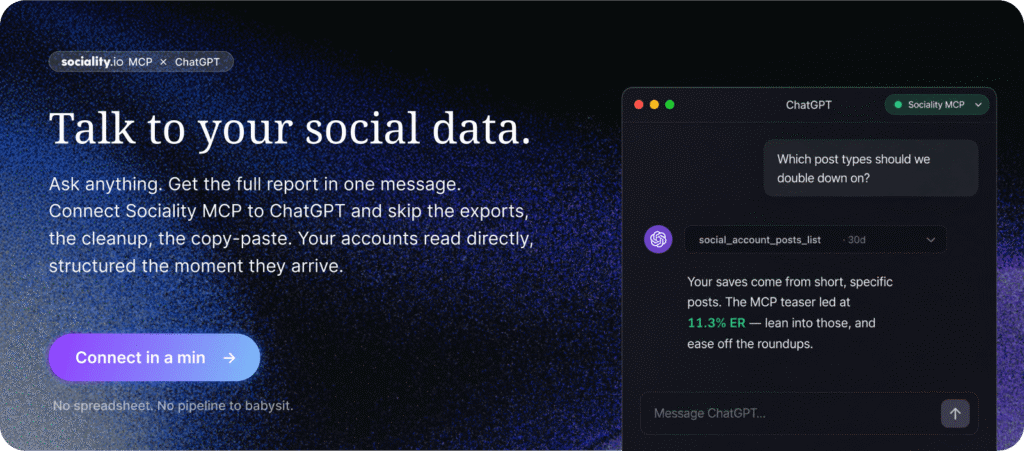
Everything below this line is the playbook. Decide what to track, set your KPIs, clean your data, wire your UTMs. That part matters and always will, because AI is only ever as sharp as the questions you point it at.
But here’s what nobody says out loud. The deciding is maybe 20% of the job. The other 80% is the grind, the exporting, the tidying, the pasting, the explaining to AI what every column means before it can tell you anything useful. That’s the part that quietly eats your afternoon.
A social media MCP removes that 80%. It connects your AI tool straight to your live social data, so half the steps below stop being a weekly chore and collapse into a single sentence you type once. Put differently, the fastest way to do AI social media analytics is to stop doing most of it by hand.
Set up Sociality MCP once, which takes about a minute, and the whole loop flips. Instead of building the report, you ask for it.
“How did we do on LinkedIn last month, and what should we double down on?”
The answer comes back as a full, AI-backed social media report. Real metrics, top posts, what moved, what to test next, all pulled from your actual accounts. No spreadsheet anywhere in the process.
So read the steps for the strategy. Use one of the best social media MCPs for the speed. We’ll show you exactly how to connect it, and what to ask, a little further down.
Step 1: Set smart goals & KPIs
Let’s be honest — “we want more engagement” isn’t a goal; it’s a wish.
AI and ChatGPT can only help you analyze what you define clearly. So before you automate anything, decide what “good” looks like.
Think of it like this: your strategy is the map, your KPIs are the checkpoints, and your metrics are the road signs. If one’s missing, your insights won’t mean much — no matter how advanced your AI setup is.
Translate business goals into measurable signals.
If you’re chasing awareness, focus on reach, impressions, and share of voice.
If it’s engagement, track saves, shares, and comments — not just likes.
If your goal is conversion or retention, measure clicks, assisted conversions, and lifetime value proxies.
These signals tell AI what to highlight and ChatGPT what to summarize. Without them, automation has no direction.
Benchmark smarter.
Campaigns and always-on content serve different purposes.
Campaigns test ideas fast — perfect for short-term AI-assisted reports. Always-on content builds trends over months, where ChatGPT can detect subtle shifts.
Step 2: Collect & organize data or let Sociality MCP do it for you
Here’s the short way. Collecting and organizing is exactly the step Sociality MCP takes off your plate. Once it’s connected, there’s nothing to export and nothing to label, since your AI tool reads your accounts directly and the data lands already structured. If this is the part that eats your week, that’s the part the MCP is built to erase.
Prefer to do it by hand, or piecing things together from scratch? Here’s the long way, and it still works great:
You don’t need a big platform to understand your numbers. With a simple Google Sheet, you can import social media data into ChatGPT and ask it to find trends or summarize top-performing content. You can think of it as ChatGPT Google Sheets analytics — light, fast, and scalable. Just make sure your structured data is clean and labeled before analysis.
If you’ve got a few exports, a spreadsheet, and ChatGPT, you already have enough to see the story.
Here’s how most social teams do it when they’re short on tools but big on curiosity:
Pull your metrics from each channel. Drop them into Google Sheets or a BI tool — short for business intelligence — like Looker Studio. Think of it as a smarter spreadsheet that helps you visualize and compare data across sources.
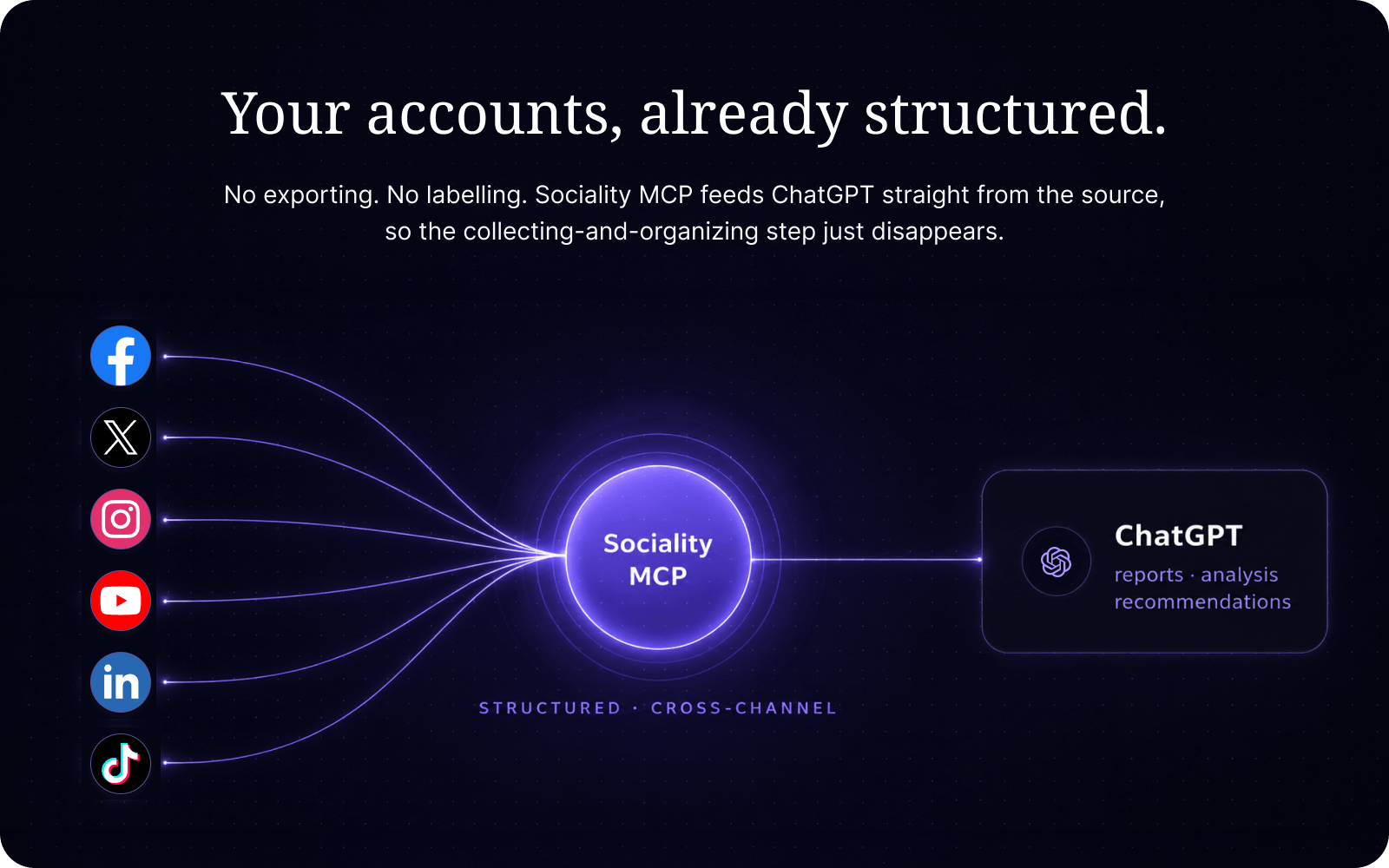
Then open ChatGPT and give it context — what each column means, what your goals are, what time range you’re analyzing.
You can ask things like:
“Summarize which posts had above-average engagement and why.”
“Write a paragraph comparing this week’s reach vs. last week’s.”
“Spot anomalies or spikes worth mentioning in a weekly memo.”
It’ll build formulas, spot patterns, even draft your commentary — all faster than you can format a chart.
Of course, you’ll still review what it says. AI doesn’t know your brand voice or your boss’s favorite metric. But for teams growing fast, it’s the easiest way to keep reporting lean, honest, and doable.
Step 3: Craft a well-focused prompt
AI only works as well as the context you feed it. Start with structure: paste a clean table — for example: (date, channel, post type, reach, ER, saves, shares, CTR, CVR, notes) — and tell ChatGPT what it’s looking at.
Add quick context: your goal, date range, and how each metric is defined. Then ask clear, outcome-driven questions.
Try to include these in your prompts:
- Top changes & causes
“Using this table, list the top 3 week-over-week changes with % deltas and likely drivers.” - Winners and laggards
“Identify 5 top and 5 bottom posts with a one-line reason for each.” - Next actions
“Propose 3 experiments (hypothesis, KPI, owner, due date) based on the gaps.” - Executive summary
“Write a 120–180-word weekly memo covering wins, risks, and next steps in a neutral, professional tone.”
But always keep a human in the loop. AI can seriously help, but you can’t just copy–paste and hope for the best: 4 in 5 marketers say they edit the output. (Sociality.io, 2026).
So, review what AI surfaces for accuracy, voice, and context. If something feels off, check the rows it referenced before you share or act on the results.
Best ChatGPT prompts to track social media analytics
Use these ChatGPT prompts for social media analytics to generate weekly or monthly reports in seconds.
If you already have your metrics in a table (e.g., date, channel, reach, engagement rate, CTR, CVR, notes), start with direct and outcome-oriented prompts like these:
“Summarize this data into a weekly social media report. Highlight top-performing posts, engagement trends, and major shifts vs. last week.”
“Write a 150-word analytics summary for this campaign. Focus on what performed best and what to test next.”
“From this dataset, create a one-page executive summary with three key insights and one recommended next action.”
These AI prompt examples for analytics focus on storytelling — they help you move from “what happened” to “what next”:
“Using this table, identify the top 3 week-over-week changes in engagement rate. Explain possible causes.”
“Compare performance between Instagram and LinkedIn. Summarize which platform drove better engagement and why.”
“Spot anomalies in this data and suggest what might have caused them (format change, timing, content type, etc.).”
“Write a neutral performance memo highlighting wins, risks, and action steps.”
For performance-driven marketers, numeric analysis matters. Use ChatGPT spreadsheet prompts for engagement rate and CTR to get quick comparisons or formula help:
“Calculate the average engagement rate per channel. Highlight which one outperformed the benchmark.”
“Detect posts with above-average CTR and summarize what they have in common (format, caption style, timing).”
“Generate a new column calculating week-over-week change in engagement rate (%). Flag the top 5 positive and negative shifts.”
Step 4: Set a reporting cadence that AI can automate
Consistency is what makes AI powerful, and the payoff is measurable. In Sociality.io’s 2026 AI in social media marketing statistics, 71.1% of marketers said time savings is the biggest benefit of using AI. A structured cadence turns that saved time into actual strategic space.
If you feed ChatGPT structured data every week, it learns your rhythm. It can summarize what changed (“engagement rose 12% after the new carousel format”), identify risks (“reel views dropped 30% on weekends”), and generate next steps (“test weekday posting between 10–11 AM”).
You can try this rhythm:
- Weekly: a one-page performance pulse (wins, risks, experiments)
- Monthly: trends and hypotheses ChatGPT can help explain
- Quarterly: strategic insights — what to scale, pause, or pivot
Step 5: Wire up your data so AI can actually read it
AI can’t fix messy data. So before you ask ChatGPT to “analyze,” make sure your tracking is airtight.
If your tracking, naming, or dashboards are inconsistent, your insights will be too.
This step turns chaos into clarity by setting up the AI data pipeline for social media that keeps every metric connected, traceable, and readable.
Keep your UTM tags clean
A simple naming pattern:
?utm_source=instagram&utm_medium=social&utm_campaign=summer_sale&utm_content=reel1
Then store your naming rules somewhere shared — AI works best when every campaign speaks the same language.
Connect your social and web analytics
Your social report shows engagement; your web analytics show what happened next. Tie them together and ask ChatGPT questions like:
“Compare posts that drove traffic vs. those that only drove engagement.”
That’s where the story starts to deepen — beyond likes and into behavior.
Build a live dashboard, even a simple one
You don’t need a complex BI system. A Google Sheet or Looker Studio dashboard that updates daily is enough. Add your essentials — channel, post type, reach, ER, CTR, CVR — and a goal or benchmark column.
Then, feed that export into ChatGPT each week for pattern summaries or report drafts.
Okay, but how exactly do I connect ChatGPT to those dashboards?
Connect ChatGPT to Looker Studio (or your preferred BI tool)
You can connect ChatGPT to Looker Studio or similar BI dashboards through exports, APIs, or plugins.
That connection creates unified, social media reporting with ChatGPT can interpret the same visualizations your team sees and turn them into narrative summaries like:
“Engagement rose 18% on Instagram after introducing carousel posts.
CTR dipped 4% on LinkedIn analytics; testing alternate headlines recommended.”
Even without direct integration, simply exporting your dashboard data weekly and feeding it to ChatGPT delivers 80% of the benefit with zero engineering overhead.
QA before you automate
Broken UTMs, expired tokens, inconsistent ER formulas — AI won’t know what’s wrong, it’ll just amplify the error. Five minutes of checking before each cycle saves hours of explaining later.
Step 6: Use AI-powered tools to simplify everything
Building a clean data pipeline is great — but maintaining it manually every week isn’t.
Platforms like Sociality.io centralize your publishing, engagement, listening, and analytics, so your reporting loop stays consistent and automated. 🦸 You don’t have to chase screenshots or exports — your metrics, UTMs, and benchmarks live in one place.
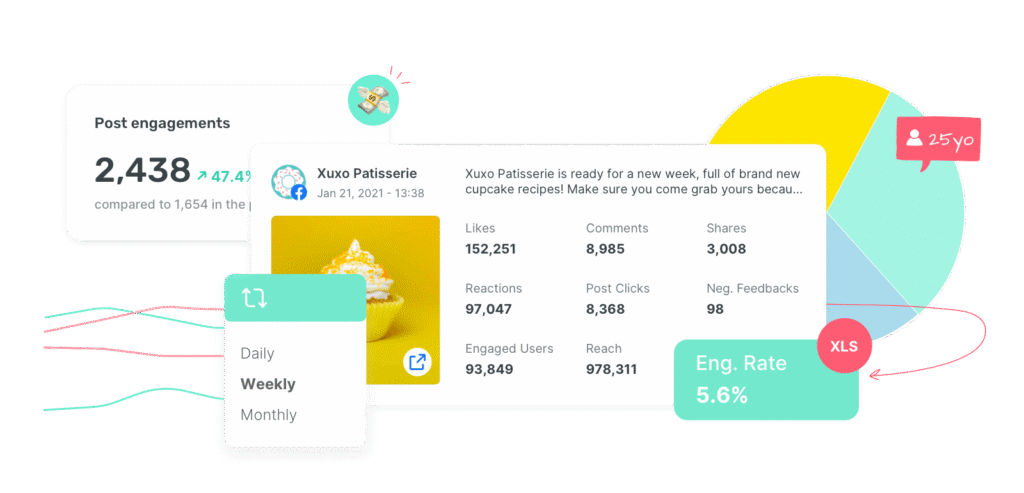
And the next generation of tools goes a step further.
Sociality.io’s upcoming “Chat with your analytics” feature lets you ask questions about your data in plain English and get instant, narrative answers — for example:
“Why did engagement dip on TikTok analytics last week?”
“Which Instagram post type got the best saves vs. reach?”
“What do our Instagram Reels analytics reveal about engagement and reach trends?”
“What are our biggest risks and wins this month?”
You’ll get summaries, comparisons, and next-step recommendations in a chat.
Use this kind of AI-powered layer once your data foundations are set. It’ll save hours of manual work and help you focus on what the numbers mean, not where to find them.
Skip the export step entirely with a social media MCP
Here’s the honest catch in everything above. You’re still the pipe. You export the dashboard, tidy the columns, explain what each metric means, then ask AI to make sense of it. That’s faster than doing it by hand, but calling it automation is a stretch when the setup work never leaves your plate.
A social media MCP closes that gap. It connects your AI tool straight to the social data behind the workflow, so you stop feeding metrics one export at a time. The model reads your connected accounts and competitors directly and works from real numbers, not a pasted table you cleaned first. This is where AI social media analytics stops being a copy-paste job and starts feeling like actual automation.
For the examples below, we used Sociality MCP.
Connect it once
In ChatGPT, the quickest path is:
- Open ChatGPT and clik on “Plugins” on the left menu.
- Search for Sociality MCP.
- Install and start chatting about your data.
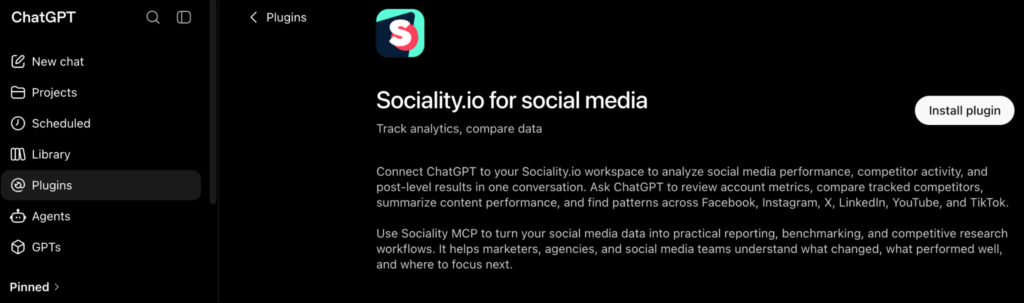
The full walkthrough for every client (Copilot, Gemini, Claude Code, the CLIs) lives in the setup docs.
Then just ask
Once it’s connected, the data is already there. No spreadsheet, no screenshots. Try prompts like these.
“Create last month’s LinkedIn performance report with key metrics, top posts, and what changed.”
“Which post formats drove the best engagement rate this quarter, and which ones should we retire?”
You get the AI-backed social media report, the comparison, the next steps. From your actual data, in one message.
A real run, competitor analysis in one pass
Here’s where prompt quality starts to matter. You could ask “how are these two competitors doing?” and get a shallow answer. Or you could hand off the whole first pass.
Checking competitors by hand always balloons into a bigger job than I plan for.
This time I connected our data and our competitors and let AI take the first pass with a prompt like this.
“Add these two profiles as competitors, compare their last 60 days against our owned accounts, organize the findings by topic and format, filter out unusual spikes, show what to test and what not to copy, and give post ideas for next month.”
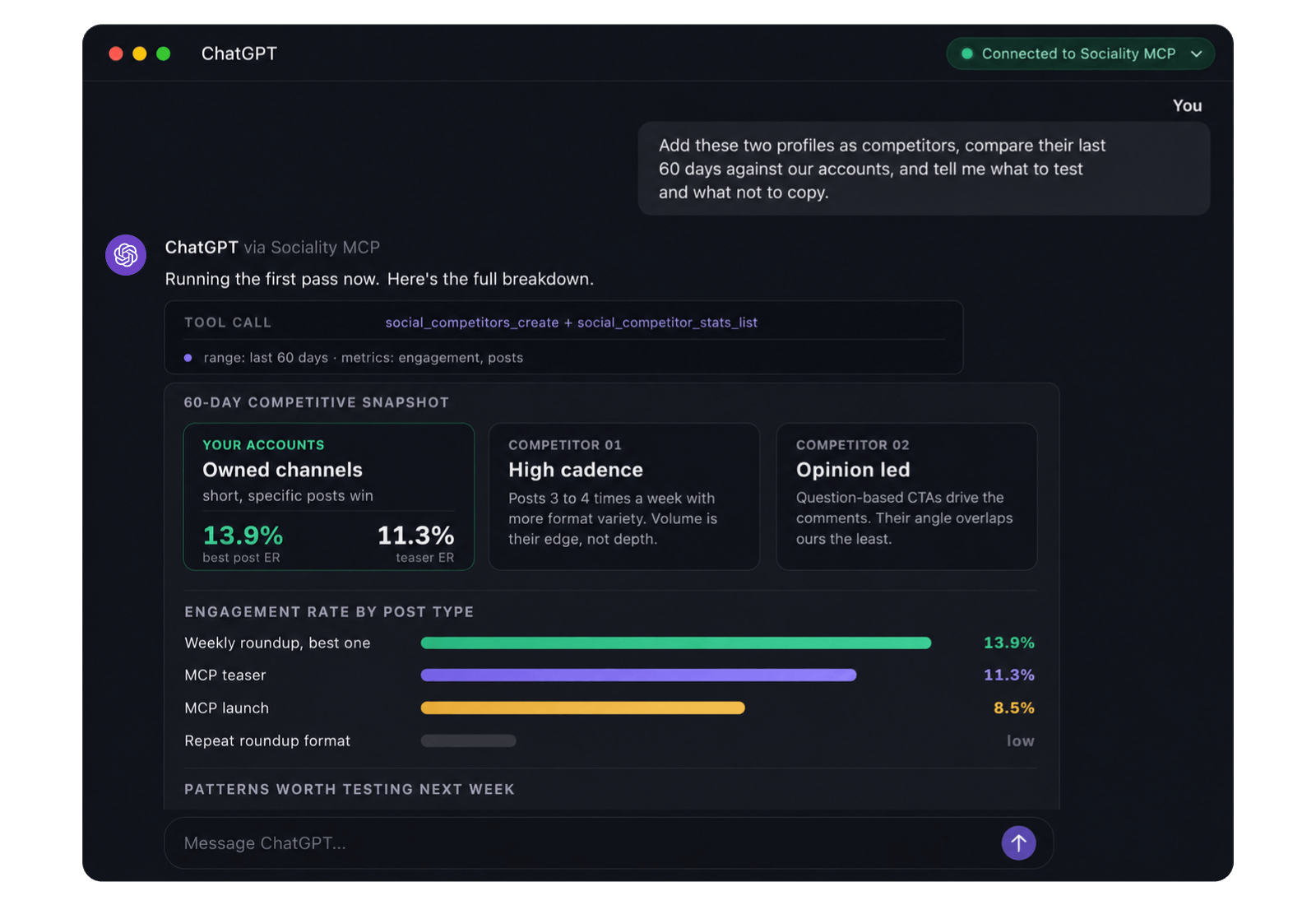
The whole export and cleanup step just was not there, which is usually where this kind of work stalls.
Our stronger posts were the simple, specific ones. The MCP launch post hit 8.5% ER, the teaser 11.3%, and one weekly roundup reached 13.9%. The weaker ones were the repeated roundup format, low impressions, generic hooks, not much reason to comment. Competitors were winning on posting frequency, format variety, question-based CTAs, and opinion-led posts. Copying them outright wouldn’t fit, though, since our sharper angle is the MCP and AI workflow side.
The ideas that actually made sense were simple. Post 3 to 4 times a week, make roundups about what each update means instead of just listing it, test carousels and short video, ask more direct questions, and lean on real AI workflow examples over generic tips.
I’d still open the real posts and comments before running with any of it, because numbers don’t explain brand fit or audience quality. The MCP does the profile-by-profile grind, you make the call.
Step 7: Monitor brand sentiment with AI listening tools
If your analytics tells you what happened, social listening tells you why people cared. It’s the layer that catches early signals—product friction, a brewing PR issue, a creator mention that’s quietly sending traffic your way. And yes, AI helps here too: faster clustering, cleaner spam filtering, better summaries you can drop straight into a weekly memo. Just remember the rule of this whole playbook—machines find the patterns; you decide what they mean.
Brand health use cases
Think in jobs-to-be-done. Reputation tracking (are we trending up or down this week?), crisis watch (did volume or negativity jump suddenly?), and product feedback mining (what themes repeat in complaints, praise, or how-to questions). The volume is real—social is now a super-majority habit globally—so the signals are there if your filters are tight.
Setup checklist (entities, languages, sources, spam filters)
Start narrow, then widen:
- Entities & topics. Brand, product lines, exec names, campaign tags, common misspellings.
- Languages & locales. Track the markets you actually serve first; expand once your QA rhythm is solid.
- Sources. Public social, news, forums, video comments. (Document what’s in vs out.)
- Noise controls. Block obvious spam terms, promo bots, coupon farms. Revisit this list monthly.
- Privacy & terms. Focus on public data and follow platform policies—good governance is part of trust.
Smart alerts for volume spikes and sentiment swings
Let AI watch the baselines while you work. Practical thresholds:
- Volume spike: +150–200% vs. 14-day average → open an issue, verify with a manual sample.
- Negative swing: −8–10 pts in sentiment vs. last 7 days → triage root causes (creator call-out? service outage?).
- Topic breakout: new cluster >5% of weekly mentions → add to weekly memo with two representative quotes.
Because crises travel fast online, time-to-first-response matters more than perfection—structured listening cuts that lag (Embed Social, 2025).
Weekly synthesis
Keep it human and short. One page is enough:
- Top themes (3–5) with percent of mentions and trend vs. last week.
- Representative quotes (not the loudest; the most typical).
- Recommended actions (who owns the reply, what to publish, what to fix).
That last line is the point. Listening without action is just eavesdropping.
Multilingual and sarcasm caveats to watch
Sentiment is where AI needs guardrails. Irony and sarcasm still trip models, and accuracy varies by language and domain. Use AI for speed, but keep a human sample in your QA—especially on heated topics. Recent reviews of sarcasm detection (even with transformer models) underline why: context is hard, cues are subtle, and misreads are common. Build acceptance thresholds and always verify critical spikes with manual checks (Springer, 2025).
Step 8: Benchmark competitors and your industry
AI can help you see how your brand stacks up in the market, spot creative gaps, and design smarter experiments — all without turning your feed into a clone of someone else’s.
Here’s how to do it:
- Choose your comparison set: include
- Direct peers (same audience, similar offers)
- Aspirational brands (bigger stage, high-quality packaging)
- Category leaders (set the ceiling for performance and standards)
- Direct peers (same audience, similar offers)
- Collect performance signals: export public data or summaries — posting frequency, formats, hooks, engagement ratios, content pillars.
- Ask ChatGPT to summarize patterns:
“Compare our content cadence and top-performing post types to [competitor]. Highlight gaps and test ideas.” - Turn insights into experiments:
- Example → If competitors lift saves with step-by-step carousels, test your own version.
- Define a clear KPI (target + hypothesis) before you test.
- Example → If competitors lift saves with step-by-step carousels, test your own version.
- Adjust for paid spend and audience mix:
AI can’t always see ad budgets or targeting. Check whether competitor spikes are organic or paid-supported before drawing conclusions. - Mine the themes, not just the numbers:
Performance signals tell you how much a competitor is winning. They don’t tell you what they’re winning with. That’s the part worth borrowing (respectfully). Drop a batch of a competitor’s top posts into AI and let it cluster.
“Group these 20 top posts into content themes. Which ones repeat, and which are missing from our own feed?”
“What hook style shows up most in their best performers? Give me three angles we haven’t tried.”
Now you’re not cloning a post. You’re spotting the gap in the category and filling it before they do. - Read the audience, not just the content:
Numbers tell you what performed. Audience signals tell you who showed up and why they cared. Wherever you’ve got public engagement data or your own follower breakdown, ask AI to profile it.
“Based on who engages most, describe the audience segment this content actually reaches. Where does it differ from who we think we’re talking to?”
That gap between the audience you’re aiming at and the one you’re actually hitting is often the real story your dashboard is quietly sitting on.
Same rule as the rest of this playbook. AI clusters and profiles: you decide what’s worth acting on.
What should you measure? (Goals, KPIs, metrics)
Every marketer calls themselves “data-driven.” But being data-driven doesn’t mean swimming in dashboards — it means knowing what the numbers are trying to say.
AI can help you track and translate those signals faster, but it still needs direction. Without clear goals, even the best models just surface noise.
Before you bring ChatGPT or any AI assistant into your workflow, start with intent. What do you want your data to prove? Awareness? Engagement? Sales? Loyalty? That’s your starting point.
Once you know that, AI becomes a thinking partner. 💖
Map business goals to AI-ready social objectives
Here’s the simple truth: AI only makes sense of what you define clearly.
If you tell ChatGPT, “Analyze my campaign performance,” it’ll do it. But if you say, “Analyze which posts drove the highest saves and explain what made them stand out,” you’ll get insight that matters.
So translate your business goals into social metrics that AI can read:
- Awareness: reach, impressions, share of voice
- Engagement: saves, shares, comments (skip likes — they’re empty calories)
- Acquisition: clicks, CTRs, conversions
- Retention or loyalty: assisted conversions, repeat visits, LTV signals
Each one gives AI a context window — a boundary for what “good” looks like.
And the beauty is, once you define these, ChatGPT can turn them into prompts, benchmarks, or even visual report summaries automatically.
Your essential KPI menu (AI interprets better when you label clearly)
AI doesn’t guess; it categorizes, so label your columns well, and it’ll do the heavy lifting:
| Goal | Core KPI | What it tells you |
| Awareness | Reach, Impressions | Who saw your content and how often |
| Engagement | ER, Saves, Shares | Who cared enough to interact or bookmark |
| Acquisition | CTR, CVR | Who took the next step — click or convert |
| Retention | Assisted conversions | Who came back or converted later |
| Brand health | SoV | How loud your voice is vs. competitors |
📌Keep your KPI set small and clean — five metrics max per report. ChatGPT can easily summarize top shifts and flag outliers if you give it structure like this.
Mini glossary 🌟
| Term | Quick definition/context |
| AI-powered social media analytics | Using artificial intelligence to track, interpret, and summarize performance across social platforms. |
| ChatGPT reporting | The process of using ChatGPT to analyze metrics, generate summaries, and create social media reports automatically. |
| Analytics cadence | Your reporting rhythm (weekly, monthly, quarterly) for consistent AI-driven insights. |
| KPI (Key performance indicator) | Core metric that measures progress toward a goal—e.g., engagement rate, CTR, or conversions. |
| Engagement rate (ER) | Interaction level of users with your content (saves, shares, comments) relative to reach. |
| Click-through rate (CTR) | Percentage of users who clicked a link after viewing a post or ad. |
| Conversion rate (CVR) | Share of users who completed a desired action (purchase, signup) after clicking. |
| Assisted conversions | Conversions influenced by social activity but not attributed to the final click. |
| Attribution & UTM tracking | Mapping which channels or campaigns drive conversions using URL parameters (e.g., ?utm_source=instagram). |
| Data pipeline | The structured path that moves data from social platforms → spreadsheets/BI tools → ChatGPT analysis. |
| Data hygiene | Keeping data consistent, well-labeled, and free of duplicates or naming errors so AI can read it correctly. |
| Looker Studio (BI tool) | Google’s analytics dashboard platform for visualizing cross-channel social data. |
| Prompt engineering | Writing precise instructions or questions that guide ChatGPT to produce accurate, useful analysis. |
| Executive summary | AI-generated short report summarizing wins, risks, and next steps for stakeholders. |
| Social listening | Using AI tools to monitor online mentions, sentiment, and brand perception. |
| Sentiment analysis | AI-based classification of public mentions as positive, negative, or neutral. |
| Benchmarking | Comparing performance against competitors, industry standards, or historical baselines. |
| Always-on content | Continuous publishing strategy that builds trends over time (vs. short-term campaigns). |
| Campaign analysis | Evaluating discrete, time-bound marketing efforts using AI summaries and comparisons. |
| Structured data | Organized spreadsheet-style data (columns, labels, date ranges) that AI can interpret reliably. |
FAQ about tracking social media analytics with AI