



Sprout Social vs Hootsuite (2026): Pros, cons, pricing & which tool wins?
Summarize this article via
Deciding on your go-to social media management tool with a careful Sprout Social vs Hootsuite comparison usually comes down to this:
Do you want deeper analytics and cleaner reporting?
Or do you want a flexible scheduler that plugs into lots of things without drama?
Both Sprout and Hootsuite are solid. But both get pricey once you add teammates.
And yes, depending on what you actually need, they can feel like “too much tool.” I’m not even getting into the onboarding and brainload.
So let’s make this practical. Here’s how the two usually stack up depending on what you actually need.
- Best for deep analytics & reporting: Sprout Social (strong reporting depth and stakeholder-ready insights).
- Best for flexible scheduling + integrations: Hootsuite (mature publishing tools and broad platform integrations).
- Best for an all-in-one social media workspace: Sociality.io (publishing, engagement, analytics, listening, and competitor tracking in one place).
- Best for budget-first teams: consider simpler tools like Buffer’s free plan or other lightweight schedulers.
- Sprout Social vs Hootsuite comparison table
- Sprout Social vs Hootsuite review with 2026 pros & cons
- Sprout Social vs Hootsuite features comparison
- Sprout Social vs Hootsuite cost
- Which is better for different teams: Sprout Social or Hootsuite?
- Bonus take: Alternatives to Sprout Social and Hootsuite
- How to choose between Sprout Social and Hootsuite
Sprout Social vs Hootsuite comparison table
Here’s the cleanest way to see a Hootsuite vs. Sprout Social comparison without spiraling.
| Feature | Sprout Social | Hootsuite |
| Publishing | ✅ | ✅ |
| Unified inbox | ✅ | ✅ |
| Social listening | Add-on on some plans (Listening is sold as an add-on) | Included in some tiers/varies (Enterprise lists “Listening powered by Talkwalker”) |
| Analytics & reporting | Deep (reporting + premium analytics available) | Moderate (strong basics; advanced analytics appears in higher tiers) |
| Collaboration features | Strong | Moderate |
| Pricing model | Per seat | Per user |
If you’re also looking for solid Sprout Social or Hootsuite alternatives, it’s also worth checking out Sociality.io (4.8/5 on G2). It’s known for its deep analytics and reporting, and its Business plan starts at $166 per month with no per-seat fees!

Sprout Social vs Hootsuite review with 2026 pros & cons
If you compare Sprout Social vs Hootsuite only through feature checklists, they will look almost identical. Both platforms offer publishing, scheduling, engagement inboxes, social media analytics dashboards, and social listening modules.
But once teams start using them daily, the real differences appear. Reporting depth, pricing structure, collaboration workflows, and usability are the areas where users begin to notice trade-offs.
Both tools still receive strong ratings overall:
And here’s how they compare to each other according to their G2 and Capterra reviews:
| Metric | Sprout Social | Hootsuite |
| Meets requirements | ⭐⭐⭐⭐ | ⭐⭐⭐⭐ |
| Ease of use | ⭐⭐⭐⭐ | ⭐⭐⭐ |
| Support quality | ⭐⭐⭐⭐ | ⭐⭐⭐ |
So the platforms themselves are not “bad tools.” In fact, they’re among the most established social media management systems in the industry. But if you scroll through the pros and cons sections of user reviews, you start to see clear patterns.
Let’s break down the strengths and weaknesses users mention most often.
Sprout Social pros 👍
Strong analytics and reporting
Reporting is one of the biggest reasons teams adopt — and stay with — Sprout Social. The platform focuses heavily on structured analytics dashboards and exportable reports that help teams measure campaign performance across channels.
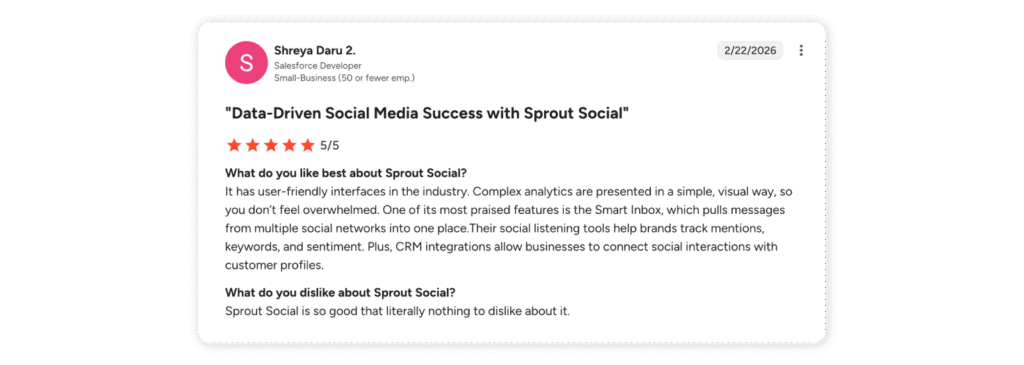
Many users highlight how the analytics layer turns complex social data into clearer insights. For example, Shreya Daru, Salesforce Developer, wrote in a G2 review:
“Complex analytics are presented in a simple, visual way, so you don’t feel overwhelmed.”
Clean interface and centralized workflow
Sprout’s UI gets a lot of love because it doesn’t feel like five different tools duct-taped together. Publishing, inbox, and analytics sit in one flow, so you can plan, post, reply, and check performance without bouncing between dashboards.
That “not overwhelming” part shows up clearly in reviews too. Shreya Daru, Salesforce Developer, says: “It has user-friendly interfaces in the industry.”
And on the Capterra side, reviewers echo the same theme: Sprout is praised for an “Intuitive and clean design,” especially when you’re juggling multiple channels and don’t want the tool to be the hard part.
Collaboration and centralized social inbox
Sprout’s Smart Inbox is basically the “stop opening 7 tabs” feature. It pulls messages, mentions, and comments into one place, so engagement feels manageable even when you’re running multiple accounts.
Daria H., Head of Business Development, puts it in the most human way possible:
“Honestly the number one thing I love about it is that I can see all the messages in one inbox so I don’t have to open up 6 or 7 different tabs.”
And if you want a clean Capterra quote that supports the same point from the “multi-platform management” angle, Maryam N., Marketing Coordinator (501–1,000 employees), says,
“Thanks to its robust suite of features and tools, Sprout Social has facilitated the streamlining of our posting processes, as well as the management of follower interactions across numerous social media platforms.”
Sprout Social cons 👎
Seat-based pricing adds up fast
Sprout gets a lot of love, but pricing is the repeat complaint. On G2, the Standard plan starts at $199 per user/month(billed annually), so the bill grows with every teammate.
Priyanka T., Software Engineer, calls it the “most significant hurdle”:
“Most significant hurdle is the pricing structure which can feel quite steep for smaller teams or agencies…”
Capterra reviews land in the same place. Dhirendra P., Marketing Manager (11–50 employees) says:
“One thing which I little bit dislike about it is its cost… paying extra for features can make overall cost prohibitive… for small business owners and individuals.”

Reporting isn’t always smooth
Sprout’s reporting is a strength, but when it gets buggy or you need precision, it can turn into manual work. Daria H., Head of Business Development, mentions Instagram Story reporting being inaccurate for months:
“The Instagram story reporting also was buggy for months and was giving us totally inaccurate numbers and I had to spend hours manually counting everything myself.”
And if you’re moving from a lighter setup into a more structured workflow, there can be a learning curve. Christopher P., Marketing Manager, puts it simply:
“Moving our team from a basic HubSpot implementation to a fully process-driven workflow in Sprout took more time than we expected.”
Hootsuite pros 👍
Reliable scheduling and publishing
Scheduling is still Hootsuite’s most common “core use case” in reviews: teams use it to plan ahead, stay consistent, and publish across multiple networks without living inside native apps.
Samantha L., Social Media Manager, highlights the cross-platform workflow:
“I love that I can schedule posts across Instagram and TikTok in one window instead of jumping between apps all day.”
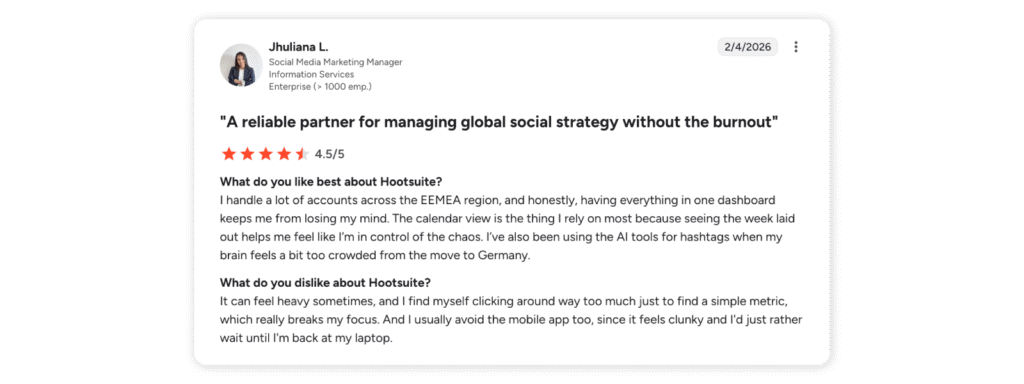
Jhuliana L., Social Media Marketing Manager, emphasizes how the calendar view reduces day-to-day chaos:
“The calendar view is the thing I rely on most because seeing the week laid out helps me feel like I’m in control of the chaos.”
G2’s review summaries also reflect this pattern—Post Scheduling and Scheduling are among the most frequently mentioned positives in user feedback.
Centralized multi-account management (everything in one place)
Another consistent “pro” theme is centralized management: one dashboard to schedule content, check engagement, and track performance across many accounts—especially useful for agencies and multi-brand teams.
Kriti S., Influencer Marketing Specialist, describes the practical day-to-day benefit:
“Hootsuite keeps all of that in one place, which saves me from constantly switching between platforms.”
Diego S., Community Manager, echoes the same “single workspace” value:
“I can schedule posts in advance, monitor comments and messages, and track performance without switching between platforms.”
Capterra’s review analysis aligns with this positioning too: Hootsuite is repeatedly framed as a tool that centralizes scheduling, analytics, and account management into one dashboard for workflow simplicity.
Hootsuite cons 👎
Pricing scales quickly with team size
Pricing is one of the most frequently mentioned drawbacks in Hootsuite reviews. Plans are typically priced per user, which means the cost increases every time a new teammate needs access.
G2 review summaries also flag pricing as a recurring concern—users often mention “Expensive” and “High Pricing” among the most repeated cons.
Recent reviewers also describe the same pattern more directly.
SAINT I., Salesman, explains both the lack of a free plan and rising cost impact for small teams:
“Pricing has also climbed over the years and there’s no real free plan anymore, which makes it harder for solo creators or very small teams to justify compared with lighter, cheaper tools.”
Another reviewer highlights how pricing jumps between tiers and how advanced features sit behind higher plans.
Vuyile M., Managing Director:
“The pricing jumps noticeably between plans, and key advanced features (such as bulk scheduling or advanced analytics) are locked behind higher tiers.”
Interface can feel cluttered
Hootsuite’s dashboard pulls publishing, analytics, and engagement into one place—but some users say that “all-in-one” setup can feel busy when you’re juggling lots of accounts, streams, or workflows.
For example, Michael A., a Grantmaking and Engagement Manager in the non-profit space, says:
“The interface can feel a bit cluttered at times, and certain features take a while to get used to.”
A similar point comes up in Capterra feedback, where one reviewer notes that even if the tool is useful, the UI can take time to get comfortable with—an Anonymous User(Art, Retail) puts it plainly:
“I feel the layout can be a little complicated.”

Advanced analytics often sit behind higher plans
Hootsuite includes analytics, but more detailed reporting and customization is often tied to higher tiers—so teams can hit limits when they need deeper insights.
Ilyas L., Business Owner (Small-Business, 50 or fewer emp.) calls this out directly:
“Advanced features like detailed analytics, custom reports, and multiple social accounts are often locked behind higher-tier plans.”
Sprout Social and Hootsuite both handle the core social media management work well. But the gap usually shows up in the everyday stuff: how smooth the workflow feels, how quickly you can get to the features you actually need, and how many little frictions you’re willing to live with.
That’s why a lot of teams also look at newer platforms that try to keep the workflow lighter while still going deep on insight. Sociality.io is one option worth considering if analytics, competitor insights, and listening matter to you. Sprout and Hootsuite tend to lean publishing-first (schedule, inbox, reports). Sociality.io leans more toward analysis-first, so it’s easier to stay on top of what’s happening in your space and act on it.
What does the Internet say about Sprout vs Hootsuite?
If you leave review sites for a second and listen to real people venting on Reddit, the tone shifts fast. It’s less “feature matrix” and more “this is what broke my workflow.”
On Sprout Social, one recurring pain point is reporting accuracy, especially when paid + organic data gets mixed in ways that make key metrics useless.
In r/socialmedia, a case is described where engagement rate becomes basically unreadable because impressions include paid + organic but engagement doesn’t:
Does anyone use Sprout Social?
by u/luna_specs in socialmedia
And cost comes up too:
Comment
by u/luna_specs from discussion
in socialmedia
And some comments go beyond cost into support and contract frustration. Another Reddit user says:
Comment
by u/luna_specs from discussion
in socialmedia
On Hootsuite, the pattern is more “works, but…” People acknowledge it’s a capable all-rounder, then immediately bring up price and UX.
In r/SocialMediaMarketing, a Reddit user puts it like this:
Comment
by u/imahappyymeal from discussion
in SocialMediaMarketing
Interface complaints show up repeatedly, too. One user goes blunt:
Comment
by u/imahappyymeal from discussion
in SocialMediaMarketing
So the internet takeaway is pretty consistent:
- Sprout gets praised as powerful, but people get annoyed when reporting logic or support processes slow them down.
- Hootsuite gets treated like a solid default, but pricing and UX friction make people look around.
Sprout Social vs Hootsuite features comparison
This is where “which is better” turns into “better for what.” Same tools on paper, different strengths in real life. 🧠
Publishing, scheduling, and content planning
If your day is mostly planning, queuing, and keeping a calendar clean, Hootsuite usually clicks fast. It’s built around publishing at scale and managing multiple accounts without too much friction.
Sprout’s publishing is strong too, but it shines when publishing connects to reporting and customer care workflows. You’ll notice it once you start tagging messages, tracking themes, and trying to explain what’s driving performance—not just pushing posts.
Sprout Social vs Hootsuite social listening
Sprout is very clear about listening as a separate layer you add on. It’s positioned as an add-on, with features like sentiment and spike alerts.
Hootsuite tends to position listening as higher-tier capability, especially at Enterprise level (often bundled as “Listening powered by Talkwalker”).
So the real difference is how you end up buying it:
- With Sprout, you’re usually choosing listening intentionally as an extra layer.
- With Hootsuite, listening tends to show up as you move up tiers, or through the right add-on path.
Engagement and unified inbox workflows
Both have a unified inbox idea, but Sprout is often seen as stronger for day-to-day engagement workflows—tagging, inbox structure, and customer care style reporting.
If your org treats social like a support channel, Sprout tends to feel more “built for that.” If social is mostly outbound publishing, Hootsuite can be enough.
Sprout Social vs Hootsuite ease of use comparison
Sprout usually wins on perceived usability. Reviewers often describe the UI as calmer, and onboarding as easier.
That doesn’t mean Hootsuite is hard. It just means Sprout feels less chaotic when you’re moving fast.
Hootsuite vs Sprout Social collaboration features
If you need approvals, roles, and accountability, both can do it. The practical difference is whether your team actually enjoys the process.
Sprout is often described as more approachable for teams. Hootsuite is flexible, but some teams say workflows and reports take more shaping to feel “ready to share.”
Analytics and reporting (depth + exports)
Sprout is reporting-forward by design, and it also has Premium Analytics for teams that need more customization.
Hootsuite covers core reporting well, and the more advanced analytics typically show up at higher tiers.
If your week includes “can you export this for the CMO in 20 minutes,” this section matters more than you think. 😅
Influencer marketing capabilities
Sprout offers Influencer Marketing separately from its core plans (and their pricing page explicitly notes you don’t need a Sprout plan to use it).
Sprout Social vs Hootsuite cost
Pricing looks simple until you do the math with your actual team size. Both tools charge per user/seat, so the monthly total scales with every new teammate you add. And while the plan names sound similar, what you get at each tier (profiles, reporting depth, add-ons) is where costs start to feel very real.
Sprout Social (per seat)
- Standard: starting at $199 per seat/month — 5 social profiles
- Professional: $299 per seat/month — unlimited profiles
- Advanced: $399 per seat/month — unlimited profiles
- Enterprise: custom — unlimited profiles
Hootsuite (per user)
- Standard: €199 per user/month — 10 social profiles
- Advanced: €429 per user/month — unlimited social accounts
- Enterprise: custom — unlimited social accounts
Sprout Social vs Hootsuite cost comparison table
| Pricing Aspect | Sprout Social | Hootsuite |
| Pricing model | Per seat | Per user |
| Free trial | 30-day free trial | 30-day free trial |
| Billing | Annual billing shown | Monthly billing shown (annual saves up to 20%) |
| Entry plan name | Standard | Standard |
| Entry plan price | $199/seat/month | €199/user/month |
| Mid-tier plan | Professional | Advanced |
| Mid-tier price | $299/seat/month | €429/user/month |
| High-tier plan | Advanced | — |
| High-tier price | $399 / seat / month | — |
| Enterprise plan | Custom | Custom |
| Minimum users | 1 seat | 1 user (Enterprise: 5+) |
| Social profiles (entry plan) | 5 profiles | 10 social accounts |
| Social profiles (higher plans) | Unlimited (Professional+) | Unlimited (Advanced+) |
| Keyword monitoring | Yes (Standard) | Brand mention search |
| Competitor benchmarking | Professional plan | Standard: 5 competitors/Advanced: 20 |
| Social listening | Available via Listening add-on | Advanced listening via Talkwalker (Enterprise) |
| Analytics | Reporting included; Premium Analytics add-on available | Custom analytics reports in Advanced |
| Inbox/engagement | Smart Inbox | Unified inbox |
| AI features | AI Assist for posts and replies | OwlyGPT AI assistant |
| Automation | Tagging, workflow features | DM automation, routing, tagging |
| API access | Available in Advanced | Not listed in Standard/Advanced (Enterprise integrations) |
| Integrations | Helpdesk integrations in Advanced | Salesforce integration in Enterprise |
| SSO | Enterprise | Enterprise |
| Add-ons listed | Premium Analytics, Listening, Employee Advocacy, Professional Services | Listening (Talkwalker), Advanced Analytics, Employee Advocacy, Advanced Inbox |
| Onboarding support | Enterprise white-glove onboarding | Enterprise support + consulting services |
Pricing vs. real total cost
Both platforms use per-user (seat-based) pricing, so your total cost increases as your team grows. If you’re looking for an all-in-one social media solution, you can try Sociality.io free for 14 days—and if it’s a fit, you won’t pay per-seat fees starting from the Business plan ($166).
The table below shows an example scenario for a team of 5, calculated by multiplying the per-user or per-seat price by five to estimate the real monthly cost.
| Platform | Plan | Price per user/seat | Total for 5 users/seats |
| Sprout Social | Standard | $199 | $995/month |
| Sprout Social | Professional | $299 | $1,495/month |
| Sprout Social | Advanced | $399 | $1,995/month |
| Sprout Social | Enterprise | Custom | Custom |
| Hootsuite | Standard | €199 | €995/month |
| Hootsuite | Advanced | €429 | €2,145/month |
| Hootsuite | Enterprise | Custom | Custom |
Sprout Social vs Hootsuite cost per persona
These quick scenarios are here to help you sanity-check the spend before you fall in love with a demo. Numbers below assume annual billing where the vendor listings show it.
Solo marketer (5 profiles)
If it’s just you managing a handful of profiles, both tools can “work” on entry plans. The real question is whether you’ll actually use the depth you’re paying for.
Sprout: Standard covers 5 social profiles on the entry tier, starting at $199/month for 1 seat.
Hootsuite: Standard is listed at $199/month for 1 user.
Small team (3 users)
This is where seat pricing starts to show its teeth. Three users means three seats, and the total jumps fast.
On Sprout Social, 3 seats add up quickly at $199+ per seat. Hootsuite also scales per user, so it’s the same story. Whichever tool you choose, be strict about who truly needs a seat.
Agency (10+ users)
At this point, per-seat pricing becomes the main plot. You’re usually negotiating, consolidating tools, or looking at alternatives with stronger agency economics—because adding “just one more teammate” stops being a small decision.
Enterprise (custom)
For enterprise, your real cost isn’t just the subscription. It’s implementation, governance, adoption, and reporting consistency across teams. If you don’t have a process, even the best platform turns into an expensive tab you keep open.
Hidden costs to watch for
Sprout add-ons like Listening and Premium Analytics can shift the total quickly, especially if listening becomes “mandatory” halfway through the year.
And don’t ignore onboarding time. If the tool is powerful but steep, you pay in hours, not just dollars.
Which is better for different teams: Sprout Social or Hootsuite?
This part matters more than feature checklists, because most teams don’t fail with tools due to missing features. They fail because the workflow doesn’t match how they work.
Best for solo social pros
If you’re solo and you mainly need scheduling + light analytics, both can be overkill at $199/month tiers. That’s not a judgement. It’s just math.
You’ll probably be happier with a simpler tool unless reporting and inbox workflows are genuinely central to your week.
Best for small business teams
If your team cares about clean reporting and an inbox that supports faster collaboration, Sprout often fits better.
If your team cares more about publishing volume, scheduling flexibility, and a tool that “just works” for planning, Hootsuite can be enough.
Best for agencies and multi-brand workflows
Agencies usually feel two pains first: seats get expensive, and clients want reports that look good without manual cleanup.
Sprout’s reporting reputation helps here, but you still need to run the numbers based on how many people actually need access.
Best for enterprise reporting and governance
Enterprise is about consistency: roles, compliance, approvals, standardized reporting, and long-term adoption.
Hootsuite’s Enterprise package leans into enterprise support, SSO, and a full suite of tools. Sprout’s Enterprise is also custom, with a broader add-on ecosystem and integrations that matter for larger org workflows.
Bonus take: Alternatives to Sprout Social and Hootsuite
If you’re thinking “okay… but I don’t want to pay $199 per user,” fair. This is where Sprout alternatives and alternatives to Hootsuite make sense. 💸
Some are lightweight schedulers. Others are built for inbox workflows, listening, or enterprise stacks. Pick based on what you actually need.
Best for agencies and multi-brand teams
Sociality.io
Best for: agencies and growing teams that want publishing, engagement, analytics, listening, and competitor tracking in one workspace
Tradeoff: if you only need a basic scheduler for a couple of profiles, it can be more platform than necessary
Best budget-friendly tools
Buffer
Best for: clean scheduling + simple publishing for small teams
Tradeoff: not built for heavy listening or enterprise governance
Zoho Social / SocialPilot
Best for: value-focused scheduling and basic reporting
Tradeoff: typically less depth in analytics and listening than enterprise suites
Use trials. UX fit matters more than feature lists.)
Best for deeper analytics or listening
Sprinklr
Best for: enterprise-grade listening, governance, and scale
Tradeoff: complexity + onboarding load (it’s often described as “powerful but steep”)
Vista Social
Best for: teams that want broader functionality without going full enterprise suite
Tradeoff: depends on your required integrations and data depth
Best for inbox workflows
Agorapulse
Best for: inbox + publishing + reporting balance
Tradeoff: you’ll still want to validate listening depth for your exact needs
Best for enterprise stacks
HubSpot Marketing Hub (as part of a broader stack)
Best for: teams living inside CRM + marketing automation who want social tied to lifecycle
Tradeoff: social listening depth can be the missing piece, depending on your needs
How to choose between Sprout Social and Hootsuite
You don’t need a 3-month evaluation process.
You need a clean test:
Step 1: Pick what you actually care about
Before you watch another demo, write this down somewhere:
- How much seat pricing you can live with
- What “reporting” means for you (quick check vs something you’d send to leadership)
- Whether listening is optional or non-negotiable
- How intense your inbox work is (a few comments vs real customer care)
If you can’t answer these, every tool will look good for 10 minutes.
Step 2: Separate must-haves from “would be nice”
This is the part people skip. Then they regret it.
Must-have examples:
- Approvals (if more than one person touches content)
- Exports you can share as-is
- Listening/sentiment (if your brand can spike overnight)
Nice-to-have examples:
- AI helpers
- Fancy asset libraries
- “Everything in one place” comfort
Step 3: Use the trial like a normal week
Trials are not for exploring. They’re for stress-testing.
Do three things only:
- Schedule a real week of content for your top channels
- Run one full day through the inbox
- Build one report you’d actually send
If any of that feels annoying now, it won’t feel cute later. 😬
FAQs: Sprout Social vs Hootsuite
Wrapping up
Sprout Social and Hootsuite are both powerful social media management tools, but they prioritize different strengths. Sprout Social stands out for deeper analytics, structured reporting, and stronger inbox collaboration, while Hootsuite is often preferred for flexible scheduling and broad integrations. Teams that want a more analytics-driven workspace may also consider Sociality.io, which combines publishing, engagement, listening, and competitor analysis in one platform. Meanwhile, simpler tools like Buffer can be a good fit for smaller teams that mainly need lightweight scheduling and basic publishing workflows.