
AI social media reporting for agencies helps teams analyze performance, summarize results, benchmark competitors, and create client-ready reports faster.
Sounds good.
Until you remember that agency reporting rarely means “one neat report.” It means multiple clients, multiple platforms, different KPIs, different competitors, and the same reporting deadline somehow arriving every week, like it pays rent.
Then, basic AI reporting starts to break.
In Sociality.io’s 2026 AI in social media marketing report, 59.5% of marketers said they use AI for analytics and reporting. And according to DataReportal’s Digital 2026 Global Overview Report, there are now 5.66 billion social media user identities worldwide.
So yes, there is a lot to report on, and if your team still exports dashboards, cleans spreadsheets, pastes numbers into ChatGPT, and checks every insight manually, AI is helping with the wording. It is not really automating the workflow.
The next step is connecting AI to reliable social media data so it can help analyze account performance, post-level results, competitor activity, and recurring reporting patterns.
So, you need a social media MCP to connect your favorite AI tool to your social media data, start chatting about it, and simply generate a report in a chat.
TL;DR/Key takeaways before you automate agency reporting
- Connected AI reporting slashes manual spreadsheet work, turning raw social-media metrics into client-ready insights in minutes.
- Scaling is the real agency hurdle—reports must span multiple clients, platforms, KPIs, and competitors without losing nuance.
- AI delivers value only when it taps clean, reliable data; exporting dashboards and pasting numbers still drains hours.
- Sociality MCP links AI tools to live account and competitor data, making summaries, benchmarks, and anomaly checks fully repeatable.
- Humans keep ownership of strategy, context, and voice while AI handles the repeatable data-crunching that shouldn’t be rebuilt every cycle.
Why AI social media reporting is different for agencies
AI social media reporting for agencies is harder than brand reporting because the workflow has to repeat across many clients, platforms, KPIs, competitors, and reporting formats.
A brand usually reports on its own performance.
An agency reports on everyone’s performance, then has to explain each story in a way that makes sense to that specific client. Casual.
One client may care about reach. Another may care about engagement rate. Another may want to know why a competitor’s campaign suddenly looks like it has discovered fire.
That means agency reporting usually needs to cover:
- client goals and campaign context
- account-level social media analytics
- post-level performance
- engagement analysis
- competitor benchmarking
- content themes and formats
- platform-specific changes
- client-ready recommendations
This is where generic AI reporting gets messy. A basic AI summary can describe numbers, but agency reports need context, comparison, and a clear “what now?” for every client.
For agencies, the goal is repeatable reporting without making every report sound like it was copied from the same beige template.
Why AI reporting fails without connected social media data
AI reporting often fails when the model has to work from pasted exports, incomplete spreadsheets, or dashboard screenshots instead of connected social media data.
The problem is simple. If the input is messy, the insight will be messy too. Very “garbage in, garbage out,” but with better grammar.
Disconnected AI reporting usually creates the same bottlenecks:
- teams still export data manually
- spreadsheets still need cleaning
- prompts change from client to client
- competitor context gets skipped
- insights become too broad
- report QA takes almost as long as writing the report
ChatGPT, Claude, Gemini, and other AI tools can help summarize and structure analysis, but they cannot magically understand missing context. If the model does not know the client’s goals, previous performance, competitors, or post-level patterns, it will fill the gaps with safe, generic advice.
This is what we, and Harvard Business Review, call workslop. Many teams produce polished-looking work that lacks the substance needed to move the task forward. But when AI has your data, there’s no more sloppy slop in social media analytics, reporting, benchmarking, or whatever else you need.
For agency reporting, the stronger workflow is to connect AI to the data it needs before asking for analysis. Sociality MCP is built for exactly this kind of connected social media reporting workflow.
What MCP changes in social media reporting
Using one of the best social media MCP servers changes social media reporting by helping AI tools connect to the data sources, tools, and workflows they need to produce useful analysis.
According to the official Model Context Protocol documentation, MCP is an open standard that lets AI applications connect to external systems such as data sources, tools, and workflows.
For agencies, that matters because reporting depends on context.
An AI tool can summarize a pasted spreadsheet, sure. It can also make it sound like a polite consultant who drinks three espressos before 9 a.m.
But if the AI cannot access the right account stats, post-level results, competitor data, or previous reporting logic, the output will stay limited.
That is where Sociality MCP becomes relevant for social media teams. Sociality.io describes it as a dedicated MCP server that lets agents like ChatGPT, Claude, and Gemini access account and competitor social media data for analysis, benchmarking, and custom workflows.
The Sociality MCP docs explain that Sociality MCP gives AI tools structured access to account and competitor insights through tool calls, instead of forcing teams to rely only on platform interfaces or manual exports. You can also learn what a social media MCP is and connect it in a min.
A social media MCP can help AI agents work with:
- account performance
- post performance
- engagement analysis
- competitor benchmarking
- content patterns
- recurring reporting workflows
The practical shift is simple. AI moves from “please rewrite this report” to “help me analyze the right social media data before the report is written.”
For agency teams, that means the workflow can start with a client, a time range, and a reporting question.
What changed? Why did it change? What should the client do next?
AI social media reporting without MCP vs. with MCP
AI social media reporting without MCP usually depends on manual exports, pasted data, and one-off prompts. With a social media MCP, AI tools can work closer to the actual reporting data and support more repeatable workflows.
| Reporting step | Without MCP | With social media MCP |
| Data access | Teams export dashboards manually | AI agents can query structured data |
| Account analysis | Teams compare metrics by hand | AI can work with account-level stats |
| Post analysis | Teams filter spreadsheets manually | AI can review post-level performance |
| Competitor context | Competitor research is added late | Competitor data can enter the workflow earlier |
| Multi-client reporting | Each report starts from scratch | Reporting logic becomes easier to repeat |
| Recommendations | AI gives broad suggestions | AI can use account and competitor context |
| QA | Teams check every section manually | AI can support standardized report checks |
How MCP tools support social media reporting
The difference becomes clearer when you look at how MCP tools work. OpenAI’s MCP documentation explains that an MCP server exposes tools a model can call during a conversation, using specified parameters and structured results.
In a social media reporting workflow, that could mean asking for account stats, post-level performance, competitor data, or reporting context without rebuilding the same export-and-paste process every time.
The Sociality MCP tool reference shows this in a social media context. It includes account tools for owned social accounts and competitor tools for tracked competitors, with support for account stats, account posts, competitor stats, and competitor posts.
So no, MCP does not magically write the perfect client report. Sadly, no protocol has yet solved feedback like “can we make this more strategic?” with zero context.
The real difference is where the work starts.
Without connected data, the team starts with exports. With a social media MCP, the workflow can start with a client, a time range, and the data needed to answer the reporting question. 👇
Use case: How I created a monthly LinkedIn report with AI social media reporting
I prepared a LinkedIn performance report for Sociality.io’s May 2026 activity to show how raw post data can be turned into a clear monthly story.
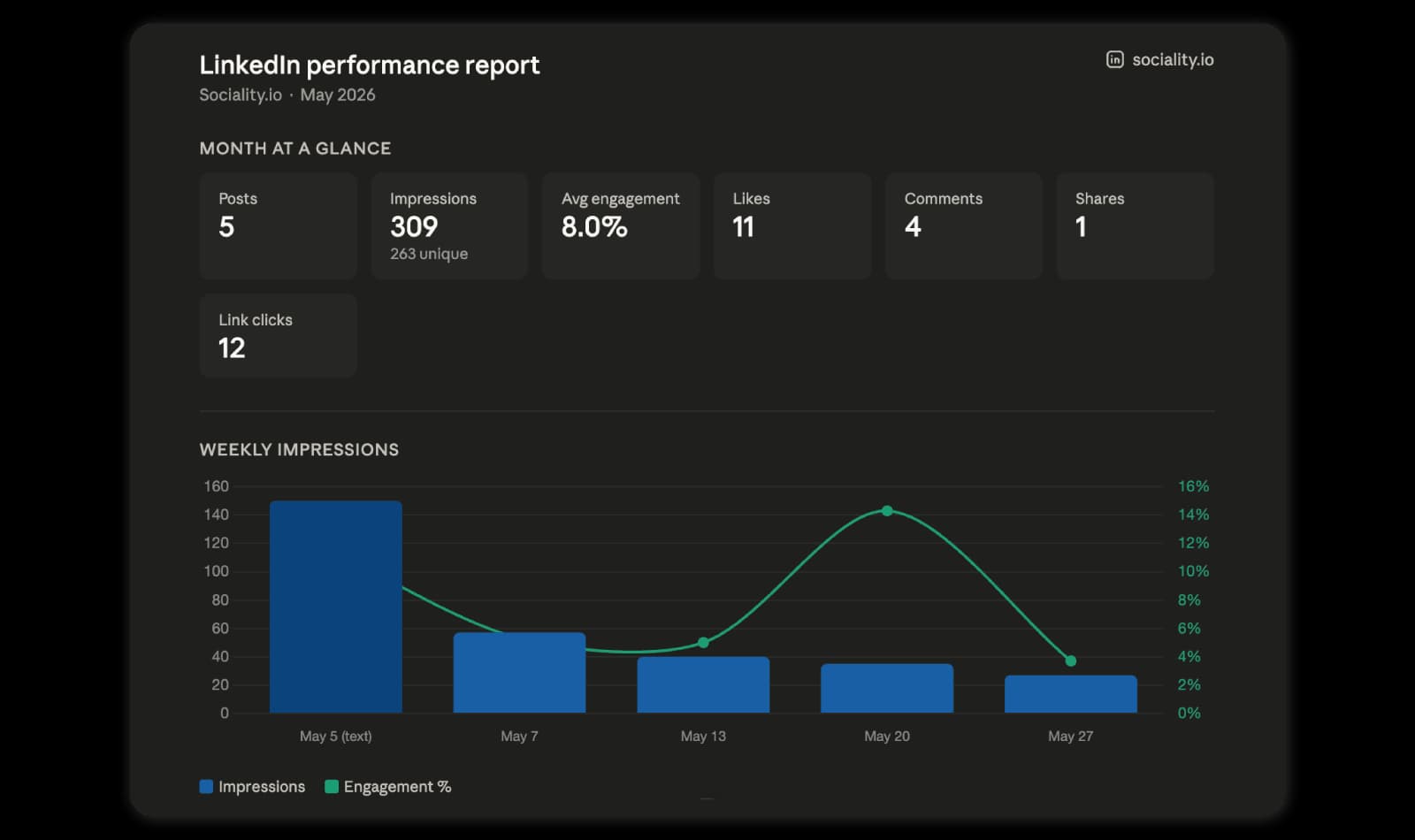
In May, Sociality.io published 5 LinkedIn posts. Together, they generated 309 impressions, 263 unique impressions, 8.0% average engagement, 11 likes, 4 comments, 1 share, and 12 link clicks.
The main story was clear: one post carried most of the month’s performance.
The top post was the May 5 text post about chatting with reports, Instagram analytics, or any other platform, and competitor data using MCPs. It generated 150 impressions, 94 unique views, 11.3% engagement, 8 likes, 8 clicks, and 1 share.
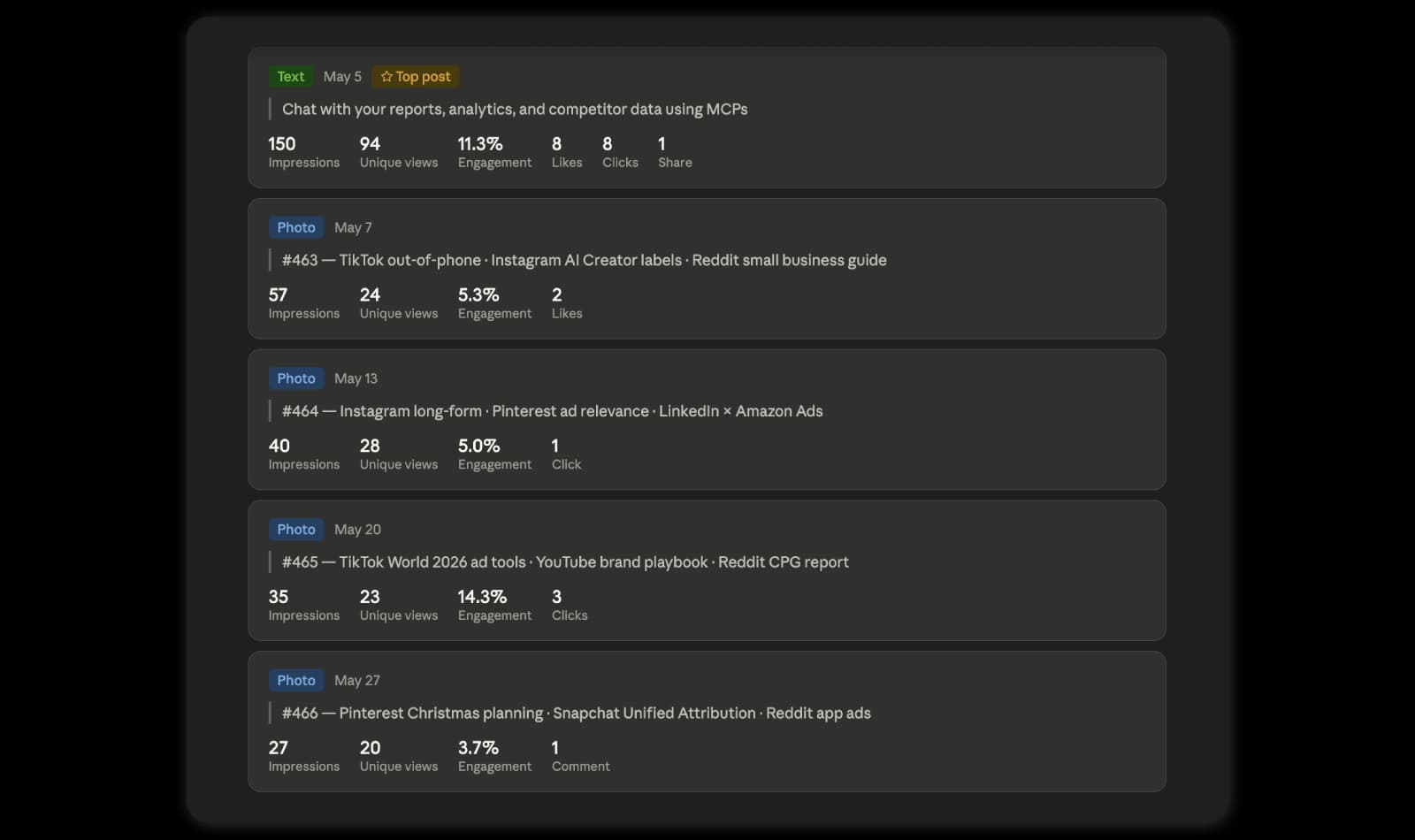
This text post generated 2.6x as many impressions as the next-best post, which had 57 impressions. It also generated 8 of the month’s 12 link clicks, making it the strongest traffic driver in the report.
The weekly roundup photo posts showed a different pattern. Their impressions declined from 57 on May 7 to 27 on May 27, a 53% drop across the month.
Based on this report, the recommendation is not to stop posting roundups, but to refresh the format. The data suggests testing more plain-text posts, stronger hooks, and clearer CTAs, especially for MCP-related topics that already showed stronger click behavior.
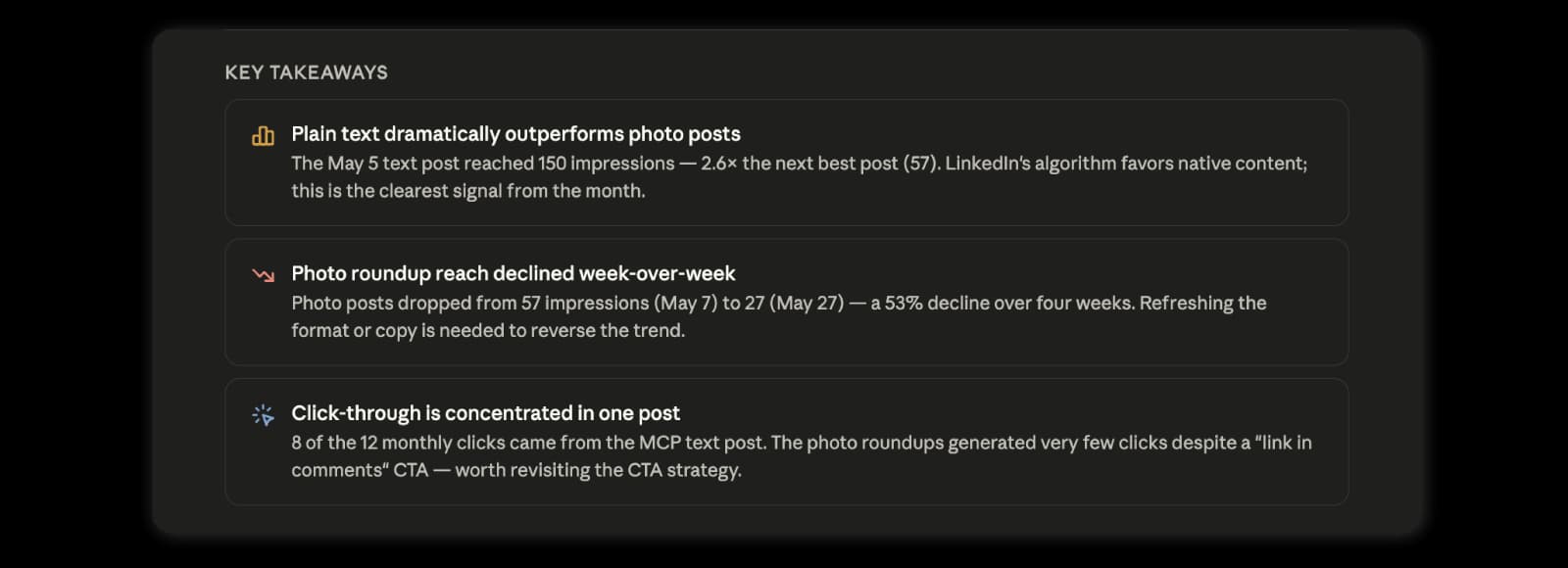
The report gives a simple monthly takeaway: plain-text MCP content drove the strongest visibility and clicks, while the recurring photo roundup format lost reach over the month and should be tested with a new structure.
Multi-client social media reporting workflows agencies can automate with AI and MCP
Agencies can use AI and MCP to automate the repeatable parts of social media reporting, including performance summaries, post analysis, competitor benchmarking, anomaly detection, recommendations, and report QA.
This is already where social media teams feel the value of AI. In Sociality.io’s 2026 AI in social media marketing report, 36.8% of marketers said AI helps automate repetitive tasks, and 23.7% said it helps with faster reporting and insights.
The goal is not to remove the strategist from the process. Please do not send your clients a raw AI report and hope the universe protects you.
The goal is to reduce the reporting work that gets rebuilt every week or month.
1. Monthly client performance summaries
A monthly performance summary explains what changed across a client’s social media accounts during a specific reporting period.
With connected social media data, AI can help summarize:
- total reach, impressions, engagement, clicks, or views
- biggest increases and drops
- strongest platforms
- weakest platforms
- top posts
- underperforming posts
- likely reasons behind the changes
For agencies, this is usually the first workflow to automate because it appears in almost every client report.
2. Cross-platform social media reporting
Cross-platform reporting compares performance across channels such as Instagram, TikTok, LinkedIn, YouTube, Facebook, and X.
This matters because one platform rarely tells the full story. A client may lose reach on Instagram while gaining stronger engagement on LinkedIn, or a TikTok video may drive visibility while Facebook quietly contributes steady traffic.
AI can help organize these platform differences into a cleaner narrative, while MCP can help reduce the manual work of pulling each channel separately.
3. Post-level performance analysis
Post-level analysis shows which individual posts performed best or worst during the reporting period.
AI can help group posts by:
- format
- topic
- hook
- creative style
- campaign
- call to action
- publishing time
- engagement pattern
This is more useful than saying “video performed well,” which is usually true, vague, and deeply unhelpful.
A stronger report explains which videos worked, what they had in common, and whether the pattern is worth repeating.
4. Underperforming content analysis
Underperforming content analysis helps agencies explain what did not work and why it may have happened.
This part often gets skipped because everyone loves a highlight slide. Fair. But clients also need to know what should change.
AI can help flag posts with low engagement, weak reach, poor click behavior, or unusual drops compared with the account average. The final explanation still needs human judgment, especially when campaign timing, creative approvals, or brand constraints affected the result.
5. Competitor benchmarking
Competitor benchmarking compares a client’s performance against relevant competitors, so the report shows market context instead of isolated numbers.
This is one of the strongest agency use cases for social media MCP.
With competitor data in the workflow, AI can help answer questions like:
- Which competitor had the strongest engagement this month?
- Which formats are competitors using most often?
- What themes are gaining traction in the category?
- Where did the client outperform competitors?
- What content gaps should the team test next?
A report without competitor context can explain performance. A report with competitor context can explain position.
Big difference.
6. Content theme analysis
Content theme analysis groups posts by topic or creative angle to show which ideas drive performance.
For example, an agency may group posts into themes like product education, founder-led content, memes, campaign assets, tutorials, community stories, or behind-the-scenes content.
AI can help spot patterns across these themes and turn them into reporting insights.
The useful output is not “educational content performed well.” The useful output is closer to “short product education posts with a practical hook drove stronger saves and comments than campaign announcement posts.”
Now we are getting somewhere.
7. Performance anomaly detection
Performance anomaly detection flags unusual spikes, drops, or shifts that deserve a closer look.
For agencies, this is helpful because small reporting misses can become big client questions later. Nobody wants to discover a 42% reach drop during the call. Character-building, maybe. Enjoyable, no.
AI can help identify:
- sudden engagement drops
- unusually high-performing posts
- sharp changes in reach or impressions
- competitor activity spikes
- platform-specific changes
- outlier posts that skew the report
The agency team should still verify the reason before presenting it as fact.
8. Client-ready executive summaries
A client-ready executive summary turns the report into a clear, readable story for decision-makers.
AI can help draft the summary after the analysis is complete. The output should cover what changed, what mattered, what caused concern, and what the team recommends next.
This is a good place for AI because the structure is repeatable, but the details still need client context.
A strong executive summary should include:
- the main performance change
- the likely reason
- the most important win
- the biggest risk or weak spot
- the next action
9. Next-month recommendations
Next-month recommendations turn reporting into action.
AI can help translate performance patterns into practical ideas for the next content cycle, such as testing a stronger hook, repeating a high-performing format, adjusting posting frequency, or watching a competitor theme more closely.
The recommendations should be specific enough for the team to act on.
“Post more engaging content” is not a recommendation. It is a cry for help wearing a blazer.
10. Internal report QA
Internal report QA checks whether a report is complete before it reaches the client.
AI can help review the draft against a standard checklist, such as:
- Does the report explain the main performance changes?
- Does it include top and underperforming posts?
- Does it mention competitor context where relevant?
- Are recommendations specific?
- Are numbers and claims consistent?
- Is the tone client-ready?
- Are weak spots explained without sounding defensive?
This is one of the easiest workflows to adopt because the AI is not making the final strategy call. It is checking whether the report is clear, complete, and less likely to cause a Slack panic 12 minutes before the meeting.
Example MCP-powered reporting workflow for an agency
An MCP-powered reporting workflow helps agencies move from manual exports to a repeatable process for collecting data, analyzing results, and preparing client-ready insights.
Step-by-step MCP reporting workflow
A simple agency workflow could look like this:
- Select the client and reporting period.
- Pull account-level performance across the relevant channels.
- Review post-level performance for the same period.
- Compare the client with selected competitors.
- Identify content themes, outliers, and performance shifts.
- Generate first-draft insights and recommendations.
- Rewrite the summary for the client’s tone and priorities.
- Run a final QA check before delivery.
Example AI prompts for social media reporting
AI prompts for social media reporting should ask for analysis, comparison, and recommendations rather than generic summaries.
Here are a few prompt examples agencies can adapt.
Monthly performance summary prompt
Analyze this client’s social media performance for the last 30 days. Identify the biggest increases, biggest drops, top-performing posts, underperforming posts, and three recommendations for next month. Keep the summary client-ready and explain why each recommendation matters.
Competitor benchmarking prompt
Compare this client’s performance with selected competitors for the same reporting period. Highlight where the client is leading, where competitors are stronger, and which content gaps the client should test next month.
Post-level analysis prompt
Review the top 10 posts by engagement rate and group them by topic, format, hook, and creative pattern. Explain what these posts have in common and how the team can use those patterns in the next content plan.
Report QA prompt
Review this social media report before it goes to the client. Check whether it includes the main performance changes, top posts, weak spots, competitor context, clear explanations, and specific next steps. Flag vague claims or unsupported recommendations.
Prompts get better when the data is better. If the model only sees a few pasted numbers, the output will stay broad. If the model can work with structured account, post, and competitor data, the prompt becomes part of a real workflow instead of a one-off writing request.
What agencies should not automate fully
Agencies should not fully automate final strategy, client-specific nuance, sensitive recommendations, campaign context, brand voice, or final report approval.
AI can speed up reporting, but clients do not pay agencies for faster summaries alone. They pay for judgment.
Keep these parts human-led:
- final strategic interpretation
- client relationship context
- campaign background
- brand tone and risk sensitivity
- budget or resourcing implications
- sensitive competitor comments
- final recommendations
- final approval before delivery
AI can prepare the analysis, organize the findings, and draft the report language. The agency team should decide what is accurate, relevant, and useful for the client.
I think this distinction matters a lot. The best agency AI workflows do not make reports feel less human. They give humans more time to make the report actually worth reading.
How Sociality MCP makes AI social media reporting take a minute
Sociality.io supports AI social media reporting workflows by combining reporting, analytics, competitor intelligence, and MCP-powered access to social media data.
For agencies, this can support workflows such as:
- client performance summaries
- post-level reporting
- competitor benchmarking
- cross-channel analysis
- internal reporting assistants
- report QA workflows
- custom AI products built on social media intelligence
For teams testing AI social media reporting workflows, Sociality.io offers a free MCP-only Starter plan for trying core capabilities with real data and 1,000 one-time credits. Paid Sociality MCP only plans start at $49/month, and MCP + Dashboard plans start at $83/month. So teams can choose a setup based on their reporting volume, competitor tracking needs, and AI workflow usage.
The goal is to make reporting data easier to use across dashboards, AI agents, and internal workflows, instead of locking every insight inside another manual export.
Explore Sociality MCP to connect AI agents with your social media data and build more repeatable reporting workflows.
Wrapping up 👉 Better reporting starts before the report is written
AI social media reporting can help agencies save time, but the real value does not come from asking AI to rewrite a finished report.
It starts earlier.
Before the summary. Before the recommendations. Before the deck.
For agencies, reporting is difficult because the same process has to be repeated across different clients, platforms, KPIs, competitors, and formats. One client may need a quick Instagram performance update. Another may need a monthly competitor benchmark. Another may need post-level analysis across several channels.
When that workflow depends on exports, spreadsheets, screenshots, and one-off prompts, AI can still help with wording. But it cannot fully solve the reporting problem.
MCP changes the starting point by helping AI tools work closer to the data. With Sociality MCP, agencies can connect AI agents to social media account data, post performance, competitor insights, and reporting workflows, so the analysis can begin before the report is written.
That does not remove the need for human judgment. Client context, campaign details, brand nuance, and final recommendations still belong to the agency team.
But the repetitive parts of reporting can become easier to repeat: performance summaries, post-level checks, competitor comparisons, first-draft insights, recommendations, and report QA.
That is the point of AI social media reporting for agencies. Not to make reports less human, but to make the manual work around them less painful.
Explore Sociality MCP to connect AI agents with your social media data and build faster, clearer, and more repeatable agency reporting workflows.
Mini glossary of AI social media reporting terms
AI Social Media ReportingUsing AI to analyze social media performance, identify trends, summarize results, and generate reporting insights faster.
MCP (Model Context Protocol)An open standard that allows AI tools to connect to external systems, data sources, and workflows, giving them access to the context needed for more accurate analysis.
Social Media MCPAn MCP implementation that connects AI agents to social media account data, post performance, engagement metrics, and competitor insights.
Account-Level MetricsPerformance data for an entire social media account, such as reach, impressions, engagement, followers, and clicks.
Post-Level AnalysisThe process of evaluating individual posts to identify which content formats, topics, or creative approaches perform best.
Competitor BenchmarkingComparing a brand’s social media performance against competitors to understand relative strengths, weaknesses, and opportunities.
Performance Anomaly DetectionIdentifying unusual spikes, drops, or changes in metrics that may require further investigation.
Executive SummaryA concise overview of the most important performance changes, key insights, risks, and recommended next actions.
Content Theme AnalysisGrouping content by topic, format, or campaign to determine which themes consistently drive stronger results.
Report QA (Quality Assurance)The final review process that checks reporting accuracy, consistency, completeness, and client-readiness before delivery.
FAQs about AI social media reporting for agencies
What is AI social media reporting?
AI social media reporting uses AI to interpret performance data, spot patterns, compare competitors, detect anomalies, and turn findings into clear client insights. For agencies, it can support summaries, post-level analysis, recommendations, and report checks across many accounts.
How can agencies automate social media reports with AI?
Agencies can automate reports by letting AI prepare recurring analysis: performance changes, top posts, weak spots, competitor context, executive summaries, and next actions. The workflow becomes stronger when AI is connected to reliable data instead of working from copied dashboard exports.
What is a social media MCP?
A social media MCP connects AI tools to structured social media data, including account metrics, post performance, engagement signals, and competitor insights. It helps AI agents retrieve the information needed for reporting without relying on manual copy-paste work.
How does MCP help with social media reporting?
MCP helps agencies move from manual exports to connected reporting workflows. AI agents can access relevant data, review posts, compare competitors, and support consistent analysis across clients, platforms, and reporting periods.
Can AI replace manual social media reports?
AI can reduce manual reporting work, but it should not replace agency judgment. Teams should still own strategy, client nuance, brand voice, sensitive recommendations, campaign context, and final approval before a report is shared.
What reporting workflows should agencies automate first?
Agencies should start with repeatable tasks: monthly summaries, post analysis, competitor benchmarking, executive summaries, next-month recommendations, and internal QA. These workflows appear often, save time, and still leave room for strategic review.
Can AI help with competitor benchmarking?
Yes. AI can compare a client with selected competitors, highlight where each side is stronger, and identify content gaps worth testing. With connected competitor data, benchmarking becomes easier to turn into useful client recommendations.