
You connect YouTube to Claude through a connector, a Model Context Protocol (MCP) server that sends you to Google to sign in and authorize your channel, then hands Claude the numbers.
Google doesn’t make a YouTube MCP server, and your Studio numbers sit behind the channel owner’s Google sign-in. This guide covers the setup in Claude and ChatGPT, what each one sees for your channel and for a competitor’s, and what I found when I compared 3 console brands on YouTube.
TL;DR: 3 facts before you connect YouTube
Google decides which YouTube numbers any connector can reach, and 2 of its rules changed this year.
- Google’s list of its own remote MCP servers has no YouTube endpoint as of 24 November 2026, so every YouTube connector comes from a third party.
- Thumbnail impressions and CTR reached Google’s bulk Reporting API on 15 January 2026, but the on-demand Analytics API that most connectors use still doesn’t return them.
- Since 27 August 2026, YouTube counts a view the moment a video begins to play, so this year’s view counts aren’t directly comparable with older reports.
Can Claude connect to YouTube?
Yes, Claude can connect to YouTube, and you have 3 ways to get the data into a chat.
- Add a directory connector such as Sociality MCP, which handles the Google sign-in and lets you ask about the channel you manage and the public channels you track.
- Add a third-party or open-source server by URL if it has the particular tools you need, such as public video research or transcripts.
- Upload a YouTube Studio export if you already have the report you want Claude to analyze.
Use the directory for recurring reports, a custom server if your team needs a specific tool, or an export for a single report. The same directory connector setup works for TikTok and Instagram.
Is there an official YouTube MCP?
No. As of 24 November 2026, Google lists no remote MCP endpoint for YouTube’s Data, Analytics or Reporting APIs, so any YouTube MCP server you find comes from a third party or an open-source project. Google does publish an MCP server for Google Analytics, but that’s your website traffic, not your channel.
For questions inside YouTube, Ask Studio is available to most creators globally in a browser or in the Studio app. Official Artist Channels, Made for Kids channels, and creators under 18 are excluded. Gemini can answer questions about public YouTube videos, playlists, and channels using the information YouTube makes public.
| Option | What it reads | Who makes it | Where it runs |
|---|---|---|---|
| Ask Studio | Your channel insights | YouTube | YouTube Studio on the web and in the mobile app |
| vidIQ connector | Channel analytics, competitor and video research, and transcripts | vidIQ | Claude and ChatGPT |
| Open-source YouTube MCP servers | Public Data API results or transcripts, depending on the server | Open-source maintainers | Self-hosted, with a compatible assistant |
| Sociality MCP | Your connected channel and the public stats of competitors you track | Sociality.io | Claude, ChatGPT, and Gemini |
If the acronym is new to you, our guide to MCP for marketing explains how these servers plug social data into an assistant.
What you need before you connect
You need the right Google login, permission to connect accounts in your workspace, and room for the channel in your plan.
- The channel’s Google login. Use the Owner login for a personal channel or a Manager, Owner, or Primary owner login for a Brand Account. A Communications manager can’t connect. Studio-invited roles can’t use YouTube APIs.
- The owner or admin role in your Sociality.io workspace, since only those roles can connect accounts.
- Claude connector access. Plugins has replaced Customize for Free, Pro, Max, and Ultra, with Team following from 30 November 2026 and Enterprise in the following weeks. On Team and Enterprise, an Owner must enable connectors for the organization.
- ChatGPT plugin access. Check the Sociality.io listing under Plugins for the install or connect option in your workspace.
- A channel slot in your plan. Connecting a channel uses no credits, and each new YouTube channel counts against your Sociality.io plan’s page allowance.
How to connect YouTube to Claude
To connect YouTube to Claude with Sociality MCP, you add the connector once and then authorize your channel from a chat, which takes about 2 minutes if you have the right Google login at hand.
Step 1: add Sociality.io from Claude’s directory
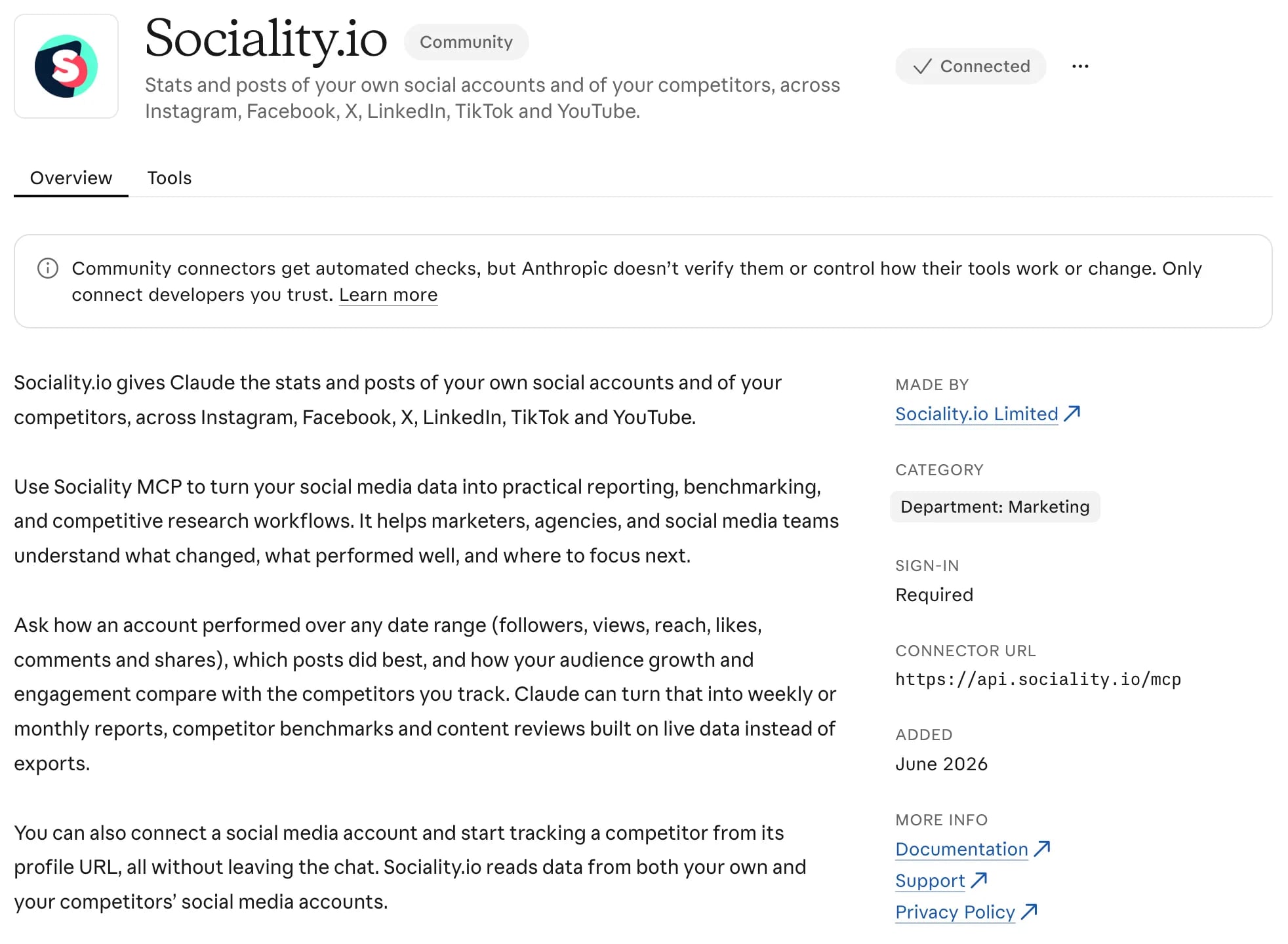
Open Plugins in Claude’s sidebar, find Sociality.io in the connector directory and select Connect. After you sign in to your Sociality.io workspace, open a chat and switch Sociality.io on under + > Connectors.
Step 2: ask Claude to connect your channel
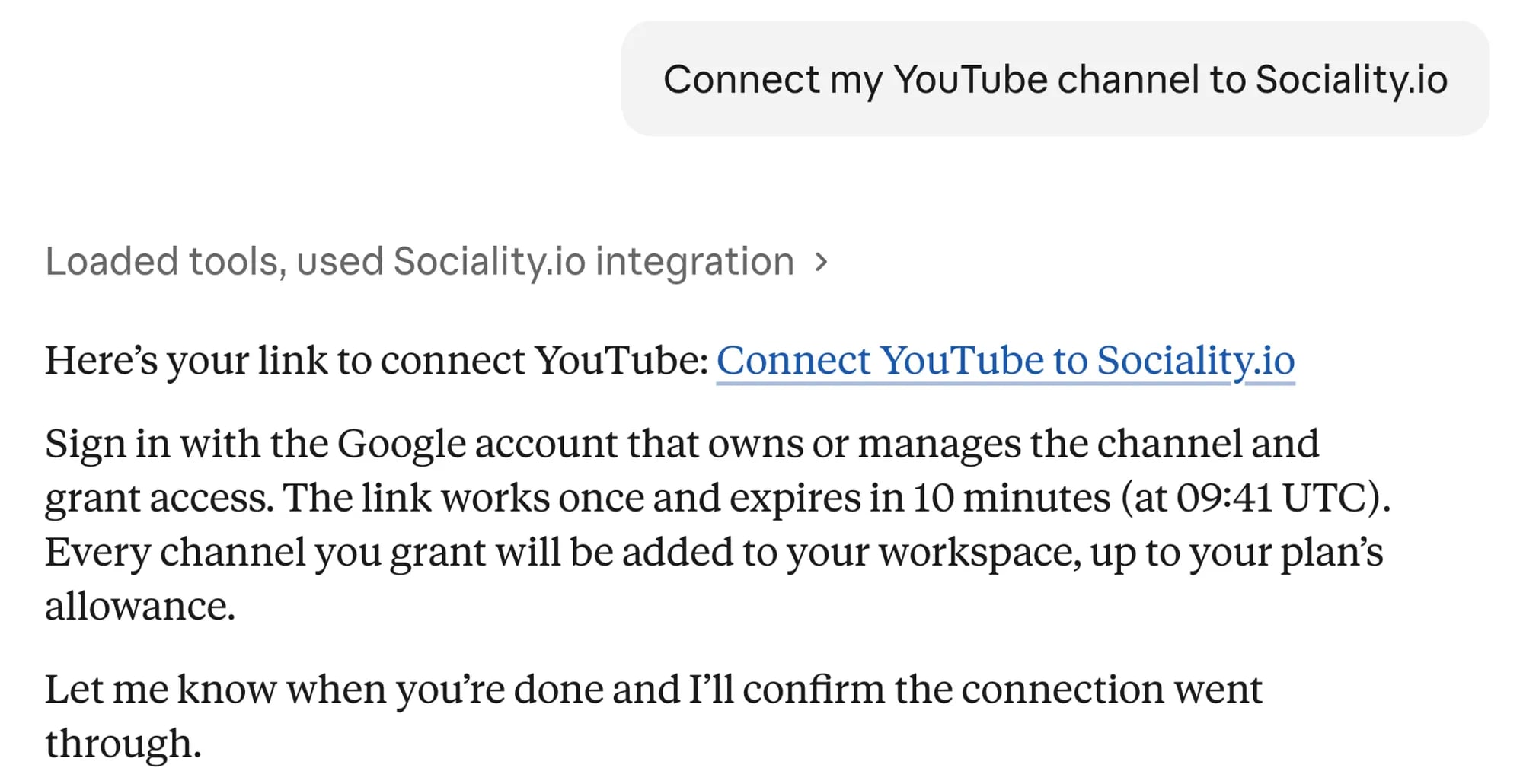
Type “Connect my YouTube channel to Sociality.io” and send it. If Claude asks to use the tool, choose Allow once or Always allow, and don’t be surprised if it asks again later, because Claude re-asks whenever a tool has changed (it did exactly that while I was writing this guide). Claude answers with a one-time link that works once and expires after 10 minutes, and no access token ever shows up in the chat.
Step 3: pick the Google account and the channel
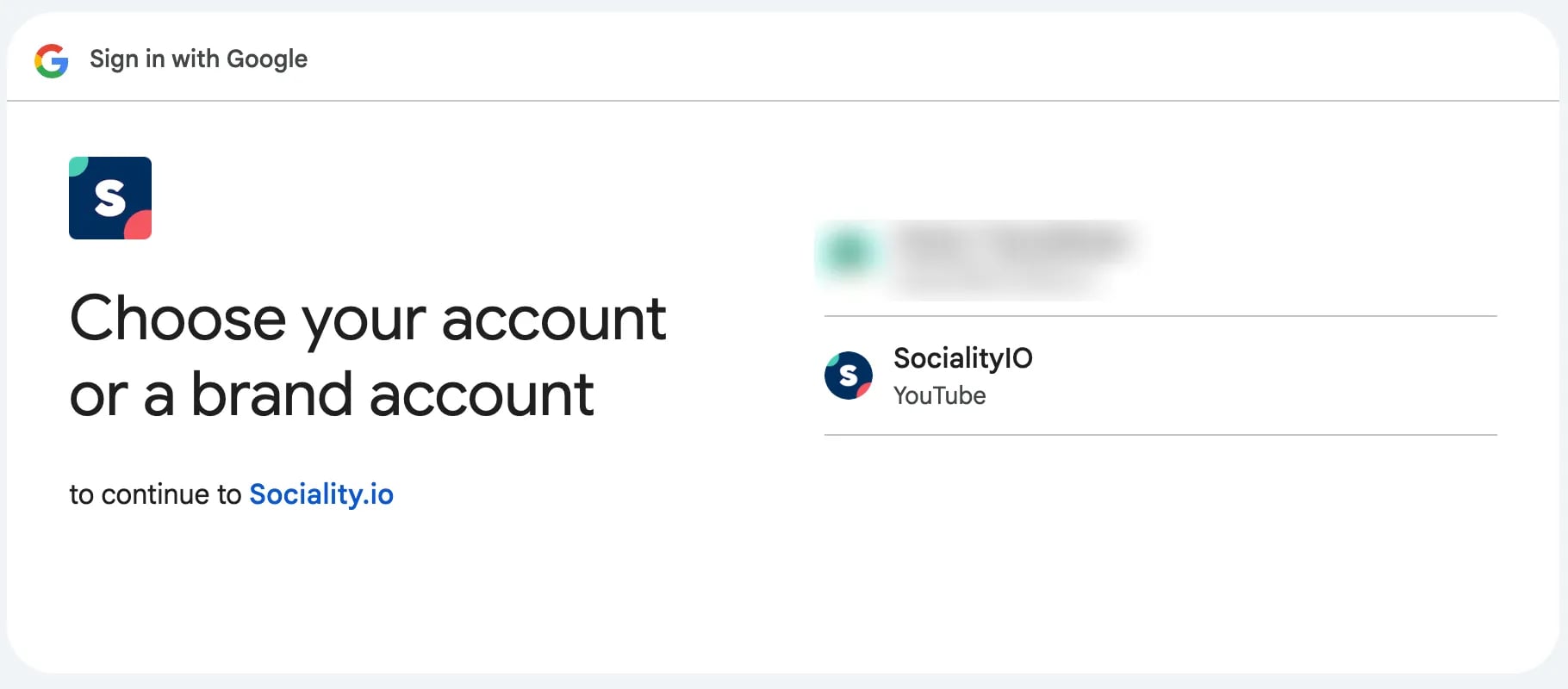
Open the link and choose the Google login that owns or manages the channel. If the channel sits on a Brand Account, Google shows a second screen where you pick it, which is where I picked SocialityIO, listed as YouTube.
Step 4: review Google’s permissions and continue
Google then lists what Sociality.io gets and asks you to Continue. When I connected our channel on 24 November 2026, it showed 3 permissions, “See, edit and permanently delete your YouTube videos, ratings, comments and captions,” “View your YouTube account” and “View YouTube Analytics reports for your YouTube content.”
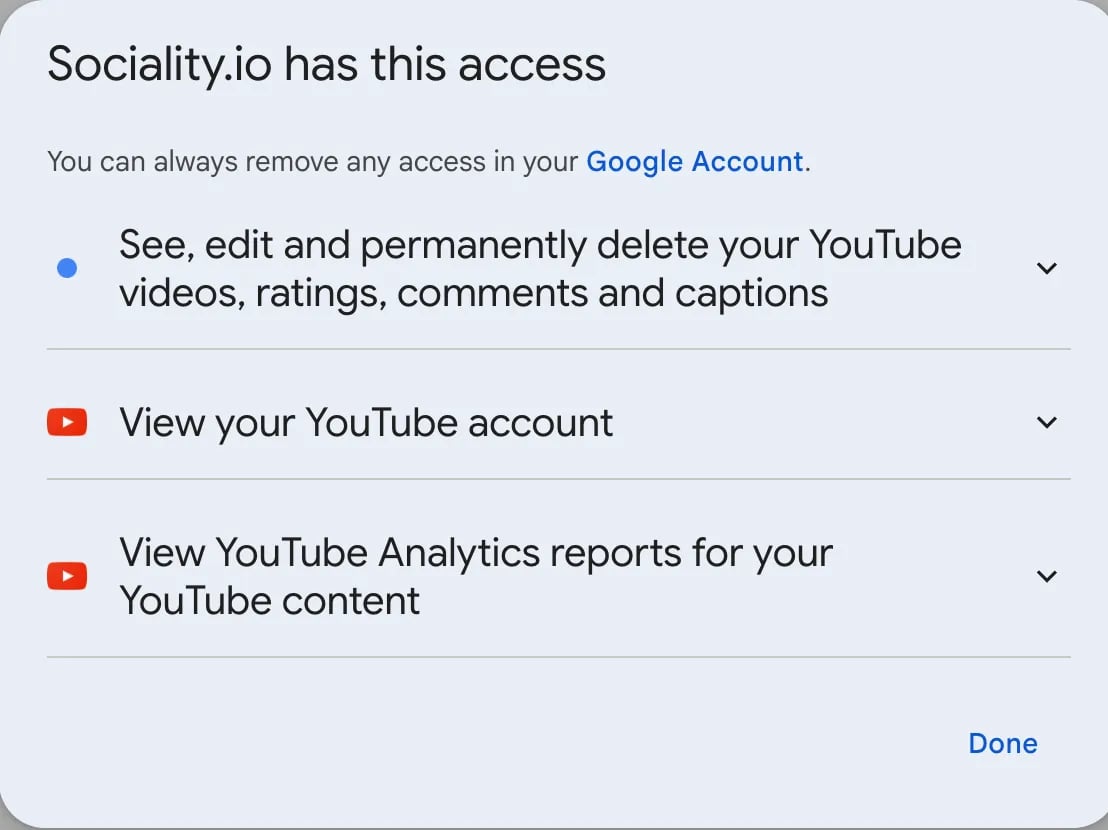
The first one sounds alarming, so here’s the part that matters. The Sociality MCP tools Claude gets only read data and handle setup, and none of them can publish, schedule, reply or delete.
Step 5: say “Done” and let Claude check
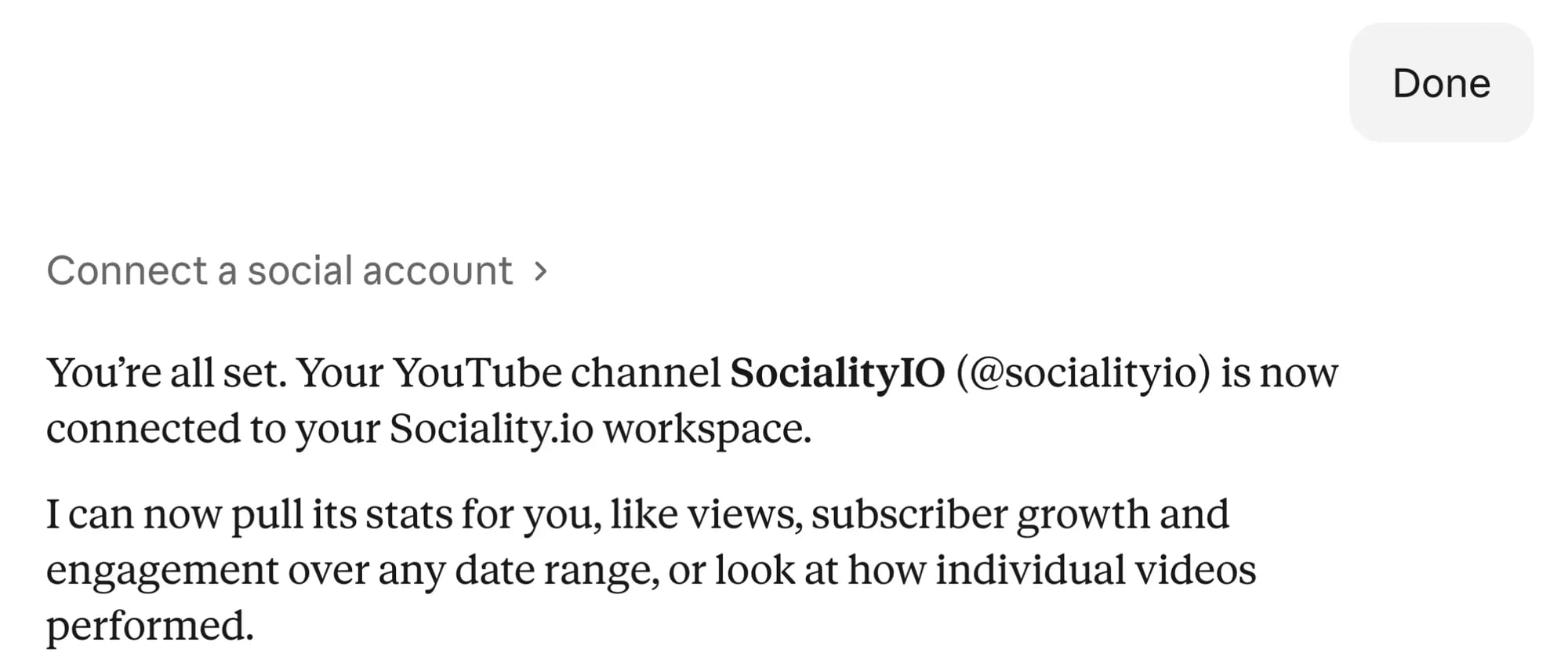
After Continue, a Sociality.io page says “Accounts connected” and lists the channel. Go back to the chat, say “Done,” and Claude confirms the channel by name and handle.
How to connect YouTube to ChatGPT
To connect YouTube to ChatGPT, open Plugins in the sidebar on web, desktop, or mobile, find “Sociality.io for social media,” and select Install plugin if shown. Select Connect if prompted and sign in to Sociality.io. In a chat, type @ and select Sociality.io from the menu.

Ask ChatGPT to connect your YouTube channel. It shows a “Connect YouTube channel” card with the status “Awaiting authorization” and a link that expires in 10 minutes.
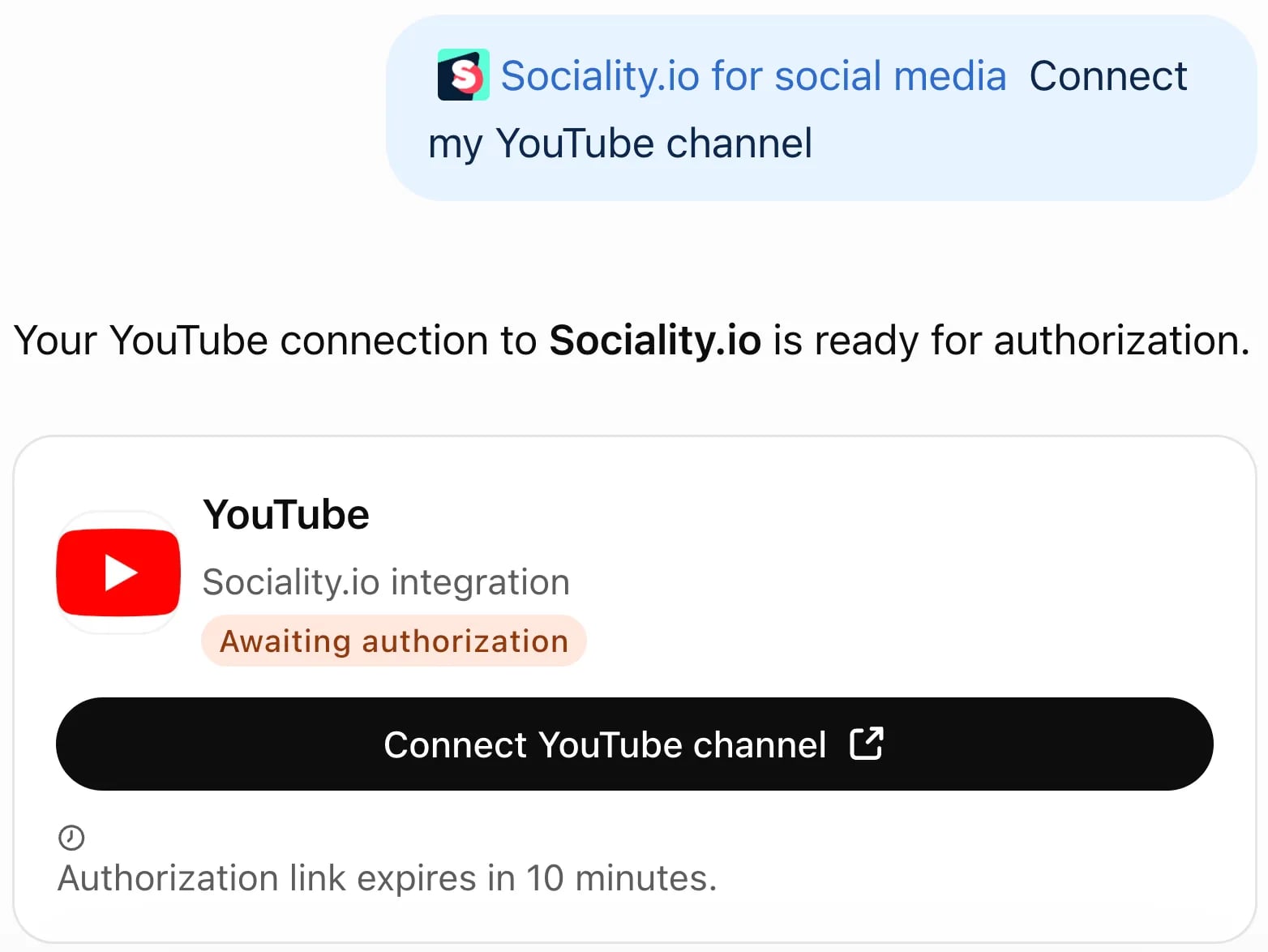
Open the link, choose your Google login and channel or Brand Account, review the permissions, and select Continue. Once Sociality.io lists the channel, say “Done” in chat.
To disconnect the plugin account in ChatGPT, open Settings > Plugins, choose Sociality.io, then go to Connected accounts (or Connection) > ••• > Disconnect.
Your channel vs a competitor’s: what Claude and ChatGPT can see
For your own channel, the assistant sees whatever owner metrics your connector pulls through Google, while for a competitor it only ever gets public counts and the history your tool has tracked.
| Metric | Your channel (owner sign-in) | A competitor’s channel (public data) | Only in YouTube Studio or Google’s bulk Reporting API |
|---|---|---|---|
| Subscribers | Sociality MCP shows counts by day, week, or month. The Analytics API gives subscribers gained and lost. | Rounded public count. Sociality MCP history starts when tracking begins. | |
| Views | Sociality MCP shows total views and views by day, week, or month. | Public channel total. Sociality MCP returns video views. Its only channel-level series is subscribers. | |
| Per-video views, likes and comments | Yes, plus dislikes (owner only). | Public counts for views, likes and comments. | |
| Watch time and retention | In the Analytics API (minutes watched, average view duration and percentage). | Private | Retention curves |
| Impressions and CTR | Not in the on-demand Analytics API. | Private | Thumbnail impressions and impressions CTR |
| Traffic sources and demographics | In the Analytics API (traffic sources, geography, age, gender, devices). | Private | |
| Revenue | Only with a separate monetary permission. | Private | Estimated revenue for monetized channels |
The middle column is what Google allows, not what every connector asks for. In my tests, Sociality MCP returned subscribers and views by day, week or month for a connected channel, plus totals such as video and comment counts, so check which YouTube Analytics API metrics your connector actually requests before you plan a report around one.
YouTube rounds public subscriber counts down to 3 significant figures, so a channel with 17.3M subscribers can gain thousands and still show the same number. Our guide to reading YouTube analytics covers the metrics you can check for your own channel.
I asked Claude about PlayStation, Xbox and Nintendo on YouTube
I compared PlayStation, Xbox and Nintendo of America in Claude on 24 November 2026, using public data from channels we track in Sociality.io. Our own YouTube channel is small and very quiet (I’m not proud of it), so 3 console brands that post constantly made a far better test.
Prompt 1: 3 channels, 3 weeks of videos
This is the prompt I gave Claude, word for word.
Compare PlayStation, Xbox and Nintendo of America on YouTube from 1 to 22 November 2026: videos posted, median views per video, engagements per 1,000 views, top video by views, and subscriber change. Put it in a table, then tell me what stands out.
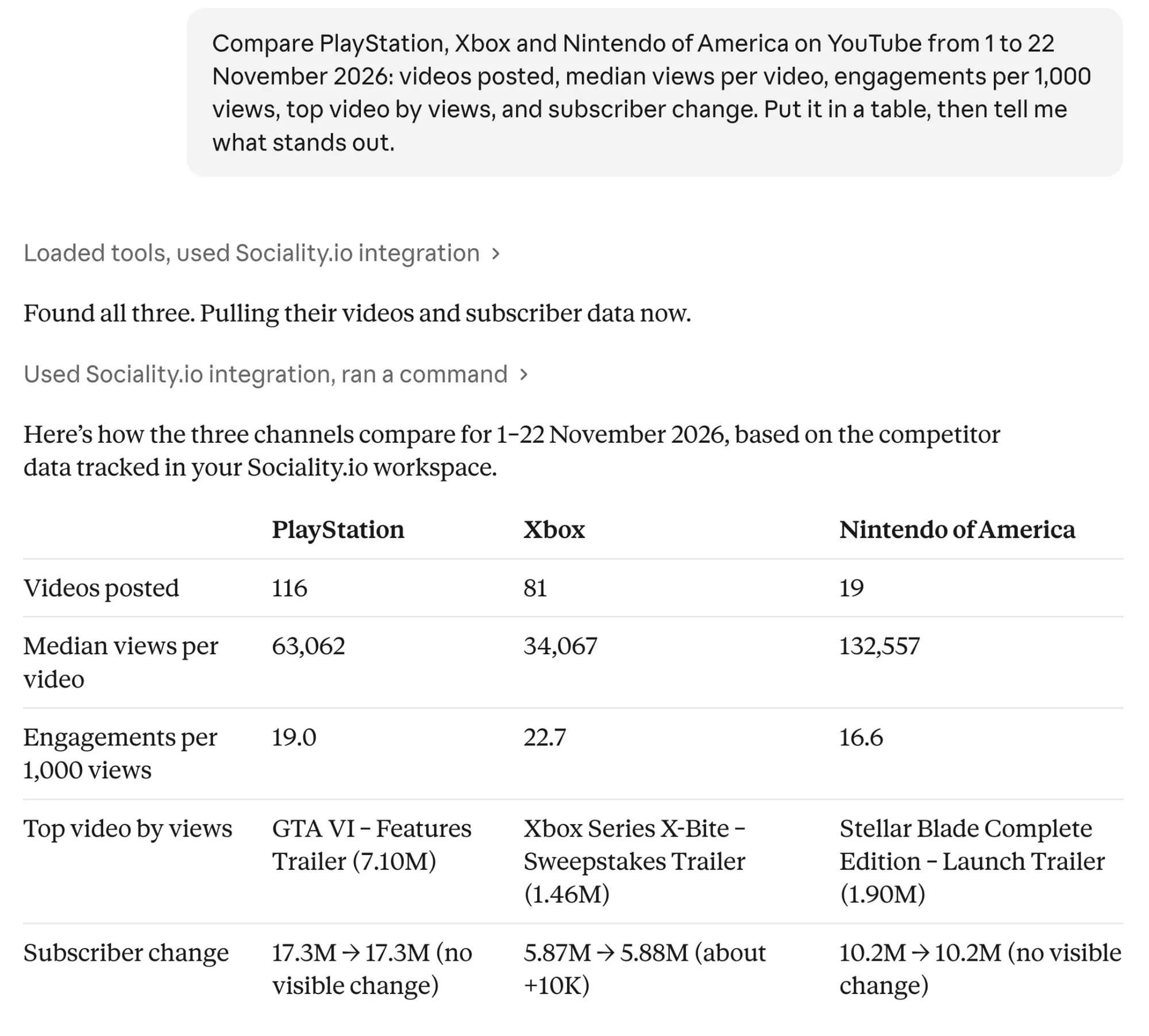
PlayStation posted the most. Nintendo led on median views, and Xbox led on engagements per 1,000 views, calculated as likes plus comments divided by views and multiplied by 1,000.
| Channel | Videos posted | Median views per video | Engagements per 1,000 views | Top video by views | Public subscriber count |
|---|---|---|---|---|---|
| PlayStation | 116 | 63,062 | 19.0 | Grand Theft Auto VI – Features Trailer, 7,095,687 (10 November) | 17.3M → 17.3M |
| Xbox | 81 | 34,067 | 22.7 | XBOX SERIES X-BITE Sweepstakes Trailer, 1,459,690 (3 November) | 5.87M → 5.88M |
| Nintendo of America | 19 | 132,557 | 16.6 | Stellar Blade Complete Edition – Launch Trailer, 1,904,029 (6 November) | 10.2M → 10.2M |
The GTA VI trailer drew 37% of PlayStation’s 18,955,798 total views across those uploads. Take it out and PlayStation drops from 19.0 to 17.3 engagements per 1,000 views. PlayStation also drew more views than Xbox on 2 shared trailers, with Shrek 2 Remastered at 366,500 versus 82,265 and Crazy Taxi at 104,080 versus 58,130.
Xbox’s community-focused posts drew more engagements per 1,000 views than the channel as a whole. The FanFest thank-you got 83 engagements per 1,000 views, “biggest week of gaming” got 78, the post about 21 OG games got 62, and the Gears of War 20th anniversary post got 52. Its sweepstakes trailer led on views, just ahead of the GTA VI pre-load video at 1,250,374.
Nintendo’s median was about 2× PlayStation’s and about 4× Xbox’s, with 18 of its 19 videos clearing 70,000 views. Its Stellar Blade trailer beat the Ocarina of Time launch trailer, which drew 1,323,036 views.
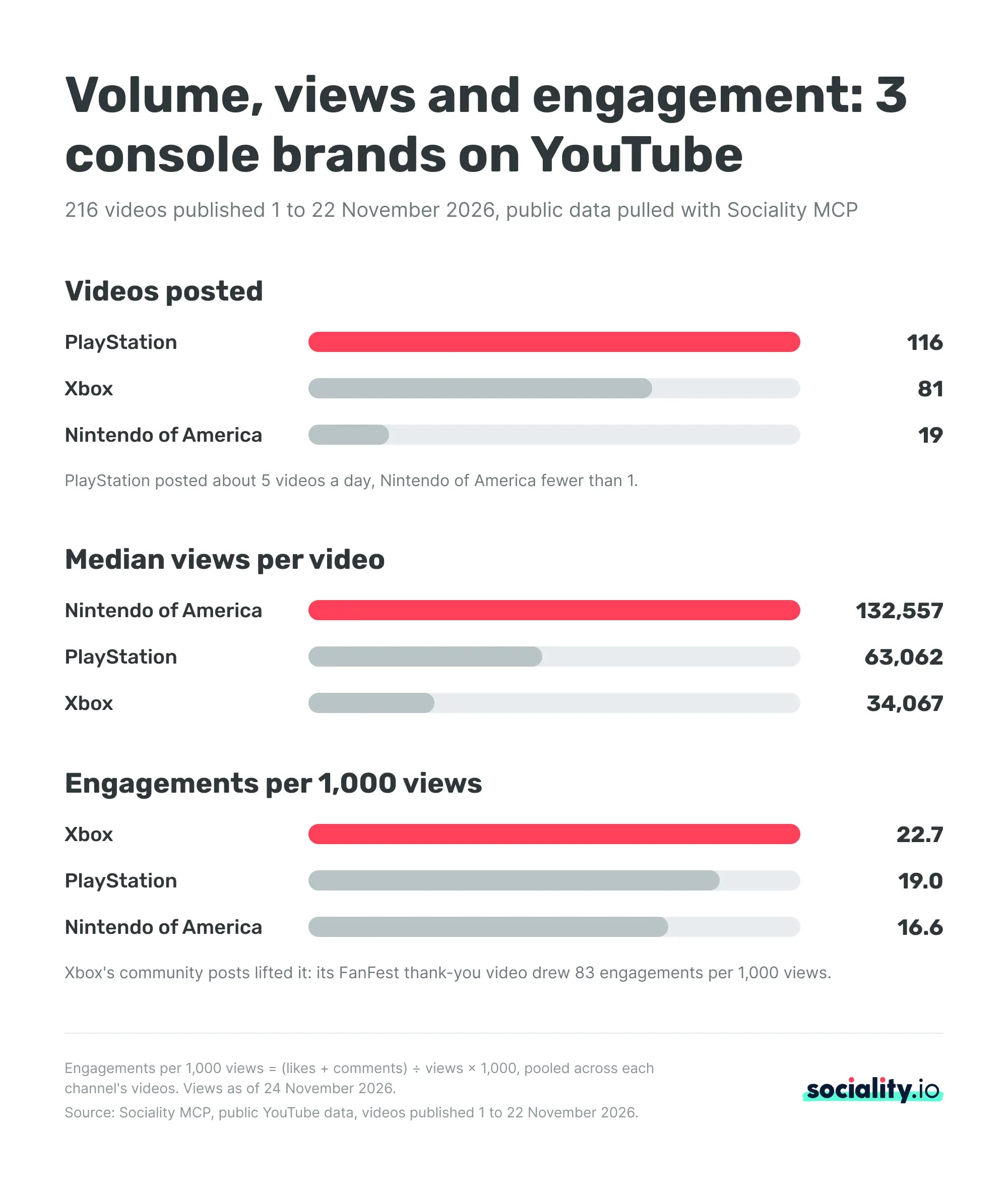
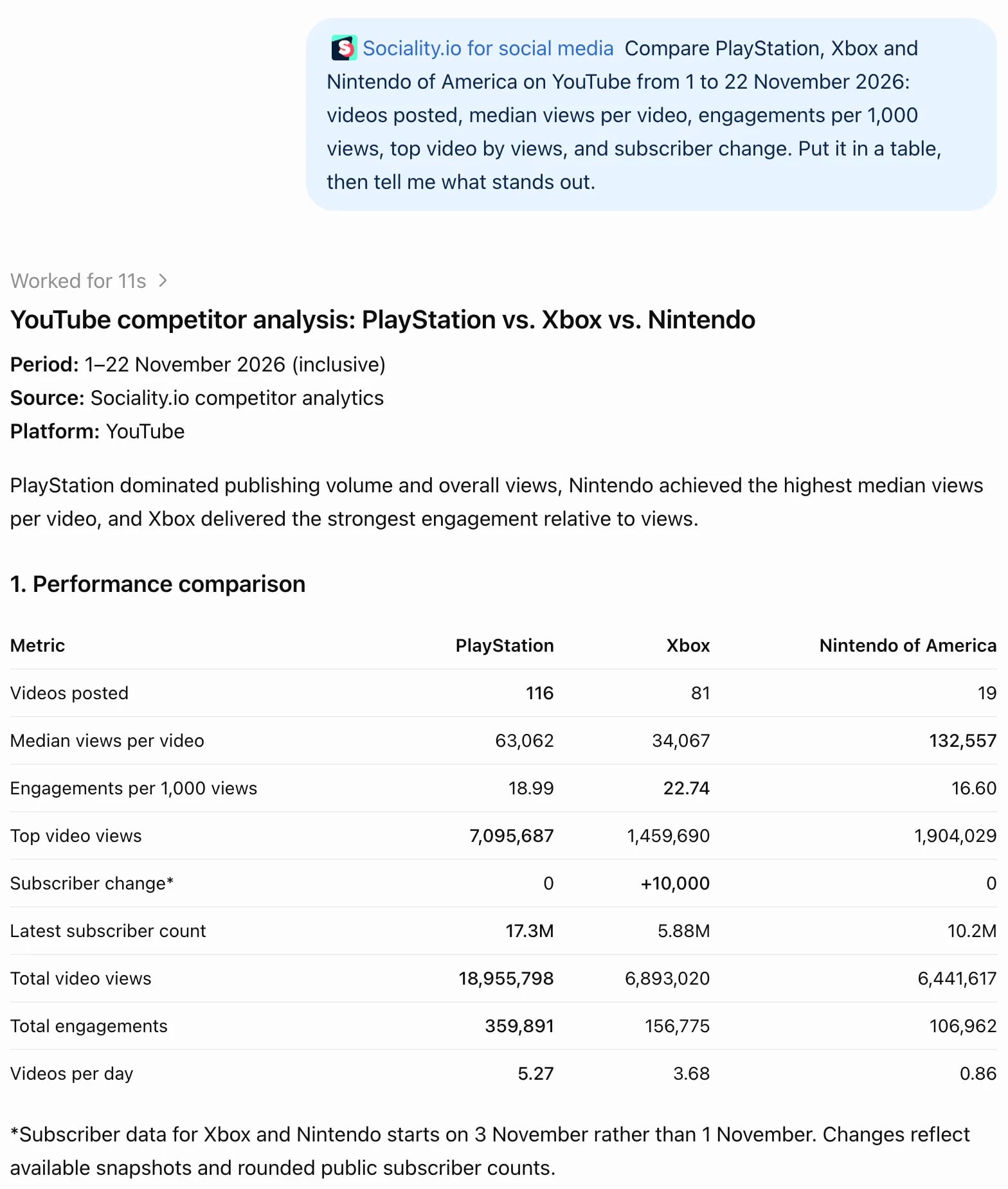
ChatGPT returned the same numbers in 11 seconds and added totals and videos per day, with PlayStation at 5.27, Xbox at 3.68, and Nintendo at 0.86.
Prompt 2: the follow-up that earns its keep
The table tells you who won, but the next question tells you why, so I’d go straight for the pattern behind Xbox’s most-engaged videos.
Which of Xbox’s videos got more than 40 engagements per 1,000 views, and what do they have in common?
There are 2 honest limits. The views are lifetime counts as of 24 November, so a video published on 2 November had far longer to collect views than one published on 21 November. The subscriber counts are rounded to 3 significant figures, so PlayStation and Nintendo could have grown even though their displayed numbers stayed flat. For Xbox and Nintendo, the subscriber history starts on 3 November, when our tracking began, and none of the 3 channels’ watch time, impressions or traffic sources is visible to me, because those numbers belong to their owners.
Sociality MCP connects your social accounts to ChatGPT, Claude or Gemini, so you can ask about YouTube in plain language and get answers from your Sociality.io data. For example:
What are the most viewed videos of Redbull on YouTube in the last 30 days and what do they have in common?
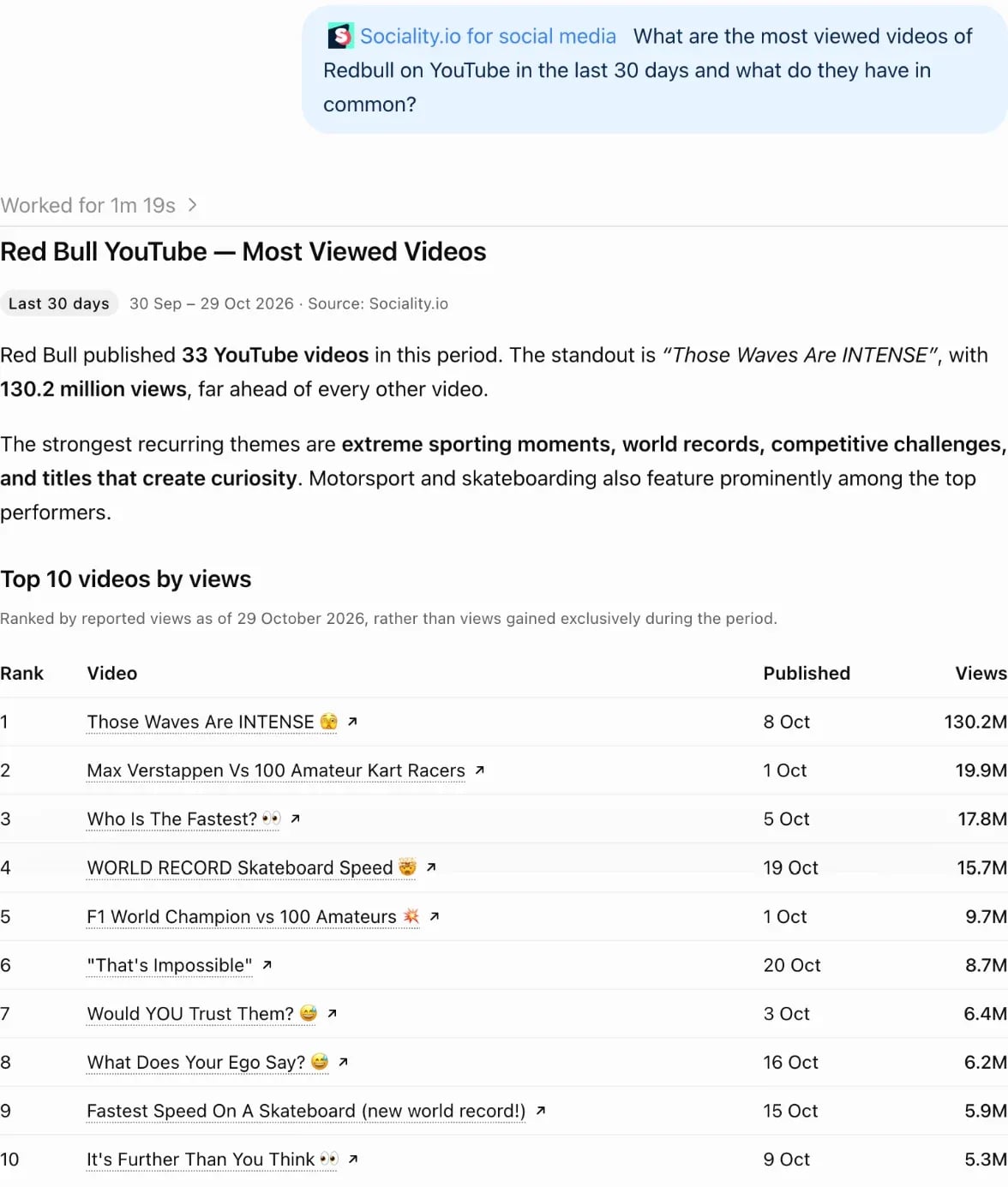
The answer ranks the videos by views and names the themes they share, so your next video brief starts from what already works.
Connect Sociality MCPFree to start: 1,000 credits, no credit card.
What to ask Claude or ChatGPT about YouTube
Name the channel, date range, and metric in your question so the answer matches the period and the figures you’ll put in your report.
For your own channel, start with last month’s performance.
- Can you show our views and subscriber counts by week for the last 2 months and flag the biggest swings?
- Which days last month brought in the most views, and what did we publish around those dates?
- Which of the videos we published last month have the most views now?
When it’s a competitor, stick to the public measures.
- Among the videos our competitors published last month, which ones have the most comments now?
- Did any tracked competitor’s public subscriber count move last month, and what dates do we have for each channel?
To make the benchmark repeatable, ask for the same measures for every channel.
For each competitor we track on YouTube, how many videos did they publish last month, what were their median views per video, and which upload was farthest above its channel’s median?
Other ways to get YouTube data into Claude or ChatGPT
You can bring in transcripts, public video research, owner analytics, or a Studio export.
| Tool | What YouTube data | Assistants | Setup | Free option |
|---|---|---|---|---|
| vidIQ | Channel analytics, competitor and video research, and transcripts | Claude and ChatGPT | Claude directory listing or ChatGPT plugin | MCP on all vidIQ plans, with credit-based calls. |
| Windsor.ai | Own-channel YouTube analytics | Claude and ChatGPT | Claude directory or YouTube by Windsor.ai plugin in ChatGPT | 1 source and the last 30 days |
| Porter Metrics | Own-channel YouTube reporting | Claude and ChatGPT | Connect your channel through Porter Metrics’ MCP | 15 days of history on Free. MCP on every plan. |
| Supermetrics | Own-channel YouTube reporting | Claude and ChatGPT | Connect your YouTube account through Supermetrics | 14-day free trial |
| Composio | Search, videos, playlists, and comments, with tools for uploading and deleting | Compatible assistants | Set up the YouTube toolkit | Free to start |
| Open-source transcript MCPs | Video transcripts from servers such as kimtaeyoon83/mcp-server-youtube-transcript and anaisbetts/mcp-youtube | Assistants that accept custom MCP servers | Run the server yourself and add it by URL | Open-source software |
| YouTube Studio CSV export | A snapshot of the selected analytics view | Claude and ChatGPT | Studio > Analytics or Insights > Advanced mode > Export current view. Upload the CSV. Downloads cap at 500 rows. | Free export |
Our comparison of social media MCP servers covers more options if your reporting spans other networks.
Connected but seeing no YouTube data?
Most empty answers come down to the channel, the dates or the metric you asked for.
- Check the Google account and channel. If the handle looks wrong or the Brand Account is missing, ask for a new link and pick the intended Google login and channel.
- Check where your role was granted. If you were invited through Studio, ask the channel owner or an eligible Brand Account manager to authorize.
- Replace an expired or used link by asking the assistant to connect again, then open the new link within 10 minutes.
- Give the channel time to sync. Check again once your published videos appear in Sociality.io.
- Move the end date back. YouTube Analytics typically takes 48 to 72 hours to process, and the last 1 to 3 days may still be missing.
- If counts differ from Studio, check which number you’re comparing. Since 27 August 2026, views count from the moment playback begins for long-form videos, live streams, and Shorts. Views and watch time include co-views since 16 November 2026, while engaged views keep the earlier definition and exclude co-views. Public subscriber counts also use rounding.
Is it safe to connect YouTube to Claude or ChatGPT?
Yes, as long as you’re comfortable with what Google grants and with how your assistant treats connector data. Sociality MCP reads published data and has 2 setup actions, connecting an account and adding a competitor. Google asks for access to view your account and analytics reports, and to see, edit, and permanently delete videos, ratings, comments, and captions.
For client work, have the channel owner or the client’s Brand Account manager review and authorize access. In Claude, choose Allow once to approve individual tool calls.
On Claude consumer plans, chats used to improve models exclude raw connector content, and commercial data isn’t used for training by default. In ChatGPT, information from connected apps is excluded from training by default on Business, Enterprise, and Edu, and it may be used on Free, Go, Plus, and Pro if Improve the model for everyone is on.
To revoke Sociality.io’s Google access, open your Google Account’s linked apps, select Sociality.io, then choose See details > Remove access > Confirm. Disconnect the channel in Sociality.io to remove it from your workspace. To disconnect the plugin account in ChatGPT, go to Settings > Plugins.
Wrapping up 👋
For a single report, I’d start with a Studio export and ask the assistant to explain the change you’re looking at. For a regular comparison with other channels, use a connector that gives you the dates and metrics you can compare, and keep Studio handy for owner-only figures like thumbnail impressions and CTR.
If I wanted our channel’s views and subscribers next to the public video numbers of competitors we track, Sociality MCP is the connector I’d add first. Start with the question you need to answer in your next report.
FAQs about connecting YouTube to Claude
Can Claude analyze my YouTube channel and my competitors?
Yes, with a connector that covers both. Sociality.io is the best fit when you need both in one chat. Claude can read your authorized channel’s views and subscriber counts and compare public metrics such as views, likes, and comments on competitors’ videos. If you want a dashboard for tracking the channels, use Sociality.io, then add Sociality MCP to ask about those numbers in Claude or ChatGPT.
Is there an official YouTube MCP server?
No. As of 24 November 2026, Google’s remote MCP list includes no endpoint for YouTube’s Data, Analytics, or Reporting APIs. Google’s channel assistant, Ask Studio, runs inside YouTube Studio. For Claude or ChatGPT, a third-party connector such as Sociality MCP handles the Google sign-in and reads your channel plus the public channels you track, or you can upload a Studio export.
What is a YouTube MCP server?
It’s a service that gives an AI assistant tools for getting YouTube data through the Model Context Protocol. When you ask about a channel or a video, the assistant calls one of those tools and uses what comes back to answer. Check the tool list for transcripts, public stats, or owner metrics.
Can Claude or ChatGPT watch a YouTube video?
Not through these connectors. They supply video data and, with a tool such as vidIQ, transcripts the assistant can summarize or search for a particular quote. Open the video itself if you need to judge the opening shot, check an edit, or see how a product appears on screen.
Can Claude see my YouTube impressions and click-through rate?
Yes, with the right data source. Upload a Studio export containing the 2 columns, or use a connector that reads the bulk Reporting API’s reach reports, where Google added thumbnail impressions and CTR on 15 January 2026. The on-demand Analytics API doesn’t return those metrics.
Can a channel manager connect a client’s YouTube channel?
Yes, with an eligible Brand Account role. You need the Manager, Owner, or Primary owner role on the Brand Account, and people invited through Studio can’t access YouTube APIs. For a personal channel, have its owner sign in. With Sociality MCP, a Sociality.io workspace owner or admin starts the connection.
Can I see a competitor’s YouTube watch time?
No. Watch time is private to the channel owner. For competitor reporting, use public views, likes, and comments on videos published within the same date range. If you’re comparing engagement across channels, add likes and comments, divide by views, and multiply by 1,000 to report engagements per 1,000 views.
Do I need a paid Claude or ChatGPT plan?
You don’t need a paid plan to connect YouTube to Claude, since directory connectors work on the Free plan. You can also add 1 custom connector by URL. In ChatGPT, look for the install option on the Sociality.io listing under Plugins to see what’s available to your plan and workspace. For a snapshot, upload a Studio export to either assistant.