
A social media MCP server connects an AI assistant to your social media management, publishing, analytics, or listening tools through the Model Context Protocol. Depending on the server, you can schedule posts, benchmark competitors, pull reports, manage approvals, monitor mentions, or reply to comments, without leaving ChatGPT, Claude, or another MCP client.
This guide compares 13 social media MCP servers and related AI connectors available in 2026 for social media managers, agencies, analysts, creators, and technical teams who want a safer, more practical way to add AI to real workflows.
You can use AI to write the post. Good. But can it pull last month’s numbers across four platforms, tell you which posts actually landed, benchmark you against three competitors, and hand you the summary before your Monday meeting?
For most teams, the honest answer is still no.
You generate the copy in a chat, paste it into a scheduler, fix the formatting, upload the media, pick the profiles, and repeat the whole ritual for every platform. Very “automated.”
This is the gap nobody warns you about. Your AI gets you half of the way there: the writing, the ideas, the variations. The other part that touches your real accounts and data still lives in a dashboard and a dozen open tabs.
Social media MCP servers exist to close that gap. They give a compatible AI assistant structured access to the tools and data behind your work: schedulers, analytics products, listening systems, and platform APIs.
Some can publish. Some are strictly read-only to ensure top-notch security. And a few look dazzling in the docs but still need a developer, several API keys, and a suspicious amount of patience.
So let’s sort out which is which.
TL;DR: The best social media MCP servers
Short on time? Here’s the map.
- Top pick with analytics and competitor benchmarking: Sociality MCP. The best social media MCP, the specialist choice for owned-account data and public competitor intelligence in one connection, with six networks and seven tools, six of them read-only, and the most security-conscious of the bunch, with role-based access, 2FA, SSO, encryption in transit and at rest, audit logs, and yearly third-party penetration tests.
- For listening and media intelligence: Meltwater leads, and Hootsuite’s Lumen server covers mentions and sentiment inside Hootsuite.
- For management, publishing, scheduling, or approvals: SocialPilot, Hootsuite, Metricool, Planable, Vista Social, ContentStudio, Agorapulse, Ayrshare, and Oktopost are the strongest options.
- For cross-channel marketing data (paid + web + CRM): Supermetrics and Windsor.ai fit better than day-to-day community management.
- Official servers from the platforms themselves: Meta and TikTok each run one for advertising. I found none for organic Instagram, Facebook or LinkedIn.
Even in 2026, most social media MCP servers lean read-first. True conversational publishing across the big networks is still rarer than the marketing pages suggest, so match the tool to the job, not to the length of its feature list.
What is a social media MCP server?
A social media MCP server is a connector that exposes social media data or actions to an AI application through the Model Context Protocol.
Quick backstory, because it explains why this category exploded. Anthropic introduced MCP in November 2024 as an open standard; the Model Context Protocol is released under a permissive license, built on plain JSON-RPC, and free for anyone to implement. You can think of it as USB-C for AI: one connector, and suddenly every compatible tool talks to every compatible model. In December 2025, Anthropic donated the protocol to the Agentic AI Foundation under the Linux Foundation, co-founded with OpenAI and Block, and backed by Google, Microsoft, AWS, Cloudflare, and Bloomberg. By then there were already 10,000+ active public MCP servers in the wild, from indie developer tools to Fortune 500 deployments.
For a social media team, this can include:
- Listing connected accounts
- Creating draft posts
- Scheduling or publishing content
- Checking the content calendar
- Pulling account and post analytics
- Comparing competitors
- Monitoring brand mentions
- Reading or replying to messages
- Generating performance reports
The exact powers depend on the server. MCP doesn’t hand an AI assistant the keys to every feature inside a product; it exposes only what the vendor chooses to wire up.
Want the plain-English version with a one-minute setup? Our guide on what a social media MCP is walks you through it, click-click.
Why does MCP matter for social media teams?
Because it moves part of the job from dashboard-based execution to conversation-based execution, and nowhere does that sting more than reporting and competitor analysis.
It also changes how you judge the big suites. Sprout Social’s Trellis lives inside its own dashboard, which is a different proposition from an MCP that feeds the agent you already use, and Hootsuite now offers both its in-dashboard assistant and four official MCP servers. We weigh that trade-off in our look at how Sprout Social and Hootsuite handle AI.
Picture the old way:
- Export a CSV from each platform.
- Paste it into a spreadsheet.
- Clean up the columns.
- Rebuild the same charts you built last month.
- Open every competitor’s profile in a new tab.
- Eyeball their posts and guess what’s working.
- Write the summary nobody had time to read.
Now picture asking, in plain language:
“Pull the last six weeks across our Instagram and LinkedIn. Rank our top posts by engagement, compare us against these three competitors, and tell me which formats we should test next.”
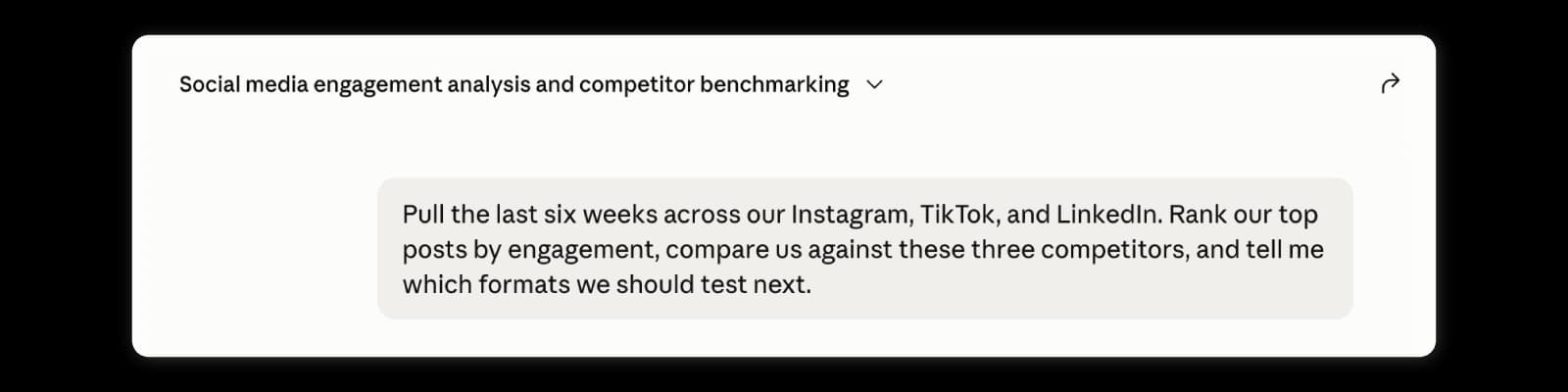
The dashboard doesn’t vanish. Your assistant just gets a controlled doorway into your real numbers and pulls the competitor data in the same breath. This is AI social media automation pointed at the work that actually eats your week, not a robot loose on your publish button.
That doorway can open onto very different jobs, depending on the server:
- Analytics and reporting: Rank top posts, spot engagement swings, compare platforms, and draft the client update.
- Competitor benchmarking: Pull public competitor data, compare several rivals at once, and group their best content by format.
- Social listening: Track mentions, sentiment, and the narratives moving around your brand this week.
- Content creation and repurposing: Turn one long-form asset into platform-specific drafts across the board.
- Publishing and scheduling: Create, schedule, or publish posts, upload media, and check the queue.
- Approvals and team workflows: Route drafts to a reviewer, add notes, and keep AI content in draft mode until someone signs off.
- Community and inbox management: Read comments, DMs, and assignments, with the tightest permissions of the bunch.
And teams want this. In Sociality.io’s 2026 AI in social media marketing report, 89.7% of marketers said they use AI daily or several times a week, and 59.5% already lean on it for analytics and reporting. So, the bottleneck here was never willingness. It was the wall between the AI and the real data. Luckily, that’s exactly the wall MCP is built to break down.
Best 13 social media MCP servers in 2026
| Tool | Best for | Main capabilities | Write access | Approvals | Analytics | Setup | Starting price |
|---|---|---|---|---|---|---|---|
| Sociality MCP | Analytics + competitor benchmarking | Account stats, posts incl. Reels and stories, competitor stats and posts (6 networks) | Read-first (1 write tool: add a competitor) | Not relevant | Specialist | ChatGPT plugin, Claude connector, OAuth remote MCP | Free; from $49/mo |
| Meltwater MCP | Listening + media intelligence | Mentions, sentiment, narratives, cited briefs | Read-only | Not relevant | Specialist | Add-on to a Meltwater subscription | Custom pricing |
| SocialPilot MCP | Publishing operations | Create, schedule, publish, drafts, queue checks | Yes | Draft support | Some | Sign in with SocialPilot; ChatGPT needs a paid plan | From $30/mo (MCP on every plan) |
| Metricool MCP | Scheduling across platforms (free tier) | Schedule/edit, analytics, ads data, competitors (10 networks) | Yes (check scheduling first) | Limited | Strong | OAuth remote; free plan | Free; from $20/mo billed annually |
| Agorapulse MCP | Draft-first management | Drafts, inbox, Listening, performance analysis, org data | Drafts only | Human-in-loop | Yes | OAuth (beta; paid only) | From $79/user/mo billed annually |
| Planable MCP | Approvals + client collaboration | Drafts, workspaces, approvals, media library | Drafts only | Strong | Add-on | Custom connector (paid; free posts) | From $33/workspace/mo |
| Vista Social MCP | Publishing, inbox, reporting | Publishing, inbox, analytics, reports, tasks | Yes | Yes | Strong | MCP on paid plans; trial | From $79/mo billed yearly ($99 monthly) |
| ContentStudio MCP | Content creation + publishing | Generate, manage, schedule posts, images and video | Yes | Product-dependent | Limited | OAuth remote URL or API key | From $19/mo billed annually |
| Ayrshare MCP | Developers + social products | Publishing, analytics, comments and DMs (33 tools) | Yes | Custom | Yes (API) | Remote MCP with an API key | From $149/mo |
| Oktopost MCP | B2B + governed enterprise | Campaigns, publishing, approvals, inbox, advocacy (69 tools) | Yes | Strong | Yes | API key or OAuth | Custom |
| Supermetrics MCP | Cross-channel reporting | Ads, analytics, CRM, commerce via the Data API | Not stated | Not relevant | Strong | Included with plans that have Data API access | From €39/mo billed yearly |
| Windsor.ai | Connectors + BI workflows | Live data, warehouses, ROAS, dashboards (350+ connectors) | Read-only | Not relevant | Strong | OAuth or API key; free plan | Free; from $19/mo billed yearly |
| Hootsuite MCP | Teams already on Hootsuite | Four servers: publishing, inbox, listening, advocacy | Yes (Perch, Nest, Parliament) | Organization controls publishing | Perch and Lumen | Sign in with Hootsuite; ChatGPT, Claude, Copilot, Gemini | Not listed on its MCP page |
Scroll horizontally to see all columns on smaller screens. Starting prices are indicative, billed by the underlying subscription, and were checked against each vendor’s own pages on 28 October 2026.
1. Sociality MCP: Best for social media analytics and competitor benchmarking
Sociality MCP is the best and most useful social media MCP, especially for those who need AI help with fast yet clever, in-depth social media reporting, analytics, and benchmarking. Sociality MCP is a social media intelligence server built around three things most tools split apart:
- Owned-account data
- Post-level analysis
- Public competitor benchmarking, in one connection.
What stands out: Plenty of AI social media analytics tools cover your accounts well and then make rivals a separate research project. Sociality MCP lets the AI list connected accounts, retrieve account stats, fetch published posts and stories, list tracked competitors, add a competitor via profile URL, pull competitor stats, and analyze competitor posts, across Instagram, TikTok, Facebook, YouTube, X, and LinkedIn. Most tools are read-only; the main write action adds a competitor to your workspace, and the docs sensibly nudge you to confirm the URL and workspace before approving. On the trust side, it follows the Sociality.io platform’s security posture, role-based permissions, 2FA, SSO for enterprise, TLS in transit, encryption at rest, audit logs, and yearly third-party penetration tests.
Pricing: Credit-based, not per-seat. Free Starter tier with 1,000 one-time credits, Growth from $49/mo (2,000 to 20,000 credits), and custom Scale with enterprise controls. One credit equals a day of account metrics, a day of competitor insights, or one full post. Users, pages, and competitors aren’t capped by plan. Starter keeps 30 days of data, Growth keeps 12 months, and Scale can extend it.
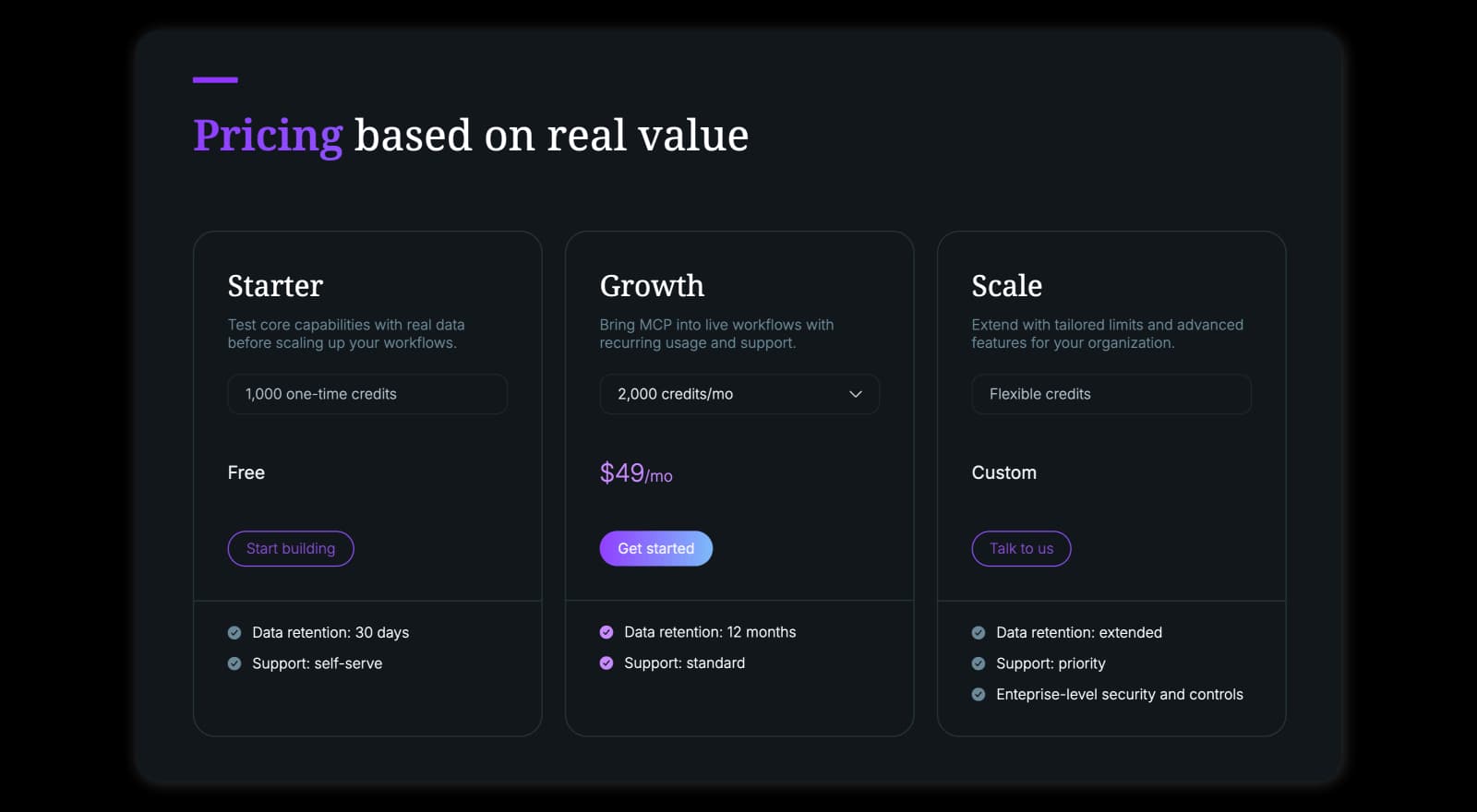
Best for: Social media reporting, owned-account analysis, post-level reviews, competitor benchmarking, cross-platform analytics, agencies and analysts, and teams building custom reporting agents.
Main strength: It points the AI at both your data and your competitors’, so you stop pasting spreadsheets and start asking questions.
Watch-outs: It’s intelligence-first. It won’t publish posts, answer DMs, or run your content calendar. If you need that, pair it with one of the management MCPs further down this list.
Verdict: Choose Sociality MCP when you want ChatGPT, Claude, Gemini, or a custom agent to answer real questions about performance and competitors, not hallucinate conclusions from a screenshot.
If you’re on ChatGPT, it’s the quickest path. Sociality MCP is listed as an official app in ChatGPT’s plugin directory, so you can add it from there in a couple of clicks. The same directory has the design and reporting apps that round out a ChatGPT setup for social media.
- Open ChatGPT and click on “Plugins” on the left menu.
- Search for Sociality MCP.
- Install and start chatting about your data.
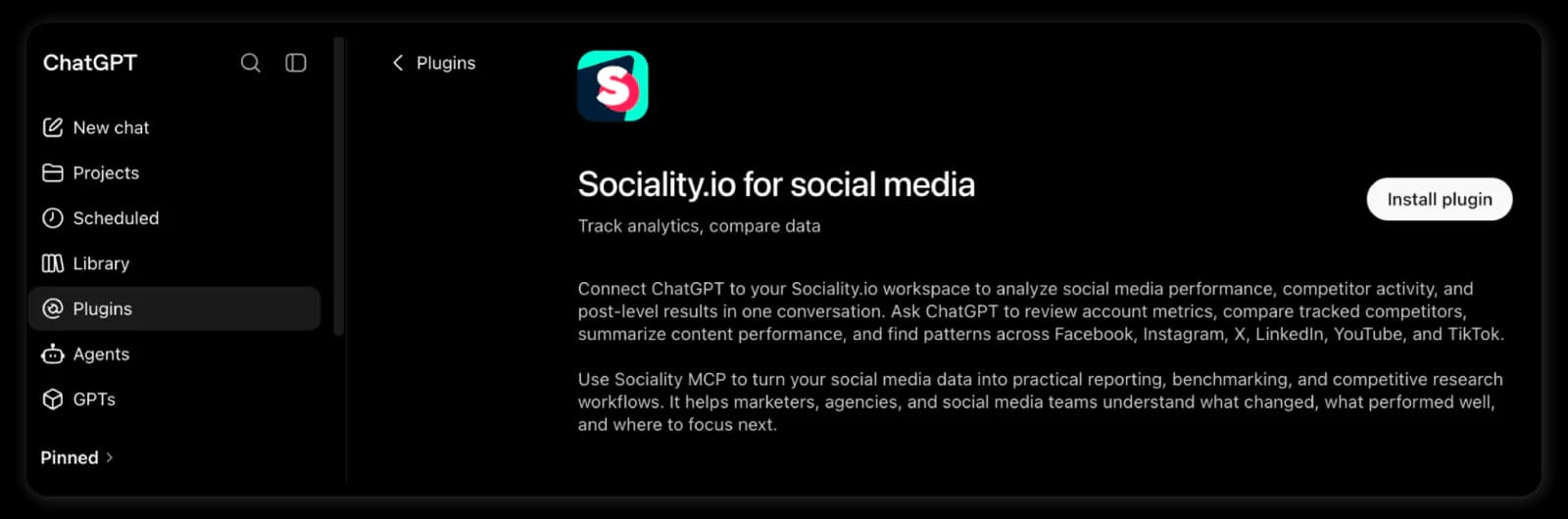
On Claude, add Sociality.io as an official connector from the Claude directory and sign in with OAuth. On Gemini or any other MCP client, the manual setup takes about a minute:
- Open Claude, Gemini, or another AI tool.
- Open its Plugin/Skills/Connector settings.
- Add Sociality.io as a connection.
- Paste the MCP URL: https://api.sociality.io/mcp
- Sign in and start chatting about your social data.
Bonus: You can find the setup videos in Sociality’s ultimate guide to social media MCPs.
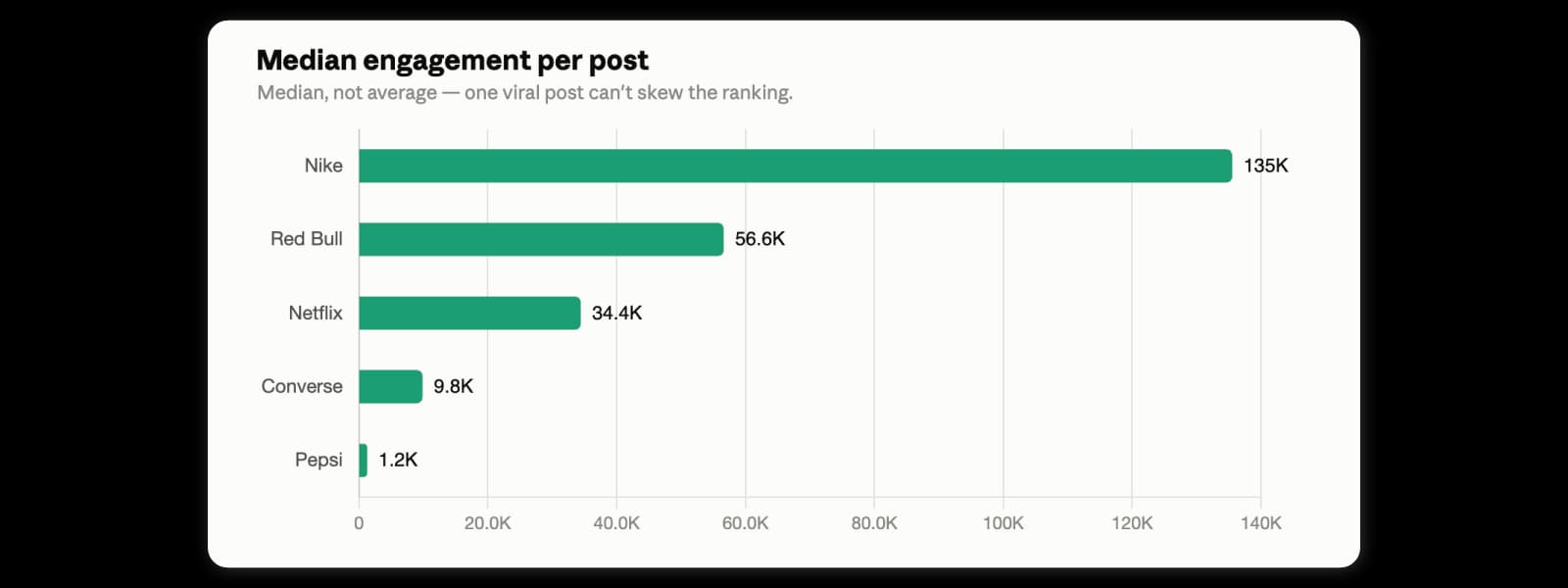
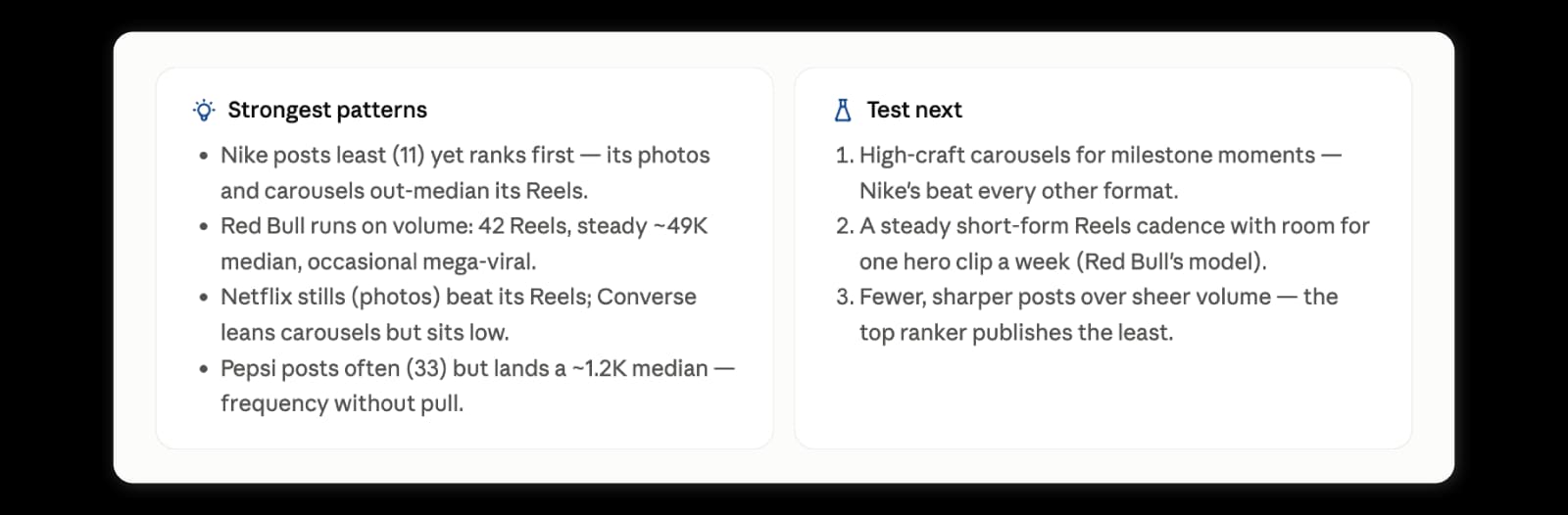
Try this prompt: Pull six weeks of posts from our account and four competitors. Rank the brands by median engagement per post, explain the strongest content patterns, and recommend three formats we should test next.
2. Meltwater MCP: Best for social listening and media intelligence
Meltwater MCP brings licensed media, social, influencer, brand, and competitive intelligence into compatible AI workflows.
What stands out: It grounds AI answers in the Meltwater data already in your subscription, brand and topic monitoring, sentiment, narrative detection, competitive summaries, executive briefs, saved searches, and, above all, cited responses where available. That citation trail is the difference between “the AI says sentiment dropped” and “here’s the coverage that proves it.”
Best for: Brand monitoring, social listening, PR and media teams, reputation analysis, competitor narratives, and executive briefs.
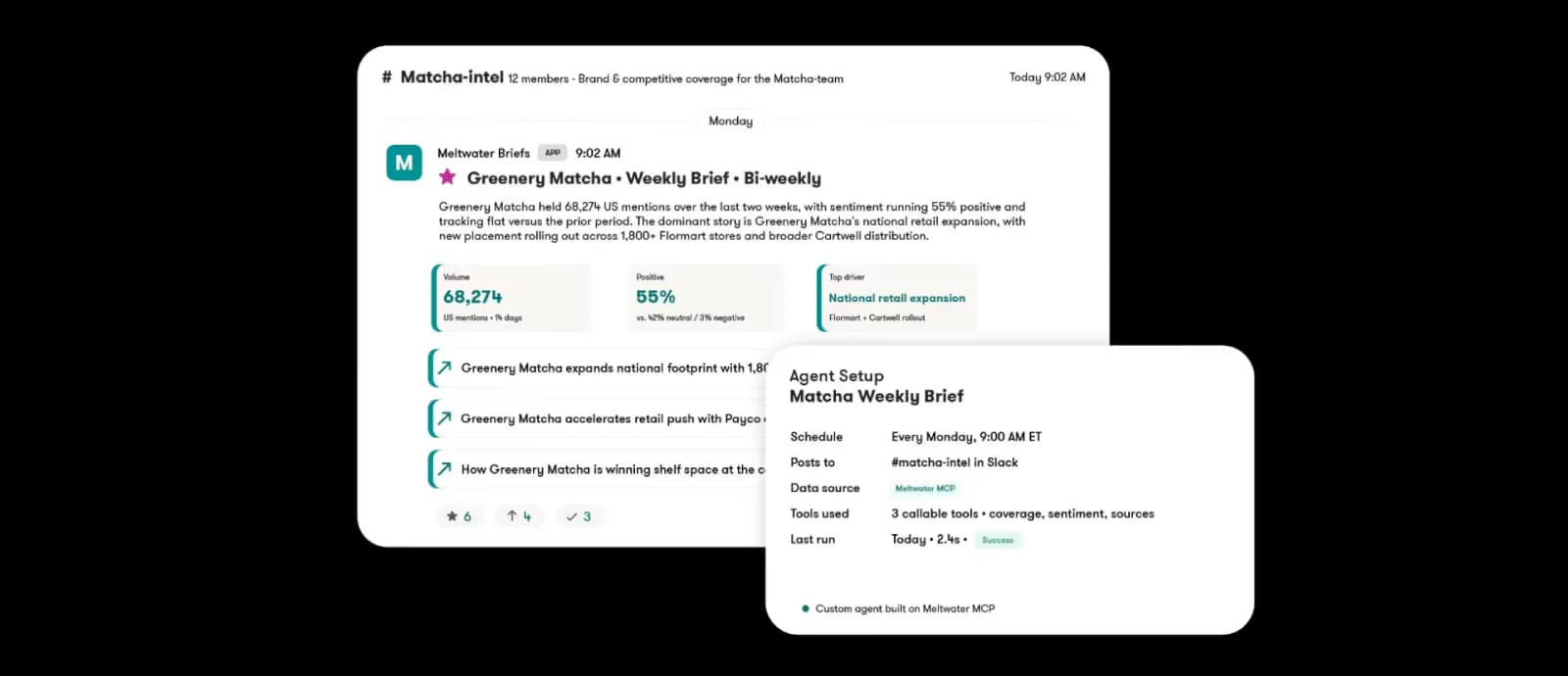
Pricing: Available through sales, with no public list price or trial terms on its MCP page. Meltwater says the MCP is not a separate product: you need an active Meltwater subscription, the MCP add-on, a supported AI assistant and the right permissions.
Main strength: Sourced answers you can trace back to the underlying coverage.
Watch-outs: It’s an enterprise intelligence product, not a lightweight scheduler. Pricing runs through sales, and access is scoped to your subscription.
Verdict: The strongest pick here when your question is “What is the market saying?” rather than “What should we post at 2 p.m.?”
3. SocialPilot MCP: Best for publishing operations
SocialPilot MCP is suitable for teams that want AI to move past generating content and into actually shipping it.
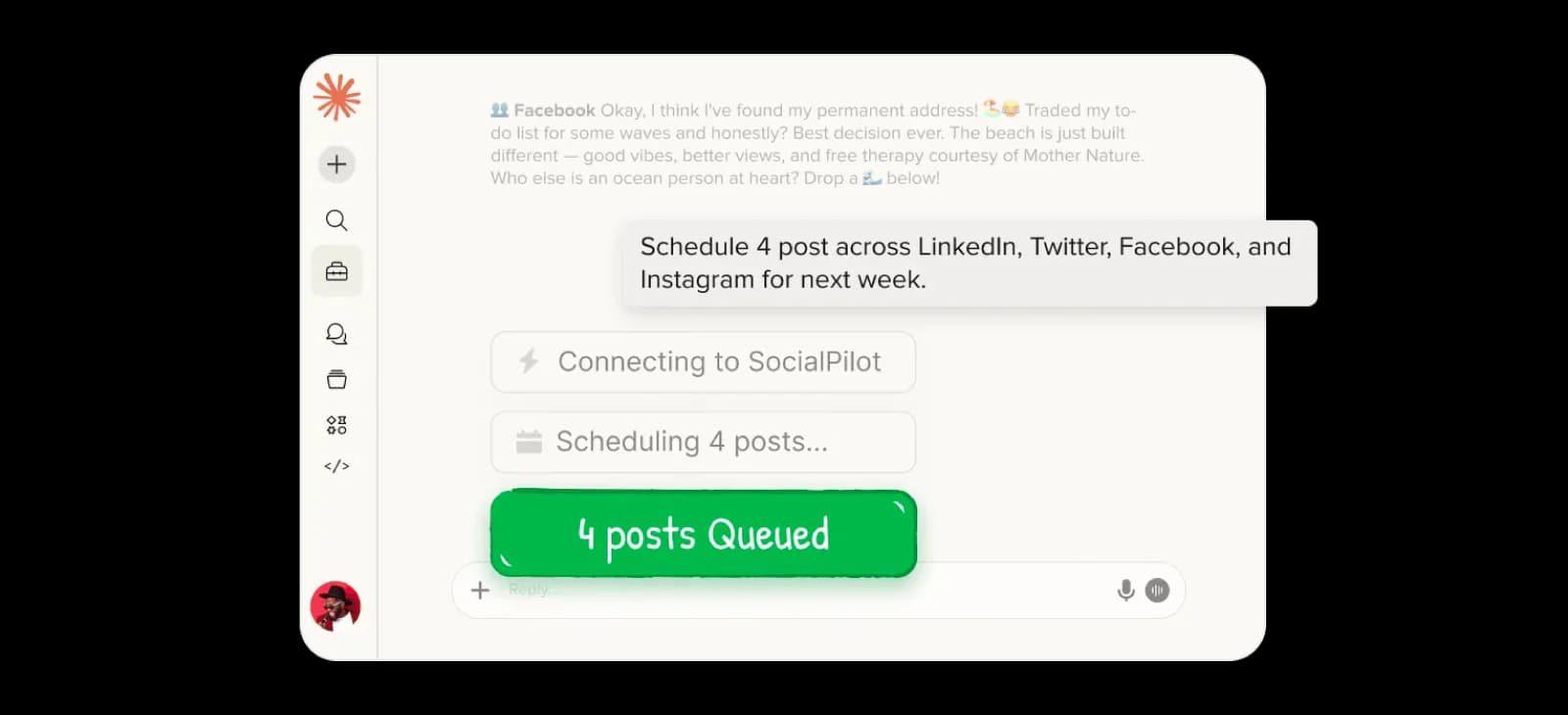
What stands out: Its official MCP documents real write actions, post creation, scheduling, account-level execution, draft workflows, queue visibility, and checks for missed or undelivered posts. You can tell the AI to publish when content’s ready, or park it as a draft when review is required. That “publish or draft” toggle is the whole game.
Best for: Agencies running many accounts, multi-profile publishing, scheduling straight from a chat, and keeping an eye on queued, live, and failed posts.
Pricing: No separate MCP fee. SocialPilot lists the MCP server as included on every plan. Claude and ChatGPT sign in with your SocialPilot account, and ChatGPT needs a paid ChatGPT plan that supports connectors. Subscriptions run $30/mo for Essentials (about $25.50 billed annually),$100/mo Premium, and $200/mo Ultimate, with Enterprise custom. Extra accounts ($4/mo) and extra users ($5/mo) stack on top, and the agency features (client approvals, white-label) start at Premium.
Main strength: It lets AI schedule posts on your behalf.
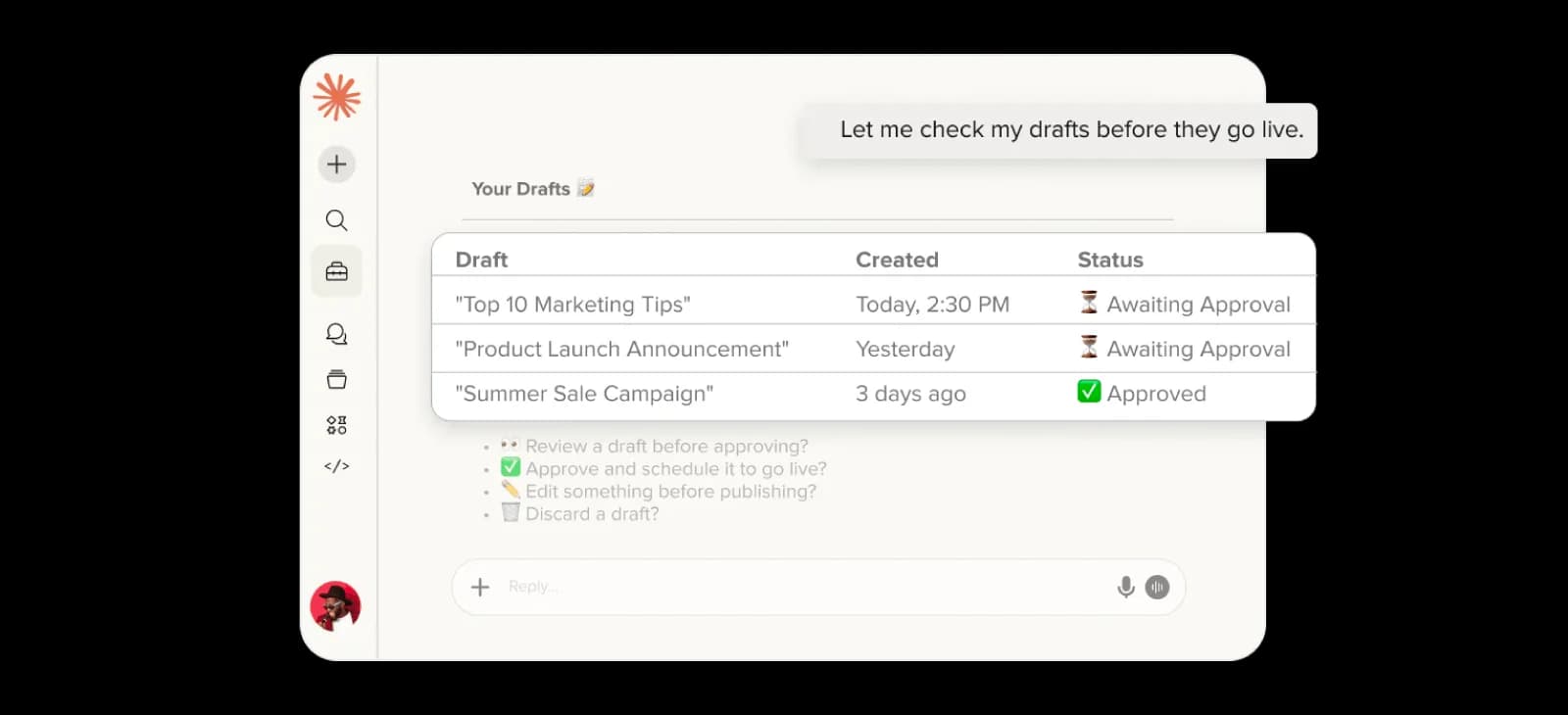
Watch-outs: Confirm which actions your plan includes and whether your AI client supports the required auth. And introduce direct publishing gradually: read-only first, drafts next, live posting last.
Verdict: Choose SocialPilot MCP when the goal is turning AI-generated content into scheduled or published posts across an existing SocialPilot operation.
4. Metricool MCP: Best option for content scheduling on numerous platforms
Want to test a real MCP workflow for Claude without paying for a new plan? Start here.
What stands out: Metricool’s MCP server works on the free plan (normal free-plan limits still apply), and it’s genuinely broad, scheduling and editing posts, listing scheduled content, reading Instagram posts/Reels/Stories, pulling TikTok, Facebook, LinkedIn, X, YouTube, Pinterest, Threads, Bluesky, and Twitch content, and even reaching Meta Ads, Google Ads, and TikTok Ads data plus competitor posts. It’s a hosted remote server (OAuth in a supported client, nothing to install), and Metricool also publishes it as a PyPI package (mcp-metricool) if you prefer a local install.
Best for: Individuals and smaller teams kicking the tires, combined scheduling + analytics, multi-platform accounts, and anyone who wants a free on-ramp.
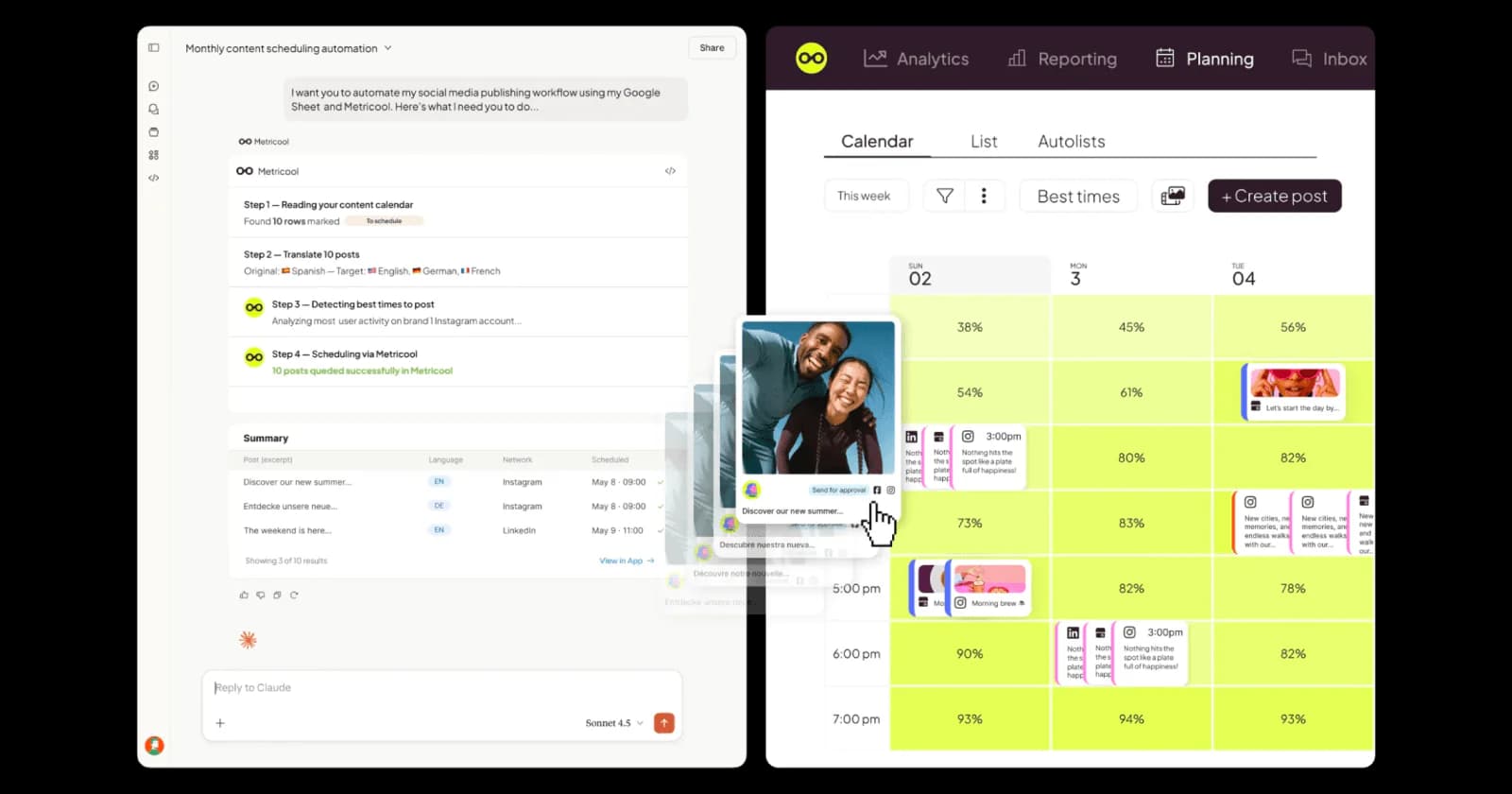
Pricing: Free to start. The MCP itself runs on any Metricool plan including the free tier, so there’s no separate cost to connect. Paid tiers scale by brand count: Starter from $20/mo billed annually ($25 monthly) for up to 5 brands, Advanced from $53/mo billed annually ($67 monthly) for up to 15 brands, plus approvals and API, and Custom for larger agencies. The free plan covers 1 brand, 20 scheduled posts a month, 5 competitor profiles and 30 days of analytics. X/Twitter is a paid add-on on every paid tier.
Main strength: A meaningful slice of MCP workflows, free.
Watch-outs: Two real ones. First, your MCP powers inherit your Metricool plan’s limits, a free connection doesn’t magically add unlimited history or premium networks. Second, and this is a genuine hands-on report worth knowing: an AI consultancy (Purple Horizons) wrote in its CLI README, last updated in March 2026, that the MCP reads data reliably but can’t schedule, because the providers field gets sent as strings instead of objects. They built a full CLI around it. I couldn’t re-test that, so verify scheduling actually works for your setup before you trust it with a calendar.
Verdict: The safest place for a non-technical marketer to experiment with a free social media MCP, just test the write actions before you rely on them.
5. Agorapulse MCP Connector: Best for draft-first management
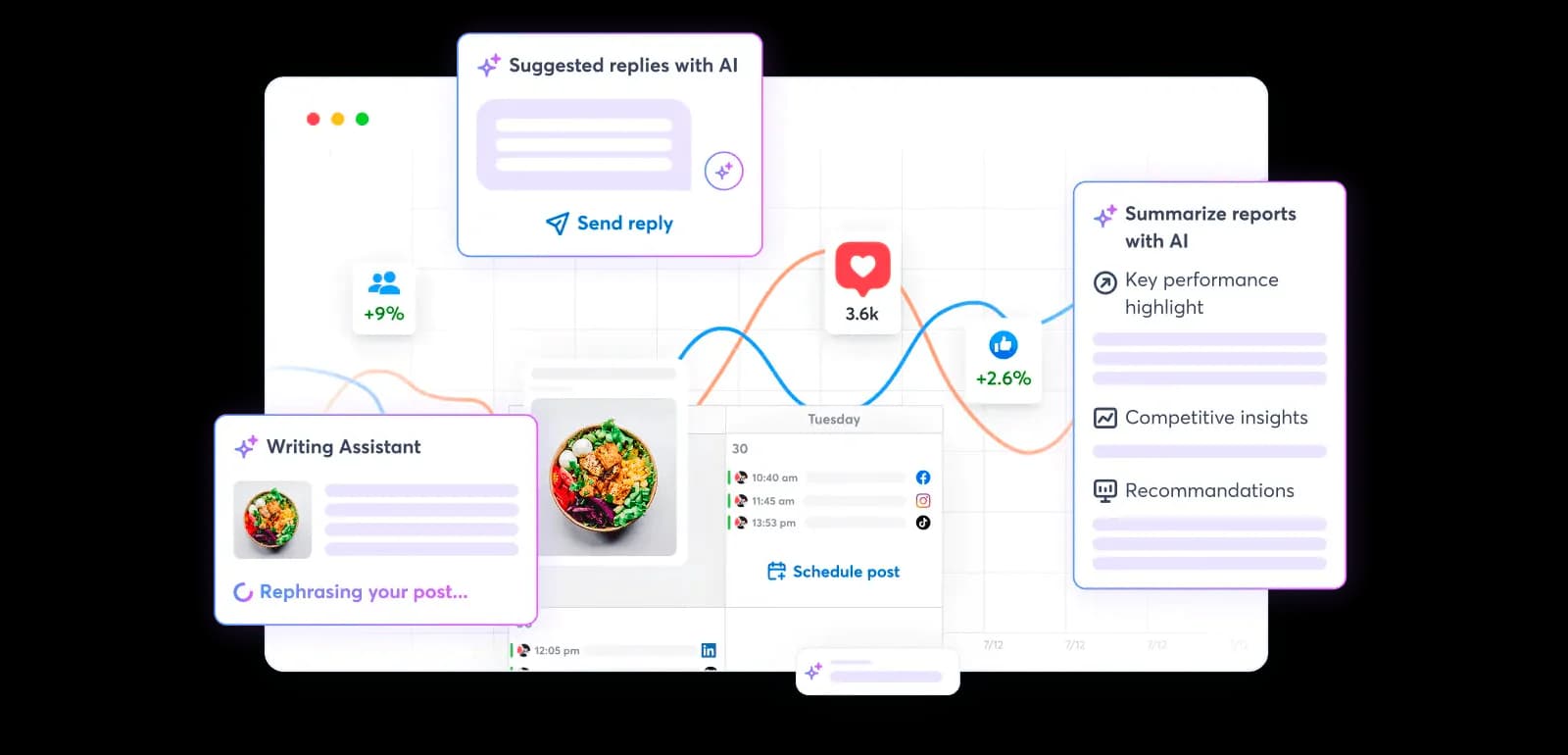
Agorapulse’s MCP connector for Claude and ChatGPT reaches social data, performance analysis, content creation, and the publishing calendar.
What stands out: The deliberate ceiling: it creates drafts and does not auto-publish. Scheduling and final publishing stay inside Agorapulse. For a lot of teams, that’s not a missing feature; it’s a seatbelt. Documented examples include drafting a Facebook post, viewing calendar notes, ranking posts by engagement, checking Instagram audience demographics, and listing organizations. It runs on OAuth, respects your existing permissions, and doesn’t permanently store the data it fetches. Beyond drafting, it reads the inbox and Listening results, and it works with Claude, ChatGPT and Microsoft Copilot.
Best for: Teams that want AI-created drafts, analytics and calendar Q&A, and a guaranteed human hand on the publish button.
Pricing: Included with paid Agorapulse plans (from US$79/user/month billed annually or US$99/user/month billed monthly). Not available on Free or Legacy plans.
Main strength: The draft-only model keeps the AI useful without handing it the final click.
Watch-outs: It’s in beta and unavailable on Free and Legacy plans. And if you want fully conversational scheduling, this isn’t it, by design.
Verdict: Strong for teams that want AI inside their process but aren’t ready to give it publishing rights.
6. Planable MCP: Best for approvals and client collaboration
Planable MCP is built around the part of social work that turns chaotic fastest: getting content reviewed and approved.
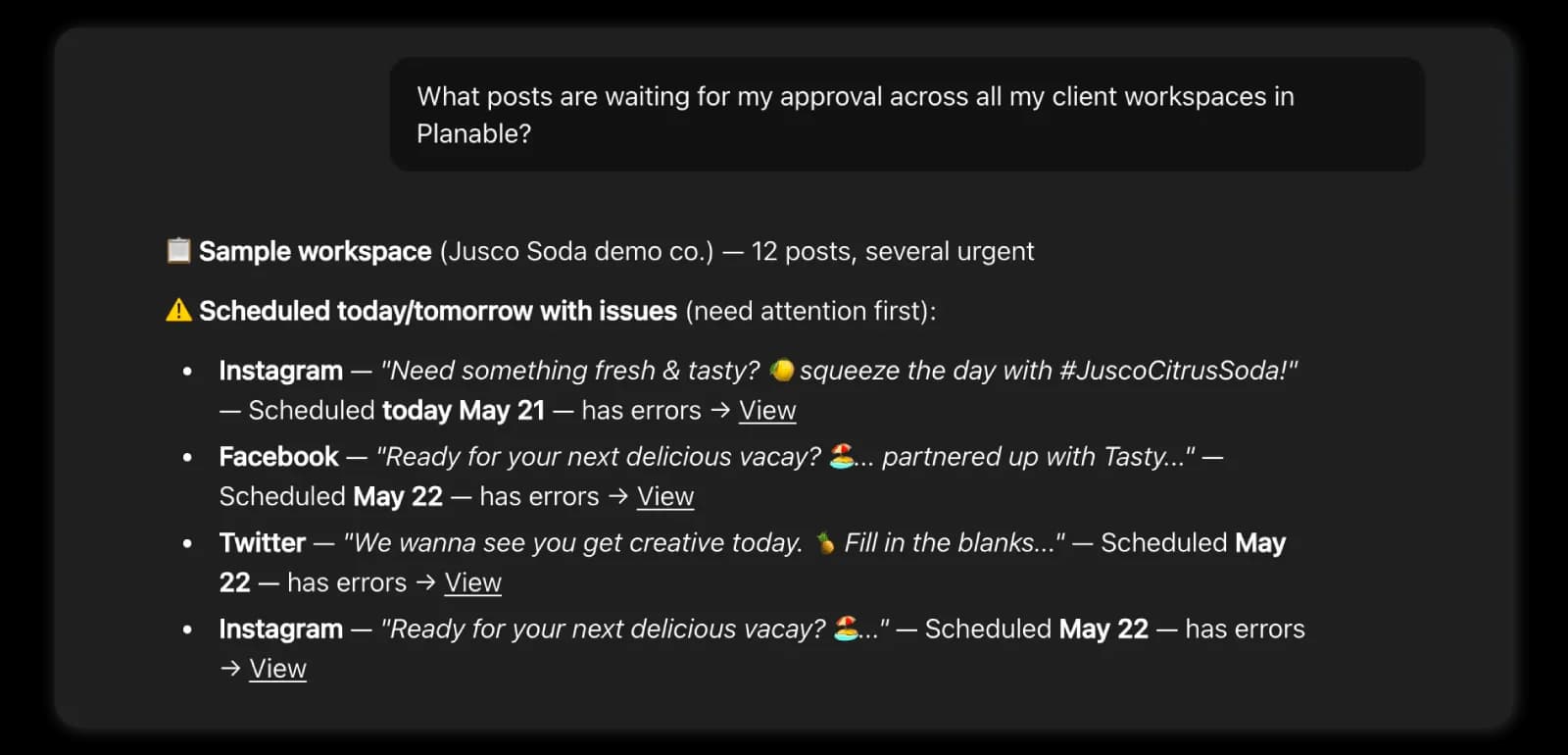
What stands out: AI-created posts enter as drafts and flow through the workspace’s normal review process, nothing skips the line. The connector spans connected accounts and multiple workspaces while preserving your approval rules. Its guide groups the tools into six areas: account browsing, content review, content creation, approvals, the media library and analytics. It’s included in paid plans and testable with Planable’s free posts; analytics ride on the separate add-on.
Best for: Agencies with client sign-off, brands with several reviewers, content teams juggling separate workspaces, and draft-first scheduling.
Pricing: Included in all paid Planable plans, starting at $33/workspace/month (Basic), with Pro at $49/workspace/month. The MCP Connector is included at no extra cost, while Analytics is an optional add-on listed at $12 to $14/workspace/month. Planable offers 50 free posts with no time limit and no credit card.
Main strength: AI content can’t bypass the workflow your team spent three years arguing into existence.
Watch-outs: Approval and collaboration are the heart of Planable. If you need deep listening or heavy competitor intelligence, you’ll pair it with something else.
Verdict: The natural fit when your bottleneck isn’t making posts but moving them safely from idea to approved.
7. Vista Social MCP: Best for publishing and inbox management
Vista Social lists MCP support on every paid plan, alongside a wide publishing, inbox and reporting product.
What stands out: Vista Social’s pricing page lists MCP on all four plans, and the product spans publishing, analytics, reporting, inbox and team tasks. I couldn’t open Vista Social’s MCP documentation while checking this list, so read that scope as what the product covers, not as a confirmed tool list.
Best for: Teams wanting a single broad connection covering publishing, inbox, reporting, and tasks, especially multi-client shops comfortable with a large surface area.
Pricing: Included in all paid Vista Social plans, starting at $99/month (Professional, about $79/month billed yearly), with Advanced at $199/month (about $159 billed yearly), Scale at $449/month (about $359 billed yearly), and Enterprise pricing available on request. The MCP integration is included with paid plans, and every plan comes with a 14-day free trial.
Main strength: The wide product behind it: publishing, inbox, reporting and team tasks in one tool.
Watch-outs: A big write surface means setup deserves real care. Test profiles, roles, reply permissions, and approval rules before the AI touches live client accounts. Breadth is power; it’s also more places to trip.
Verdict: A candidate when you already run Vista Social and want its management features inside a chat. Confirm the tool list with Vista Social first.
8. ContentStudio MCP: Best for content creation and publishing
ContentStudio MCP connects AI assistants to ContentStudio through a remote server with browser sign-in (OAuth) or an API key, and it still ships a prebuilt bundle for Claude Desktop.
What stands out: Focus. It’s built to fetch your accounts, create and schedule posts, and generate images and videos from inside the AI client, and the workflow is easy to reason about: make the content, pick the accounts, send it in.
Best for: Content-heavy workflows, existing ContentStudio users, creating-and-publishing from Claude, and teams who like a downloadable package.
Pricing: Starts at $19/month (Standard, billed annually; $29 month to month), with Advanced from $49/month, Agency Unlimited from $99/month, and custom Enterprise plans available. A 7-day free trial is included with all plans.
Main strength: The mental model is clean and hard to misuse.
Watch-outs: Its public docs say less about approvals, inbox, and analytics tooling than Vista Social or Oktopost do. If governance matters, dig into the details first.
Verdict: A sensible pick when your priority is moving AI-generated content into a familiar multi-platform publisher.
9. Ayrshare MCP: Best for developers and social media products
Ayrshare is API-first, a platform for building social features, not a calendar for a solo manager.
What stands out: Its official MCP Action Server exposes the Ayrshare API through 33 tools that drive real actions, while a separate Documentation MCP gives read-only access to the technical docs. That split is the tell:
- Ayrshare MCP Action Server → performs social actions.
- Ayrshare Documentation MCP → helps the AI understand and implement the API.
- Ayrshare REST API → powers the publishing, analytics, history, and engagement underneath.
Best for: Developers building social features, SaaS platforms connecting customer accounts, custom agents, multi-tenant products, and teams that want one API across many networks, a proper Facebook MCP server, X/Twitter MCP, and the rest, under one roof.
Pricing: Starts at $149/month (Premium) for a single social profile. Launch starts at $299/month for up to 10 profiles (with a 28-day free trial), Business at $599/month for 30 profiles ($499 billed annually), and Enterprise offers custom pricing. Pricing is based on connected social profiles rather than users or seats, and the MCP server authenticates with your Ayrshare API key.
Main strength: It’s made for embedding social capabilities into your own product or agent.
Watch-outs: It’s overkill for a non-technical marketer who just wants a visual calendar and an approval queue.
Verdict: Choose Ayrshare when you’re building the social workflow, not merely using one.
10. Oktopost MCP: Best for governed enterprise workflows
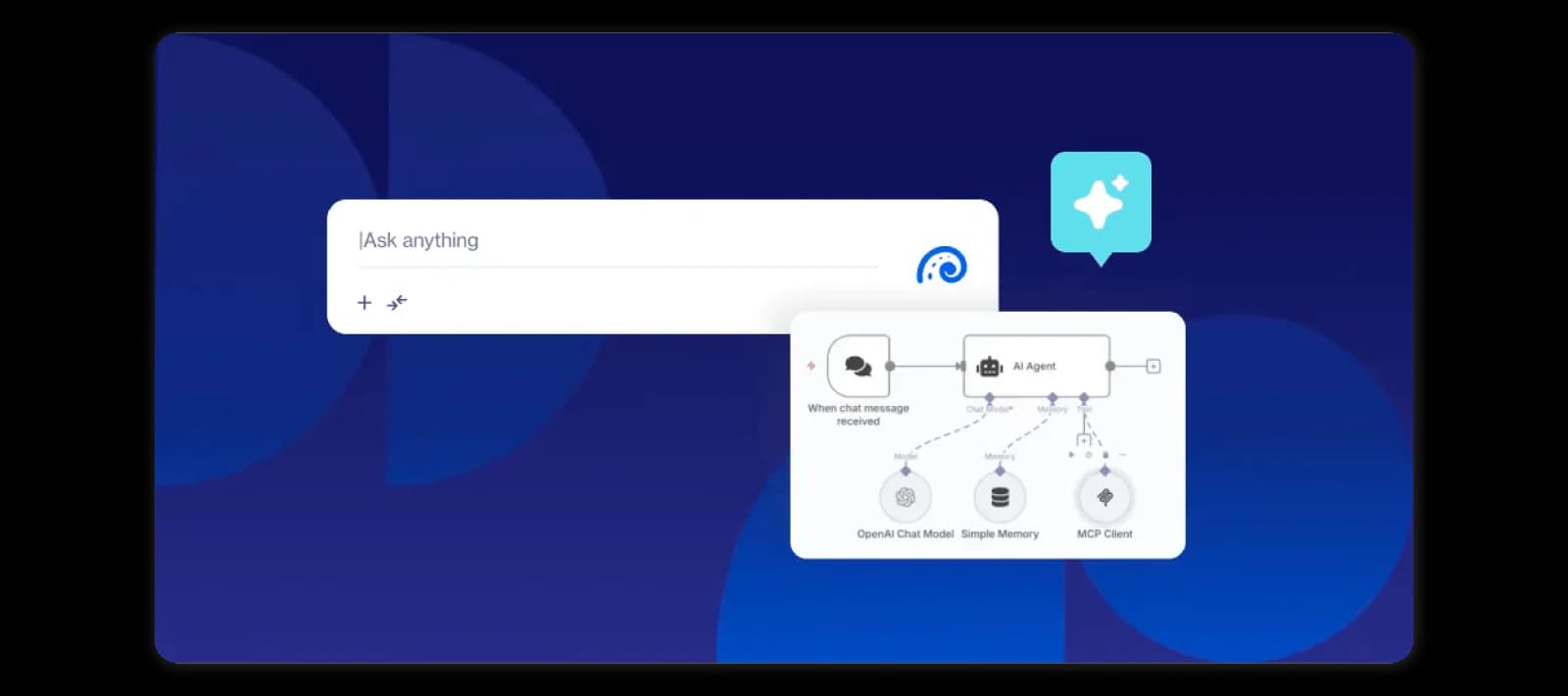
Oktopost’s MCP Server hands AI access to campaigns, content, publishing, media, calendars, approvals, users, advocacy, and the social inbox.
What stands out: Governance, not just reach. Its documentation lists 69 tools across 13 areas, covering creating campaigns, scheduling, uploading assets, validating video requirements, routing content into approval, approving/rejecting items, and adding review notes. Auth is flexible, API keys for Claude Desktop, OAuth for ChatGPT and Claude web, Basic auth for automation tools like n8n and Make. Its server respects existing user permissions, limits OAuth access to approved scopes, and does not log or store your API credentials.
Best for: B2B marketing teams, enterprise approval chains, employee advocacy, governed publishing, and anyone who needs permission-scoped access.
Pricing: Oktopost uses custom enterprise pricing rather than public monthly plans. Pricing scales based on users, products, and governance requirements, and Enterprise plans are quoted individually.
Main strength: Meaningful write actions plus the controls enterprises actually require.
Watch-outs: Probably too much machinery for a small business that just needs scheduling and a few monthly reports.
Verdict: One of the strongest MCP options for established B2B teams where permissions, campaigns, and approvals matter as much as speed.
11. Supermetrics MCP: Best for cross-channel marketing reporting
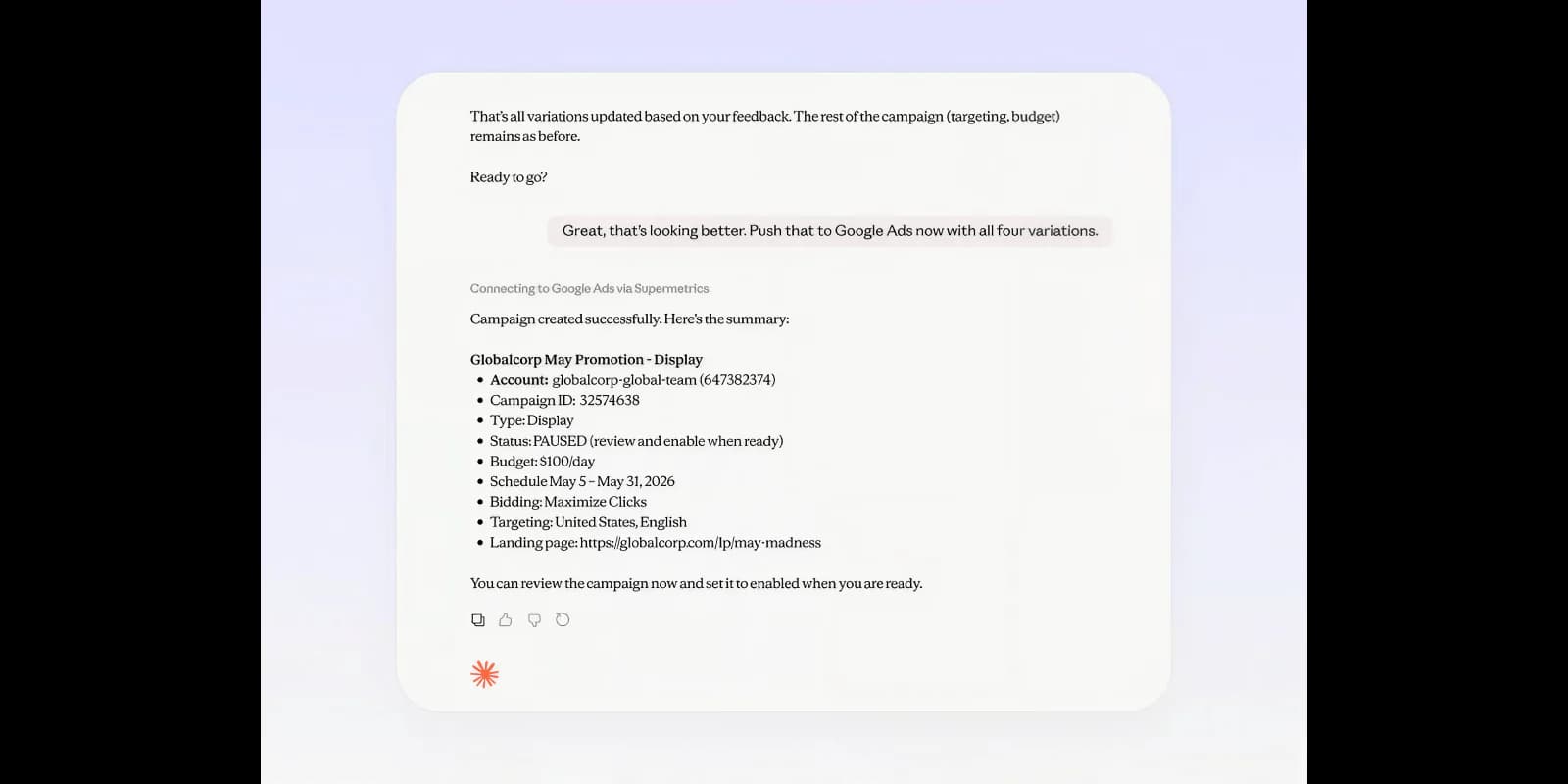
Supermetrics MCP connects AI to marketing, advertising, analytics, sales, and commerce data.
What stands out: Scale of sources. Google Ads, Meta Ads, GA4 and every other source available through the Supermetrics Data API. It’s built for questions like Why did paid social CPA jump? or Which channels drove revenue? or Build me a live cross-channel dashboard.
Best for: Paid social reporting, marketing analysts, multi-channel performance, blending social + web + CRM + commerce, and dashboard creation.
Pricing: No separate MCP fee. The server is included with any Supermetrics subscription that has API access, so you pay for the underlying plan. Those are tiered and billed per data source and per destination, so cost climbs fast: Starter runs €39/mo billed yearly (€49 monthly) for 2 data sources, Growth €159/mo billed yearly (€199 monthly) for 7, and Enterprise is quoted individually. Supermetrics’ pricing page lists Data API access on Enterprise, so confirm that your tier includes MCP before you buy. A 14-day free trial is available.
Main strength: It puts organic social into a much wider marketing context.
Watch-outs: It’s not built for organic post approvals, social inboxes, or community management.
Verdict: Reach for Supermetrics when social is one slice of a bigger measurement question.
12. Windsor.ai: Best for broad connector access and BI workflows
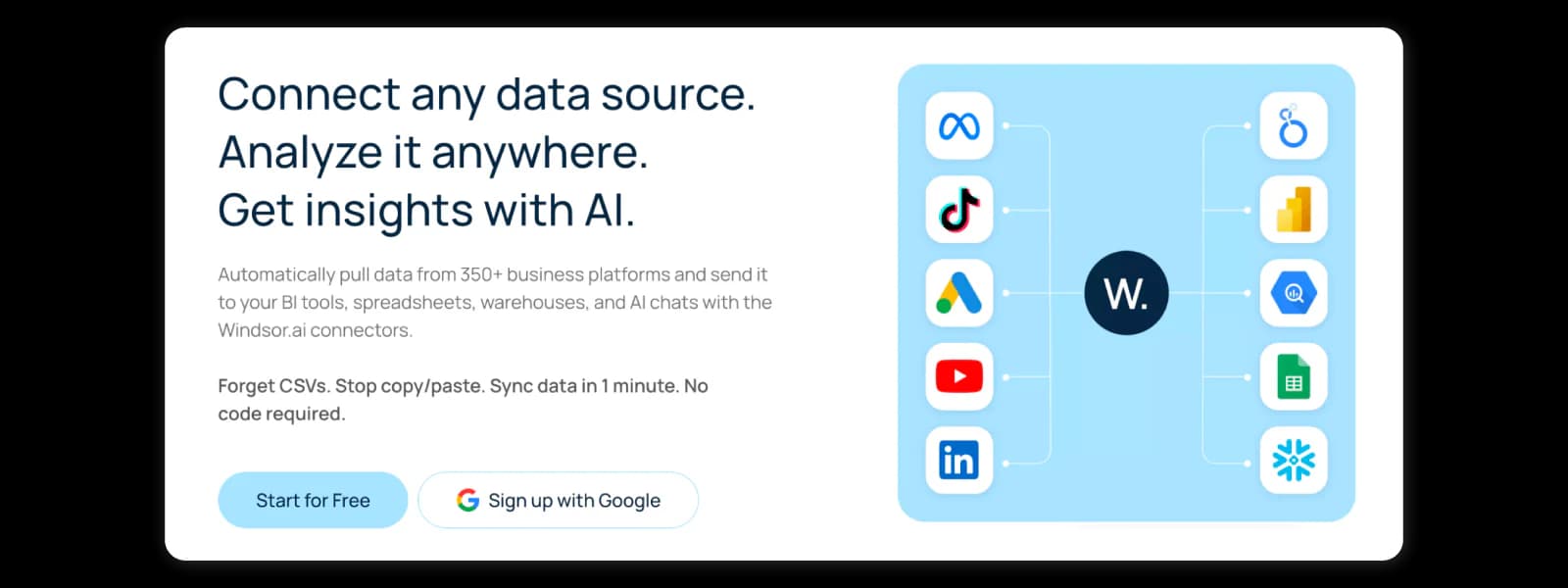
Windsor.ai is a remote server exposing 350+ marketing and business data connectors to MCP-compatible clients.
What stands out: Flexibility on both ends. It supports OAuth 2.0 (with an API-key fallback), can retrieve live marketing data, query warehouses, combine channels, calculate ROAS, and help build dashboards, with documented setup for ChatGPT, Claude, Gemini, Perplexity, Cursor, Copilot, and more.
Best for: Agencies building client dashboards, analysts spanning many sources, BI and warehouse workflows, ROAS and attribution questions, and teams wanting broad AI-client compatibility.
Pricing: Free-forever plan to start, no credit card. Paid plans begin at $19/mo billed yearly ($23 monthly) and scale with the number of sources and accounts.
Main strength: A large connector library plus flexible client support.
Watch-outs: Like Supermetrics, it’s focused on marketing data; it’s not a full social management server.
Verdict: Useful when you want a flexible bridge between AI, ad data, analytics platforms, and wider business reporting.
13. Hootsuite MCP: Best for teams already running Hootsuite
Hootsuite MCP is really four official servers, one for each part of the Hootsuite suite, that you connect to your AI assistant with a single Hootsuite sign-in.
What stands out: The split. Perch handles content creation, planning and publishing, including drafts, scheduling and media uploads. Lumen covers insights and listening, from mentions and sentiment to influencers and competitive summaries. Nest works the social inbox: triage, assignments, saved replies and resolving conversations. Parliament covers employee advocacy. ChatGPT and Claude connect through pre-built connectors, while Microsoft Copilot and Gemini use a remote URL, which Hootsuite says needs IT administrator access. Permissions stay tied to your Hootsuite account.
Best for: Teams already on Hootsuite that want drafting, inbox triage, listening and advocacy inside the AI client they already use.
Pricing: Hootsuite doesn’t list MCP pricing. You need an active Hootsuite account with access to the product behind each server, and Hootsuite offers a free trial.
Main strength: One vendor, four jobs, and the same sign-in and permissions you already manage in Hootsuite.
Watch-outs: Hootsuite says its workflows are built around a human-in-the-loop model, yet its own sample prompts include publishing straight to a LinkedIn page, so set your approval rules before you connect. Lumen is described as monitoring, searching and summarizing, with no write actions listed.
Verdict: The obvious pick if Hootsuite already runs your publishing and inbox. Less compelling if you’re not a customer, since the servers only reach what your Hootsuite plan includes.
Sprout Social MCP: what it covers and what it doesn’t
Sprout Social has an official MCP server for ChatGPT (it uses OAuth and you add it as a custom connector, per Sprout’s setup guide), and it’s narrower than the brand suggests:
- Scoped to TikTok insights and post-performance metrics only.
- Read-only, and available to ChatGPT Plus, Pro and Enterprise users.
- The impressive part, Trellis, is a separate in-product AI agent, not something exposed over MCP.
Sprout’s integrated AI agent, not an MCP, Trellis analyzes your social data through natural language and returns audience, competitor, trend, sentiment, and performance insights, with custom skills via Trellis Studio. It rides on top of a Sprout subscription (per seat, billed annually, Standard $199 up to Advanced $399/user per month).
Worth watching if you’re already on Sprout, but too narrow to build a cross-platform workflow around today.
Social media MCP servers by platform: Meta, Instagram, LinkedIn and TikTok
“Social media MCP” means three different things depending on the network: an official server from the platform itself (usually for ads), a tool vendor’s server like the ones in the list, or a developer platform that wraps the network’s API. Here is where each network stood on 28 October 2026.
Meta MCP: Facebook and Instagram
Meta runs its own official Ads MCP server, and it is built for advertising, not organic social. According to Meta, it lets an AI client create and optimize campaigns, pull performance insights and manage product catalogs through natural language. Sign-in is OAuth through Facebook Login for Business, and Meta lists Claude, ChatGPT, Codex and Cursor among the clients it has validated.
It is scoped to ads. For organic posting or Page and Reels analytics, you still need one of the tool servers in the list.
Instagram MCP servers
For organic Instagram, the options come from tool vendors and developer platforms, not from Meta. Sociality MCP reads Instagram account stats, published posts including Reels and Stories, and tracked competitors’ stats and posts, which is the setup behind our guides to Instagram analytics and Instagram Reels analytics. The scheduler servers in the list are the route when you want the AI to queue posts, so check each one’s platform list before you count on Reels or Stories.
On the developer side, Composio’s Instagram toolkit offers 32 tools behind managed OAuth. It is aimed at people building agents, not at social media teams that want a ready-made reporting setup.
LinkedIn MCP servers
I found no official LinkedIn MCP server as of 28 October 2026. LinkedIn’s own APIs are REST-based and sit behind an approval process, so most MCP routes go through a tool vendor. In this list, Sociality MCP reads LinkedIn account stats and posts plus competitor stats and posts. For publishing to LinkedIn, check each scheduler’s platform list before you commit.
Be careful with community servers that scrape LinkedIn or drive a logged-in browser. That is the riskiest pattern for a brand account.
TikTok MCP servers
TikTok runs an official TikTok for Business MCP server, and like Meta’s it is for ads: campaign management, performance reporting, audience setup and creative operations. TikTok says it needs no developer credentials or API key management, and its help article describes roughly 400 tools in flat mode or about 40 in progressive mode, another reason not to compare servers by tool count.
For organic TikTok analytics, Sociality MCP reads TikTok account stats and posts, and Sprout Social offers the read-only TikTok connector for ChatGPT described in the Sprout section. Our TikTok analytics guide shows what to ask once you are connected.
How I evaluated these social media MCP servers
I reviewed official vendor pages, product documentation, help centers, GitHub repositories, and MCP tool references available as of 28 October 2026, and cross-checked capability claims against setup docs and, where they existed, hands-on practitioner reports.
My priorities, in order:
- An official, vendor-operated MCP server or documented connector
- Clearly stated capabilities (not vibes)
- Official API or product-level integration
- OAuth, scoped keys, or existing user permissions
- Approval and draft controls
- Current, maintained documentation
- Genuine value for a real social media workflow
One honest caveat about the “reviews” part. This category is barely 18 months old, and independent, hands-on coverage is thin, and a lot of “best MCP server for social media” lists floating around are AI-summarized GitHub roundups written by people who never actually posted anything with these tools. Where I found real practitioner signal (a developer hitting a scheduling bug, a documented limitation). I’ve flagged it. That’s the deal.
And two more caveats:
- Sprout Social has an official conversational agent and an official MCP server, but the MCP server is TikTok-only and read-only, so it isn’t a general-purpose option comparable to the others here. It sits after the numbered entries, clearly marked as MCP-adjacent, because it belongs in the conversation.
- Several “official” community servers still wrap a REST API in ways that break in practice.
How to choose the right social media MCP server
The best social media MCP server is Sociality MCP, with its deep analytics and benchmarking AI features, a high level of security, and limited write features.
1. Decide whether you need reading or writing
Read-only servers retrieve information without changing anything. They’re your friend for reporting, analytics, competitor research, listening, calendar checks, and trend analysis.
Write-capable servers create drafts, schedule, publish, edit campaigns, reply, or approve. Every ounce of write access you add is an ounce more attention you owe to permissions, reviews, and logs. Add it on purpose, not by accident.
2. Check the exact platform coverage
“Supports social media” tells you almost nothing.
Confirm which networks are covered, whether personal and business accounts work, which post formats are supported, whether media uploads work, and whether Reels, Stories, Shorts, carousels, and threads are in scope. Then confirm the boring detail everyone skips: does analytics cover the same networks as publishing? A server might publish text to ten platforms but only report on two. Read the tool reference, not the homepage headline.
3. Check workflow depth
A shallow server lists profiles and posts text. A deep one also checks the queue, selects media, validates video specs, edits scheduled posts, routes to approval, pulls analytics, analyzes competitors, replies through approved macros, and drafts the next content plan.
Only pay for the deep system if you’ll actually use the depth.
4. Review authentication and permissions
Look for OAuth, scoped API keys, revocable tokens, existing user-role enforcement, workspace-specific access, separate read/write permissions, audit logs, service-account controls, and documented data-storage behavior.
Remote MCP servers are powerful precisely because they can reach external data and take actions, which is exactly why you configure sensitive tool calls to require approval. Verify the MCP setup before you trust it, every time.
5. Look for approval controls
Draft-first is the sane default for publishing. A good setup lets the AI:
- Create the post.
- Drop it in the right workspace.
- Assign a reviewer.
- Wait for approval.
- Schedule only the approved version.
Direct publishing enters after all that, never before.
6. Check setup complexity
Hosted servers are easiest for non-technical teams: add a URL, sign in with OAuth, and authorize, and done.
Self-hosted or local servers may want you to clone a GitHub repo, install packages, create platform developer apps, manage environment variables, juggle API keys, run Docker, and handle updates. Technical control is great. So is not pinging a developer every time a token expires. Pick the trade-off you can live with.
7. Understand the full price
The MCP server can be free while the product or API underneath is very much not.
Check whether pricing keys off users, workspaces, connected accounts, brands, posts, API calls, data rows, credits, historical range, or your AI-client subscription. Metricool’s MCP rides its free plan but inherits its limits. Sociality MCP uses credits tied to returned data, like days of metrics or detailed posts. Know the meter before you build a habit on it.
Social media MCP vs. schedulers, Zapier, and built-in AI
MCP doesn’t retire your other tools; it slots in beside them, and here’s who does what.
Traditional social media schedulers
Still strong for visual calendars, manual planning, bulk uploads, approvals, campaign organization, and previews. Their weak spot is the gap between the AI that wrote the content and the dashboard that manages it.
Zapier, Make, and n8n
Ideal for predictable, rule-based triggers: publish when an RSS item appears, save approved assets to a folder, ping Slack when a post fails, add campaign data to a sheet. They get uncomfortable the moment a task needs judgment, iteration, or a few follow-up questions. Zapier also runs its own MCP server now, so an AI client can call the apps you have connected there. Each successful tool call counts as two tasks from your plan, so a chatty workflow uses the allowance faster than a Zap would.
Built-in AI features in social media marketing SaaS
Native assistants write captions, rewrite copy, suggest hashtags, and summarize analytics. Convenient, but their context usually stays trapped inside one product, while your brief, research, and client docs live everywhere else.
Social media MCP servers
MCP shines when you want the assistant to reason across context and then call a real tool. It takes a loose instruction, picks the right action, asks for what’s missing, and carries the workflow through several tool calls.
The likely future is hybrid. Dashboards keep owning planning, approvals, and detailed admin. MCP takes the quick questions, the repeated execution, the data pulls, the reporting, and the conversational actions. Best of both, not either/or.
Sociality MCP vs Composio, Zapier, Ayrshare and Meta Ads MCP
These five get compared often because they all let an AI touch social data, but they solve different problems.
| Tool | What it is | Best for | Social data it reaches | Read or write | Setup | Pricing basis |
|---|---|---|---|---|---|---|
| Sociality MCP | Analytics and competitor benchmarking product | Reporting, benchmarking, performance questions | Instagram, TikTok, LinkedIn, YouTube, X, Facebook | Read-first: 6 of 7 tools read-only | OAuth connector in ChatGPT and Claude; remote MCP for other clients | Credits: free Starter (1,000 one-time), Growth from $49/mo |
| Composio | Developer platform with toolkits for many apps | Developers building agents that use many apps | Instagram toolkit (32 tools); other networks per toolkit | Read and write, per toolkit | Managed OAuth | Free Hobby plan (100K tool calls), Pro $29/mo |
| Zapier MCP | Automation platform that exposes its apps as tools | Teams already on Zapier who want ad hoc actions | Whichever social apps you connect in Zapier | Read and write, per action | Create a server in Zapier, then connect your AI client | Each successful tool call counts as 2 tasks |
| Ayrshare MCP | Social publishing API | Developers and products that post to many networks | Networks supported by the Ayrshare API | Read and write (33 tools) | Remote MCP with an API key | From $149/mo (1 profile), Launch $299 (10 profiles) |
| Meta Ads MCP | Meta’s official ads server | Advertisers managing Meta campaigns | Facebook and Instagram ads, not organic | Read and write | OAuth through Facebook Login for Business, or an access token | No MCP price listed in Meta’s docs |
Prices and limits come from each vendor’s own pages and were checked on 28 October 2026.
Sociality MCP is the only one of the five built around social analytics and competitor benchmarking. Composio and Zapier are general automation layers, so you design the social workflow yourself and pay in tool calls or tasks. Ayrshare fits when you are building a product that posts to many networks. Meta Ads MCP covers ad accounts only, so it complements the others rather than replacing them.
Six social media MCP workflows to try
Workflow 1: Run a weekly analytics review
Analyze last week’s posts across Instagram, LinkedIn, TikTok, and YouTube. Show the strongest topics, formats, and posting days. Compare with the previous week and recommend three tests.
An analytics MCP fetches; the AI turns numbers into a narrative you’d actually read. (Want to go deeper per platform? Our Instagram analytics,TikTok analytics, and YouTube analytics guides are the companions here.)
Workflow 2: Compare competitors
Compare our Instagram performance with these four competitors over the last six weeks. Use median engagement per post, flag unusual spikes, and group the best-performing posts by topic and format.
Sociality MCP is built for exactly this: owned and tracked competitor data, side-by-side.
Workflow 3: Monitor brand conversations
Review brand and competitor mentions from the last seven days. Group the main narratives, flag sentiment changes, and write a five-bullet executive summary with sources.
This wants a listening MCP like Meltwater, not a publishing server.
Workflow 4: Repurpose a webinar
Read this webinar transcript. Pull three strong ideas, turn each into a LinkedIn post, an X thread, an Instagram carousel brief, and a TikTok hook. Save the drafts in the campaign workspace for review.
The AI extracts, a management MCP drafts, and your team approves. Nobody transcribes anything by hand.
Workflow 5: Fill content-calendar gaps
Check our scheduled posts for the next two weeks. Find any three-day gaps, then draft suitable posts using our current campaign themes. Do not publish anything.
Needs calendar-reading and draft-creation tools, and that firm “do not publish.”
Workflow 6: Create a closed-loop content cycle
Analyze the last 30 days of posts, identify the three themes most consistently tied to engagement, and draft five new ideas based on those patterns.
This is the long game: performance data feeds content, content gets published, and results sharpen the next round. It’s the whole promise of AI in social media analytics, the loop, not the one-off report.
Common mistakes with social media MCP servers
By now, you probably have a good idea of which social media MCP fits your workflow. But choosing the right one is only half the battle. A few common mistakes can quickly turn a helpful AI assistant into an expensive source of confusion.
Letting AI publish immediately
Start read-only, move to drafts, then to scheduling with approval; direct publishing is the final stage, not the welcome tutorial.
Ignoring account context
“Post this everywhere” isn’t a strategy. The AI needs to know the account, brand, audience, platform, language, campaign, and approval flow. Vague in, chaos out.
Choosing based on tool count
A long tool list can add flexibility, or just make the connection harder for both the AI and you to understand. Check that the core tools are reliable and clearly documented before you fall for the number.
Assuming every feature uses an official platform API
Some community servers lean on scraping, browser automation, or unofficial endpoints. That’s a reliability, compliance, and account-security risk. For important brand accounts, favor vendor-maintained servers backed by official integrations.
Forgetting the reporting half
Posting more doesn’t automatically mean performing better. Your MCP setup should eventually answer: what worked, what changed, which platform pulled weight, what to repeat, what to stop, and how you stack up against competitors. Skip that, and you’ve just built a faster posting machine.
Security checklist for social media MCP servers
Before you connect a server, run through this:
- Who operates it: official or community-built?
- Does it use an official platform API?
- What permissions does it request?
- Can you connect via OAuth?
- Can access be revoked?
- Does it inherit existing user roles?
- Are write actions separated from read actions?
- Are logs available?
- Does it store tokens or returned data?
- Is the tool reference current?
- Can publishing be restricted to drafts?
Before you enable write access, run through this:
- Can the AI publish without approval?
- Can it edit or delete scheduled posts?
- Can it reply to public comments?
- Can it read private messages?
- Can it act across every account?
- Can accounts be restricted by workspace?
- Is there a cancellation or rollback path?
- Can the AI approve its own content?
That last one should be an easy no.
What’s the best MCP server for social media?
Sociality MCP is the pick for analytics and competitor benchmarking: seven tools, six of them read-only, covering Instagram, TikTok, LinkedIn, YouTube, X and Facebook, free to start. Publishing is a different job and needs a different tool, so the honest answer depends on one question. Do you need to read your data, or write to it?
- Owned analytics + competitor benchmarking (our top pick): Sociality MCP.
- Broad management + write: SocialPilot, Hootsuite, Metricool, Vista Social, or Oktopost.
- Approvals at the core: Planable.
- AI-drafts with a human on publish: Agorapulse.
- Building a product or agent: Ayrshare.
- Listening, media intelligence, reputation: Meltwater or Hootsuite’s Lumen.
- Paid, web, CRM, commerce, BI: Supermetrics or Windsor.ai.
- Ads on Meta or TikTok: the official Meta Ads MCP or TikTok for Business MCP, covered in the platform section.
If I had to crown one, it’s Sociality MCP, not because it does everything (it won’t publish your posts), but because the job most teams actually reach for is understanding performance and competitors, and it’s the deepest, most secure specialist at exactly that. The power move is pairing it with a management MCP: let SocialPilot, Hootsuite or Oktopost handle the draft-approve-schedule half, and let Sociality answer, “What actually landed, and how do we stack up?”
Wrapping up
Social media MCP servers are finally dragging AI past captions and summaries and into the real workflow: pulling reports, benchmarking competitors, tracking performance, and yes, drafts and approvals too.
But the category is young, and it shows. Capabilities vary wildly, publishing is rarer than the demos imply, and an official-looking integration is not proof that every feature actually works through MCP. (Ask Metricool’s scheduling bug.)
So keep it simple: start with one job, keep write access on a short leash, test the result, then expand.
Your workflow doesn’t need a fully autonomous robot loose across every client account. It just needs an assistant that can pull the right numbers, tell you what’s working and how you stack up, and prep the next draft, without you opening twelve more tabs.
FAQs about social media MCP servers
What is the best social media MCP server?
Sociality MCP is the best social media MCP as it stands out for analytics and competitor intelligence, with a high level of security. It connects ChatGPT, Claude or Gemini to your own accounts and tracked competitors across Instagram, TikTok, LinkedIn, YouTube, X and Facebook, and six of its seven tools only read data. For publishing, inbox or listening, choose a scheduler’s server instead.
What is a social media MCP server?
A social media MCP server is a connector that lets an AI assistant reach social media data or actions through the Model Context Protocol (MCP), a standard way for AI clients to connect to platforms, management tools, analytics products, and listening systems. Depending on the server, you can track performance, benchmark competitors, pull reports, schedule posts, manage approvals, or monitor mentions without leaving ChatGPT, Claude, or another MCP client.
Can ChatGPT manage social media through MCP?
Yes. ChatGPT reaches remote MCP servers through connectors, so a social media MCP can pull your analytics or push a post from inside a chat. What you actually get depends on the plan you’re on, whether your workspace admin allows custom connectors, and which tools the server exposes. A server built for reporting will answer questions, not publish for you.
Can Claude publish social media posts through MCP?
Yes, when the connected server exposes publishing or scheduling tools. SocialPilot, ContentStudio, Ayrshare, Oktopost and Hootsuite all document write-capable workflows, so Claude can draft a caption and drop it into a queue in the same conversation. Servers built for analytics hand back data and stop there. Check the tool list before you promise a client anything.
What is the best free social media MCP?
Sociality MCP is free to start: the Starter tier gives you 1,000 one-time credits, and it connects to ChatGPT, Claude or Gemini for analytics, competitor tracking and reporting across Instagram, TikTok, LinkedIn, YouTube, X and Facebook. Open-source servers you host yourself cost nothing either, but you carry the API keys and the maintenance. Check what a free tier caps before you build a weekly report on it.
Are social media MCP servers safe?
They can be when they use trusted servers, official APIs, scoped authentication, revocable access, user permissions, audit logs, and human approval. Start with read-only or draft-first workflows before enabling scheduling or publishing, and prefer vendor-maintained servers over community ones for any important brand account.
Is a social media MCP the same as a ChatGPT plugin?
No. An MCP-based integration, such as Sociality MCP, can also appear in ChatGPT’s Plugin Directory, but MCP itself is an open protocol that works across compatible AI clients instead of belonging to a single assistant. That is why one server can also be added to Claude or Gemini.
What is the difference between an MCP server and a social media scheduler?
A scheduler is a dashboard for planning and publishing. An MCP server gives an AI structured access to selected scheduler features or data. In practice, they usually work together rather than replacing one another: the dashboard keeps the calendar and approvals, while the MCP handles quick questions and repeated tasks.
What is the difference between MCP and Zapier?
Zapier runs fixed trigger-and-action automations, while MCP lets an AI choose and use tools dynamically based on the conversation and the outcome of earlier actions. Zapier also offers its own MCP server, and each successful tool call counts as two tasks from your plan, so heavy use can drain the allowance quickly.
Can an MCP server analyze social media competitors?
Yes, when competitor data is available. Sociality MCP supports tracked competitor statistics and post-level analysis alongside owned-account data, including Instagram Reels, while Metricool also provides documented competitor analysis features. Check which networks and how many competitors a plan covers before you build a routine on it.
Can MCP servers manage comments and DMs?
Some can. Hootsuite’s Nest server, Agorapulse and Oktopost document inbox tools, while others focus only on publishing or analytics. Because inbox access may expose private messages or allow brand responses, stronger permissions and approval controls are recommended, and replies should wait for a human check at first.
Does Meta have an official MCP server?
Yes, for ads. Meta’s Ads MCP server lets an AI client create and optimize campaigns, pull performance insights and manage product catalogs, and it signs in with OAuth through Facebook Login for Business. It does not cover organic posting or Page and Reels analytics, so pair it with a social media server for those.
Is there an official LinkedIn MCP server?
I found no official LinkedIn MCP server as of 28 October 2026. LinkedIn’s own APIs are REST-based and sit behind an approval process. In this list, Sociality MCP reads LinkedIn account and competitor data. Be careful with community servers that scrape LinkedIn or drive a logged-in browser.
Is there an official TikTok MCP server?
Yes, for ads. TikTok for Business offers an MCP server for campaign management, performance reporting, audience setup and creative operations. For organic TikTok analytics, Sociality MCP reads TikTok account stats and posts, and Sprout Social offers a read-only TikTok connector for ChatGPT.
Does Hootsuite have an MCP server?
Yes. Hootsuite runs four official servers: Perch for content and publishing, Lumen for insights and listening, Nest for the inbox and Parliament for employee advocacy. They work with ChatGPT, Claude, Microsoft Copilot and Gemini, and sign in with your Hootsuite workspace. Hootsuite doesn’t list a price on its MCP page.
Are open-source social media MCP servers better?
Open-source servers offer transparency and flexibility, but your team is responsible for setup, updates, hosting, credentials, security, and maintenance. For most non-technical teams, an official managed server is easier to operate, and it is the safer choice for client or brand accounts.
What should I check before choosing a social media MCP server?
Compare supported platforms, post formats, read and write capabilities, analytics coverage, authentication methods, approval controls, pricing, maintenance status, documentation, and compatibility with your preferred AI client. Then test one real task end to end, such as pulling last week’s numbers, before you roll it out to the team.
Can a social media MCP replace a management dashboard?
Usually not. MCP is excellent for conversational workflows, quick analysis, repeated tasks, and AI agent access. Dashboards still provide the best experience for visual calendars, detailed settings, approvals, manual reviews, and advanced administration, so most teams run the two side by side.
When should you not use a social media MCP server?
Two situations. If the data you need isn’t in the server’s catalogue (history older than its retention window, say, or a network it doesn’t cover) prompting harder won’t conjure it. And when a number is going into a client invoice or a board deck, pull it from the source and check it. An MCP speeds up the asking, not the accountability.