



What is MCP for marketing? 7 ways to put AI to work on your social media data
Summarize this article via
MCP for marketing means connecting AI tools like ChatGPT or Claude to the platforms where your marketing data lives, so the model can pull real numbers and work with them instead of guessing from a prompt. For social media teams, that usually starts with a social media MCP like Sociality.io’s, which makes reporting faster, analysis more useful, and multi-platform work much less manual.
Saving time is the real appeal here. Many marketers already use AI for ideas, summaries, or first drafts. In fact, 89.7% of marketers use AI daily or several times a week. But the moment they want actual analysis, they hit the same wall, because the AI tool does not have their real data. So they go back to their favorite social media analytics tools, exports, spreadsheets, and copy-paste workflows. MCP closes that gap and lets fellow marketers handle that work in the AI tool they already use, be it ChatGPT, Claude, or Codex.
Quick takeaways, aka TL;DR
- MCP (Model Context Protocol) is an open standard Anthropic introduced in November 2024 that lets AI tools connect to outside data and software
- In marketing, MCP turns your social media, analytics, CRM, and SEO platforms into sources ChatGPT or Claude can query in plain language
- The 7 most practical use cases for social media teams are reporting, analytics, content planning, competitor monitoring, campaign post-mortems, creator vetting, and client reporting
- Google Analytics, HubSpot, Ahrefs, and Meta Ads all offer official MCP servers, while Sociality MCP covers Instagram, TikTok, LinkedIn, YouTube, X, and Facebook
- Connecting an MCP to ChatGPT, Claude, or Codex takes about a minute, but the numbers it returns still need a marketer’s judgment
- Quick takeaways, aka TL;DR
- What is MCP in marketing?
- What is social media MCP?
- How does MCP work in a social media marketing stack?
- Why are marketers switching to MCP?
- 7 MCP use cases for marketing teams
- How I used Sociality MCP to audit 9 YouTube creators in one chat
- Which MCP servers do marketers use?
- MCP prompts for marketers, with the follow-ups that matter
- How to connect an MCP to ChatGPT, Claude, and Codex
- What can’t MCP do for marketers yet?
- Is MCP safe for marketing data?
What is MCP in marketing?
MCP stands for Model Context Protocol. It is an open standard that lets AI tools connect to external systems, such as data sources, software, and workflows, instead of working only with the text inside a prompt. In other words, it works as a standardization layer that helps you handle tasks without switching to another tool. You can stay on your ChatGPT, Claude, Codex, or similar interface and interact with what you need there.
Applied to a marketer’s stack, MCP for marketing means your social media accounts, web analytics, CRM, and SEO data stop being places you visit one tab at a time and turn into sources your AI assistant can reach into directly.
That matters because AI is often useful in theory but limited in practice. A model can write, summarize, and explain, but without access to the right context, it cannot do much with your actual tools or live information. MCP solves that problem by creating a shared way for AI clients to interact with outside systems.
In simple terms, MCP gives AI a structured way to request data or actions from another tool and use the response inside the conversation. So instead of pasting reports, copying metrics, or rewriting the same context again and again, you create a connection layer the model can work through.
Anthropic introduced MCP in November 2024 as an open standard for connecting AI assistants to the systems where data lives, rather than relying on fragmented one-off integrations. Since then, MCP has grown well beyond Anthropic itself, and the marketing tools most teams already pay for are part of that ecosystem now.
What is social media MCP?
What MCP means for social media is fairly concrete once you strip the acronym away. Your reporting stack stops being a place you visit and becomes something your AI assistant can reach into directly. Social media MCP means using MCP to connect an AI tool to social media systems so the model can work with real platform data, workflows, and actions instead of relying only on the text in your prompt.
That connection can support different kinds of work depending on the server and the tool behind it. In some cases, it may help with reporting or analytics, be it Instagram analytics or any other platform. In others, it may support content drafting, publishing workflows, trend research, or multi-platform coordination. What matters is whether the connection covers the work your team actually does, not how many functions the server advertises.
For marketers, this changes the role of AI. Without that connection, AI can still help you brainstorm captions, rewrite copy, or summarize notes. Useful, yes. But once social media MCP enters the picture, the model can potentially work with the systems behind your social media process, which makes the output more grounded and the workflow less manual.
So when people say “social media MCP,” they are not talking about one single app or one fixed product category. They are talking about a way of connecting AI to social media work through MCP servers built for that purpose.
Sometimes that means:
- Analytics
- Reporting
- Publishing
- Trend research
- Multi-platform workflows
How does MCP work in a social media marketing stack?
An MCP server is a program that exposes a specific set of tools, data, and actions to an AI client through the Model Context Protocol. Every marketing platform that ships one, from your analytics tool to your social media platform, is basically handing the model a menu of things it’s allowed to ask for.
The basic flow is simple. The AI tool sends a request, the MCP server interprets it, connects to the relevant source, and returns the result in a structured way the model can use. That is what allows the AI to do more than generate text. It can work with connected context.
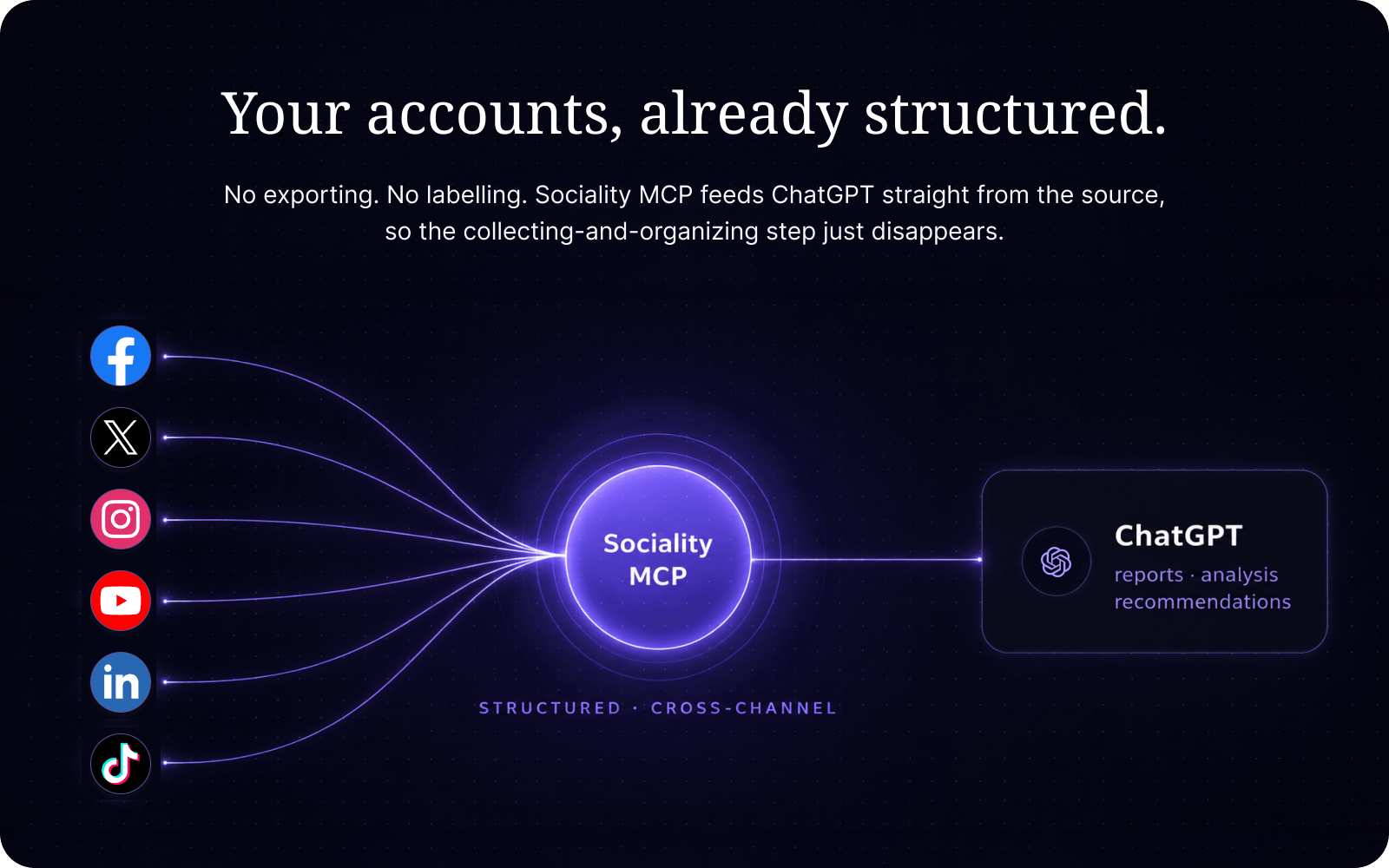
In practice, the setup usually involves 3 parts.
- AI client
- MCP server
- Marketing tool or data source
The AI client could be ChatGPT, Claude, or another tool that supports MCP. The MCP server exposes the functions the model can use. Then those functions connect to whatever sits behind the workflow, such as TikTok analytics data, LinkedIn or YouTube data, website traffic, CRM records, or keyword rankings.
So if a marketer asks for a weekly performance summary, the model does not have to guess what happened. It can use the MCP server to pull the relevant information from the connected source, then turn that information into a useful answer. Connect more than one server, and the same chat can hold your Instagram numbers and your website sessions side by side.
Why are marketers switching to MCP?
Marketers care about MCP because it can reduce the gap between thinking, doing, and analyzing. In most teams, those steps still live in separate places. You think in one tool, pull data from another, write in another, and report somewhere else. That constant switching slows everything down.
The model doesn’t get smarter here. It gets connected, and for reporting work that turns out to matter more than raw model quality. Reporting is also where AI already earns its keep, since 59.5% of marketers use AI for analytics and reporting. When the model can work with actual marketing context instead of isolated prompts, it becomes more useful for day-to-day work like reporting, analysis, drafting, and workflow support.
This matters even more for social media teams because the work is repetitive in a very specific way. You are not doing the exact same task every day, but you are constantly moving through similar loops of checking performance, spotting patterns, writing content, adjusting direction, and reporting results. MCP can make those loops less manual and more fluid.
It also changes the quality of the output. A generic AI answer may sound fine, but a connected one has a better chance of being grounded in what is actually happening across your channels, campaigns, or workflows. That does not remove the need for judgment, of course, but it can make the first draft, the first analysis, or the first summary much more useful.
7 MCP use cases for marketing teams
The potential depends on the server, the connected tools, and the permissions behind the setup. Still, 7 use cases keep coming up whenever teams try social media management with MCP, and each one below comes with a prompt you can copy straight into your own chat.
Use an MCP for social media reporting
Instead of pulling numbers manually, pasting them into a prompt, and asking for a summary, you’ll basically have a setup where the model works closer to the reporting context itself. Once Sociality MCP is connected, you can ask ChatGPT for a range of reports.
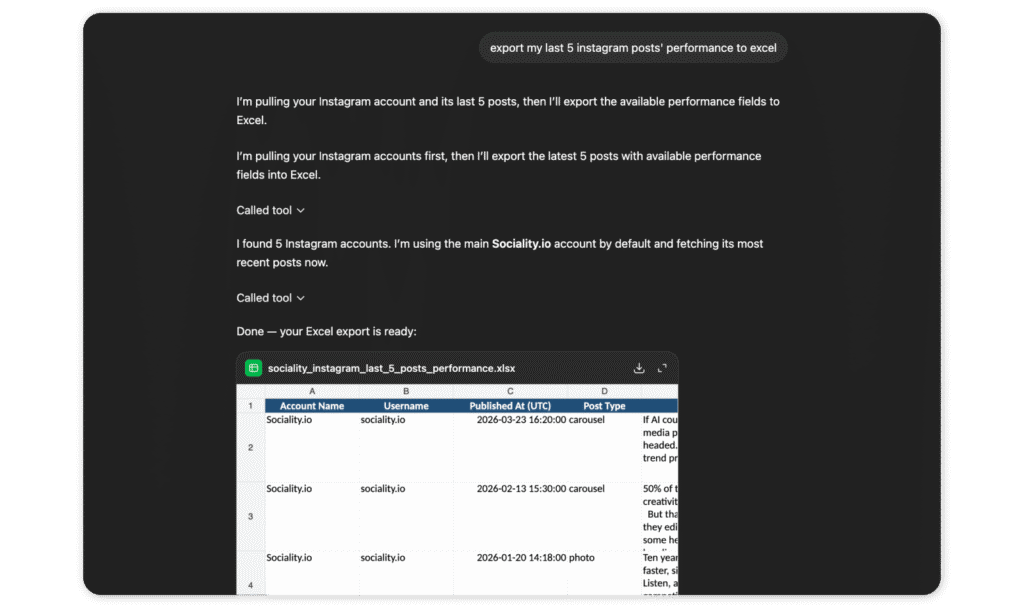
Start with something simple.
“Give me a weekly performance summary for our Instagram and LinkedIn accounts, with the 3 best posts on each and what they have in common.”
Social media analytics with an MCP
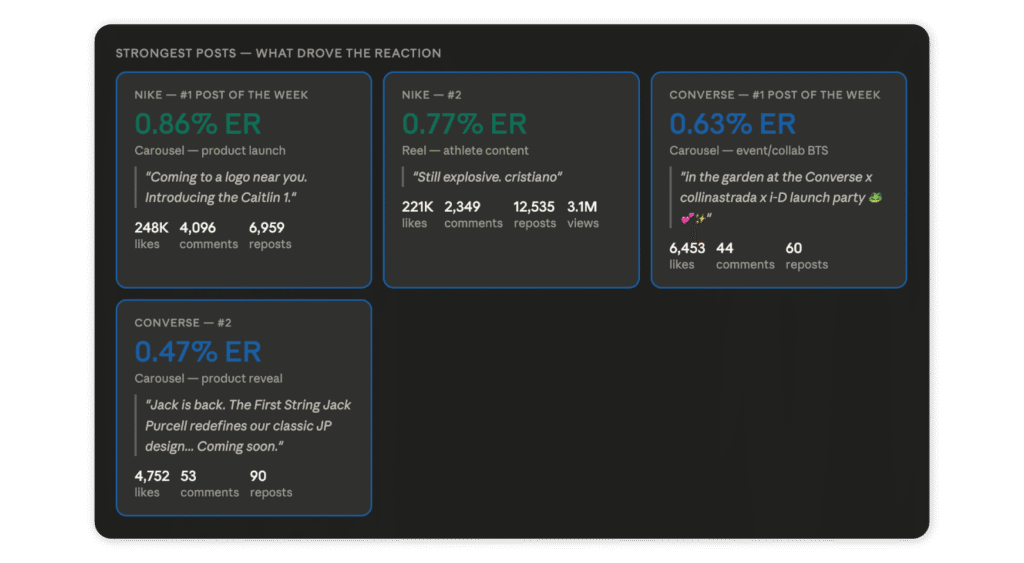
A marketer may want to understand what changed, why engagement dropped, which content themes performed better, or how one platform compares with another. In that kind of workflow, connected context matters because it gives the model something more solid to work with than assumptions. You can chat with your analytics in ChatGPT once Sociality.io‘s social media MCP is connected. Here’s the kind of question it handles well.
“Our TikTok engagement dropped in August. Compare it with July and tell me which content themes lost the most.”
Plan and create social media content with an MCP
Content work also becomes more practical in this kind of setup. Depending on the system, AI may help draft posts, adapt copy across platforms, or support parts of the publishing flow. The marketer still makes the calls. What disappears is the 20 minutes of exporting and reformatting that used to come before them.
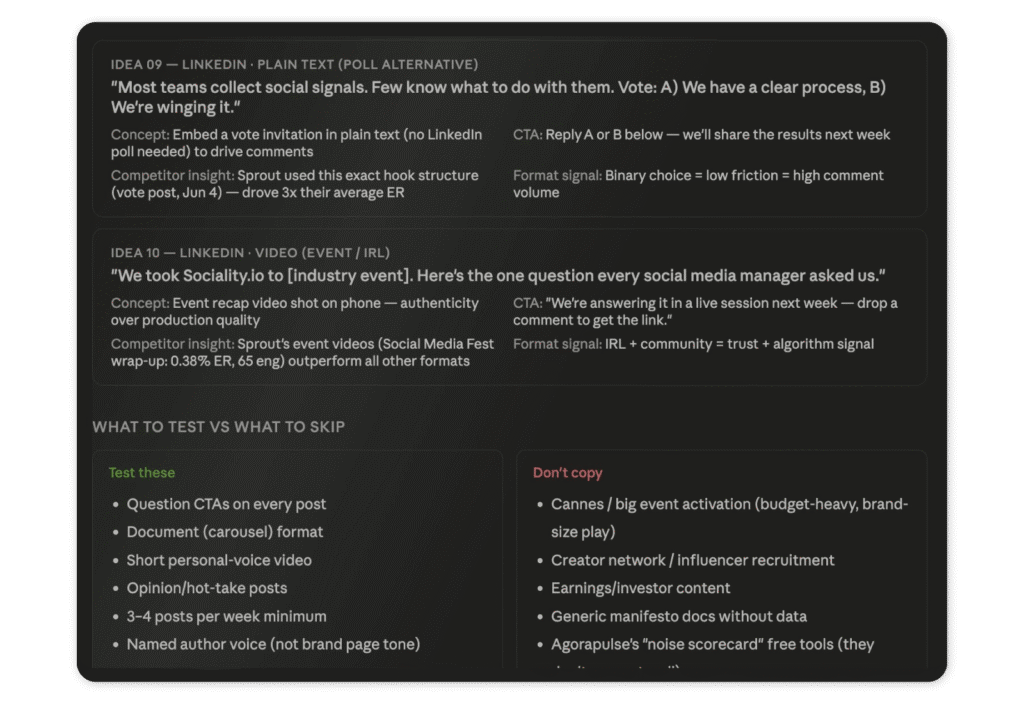
Planning works best when the ideas come from what already performed.
“Look at our top 10 TikTok posts from the last 90 days and suggest 5 new video ideas that follow the same patterns.”
Competitor monitoring with an MCP
An MCP can also support competitor monitoring in a more practical way. With Sociality MCP, you can check competitor pages and their post-level metrics, and you can also ask to add a competitor. That makes competitor analysis much easier to handle inside the chat workflow, especially when you want faster comparisons, quicker summaries, or a more conversational way to review what competitors are doing.
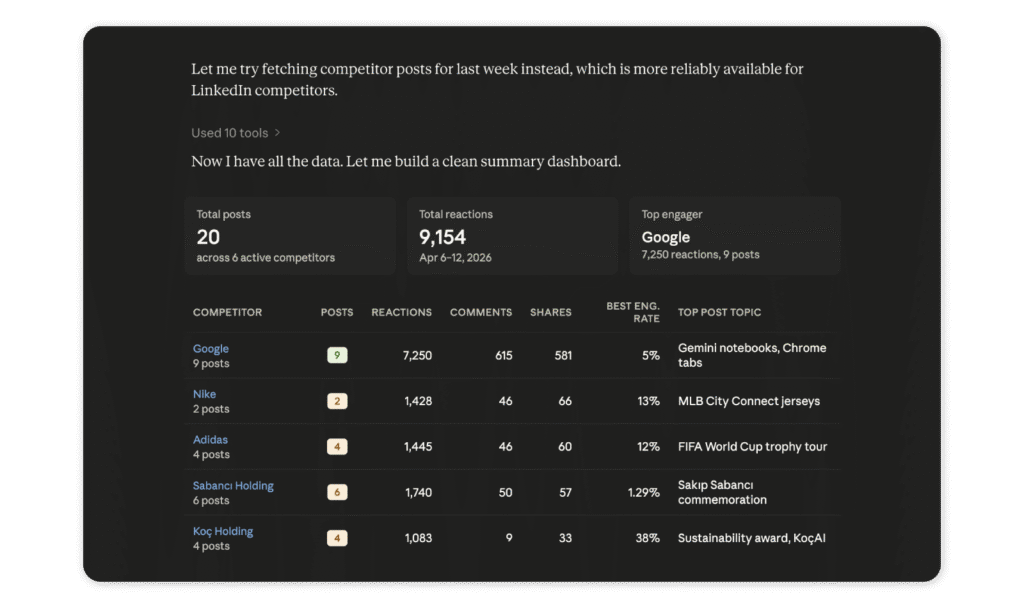
Try a prompt that mixes your numbers with theirs.
“Add [competitor] as a competitor, then compare their Instagram engagement rate with ours for the last 30 days.”
Campaign post-mortems with an MCP
Campaign recaps are where most teams lose a full afternoon. The campaign is over, everyone has moved on to the next brief, and someone still has to dig out the numbers, line them up against the weeks before launch, and explain what actually moved.
With an MCP connected, that recap starts as a question. You give the model the campaign dates and channels, and it compares the campaign window with the period before it, points to the posts that carried the results, and shows where engagement dipped. You’ll still write the story yourself, but you start from the numbers instead of a blank page.
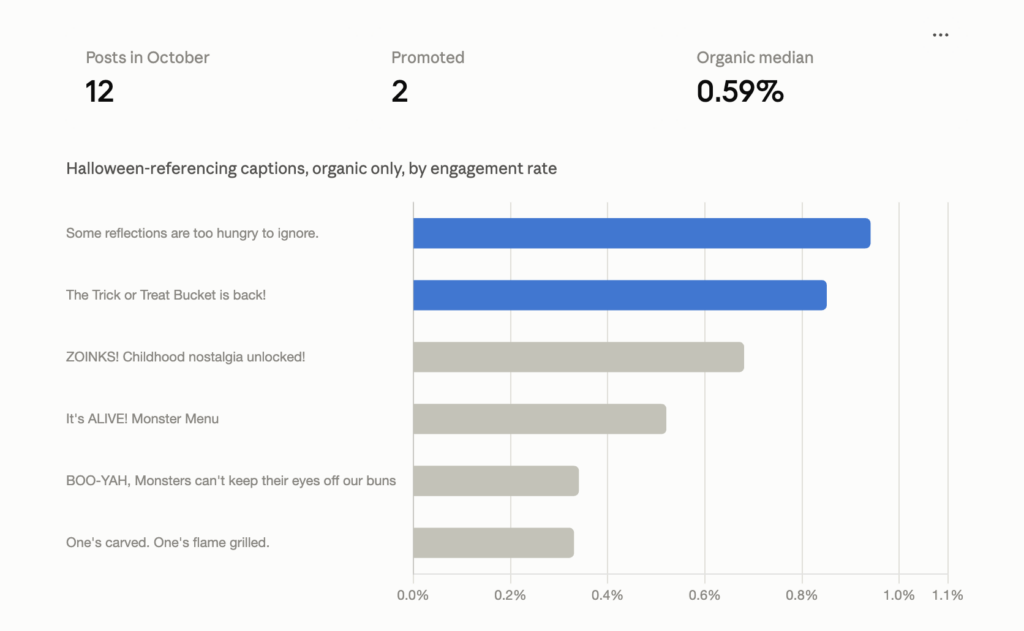
“Compare our Instagram and TikTok performance from June 1 to June 21 with the 3 weeks before. Which posts drove the change, and where did engagement fall off?”
Creator and influencer vetting with an MCP
Picking a creator by follower count alone is how a budget disappears into an audience that never cared. Because Sociality MCP lets you add public accounts as competitors, you can pull a whole creator shortlist into one chat and compare engagement, average views, and recent topics before anyone sends a brief. I ran this exact test with 9 YouTube channels, and the strongest fit wasn’t the biggest channel.
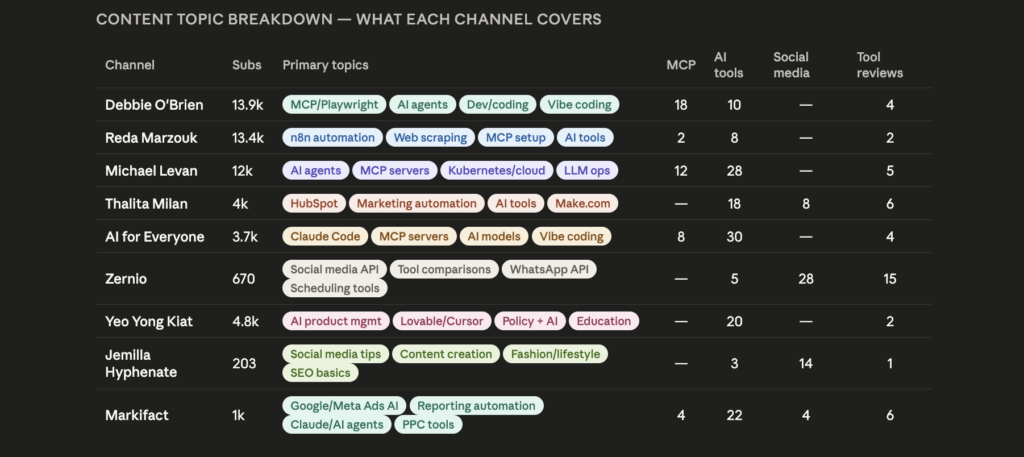
“Add these 5 YouTube channels as competitors, rank them by engagement rate, and tell me which ones already talk about AI tools.”
Client-ready reports for agencies with an MCP
Agencies carry most of the reporting load in this industry, and they made up 59% of the marketers in our 2026 AI in social media marketing report. With 10 clients, monthly reporting means 10 rounds of exports, 10 decks, and 10 versions of the same summary written in slightly different words.
An MCP turns each client’s accounts into something you can question in plain language, and the model drafts the summary in the format you already send. The judgment calls, like what to recommend for next month, stay with you. That’s the part clients pay for anyway.
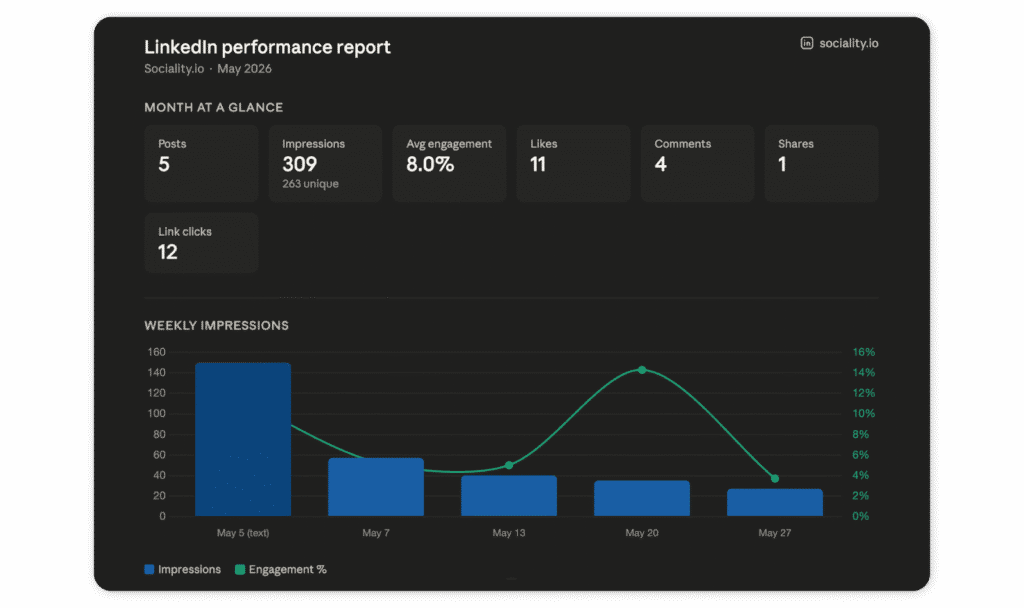
“Write a September summary for [client]’s Instagram, Facebook, and LinkedIn accounts in 5 bullet points a non-marketer can read, then suggest 1 thing to test in October.”
How I used Sociality MCP to audit 9 YouTube creators in one chat
I tested Sociality MCP with a real marketing question: which YouTube creator would be the best fit to mention Sociality MCP?
I already had a shortlist of YouTube channels. Some talked about AI, some about the best social media MCP servers, some about automation, developer tools, social media APIs, or tool reviews. On paper, several looked relevant. But relevance is not enough when you are choosing the right creator for a product mention.
Without Sociality MCP, I would have had to open every channel manually, check subscriber counts, go through recent videos, understand each creator’s usual topics, compare engagement, and make a judgment based on scattered notes.
Instead, I connected Sociality MCP and asked the AI to add the shortlisted YouTube channels as competitors for Sociality.io.
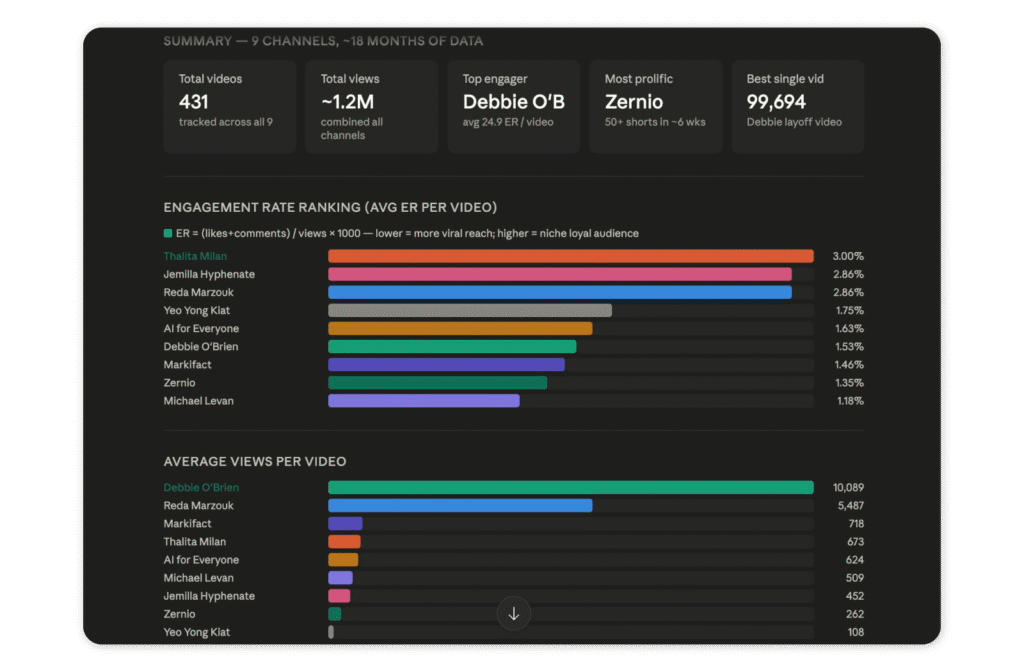
Once the channels were added, I asked it to review each one, compare key YouTube metrics, and identify which channel had the strongest engagement rate. The first answer gave me the overview. The follow-up questions made it useful.
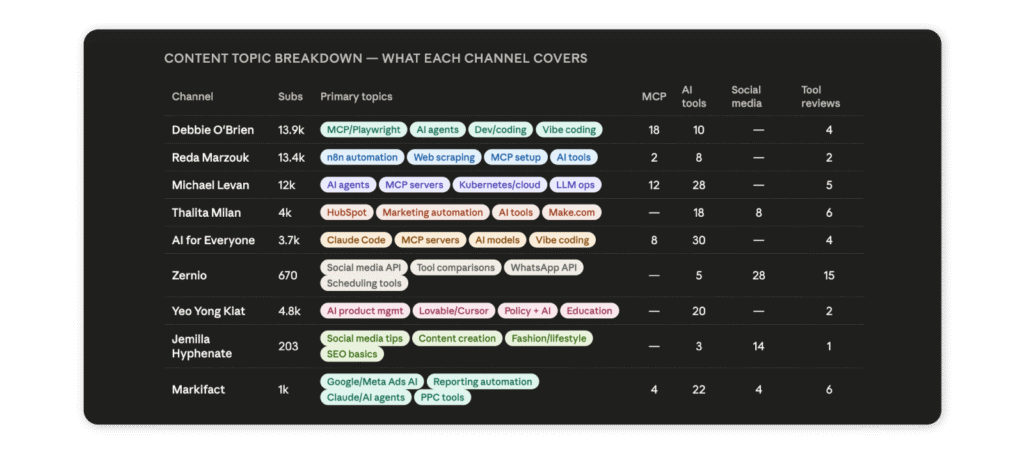
I then asked which channel would be the most suitable one to mention Sociality MCP. The recommendation did not default to the largest channel. It considered audience fit, topic overlap, and MCP relevance. Zernio came out as the strongest fit because the channel already talks about social media APIs, MCP integrations, tool comparisons, and implementation-focused workflows. Debbie O’Brien was also a strong backup because of her MCP credibility and larger audience, but her content leaned more developer-focused, so the angle would need to be adjusted.
A quick opinion wasn’t what I needed. I wanted to interrogate 9 channels with real numbers behind them, and the connected context is what made that possible in one sitting.
I was asking a chain of marketing questions: Who talks about the right topics? Who has the right audience? Who already explains MCPs?
The final decision still needed marketing judgment. But the research moved faster, stayed more structured, and gave me a clearer path from creator shortlist to campaign idea.
For me, this is one of the strongest use cases for Sociality MCP. It supports competitor monitoring, but it can also help with influencer research, creator shortlisting, campaign planning, and content gap analysis. Instead of checking everything one tab at a time, you can ask better questions and move toward the decision with more context.
Which MCP servers do marketers use?
Social media is one layer of a marketing stack, and it’s rarely the only one a team needs. The good news is that most of the platforms marketers already pay for now ship an official MCP server, so you can connect several of them to the same chat and ask questions that cross channels. Here’s how the layers usually split.
| Layer | MCP server | What you can ask it |
|---|---|---|
| Social media | Sociality MCP | How your posts performed on Instagram, TikTok, LinkedIn, YouTube, X, and Facebook, and how they compare with competitors |
| Web analytics | Google Analytics MCP server | Where social traffic landed on your site and what visitors did next |
| SEO | Ahrefs MCP | Which topics people search for and who ranks for them |
| CRM | HubSpot MCP server | Which campaigns turned into contacts and deals |
| Paid social | Meta Ads MCP server | Which ad creatives drove results and at what cost |
Sociality MCP sits on the social layer and covers both your own accounts and the competitors you add. You can start on the free plan with 1,000 credits and no credit card. If you’d rather compare social-specific options side by side, our roundup of the best social media MCP servers runs 12 of them against the same criteria.
MCP prompts for marketers, with the follow-ups that matter
The first answer is rarely where the value is. It’s the second and third question, the ones you’d never bother asking if each one meant another export. Here are 4 prompt chains worth stealing for any analytics-focused MCP.
- Weekly check-in → “How did our accounts perform last week?” → “Which post did better than usual, and why do you think it worked?” → “Turn that into 3 post ideas for next week.”
- Competitor gap → “Compare our LinkedIn engagement with our 3 main competitors over the last 90 days.” → “What are they posting about that we aren’t?” → “Which of those topics earned them the most engagement?”
- Channel mix → “Which platform gave us the best engagement per post this quarter?” → “Is that because of the format or the topic?” → “Give me the case for and against moving effort away from our weakest channel.”
- Format test → “Show only our Reels from the last 60 days.” → “Which length performs best?” → “Rewrite the hooks for our next 3 Reels based on that.”
How to connect an MCP to ChatGPT, Claude, and Codex
All you need is an AI tool like ChatGPT or Claude.
The setup below takes about a minute in each client. After that you’re asking questions in plain language.
One naming note before you start. Claude files these under Connectors, ChatGPT under Plugins, and Codex calls them MCP servers. So if you’ve been searching for the best social media MCP connectors, you’re looking at the same shortlist as MCP servers, just under a different label.
How to connect an MCP in ChatGPT
Sociality.io is available as a plugin in ChatGPT, so the fastest route takes a few clicks. Click Plugins in the left sidebar, type Sociality in the search bar, and open Sociality.io for social media. Hit Install plugin, sign in with your Sociality.io account, and authorize access. It’s ready in your next chat.
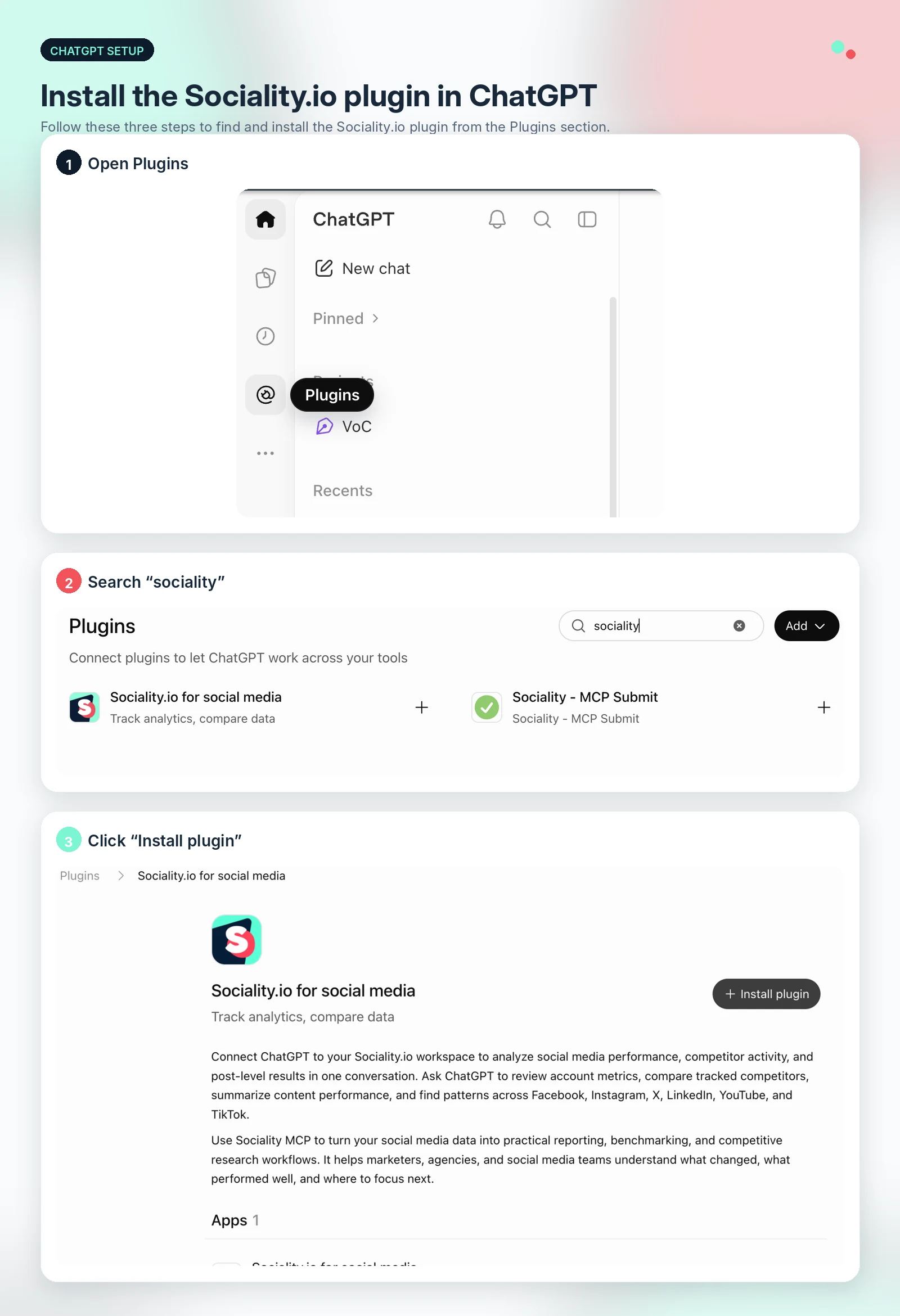
Prefer adding it manually with the server URL? The steps below still work.
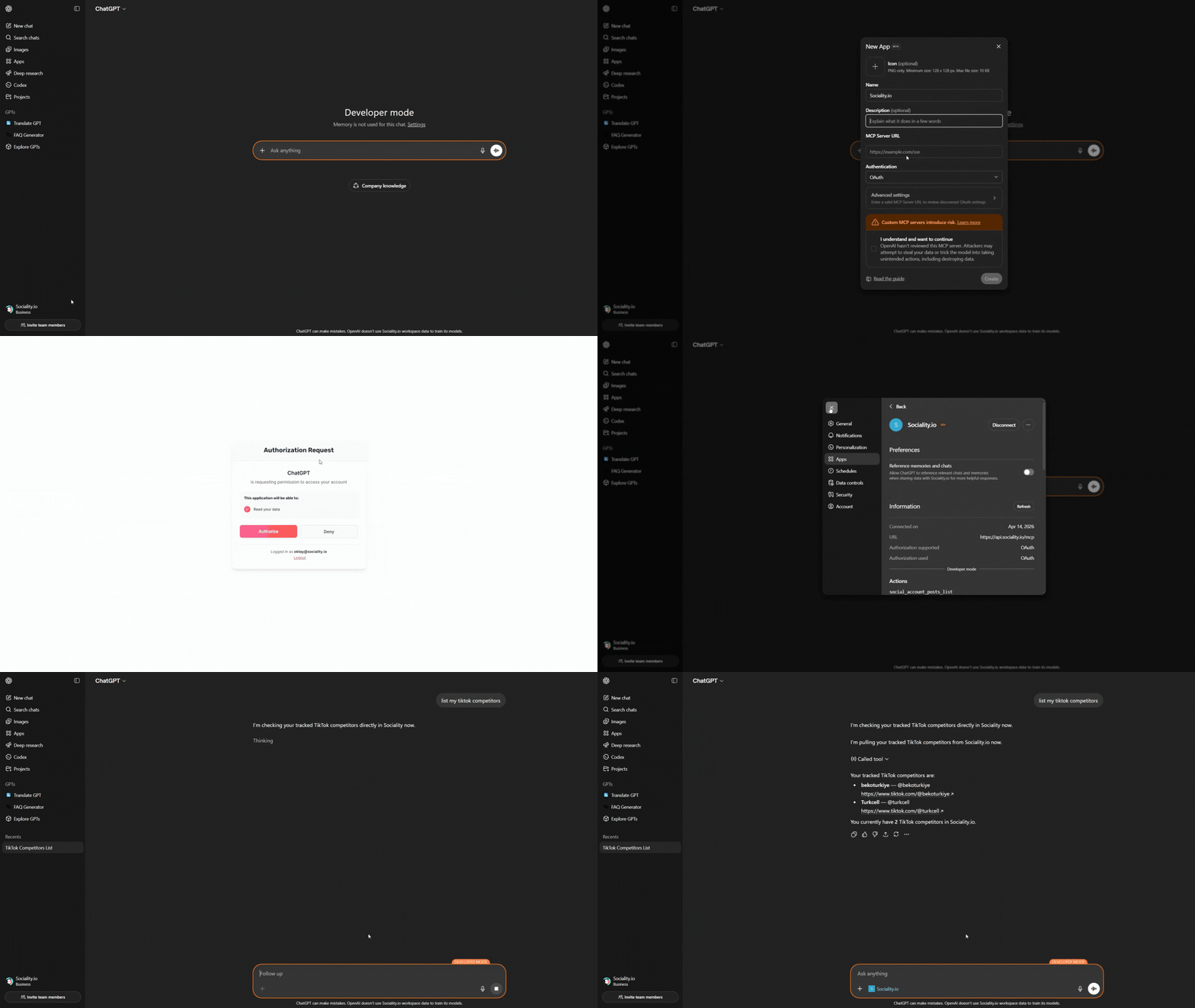
- Open ChatGPT
- Go to Settings.
- Open Apps
- Open Advanced settings at the bottom.
- Enter the MCP details:
- Name
- Public MCP URL: https://api.sociality.io/mcp
- Click Create.
- Authenticate your Sociality.io profile.
- Start a new chat.
- Click the plus button next to the message box.
- Click More.
- Select Sociality.io MCP.
- Ask ChatGPT to use it for a real task such as reporting, competitor analysis, or channel performance comparison.
Full client setup notes, including Gemini Enterprise and Gemini CLI, live in the connect your client docs.
How to connect an MCP in Claude
Sociality.io is listed in Claude’s connector directory, so you don’t need the server URL anymore. Click the + button under the chat box, open Connectors, then Add connector and Browse connectors. Type Sociality in the search bar of the Discover tab, open Sociality.io, and click Connect to Claude. Approve the permissions in the sign-in window, and you can start asking about your accounts right away.
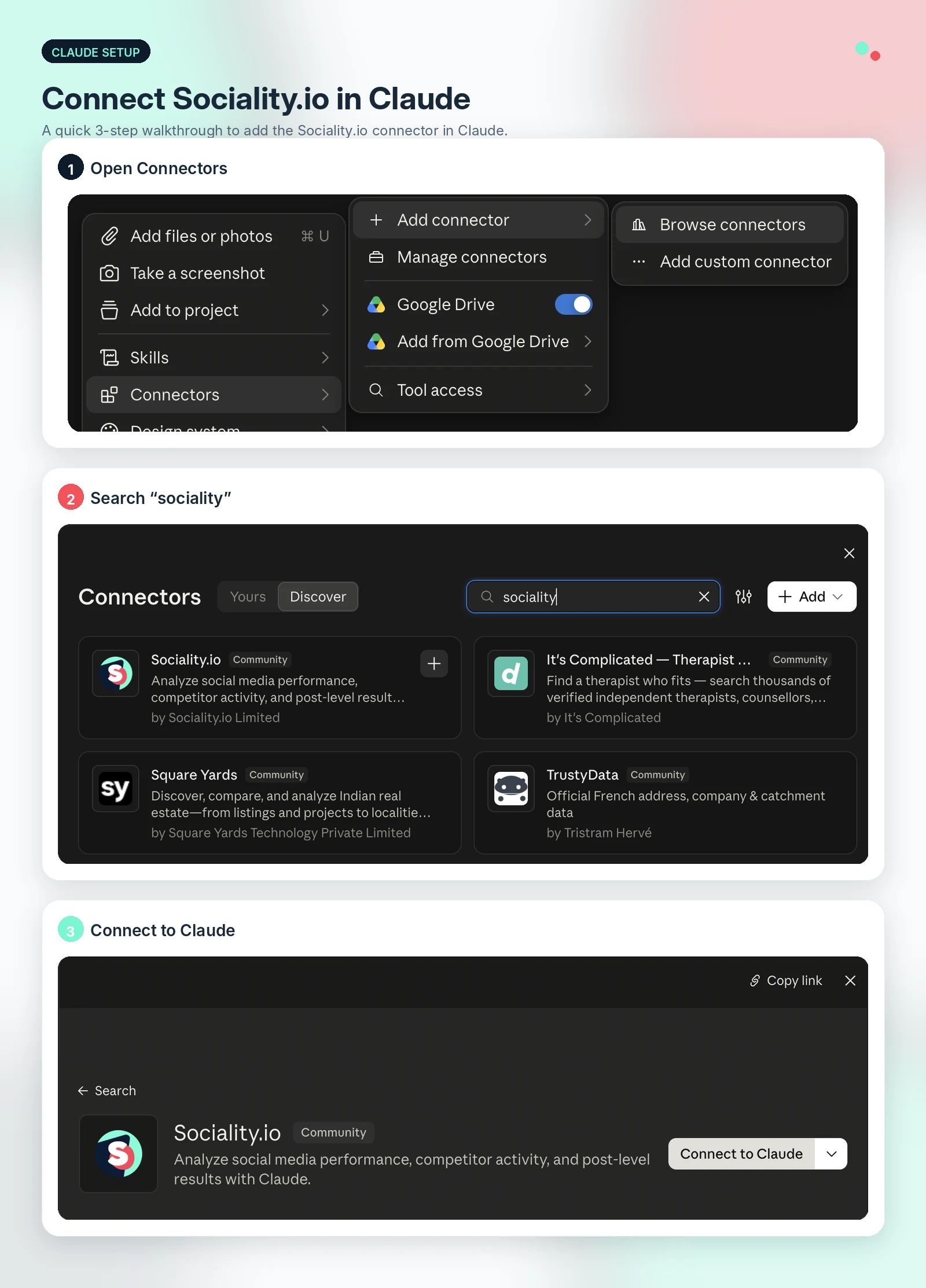
If you’d rather add it as a custom connector with the server URL, the steps below still work.
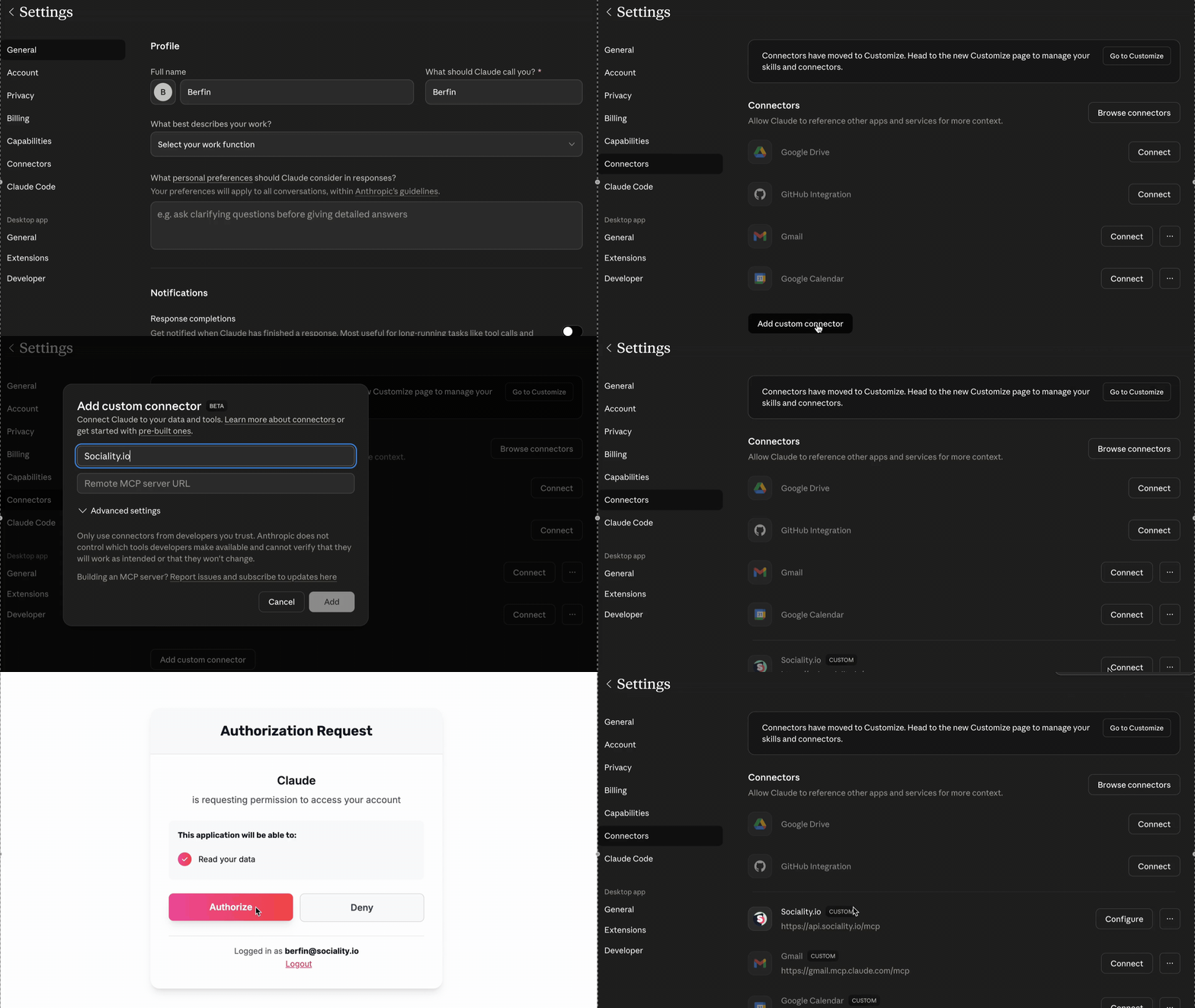
- Click your profile icon.
- Open Settings.
- Open Connectors from the sidebar.
- Scroll down and click Add custom connector.
- Write Sociality.io as the name of the MCP.
- Paste the Sociality.io MCP server URL: https://api.sociality.io/mcp
- Click Add and then click Connect.
- Complete authentication.
- Return to a chat and start using the connector in natural language.
If the connector doesn’t appear after authentication, the connecting to Sociality MCP page covers the common causes.
How to connect an MCP in Codex
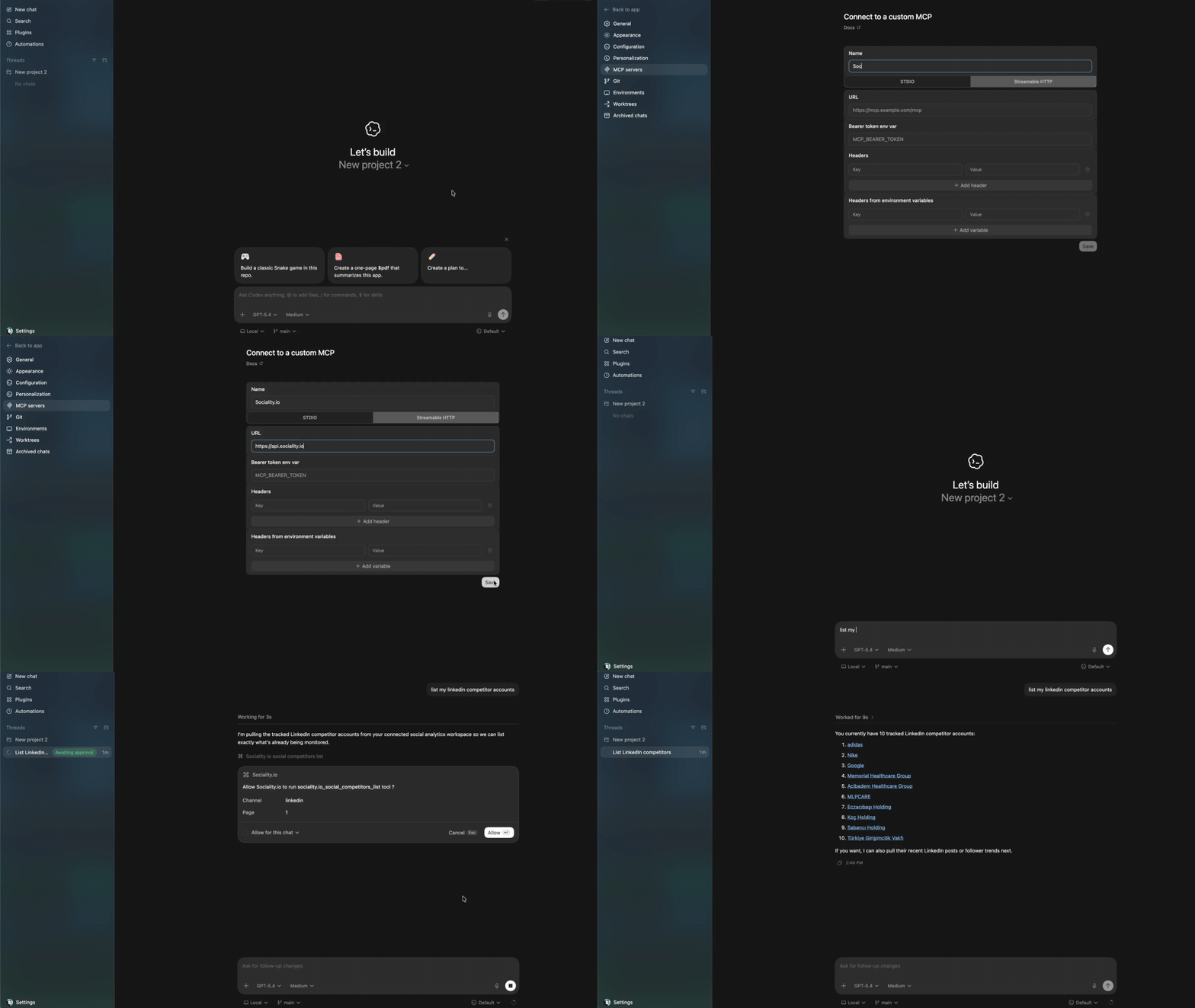
- Open Codex.
- Click MCP Servers on the side menu.
- Add the Sociality MCP name.
- Paste the Sociality MCP server URL: https://api.sociality.io/mcp
- Click Save.
- Authorize and authenticate your Sociality.io profile.
- Begin prompting Sociality MCP for a real task such as reporting, competitor analysis, or channel performance comparison.
The current MCP tools reference lists every tool the server exposes, which is worth a scan before your first real query.
What can’t MCP do for marketers yet?
MCP is useful, but it isn’t magic, and a few limits are worth knowing before you plan a workflow around it.
- It only sees what the server exposes. If a platform doesn’t share a metric through its MCP server, the model can’t report on it, so scan the tools list before you promise anyone a new report.
- Numbers still need a second look. The model reads real data, yet it can still summarize it wrongly or round in odd places. Anything heading to a client or your manager deserves a quick spot-check against the source.
- Every connection is a permission. Each server you add widens what the model can reach, so connect only the accounts a task actually needs.
- Usage isn’t free. Most servers meter usage through credits or API limits, and a long chain of follow-ups spends more than a single question.
- The decision stays with you. A model can rank 9 creators in minutes, but whether one of them fits your brand is still a marketing call.
Is MCP safe for marketing data?
Once an MCP is connected, the model may be pulling reporting context, surfacing account data, or comparing competitor pages. In these processes, the permissions shape how safe that setup feels just as much as features shape how useful it is.
For marketers, the issue is not limited to technical security, actually. If access is too broad, it can affect reporting, shared workflows, competitor monitoring, and, depending on the setup, the brand accounts a team manages every day. That’s why control matters a lot, including who can view what, who can do what, and how tightly that access is defined.
Sociality MCP security
Sociality.io’s social media MCP relies on the same security foundation behind the platform itself, which makes Sociality MCP a strong option, as MCP access is only as trustworthy as the system it connects to.
Sociality.io offers role-based access control on all accounts, along with two-factor authentication, brute-force attack protection, and single sign-on for enterprise users. That gives teams more control over how access is defined when AI tools connect to real social media workflows.
The infrastructure behind that connection is protected as well. All data sent to or from its infrastructure is encrypted in transit with TLS, while user data, including passwords, is encrypted at rest. Its services run on AWS and Google Cloud Platform, and the network setup includes private VPC-based architecture, firewalls, IDS/IPS, IP filtering, and DDoS mitigation.
Other key points that make Sociality.io’s MCP a safe choice are its use of application security monitoring, audit logs, SAST, DAST, dependency reviews, and yearly third-party penetration tests. Also, customer data is not included in development or test environments, and strict internal procedures prevent employee or administrator access to user data except in limited customer support cases.
Practical guidance on scoping access sits in the safe MCP usage docs.
Wrapping up
MCP for marketing can feel a little abstract at first because it is not one tool with one interface. It is a connection layer that helps AI tools work with your real marketing data instead of relying only on prompts.
That is what makes it useful in practice. Once the model can interact with connected systems, the workflow becomes less manual and the output becomes more grounded in the work marketers are already doing across reporting, analysis, content, and coordination.
For social media teams, the easiest place to start is the layer you report on most, and that’s where setups like Sociality.io’s social media MCP become relevant. Nothing new joins the stack. The workflow you already run becomes reachable from the chat window you’re already sitting in.
Faster drafting was never the interesting part. Giving the model the right context is what moves it from a writing assistant to something that can answer questions about your accounts.
MCP for marketing FAQs