
If you’re wondering how to connect Instagram to Claude, the short version is a connector that can read Instagram data, one sign-in and a switch in the chat. The setup takes a few minutes, and knowing what Claude will and won’t see afterwards takes a little longer.
This guide is for social media managers and agency teams who would rather ask Claude how last month’s Reels did than export another CSV.
2 changes have made most tutorials out of date. Meta retired impressions and plays for every API version on 21 April 2025 and made views the metric to ask for. And Claude’s sidebar item Customize became Plugins, generally available from 9 November 2026 and reaching Enterprise accounts on 30 November, so plenty of menu paths online point to a button you may no longer have.
Below you’ll find the 3 ways to connect it, what Claude sees for your account versus a competitor’s, a real test I ran on 13 November 2026, and the ChatGPT version.
TL;DR: connecting Instagram to Claude
4 facts decide whether your setup works on the first try.
- Claude needs a connector to read Instagram, and Sociality MCP is the best one on the market for the job, because it covers your own account analytics and your competitors in one connection.
- Instagram’s API only works with professional accounts, so a personal account has to switch to Business or Creator before any connector can read it.
- Directory connectors work on every Claude plan, Free included, and Free accounts can also add one custom connector by URL.
- Competitor data is public data. A connector returns a competitor’s followers, posts, likes, comments and Reel views, but not their reach, saves or profile views, because Meta’s Business Discovery only shares public numbers.
Can Claude connect to Instagram?
Yes, through a connector, but not on its own. Claude can’t log in to instagram.com or read your insights from a profile link, so it needs a connector (usually an MCP server) that holds the Instagram access and hands Claude the numbers when you ask.
There’s no Claude Instagram connector built by Meta, as of November 2026, and ChatGPT’s plugin directory has none either. When I searched “Instagram” in Claude’s directory on 12 November, it returned 476 results, almost all of them analytics, reporting or scheduling tools from third parties. So the real question is which connector, and what it’s allowed to do.
Here’s what changes once one is connected.
- Claude reads your posts, Reels and account metrics for the dates you name, then turns them into tables, summaries or a report.
- It compares your account with competitors, using their public numbers.
- It posts or answers DMs only if the connector you added has those tools. Meta’s API lets apps publish images, videos, Reels and carousels, so some connectors do, and analytics connectors usually don’t.
- It doesn’t watch the Reel. A connector returns the numbers and the caption, never the video itself.
What you need before you connect
Most failed setups trace back to one of these 3 things, so check them before you click anything.
- A Business or Creator account. Meta’s insights can’t read media owned by personal accounts. If yours is personal, here’s how to switch to a creator account in the Instagram app.
- A Facebook Page, sometimes. Connectors that sign in with Instagram Login don’t need a linked Page. Connectors that sign in through Facebook do, and that’s also the route Meta uses for competitor data, so expect the Page question from any tool that promises benchmarks.
- The right plan and role in Claude. Any plan works for directory connectors. On Team and Enterprise, an owner has to allow a connector before members can use it, and on Team only Owners and Primary Owners can add custom ones.
How to connect Instagram to Claude: 3 ways
The fastest route is a connector from Claude’s directory, the most flexible is a custom connector with a server URL, and the bluntest is an export. Each one suits a different week.
1. Add a connector from Claude’s directory
This is the route most people should take, and it takes a couple of minutes.
- Click Plugins in Claude’s left sidebar (Customize, if your account hasn’t switched yet) and filter the list to connectors.
- Search for the connector, such as Sociality MCP, open its page and click Connect.
- Sign in to the tool, choose your Instagram account and allow access.
- In a chat, click + in the lower left (or type /), hover over Connectors and switch it on.
There’s a shortcut from inside any chat as well. Click +, then Connectors, then Manage connectors, and the same list opens without leaving the conversation.
It’s also the route I use. Sociality.io is listed in Claude’s connector directory and reads the Instagram, TikTok, Facebook, YouTube, X and LinkedIn accounts you connect, plus any public competitor you track. For the rest of the field, we’ve compared the options in Instagram MCP servers compared and in our roundup of Claude connectors for marketers.
2. Add a custom connector with an MCP server URL
Use this when the tool you want isn’t in the directory, or your team runs its own MCP server.
- Open Plugins in Claude’s sidebar and filter the list to connectors (Customize, then Connectors, if your account hasn’t switched yet), then click + Add and choose Add custom connector. Anthropic’s custom connector guide still uses the older Customize labels.
- Name it, paste the server’s URL and click Continue.
- Finish the sign-in the server asks for, then click Add.
Free accounts get one custom connector. On Team and Enterprise, owners add them under Organization settings, then Connectors, and members connect afterwards. The server also has to be reachable on the public internet, so a server running only on your laptop won’t work here. If you’re setting up the same server in several clients, our social media MCP setup for ChatGPT, Claude and Codex covers each one.
3. Use an automation tool or an export
No connector at all is a fair choice for a one-off question. Automation tools such as Zapier run fixed workflows between Instagram for Business and other apps, which suits a repeating job like logging every new post, but it’s a pipeline rather than a conversation.
The bluntest option is to download your insights or take screenshots and upload them to the chat. Claude reads them fine. The numbers stop at the moment you exported, though, and your competitors aren’t in the file.
If exports are your team’s habit, Sociality.io exports reports as XLSX, CSV, PPT or PDF and emails them on a daily, weekly, monthly or quarterly schedule, competitors included, so a fresh file is already in your inbox before you open Claude.
Your Instagram vs a competitor’s: what Claude can see
For your own account, Claude can see almost everything Instagram reports. For a competitor, it sees only what’s public, which means followers, posts, likes, comments and Reel views.
| Metric | Your account | A public competitor |
|---|---|---|
| Followers and number of posts | Yes | Yes |
| Likes and comments | Yes | Yes |
| Reposts | Yes | Yes |
| Reel views | Yes | Yes |
| Views on photos and carousels | Yes | No |
| Reach | Yes | No |
| Saves and shares | Yes | No |
| Profile views and website clicks | Yes | No |
| Follows and unfollows | Yes | Net change only |
What a Claude connector returns for your Instagram and a public account, from Meta’s API documentation and my 13 November 2026 test
That public column is what Meta’s Business Discovery allows, and it only covers Business and Creator accounts. Only for your own account does Claude see reach, saves and profile views, so when a tool promises a competitor’s reach, ask where the number comes from.
History matters too. Meta keeps account-level insights for 90 days through its API, so only a connector that stores its own history can answer “how did October compare with June”. Sociality MCP is one of them, keeping 12 months of data on its Growth plan and longer on Scale, while a connector that reads straight from the API stops at 90 days.
I asked Claude about our Instagram and 2 competitors
On 13 November 2026 I opened a new chat in Claude (Opus 5.5, with the Sociality.io connector on) and asked about the 30 days from 13 October to 11 November, first for our own account and then for 2 public ones.
Prompt 1: our own @sociality.io account
Our own account went first, with this prompt.
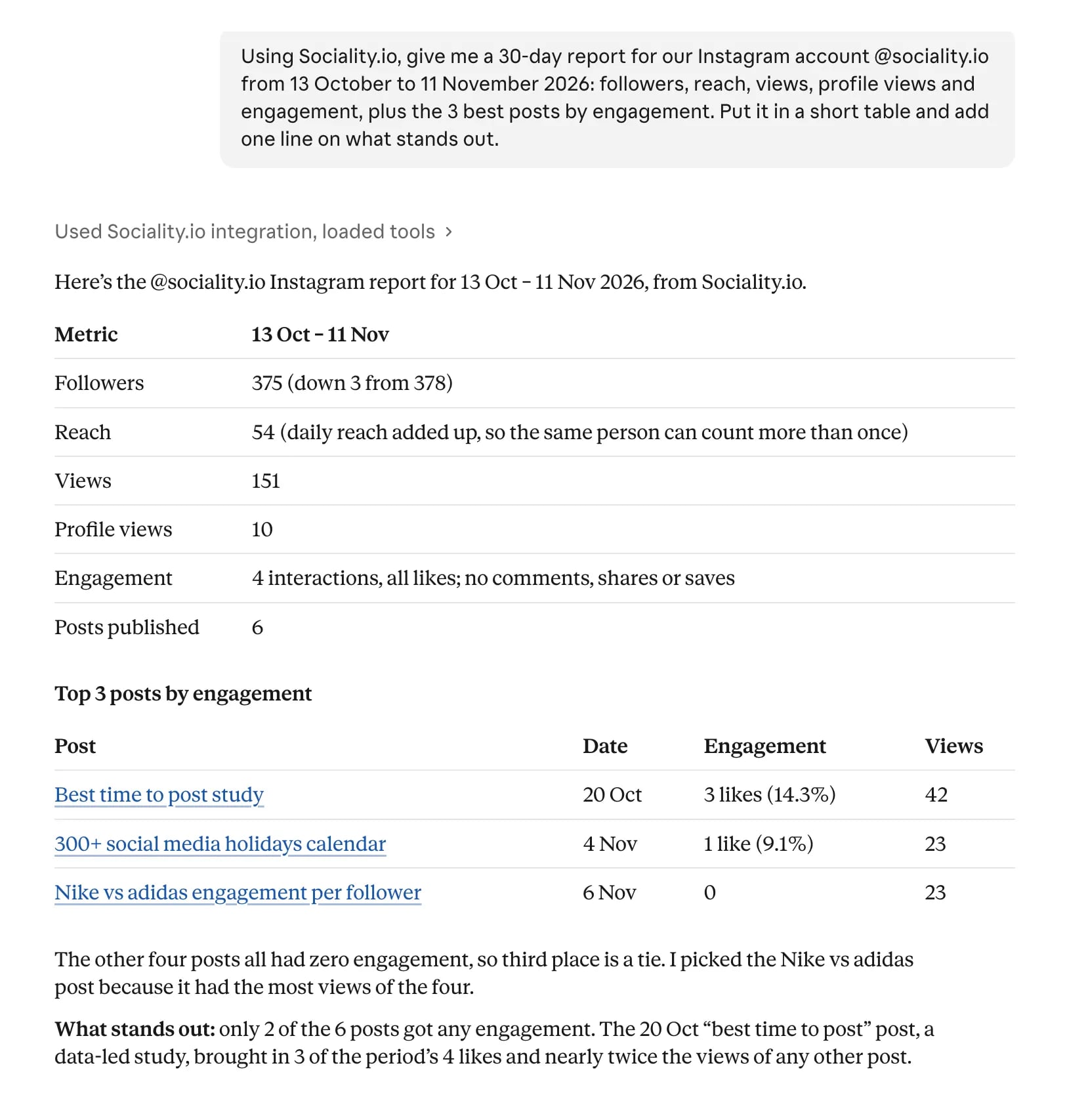
Using Sociality.io, give me a 30-day report for our Instagram account @sociality.io from 13 October to 11 November 2026: followers, reach, views, profile views and engagement, plus the 3 best posts by engagement. Put it in a short table and add one line on what stands out.
The answer was a table. 375 followers (down 3), 151 views, 54 reach, 10 profile views, 6 posts and 4 likes, with our best-time-to-post study on top at 3 likes and 42 views. I checked every figure against the raw data, and they all matched.
It’s a small account, I know. Claude said as much (only 2 of the 6 posts got any engagement) and then noticed what I’d want in a monthly review anyway, that the data-led study brought in 3 of the period’s 4 likes and nearly twice the views of any other post.
Prompt 2: Ryanair and easyJet as public accounts
Then I asked for 2 public accounts we track in Sociality.io over the same window.
Now do the same window for Ryanair and easyJet on Instagram, from my tracked competitors. Compare the two in one table (followers, posts, likes, comments, Reel views and engagement per follower), then list which of our metrics you can’t get for a public account.
Ryanair posted 100 times in those 30 days (30 Reels, 28 carousels and 42 photos) and collected 357,911 likes and 15,364 comments. easyJet posted 30 times, mostly Reels, and drew 8.71M Reel views, but Claude flagged what I’d have missed at a glance. One promoted Starlink Wi-Fi Reel had 7.89M of those views on its own, and the other 22 Reels averaged about 37K each.
It also put the engagement in proportion. Ryanair’s 19.6% engagement per follower mostly comes from posting 100 times, and per post it’s 0.20% against easyJet’s 0.14%. Its biggest post, a promoted one, had 73,200 likes, and about a third of them were paid.
Asked which of our metrics it can’t get for a public account, Claude listed reach, account-level views and views on photos and carousels, profile views, saves, and website clicks and link taps.
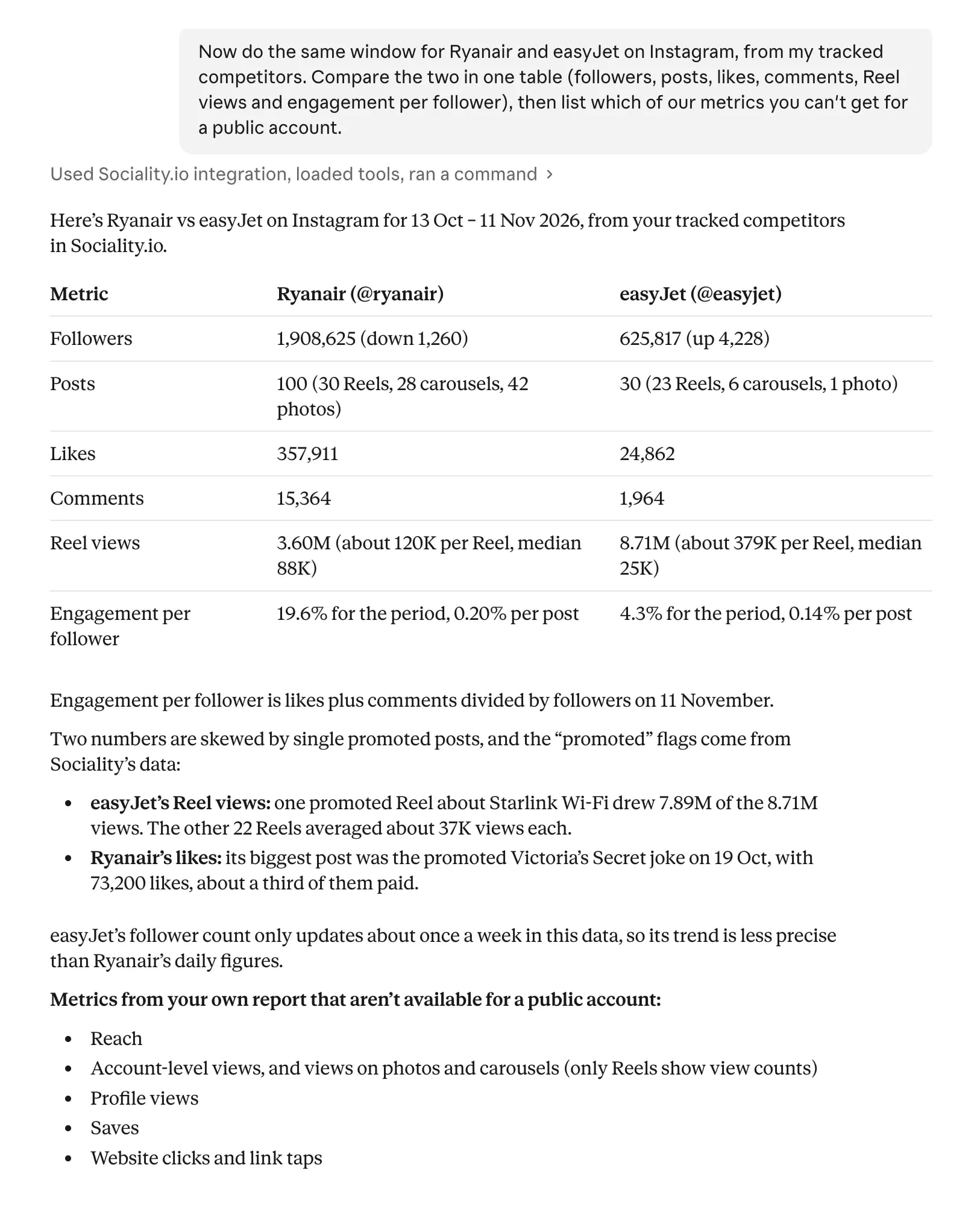
One honest limit. easyJet had only just been added to our tracked list, so its follower history came back in weekly steps, and Claude said so. Paid likes also count in every competitor total, so I’d read engagement per follower as a pointer for the next question rather than a final score.
What to ask Claude once Instagram is connected
The best prompts name the account, the dates, the metric and the format you want back. These 5 cover the jobs I see most often.
- Weekly report. “Summarize our Instagram for last week, Monday to Sunday: followers, reach, views and engagement compared with the week before, in a table with one row per metric.”
- Best Reels. “Rank our Reels from the last 90 days by views, then show saves and shares for the top 5 and what their captions have in common.”
- Competitor check. “Compare our Instagram with [competitor 1] and [competitor 2] for October: posts, likes, comments, Reel views and engagement per follower, in one table.”
- Caption patterns. “Look at our 20 most-liked posts this year and tell me which caption length, opening line and call to action they share.”
- Anomaly. “Find any day in the last 30 days when our reach or views were more than twice the daily average, and list the posts published that day.”
Ask for views, not impressions or plays. Meta retired those 2 metrics in April 2025, and a prompt built on them is asking for a number that no longer exists.
How to connect Instagram to ChatGPT
ChatGPT works the same way with different labels, and it calls its integrations plugins (older guides say apps or connectors). With Sociality MCP, the setup takes 4 steps, which are also in our ChatGPT setup guide.
- Open Plugins in ChatGPT’s sidebar, search for “Sociality” and open Sociality.io for social media.
- Click Install plugin in the top-right corner.
- Click Sign in with Sociality.io, then Authorize.
- In any chat, type @, select Sociality.io and ask about your Instagram.
Search by name rather than by “Instagram”. When I searched “Instagram” on 12 November, ChatGPT’s plugin list showed about 50 third-party plugins and none from Meta, and Sociality.io wasn’t among them. Availability also depends on your ChatGPT plan and workspace settings, and our list of ChatGPT apps for social media covers other plugins worth installing.
Adding your own MCP server is stricter than in Claude. OpenAI’s custom MCP guide gives full access to Business and Enterprise/Edu workspaces, where admins or owners add servers under Plugins, then Add, then Add custom MCP server. Pro accounts can connect only servers that read, and it works on the web, not in the mobile apps.
Connected to Claude but seeing no Instagram data?
When Claude says it’s connected but returns nothing useful, the cause is nearly always one of these.
- The account is personal. Switch it to Business or Creator, then reconnect.
- The connector is off in this chat. Click +, hover over Connectors and check its toggle.
- The wrong account was authorized. If you manage several Instagram accounts, disconnect and pick the right one at sign-in.
- No Facebook Page is linked, for connectors that sign in through Facebook.
- You asked for a retired metric. Swap impressions or plays for views.
- The dates go back further than the data. Account metrics older than 90 days only exist if the connector stored them.
- On Team or Enterprise, the connector isn’t approved yet. Ask an owner to allow it.
Is it safe to connect Instagram to Claude?
It’s as safe as the connector you pick, because Claude only gets what that connector’s tools expose.
Claude’s directory labels public listings Verified or Community, and a Community listing says plainly that Anthropic runs automated checks on it but doesn’t verify it or control how its tools work or change.
That’s why the company behind a connector matters as much as the listing. Sociality MCP runs on Sociality.io, which has 10+ years in social media and helps manage 12,000+ social media accounts, and it follows the platform’s security standards, with encryption in transit and at rest, two-factor authentication, role-based access, SSO for enterprise customers and yearly third-party penetration tests.
Before you connect a brand or client account, go through this short list.
- Connect only servers from organizations you trust, which is Anthropic’s own advice, along with a warning about prompt injection hidden in tool results.
- Read the tool list on the listing and look for anything that publishes, sends or deletes.
- Under +, Connectors and Tool access, keep approvals on for any tool that changes something, and use “Allow always” only for tools you’d trust to run unsupervised.
- To remove a connector, find it in Plugins (or Customize, then Connectors, before the switch) and click Remove or the three dots. Removing a plugin that bundles a connector doesn’t disconnect the connector, so check both.
Instagram and Claude terms in plain words
A few terms do most of the work in this guide, and the labels in each app don’t always match.
| Term | What it means here |
|---|---|
| Connector | An integration that lets Claude read data in another tool or take an action there |
| MCP server | The technology most connectors run on, which you can also add yourself by URL |
| Professional account | An Instagram Business or Creator account, the only kind Meta’s API can read |
| Business Discovery | The part of Meta’s API that returns other Business and Creator accounts’ public numbers |
| Views | The metric Instagram reports in place of impressions and plays since April 2025 |
| Reach | How many unique accounts saw your content, visible only to the account owner |
| Engagement per follower | Likes plus comments divided by followers, the comparison Claude used in my test |
Wrapping up
Connecting Instagram to Claude is quick. Making it useful takes a professional account, a connector that reads what you need, and prompts that name the metric and the dates, and for competitors the answers stop at what’s public, whichever tool you use.
If the job is reporting on your own Instagram and benchmarking the accounts you compete with, Sociality MCP for Claude is the connector I’d add first, and it works in ChatGPT and Gemini too. Starter is free with 1,000 credits and no credit card, so your first monthly report costs nothing to try.
FAQs about connecting Instagram to Claude
Can Claude analyze my Instagram and my competitors?
Yes, with a connector. Once Sociality MCP is connected, Claude reads your Instagram posts, Reels and insights plus any public competitor you track. Your own account returns reach, saves and profile views, while competitors return followers, posts, likes, comments and Reel views. It works in ChatGPT and Gemini too.
Is there an official Claude Instagram connector?
Not one built by Meta, as of November 2026. Claude’s connector directory lists many Instagram connectors from third parties, labelled Verified or Community, and Sociality MCP is one of them. Choose one by what it reads and what it can change, and connect only developers you trust.
What is an Instagram MCP server for Claude?
An Instagram MCP server is a connector that holds access to your Instagram data and passes it to Claude through the Model Context Protocol, an open-source standard for connecting AI apps to outside tools. You add it once, then ask for posts, Reels or account metrics in plain words, and Claude calls the server for the real numbers.
Can Claude post to Instagram?
Only through a connector that has a publishing tool. Meta’s API lets apps publish images, videos, Reels and carousels, so some connectors offer posting, while analytics connectors usually only read. If you allow publishing, keep approvals on so every post waits for a person.
Can Claude watch Instagram Reels?
No. A connector returns a Reel’s numbers and caption, such as views, likes and comments, plus saves and shares for your own account, but never the video. For feedback on a hook, upload screenshots of the opening frames and ask Claude to compare them with your best Reels.
Does it work with a personal Instagram account?
It doesn’t. Meta’s Instagram API only works with professional accounts, meaning Business or Creator, and its insights can’t read media from personal accounts. Switch the account type in the Instagram app, then connect again. Competitors on personal accounts stay out of reach for the same reason.
Can you link Instagram to ChatGPT?
Yes. Sociality MCP connects Instagram to ChatGPT as a plugin. Search for Sociality in ChatGPT’s Plugins, click Install plugin, sign in with Sociality.io and authorize, then type @ in a chat and pick Sociality.io. The ChatGPT setup steps are in our docs.
Do I need a paid Claude plan to connect Instagram?
No. The steps for how to connect Instagram to Claude are the same on every plan, Free included, because directory connectors work on all of them. Free accounts can also add one custom connector by URL, and on Team and Enterprise an owner allows each connector first.