
You connect TikTok to Claude through a connector, an MCP server that signs in to TikTok on your behalf and hands Claude the numbers. Which connector you pick decides whether Claude sees only the analytics TikTok shares with your own account, or also the public numbers of the brands you watch.
TikTok released its own MCP server for organic accounts in November 2026, so for some jobs you can now go straight to the source. This guide covers the setup in Claude and ChatGPT, what each one sees for your account and for a competitor’s, and what happened when I compared 3 brands that are very good at TikTok.
TL;DR: 3 facts before you connect TikTok
TikTok’s organic server is brand new, and your plan decides how you can add a server that isn’t in a directory.
- TikTok released its Social MCP server on 6 November 2026, and its tools read only the account that authorizes it.
- Claude’s directory connectors work on every plan, and Free accounts can add 1 custom connector by URL.
- ChatGPT supports custom MCP servers in full on 3 plans (Business, Enterprise and Edu), and as read and fetch only on Pro.
Can Claude connect to TikTok?
Yes, in 3 ways, and the right one depends on whose numbers you need. A directory connector such as Sociality MCP handles the TikTok sign-in and reads your account’s analytics next to the public data of competitors you track, which suits anyone who needs both in the same chat.
TikTok’s own MCP servers, added by URL, fit a team working only on its own account or its ad campaigns. And an analytics export is enough when someone already pulls the numbers every month and just wants a second pair of eyes on them.
Is there an official TikTok MCP?
Yes, TikTok runs 2 official MCP servers. The Ads MCP handles paid campaigns, and the newer Social MCP handles organic activity on your own account.
| TikTok Ads MCP (TikTok for Business MCP) | TikTok Social MCP | |
|---|---|---|
| What it covers | Campaign management, reporting, audience configuration and creative operations | Comments, brand mentions, trends, post insights and account benchmarks |
| Launch | Announced on 13 May 2026 at TikTok World | Released on 6 November 2026 |
| Add in Claude | Connect TikTok for Business from Claude’s directory and sign in | Add by URL as a custom connector |
| Add in ChatGPT | Add it as a custom MCP server | Add by URL as a custom MCP server |
| What it doesn’t do | Organic account analytics | Read another account’s analytics, or publish through standard MCP authorization |
TikTok’s 2 official MCP servers, checked against TikTok’s documentation on 23 November 2026
For your own account, the Social MCP is TikTok’s own route to comments, insights, brand mentions and trends. You can ask it to summarize the comments on your latest video or look up trending hashtags and tracks in the Commercial Music Library, and its core tools need only a TikTok sign-in, with no developer app or API key.
Its analytics stop at the account you authorize, though. The server lists publishing tools, but TikTok says they aren’t supported through standard MCP authorization yet, and as of 23 November 2026 I found the Social MCP in neither Claude’s nor ChatGPT’s directory, so you add it by URL.
What you need before you connect
A few things decide whether the connection works on the first try.
- The login for the right TikTok account, which matters when you manage several brands.
- For Sociality MCP, an owner or admin role in your Sociality.io workspace.
- On Claude Team and Enterprise, an Owner or Primary Owner who has enabled connectors for the organization. Directory connectors work on every Claude plan.
- In ChatGPT, access to plugins, since installing one depends on your plan, workspace, role and region.
- TikTok Analytics turned on, because profile data from before you enabled it isn’t available through TikTok’s API.
Reporting on more than TikTok? The same pattern works when you connect Instagram to Claude, and our LinkedIn MCP guide covers what LinkedIn shares with Page admins.
How to connect TikTok to Claude
Add Sociality MCP to Claude once, then authorize TikTok from a chat with the connector switched on. Claude’s Plugins page replaced Customize, generally available since 9 November 2026, with Enterprise switching over by default on 30 November.
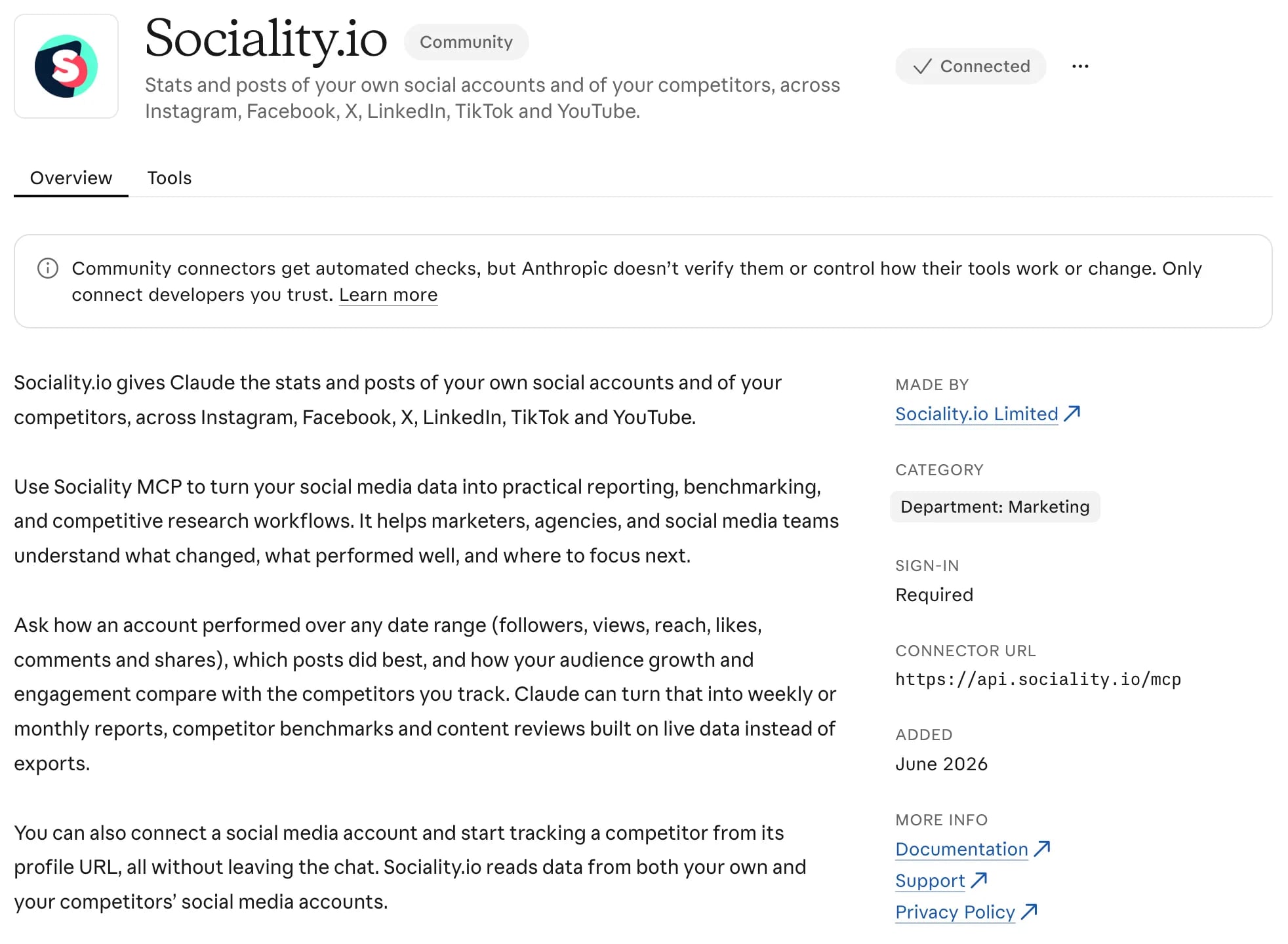
- Open Plugins, find Sociality.io in Claude’s connector directory, select Connect to Claude and sign in to Sociality.io.
- Open a chat and switch on Sociality.io under + > Connectors.
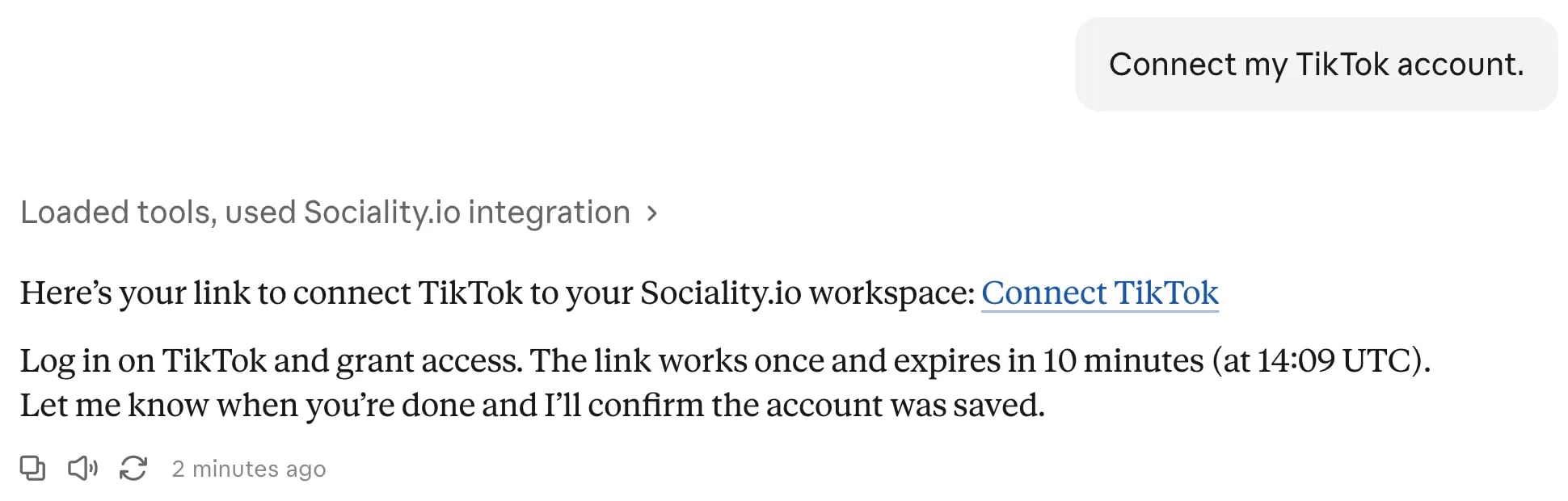
- Ask Claude to “connect my TikTok account.” It returns a link that works once and expires after 10 minutes, so open it when you’re ready.
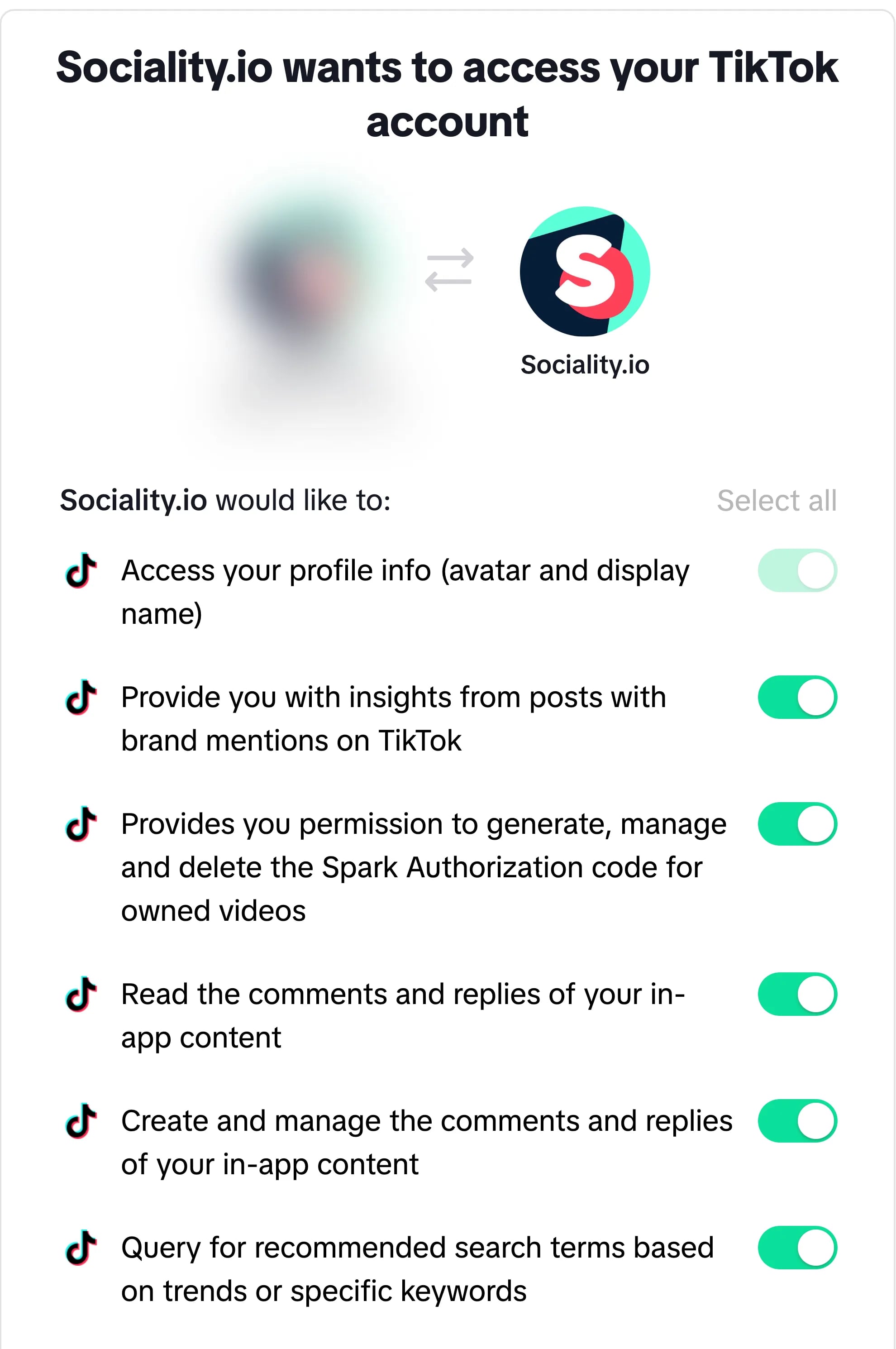
- Sign in to TikTok and review the permissions. TikTok lists everything the Sociality.io app may use, from your profile info to post insights and comments, and you can switch off the optional ones before you approve.
- Go back to the same chat and say you’re done, so Claude can check the connection and confirm it.
To use TikTok’s Social MCP instead, add a custom connector (+ Add > Add custom connector), paste the server URL from TikTok’s Social MCP page, then sign in to TikTok and authorize it. Free accounts get 1 custom connector, and on Team and Enterprise an Owner or Primary Owner has to allow it first.
How to connect TikTok to ChatGPT
To connect TikTok to ChatGPT through Sociality.io, install the plugin once and call it into a chat with an @ mention.
- Open Plugins in the sidebar, search for Sociality.io and select Install plugin on its listing.
- Select Sign in with Sociality.io, sign in and select Authorize.
- Open a chat, type @ and pick Sociality.io from the menu.
- Ask ChatGPT to connect your TikTok account, open the one-time link within 10 minutes, sign in to TikTok and approve access. Then tell ChatGPT you’re done so it can confirm.

TikTok’s own servers go in as custom MCP servers on the web, which ChatGPT supports in full on Business, Enterprise and Edu and with read and fetch permissions only on Pro.
Your TikTok vs a competitor’s: what Claude and ChatGPT can see
For your own account, Claude and ChatGPT see nearly everything TikTok shows you in its analytics. For a competitor, they see the public counters on each video and the follower count.
| Data | Your account (connected) | A competitor (tracked) |
|---|---|---|
| Followers | Total, new and lost followers | Follower count over time |
| Profile actions | Profile views, plus clicks on your bio link, email, phone, address and app download | Not available |
| Audience | Age, gender, country, city and active hours | Not available |
| Per video | Views, reach, likes, comments, shares, favorites, engagement rate, total and average watch time, completion rate, promotion flag | Plays, likes, comments, shares, promotion flag, caption and link |
| Where views came from | Views by country and by source (For You, Following, profile, search, sound, direct messages) | Not available |
| History | 30 days on Starter or 12 months on Growth, from the day TikTok Analytics was on | From the day you start tracking the account |
TikTok data returned through Sociality MCP, checked on 23 November 2026
The split comes from TikTok, not from any connector. TikTok shares reach, watch time, traffic sources and audience demographics only with the account owner, so for another brand you compare plays, likes, comments and shares without ever learning how many people a video actually reached. Our TikTok analytics guide explains what each of those owner metrics measures.
I asked Claude about Duolingo, Chipotle and Ryanair on TikTok
I asked Claude to compare 3 brands with a reputation on TikTok by plays, engagements per play and follower change. The numbers are public, pulled for the 3 accounts we track through Sociality MCP on 23 November 2026 at 12:46 UTC, with this prompt.
Prompt 1: 3 brands, 3 weeks of videos
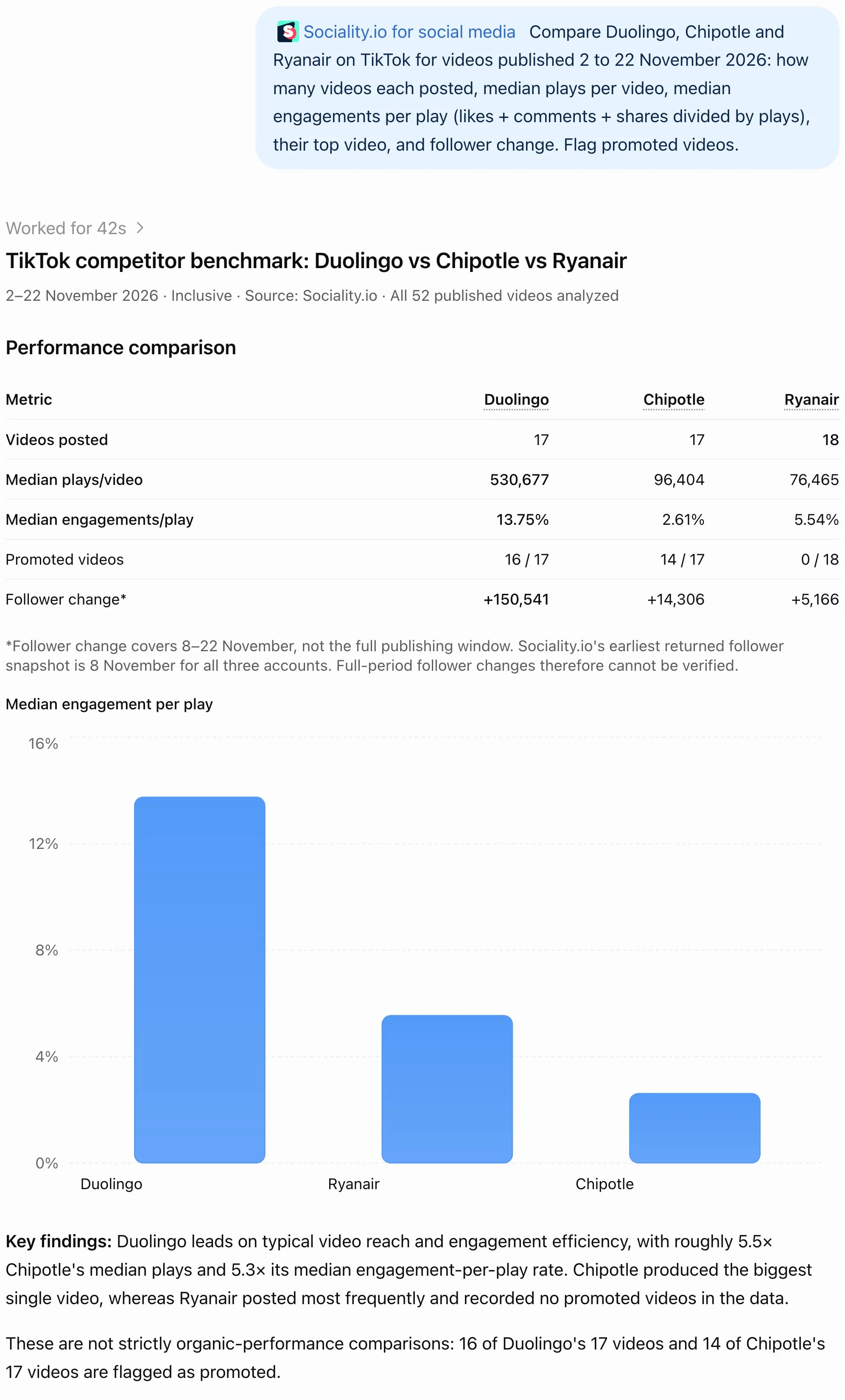
Compare Duolingo, Chipotle and Ryanair on TikTok for videos published 2 to 22 November 2026: how many videos each posted, median plays per video, median engagements per play (likes + comments + shares divided by plays), their top video, and follower change. Flag promoted videos.
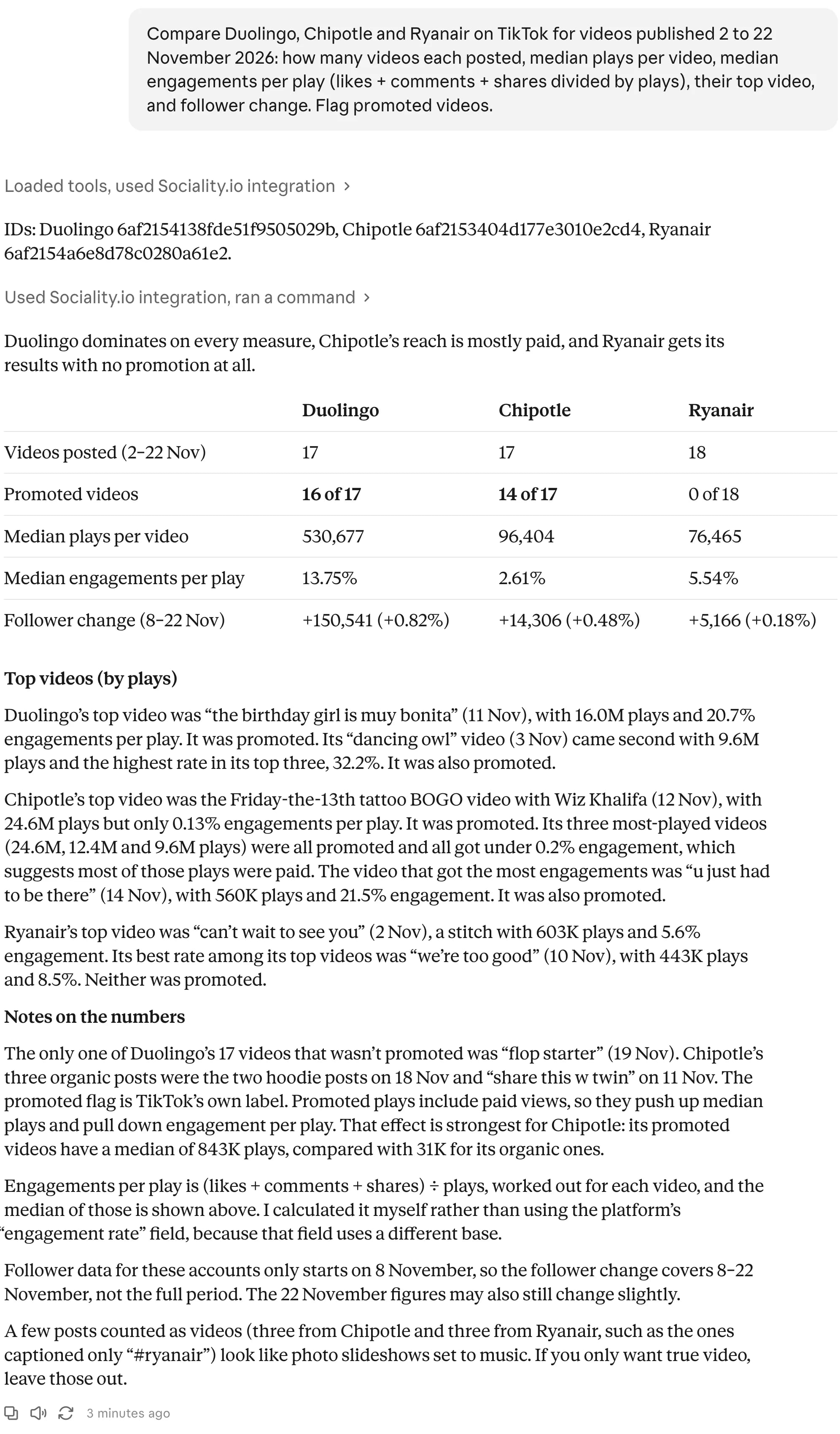
Duolingo posted 17 videos, 16 flagged as promoted, for 40.7M plays. Its median video had 530,677 plays and 13.75% engagements per play, and its top video, “the birthday girl is muy bonita” (11 November), reached 16.0M plays at 20.7%. Followers rose from 18,465,287 on 8 November to 18,615,828 on 22 November (+0.82%).
Chipotle led on total plays with 63.3M across 17 videos, 14 flagged as promoted, but its medians were 96,404 plays and 2.61% engagements per play. Its biggest video, a tattoo promo captioned “we had to run it back w the ultimate chipotle bag” (12 November), had 24.6M plays and only 0.13% engagements per play, while “u just had to be there” (14 November) collected 120,493 engagements on 560,449 plays (21.5%). Followers grew from 2,959,658 to 2,973,964 (+14,306, or 0.48%).
Ryanair posted almost daily, 18 videos with none promoted, for 2.63M plays. Its medians were 76,465 plays and 5.54% engagements per play, and its most-engaged video, “we’re too good” (10 November), drew 37,645 engagements on 443,260 plays (8.5%). Followers rose from 2,926,590 to 2,931,756 (+5,166, or 0.18%).
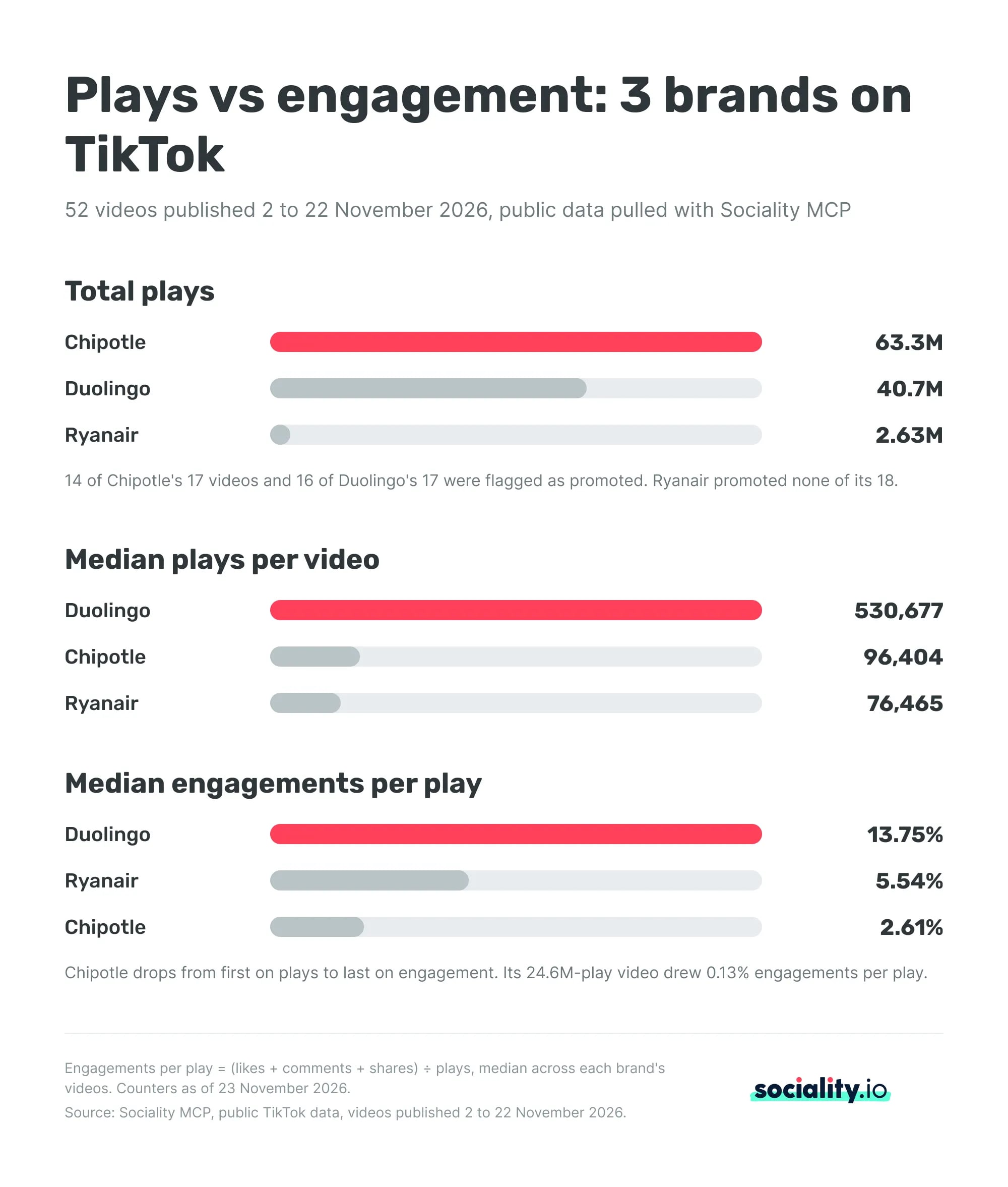
Ranked by plays, Chipotle wins. Only when you rank by engagements per play does it drop to last, behind a Ryanair account that promoted nothing, which is why I read plays on promoted videos as a measure of budget more than of the content.
A couple of limits apply. Counters are cumulative as of 23 November, so a video from 2 November had 3 weeks longer to collect plays than one from 21 November, and the follower comparison starts on 8 November because that’s when we started tracking these accounts. Their reach, watch time and traffic sources stay hidden, too.
Prompt 2: the follow-up that earns its keep
In ChatGPT, I called Sociality.io in with @ and sent the same prompt, and the figures matched. The useful part came next, because the first answer tells you which question to ask about the posts behind the median.
Of Chipotle’s promoted videos, which ones got more than 5% engagements per play, and what do their captions have in common?
The connector answers single-brand questions too, such as which videos carried a TikTok account last month.
Sociality MCP connects your social accounts to ChatGPT, Claude or Gemini, so you can ask about TikTok in plain language and get answers from your Sociality.io data. For example:
Which Redbull TikTok videos got the most views in the last 30 days and what format do they share?
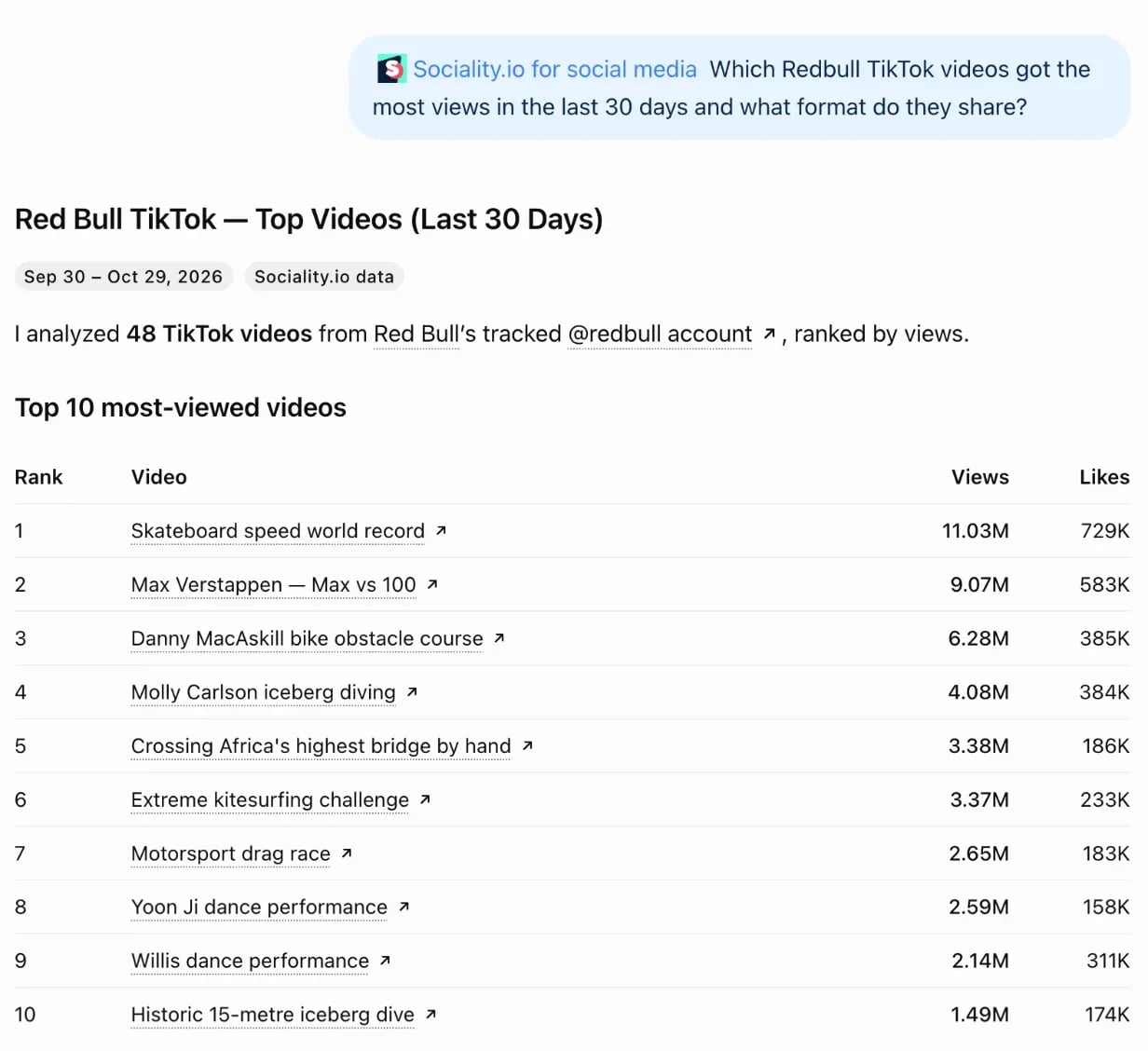
The answer ranks the videos by views and goes on to name the formats they share, so your next TikTok starts from what already works.
Connect Sociality MCPFree to start: 1,000 credits, no credit card.
What to ask Claude or ChatGPT about TikTok
Give every question a date range and the metric you care about, and you can reuse it word for word in next month’s report.
- Where did our views come from last month, and how much came from search versus For You?
- Which of our videos had the highest completion rates?
- When are our followers most active, and how does that compare with when we posted?
- On which days did we gain or lose the most followers?
- Which competitor videos got far more plays than that brand usually gets, and which of them were promoted?
- How often did each competitor post, and who had the highest median engagements per play?
Our guide to MCP for marketing has more prompts for the other networks and for reporting across all of them.
Other ways to get TikTok data into Claude or ChatGPT
Several other tools bring TikTok data into an assistant, and the right one depends on whether you need competitors at all.
| Option | What it brings in | Competitors? | Price note |
|---|---|---|---|
| Metricool | Your connected TikTok account through its MCP | No TikTok competitor tracking | MCP on every plan, Free included |
| Windsor.ai | TikTok Organic through MCP, plus separate TikTok Ads and TikTok Shop connectors | Not stated | Free plan covers 1 connected data source |
| Minter.io | TikTok account data through MCP | Not stated | MCP starts on the Gold plan at €19 a month per profile |
| Supermetrics | TikTok Organic in Claude and ChatGPT, including views, reach, completion rate and average view time | Not stated | 14-day free trial |
| Composio | A TikTok toolkit for listing your videos, fetching user stats and uploading or publishing videos | Not stated | Free to start |
| Scrapers | Public profile and video data | Yes, public data only | Varies by tool |
| A TikTok file export | A snapshot of your own analytics, uploaded to the chat | No | No connector needed |
Other ways to bring TikTok data into Claude or ChatGPT, from each vendor’s own pages on 23 November 2026
Metricool is the easy pick for a small team that only needs its own account and wants to stay on a free plan, and Windsor.ai makes sense when TikTok Shop sales sit in the same report. Scrapers are the one route that reaches any public account without the owner’s permission, but section 3.4 of TikTok’s US terms bars automated scraping or extraction without TikTok’s written approval, so check how a tool gets its data before you rely on it. Our comparison of social media MCP servers covers more options across networks.
Connected but seeing no TikTok data?
Most empty answers come down to the link, the role or the date range, so check those before reconnecting anything.
- If the link expired after 10 minutes or was already used, ask for a new one.
- If you aren’t a Sociality.io workspace owner or admin, ask one of them to connect the account.
- If Claude or ChatGPT answers without real numbers, check that the connector is on (+ > Connectors in Claude, an @ mention in ChatGPT).
- If the last 1 to 3 days are missing, that’s normal for some channels, so pick a range that ends a few days earlier.
- If a competitor you added recently shows little history, remember its data starts on the day you started tracking it.
- If older profile data is missing, start your date range on or after the day you turned on TikTok Analytics.
Is it safe to connect TikTok to Claude or ChatGPT?
Yes, if you control who authorizes access, what the assistant may do and when access ends. For an agency handling client accounts, this is the checklist I’d run before pulling client data into a chat.
- Have the client’s own admin sign in to TikTok and review the permissions requested, which TikTok lets them grant in part or revoke later.
- Keep tool approvals on, and in Claude set Needs approval for anything you want to review before it runs.
- Check the Claude plan. On consumer plans, chats used to improve models exclude raw connector content, though anything you paste into the chat may be included, and on commercial plans inputs and outputs aren’t used for training by default.
- Check the ChatGPT plan. On Business, Enterprise and Edu, OpenAI doesn’t use information from connected apps to train models by default, while on Free, Go, Plus and Pro it may if Improve the model for everyone is on.
- Know what the connector can change. Sociality MCP follows the connected user’s and workspace’s permissions, reads published data and has 2 setup actions (connecting an account and adding a competitor), and its security page covers the platform behind it.
- Revoke access when the work ends, in the TikTok app under Settings and privacy > Security > Manage app permissions > Remove access.
Wrapping up
For your own account’s comments, mentions, trends and insights, TikTok’s Social MCP is a solid start, and its Ads MCP belongs to whoever runs the campaigns. When someone already exports the numbers each month and you just need this week’s answer, uploading the file is fine.
When your report needs your analytics next to your competitors’ public numbers, I’d use Sociality MCP, because both sit in the same chat in Claude or ChatGPT. Ask for a specific date range and the one metric you’d actually make a decision on.
FAQs about connecting TikTok to Claude
Can Claude analyze my TikTok and my competitors?
Yes, with a connector. Sociality.io is the best fit when you need both in one chat. Connect your TikTok to the Sociality.io dashboard, track the competitors you care about, then add Sociality MCP to Claude. Claude reads watch time, completion rate and traffic sources for your account, plus followers, plays, likes, comments and shares for competitors.
Does TikTok have an official MCP server?
Yes, 2 of them. The Ads MCP handles paid campaigns, from reporting to audience configuration, and it’s listed in Claude’s directory as TikTok for Business. The Social MCP, released on 6 November 2026, covers organic work on your own account, such as post insights, comments, brand mentions and trends, and you add it by URL.
What is a TikTok MCP server?
A TikTok MCP server is a connector that gives an AI assistant access to TikTok data or actions through the Model Context Protocol, an open standard for linking AI apps to outside tools. When you ask a question, the assistant calls a tool on the server for the data it needs, so the tools and the permissions you grant decide what it can return.
Can Claude or ChatGPT watch a TikTok video?
No. Through a TikTok connector, Claude and ChatGPT receive numbers and captions, plus a link to the video when the connector returns one, but never the video itself. Ask which of your videos had the highest completion rate, then open that video yourself and look at the hook, the edit and the sound.
Can Claude post to TikTok?
Only through a connector with working publishing tools. TikTok’s Social MCP lists publishing tools, but standard MCP authorization doesn’t support them yet, and Sociality MCP only reads published data and handles account setup. If you use a connector that can publish, keep tool approvals on so every post waits for a person.
Does it work with a personal TikTok account?
TikTok says its Social MCP is open to all users with a TikTok account, though tools can vary by account and region. TikTok’s API knows 3 account levels, Personal, Advanced Access and Verified Business, and profile data only starts on the day TikTok Analytics was turned on, so switch it on before you connect anything.
Can I see a competitor’s TikTok watch time or reach?
No. TikTok keeps watch time, reach, traffic sources and audience demographics for the account owner, so no connector can return them for a competitor. Compare brands on public counters instead. Add up each video’s likes, comments and shares, divide by its plays, and take the median across the videos each brand posted in your date range.
Do I need a paid Claude or ChatGPT plan?
Not to connect TikTok to Claude, since directory connectors work on every plan and Free accounts can add 1 custom connector. In ChatGPT, installing a plugin depends on your plan, workspace, role and region, and custom MCP servers on the web need Business, Enterprise or Edu for full support, with read and fetch only on Pro.