
A LinkedIn MCP is what lets Claude or ChatGPT read real LinkedIn data instead of guessing at it. For a marketer, the useful version reads your Company Page’s posts and followers plus the public posts of the Pages you compete with, and that version doesn’t come from LinkedIn.
This guide is for B2B marketers and agency teams who report on LinkedIn every month and would rather ask a question than export another spreadsheet.
The demand is real. LinkedIn passed 1.4 billion members in its October 2026 update, and paid subscriptions to Premium Company Page, the paid tier with deeper Page and competitor insights, grew 121% in a year. The hard part is getting that data into a chat without handing over your LinkedIn login.
Below you’ll find what’s official, the 3 kinds of server, what you can see for your Page and a competitor’s, the setup in Claude and ChatGPT, and a test I ran on 17 November 2026 on our own Page and 4 crop-science brands.
TL;DR: 3 facts before you connect LinkedIn
3 facts decide whether a connector gives you Page analytics or something else.
- LinkedIn’s own MCP server reads member profiles for approved partners, and its Hiring Pro connector posts jobs from Claude, so neither reports on a Company Page.
- LinkedIn shares Page post statistics only with Page admins, for a rolling 12 months, through an API that developers have to be approved for.
- LinkedIn’s User Agreement bans scraping software and unauthorized bots, which is how many open-source LinkedIn servers on GitHub reach the site.
What is a LinkedIn MCP?
A LinkedIn MCP is a server that connects an AI assistant to LinkedIn data or actions through the Model Context Protocol, an open standard for plugging AI apps into outside tools. The assistant asks the server for posts, followers or profiles, and the server fetches them from LinkedIn and hands back the numbers.
What it can read depends on how the server reaches LinkedIn, not on the letters MCP in its name. Some use LinkedIn’s API with your permission, some drive a logged-in browser, and some resell data collected somewhere else.
The protocol itself won’t tell you which. Its specification makes authorization optional, so a server that connects without a hitch has proved only that it connects.
Is there an official LinkedIn MCP?
Yes, but none of LinkedIn’s official ones reads Company Page analytics. As of 17 November 2026, LinkedIn runs 4 AI integrations of its own, and each one does a single narrow job.
- My Profile MCP server. Hosted by LinkedIn and open only to select approved developer partners, it reads a member’s basic profile and changes experience entries only after the member previews and approves the change.
- Hiring Pro in Claude. It drafts a job post from your description and publishes it once you approve, which LinkedIn announced on 21 October 2026, with a Copilot version listed as coming soon.
- The LinkedIn plugin in ChatGPT. It looks up professionals and shows their title, company, location and follower count.
- The LinkedIn Ads plugin in ChatGPT. A beta with read-only access to ad set performance, which covers paid campaigns and leaves organic posts out.
LinkedIn’s developer site also has a page called Develop with MCP, but it points coding agents at Microsoft Learn’s documentation server, so it helps people build integrations rather than read your Page. For impressions, clicks and follower growth on your Company Page, you need a third-party connector that holds LinkedIn’s Page permissions. Sociality MCP is a secure way to get there, because you connect your Page to Sociality.io as a Page admin through LinkedIn’s own sign-in, never with a cookie or password, and Claude or ChatGPT then reads your Page analytics plus the public numbers of the competitor Pages you track.
The 3 kinds of LinkedIn MCP servers
Every server of this kind reaches LinkedIn in 1 of 3 ways, and the way it’s built decides both what it can read and how much it puts your account at risk.
| Kind | How it reaches LinkedIn | What it reads | Who it suits | Risk |
|---|---|---|---|---|
| API connector | You sign in with LinkedIn and approve its permissions | Your Page’s analytics if you’re an admin, plus public post data for Pages you track | Page admins, marketers, agencies | Low with a vendor you trust, and you can revoke access |
| Browser-session server | A copy of your logged-in session, often the li_at cookie, driving LinkedIn like a person | Profiles, searches, messages and posts your account can see | Developers, sales and recruiting teams | High, since it runs against LinkedIn’s rules on bots and scraping |
| Scraper or data API | Data a third party collects from public pages | Public profiles, company details, posts | Research and data teams | Depends on how the data was collected and whether you may reuse it |
How the 3 kinds of LinkedIn MCP server reach LinkedIn, checked against LinkedIn’s API documentation and User Agreement on 17 November 2026
Several of the top results for “linkedin mcp” are the second kind, open-source servers built for prospecting and job search. They see LinkedIn the way your account sees it, which is exactly why they can’t show a Page’s impressions. LinkedIn only hands those to Page admins through its API.
Choosing between vendors is a separate question, and our comparison of social media MCP servers covers pricing, platforms and write access for 13 of them.
Your LinkedIn Page vs a competitor’s: what Claude and ChatGPT can see
For your own Page, an API connector can see nearly everything in your Page analytics. For a competitor’s Page, it sees what LinkedIn shows the public, which means followers and each post’s reactions, comments and reposts.
| Metric | Your Page | A competitor’s Page |
|---|---|---|
| Followers | Yes | Yes |
| Follower growth | Yes | Yes, from the day you start tracking |
| Posts published | Yes | Yes |
| Reactions, by type | Total | Yes |
| Comments and reposts | Yes | Yes |
| Impressions and unique impressions | Yes | No |
| Clicks and engagement rate | Yes | No |
| Page views | Yes | No |
| Follower demographics | Yes | No |
What Sociality MCP returned for our LinkedIn Page and 4 tracked competitor Pages on 17 November 2026, matched against LinkedIn’s API documentation
LinkedIn keeps Page statistics for admins. Its share statistics and follower statistics both require the Page’s administrator role, organic post statistics go back a rolling 12 months, and for any other organization the API returns a follower count and nothing private.
LinkedIn’s own Competitors tab gives a different cut. A free Page compares itself with 1 competitor, Premium raises the limit depending on the plan, and the tab ranks new followers, posts, comments and reactions. Our guide to LinkedIn competitor analysis shows how to read it, and the LinkedIn Page metrics guide defines every number in the table.
How to connect your LinkedIn Page to Claude
A Claude LinkedIn connector takes 3 moves, which are adding it from Claude’s directory, signing in, and switching it on in a chat. With Sociality MCP there are 2 connections behind those moves, your Page to Sociality.io and Sociality.io to Claude, and you only make each one once.
- Connect your LinkedIn Page in Sociality.io. You need to be an admin of the Page, because LinkedIn only shares Page analytics with admins, and in Sociality.io only workspace owners and admins can connect accounts.
- In Claude, click Plugins in the left sidebar (Customize, if your account hasn’t switched yet), filter the list to connectors and open the Sociality.io connector page.
- Click Connect to Claude, then sign in with Sociality.io and allow access.
- In a chat, click + in the lower left, hover over Connectors and switch Sociality.io on.
Sociality.io is listed in Claude’s connector directory. It reads the LinkedIn, Instagram, TikTok, Facebook, YouTube and X accounts you connect, plus every competitor you track, and remote connectors like this one work on every Claude surface, including the desktop and mobile apps, Cowork and Claude Code.
A tool that isn’t in the directory can still be added by its server URL, as a custom connector under Plugins. Free plans get one custom connector, and on Team plans an owner adds it for everyone before members sign in. Setting up the same server in Codex or another client works much the same, and the MCP setup steps for ChatGPT, Claude and Codex cover each one.
How to connect LinkedIn to ChatGPT
ChatGPT calls these integrations plugins, and Page analytics come in through a third-party plugin, because LinkedIn’s own 2 plugins look up people and read ad sets. With Sociality MCP, the steps are in our ChatGPT setup guide and take a couple of minutes.
- Open Plugins in ChatGPT’s sidebar, search for “Sociality” and open Sociality.io.
- Click Install plugin in the top-right corner.
- Click Sign in with Sociality.io, then Authorize.
- In any chat, type @, pick Sociality.io and ask about your LinkedIn Page.
Availability depends on your ChatGPT plan and workspace settings. Adding your own MCP server is stricter than in Claude, since OpenAI’s custom MCP guide gives full access to Business, Enterprise and Edu workspaces on the web, while Pro accounts can only connect servers that read.
The same connector also works in Gemini Enterprise and Microsoft Copilot, with the steps for each client in Sociality.io’s setup docs.
I asked Claude about our LinkedIn Page and 4 crop-science Pages
On 17 November 2026 I opened a new chat in Claude (Opus 5.5, with the Sociality.io connector on) and asked about the 30 days from 17 October to 15 November, first for our own Page and then for 4 public ones.
Prompt 1: our own Sociality.io Page
Our own Page went first, with this prompt.
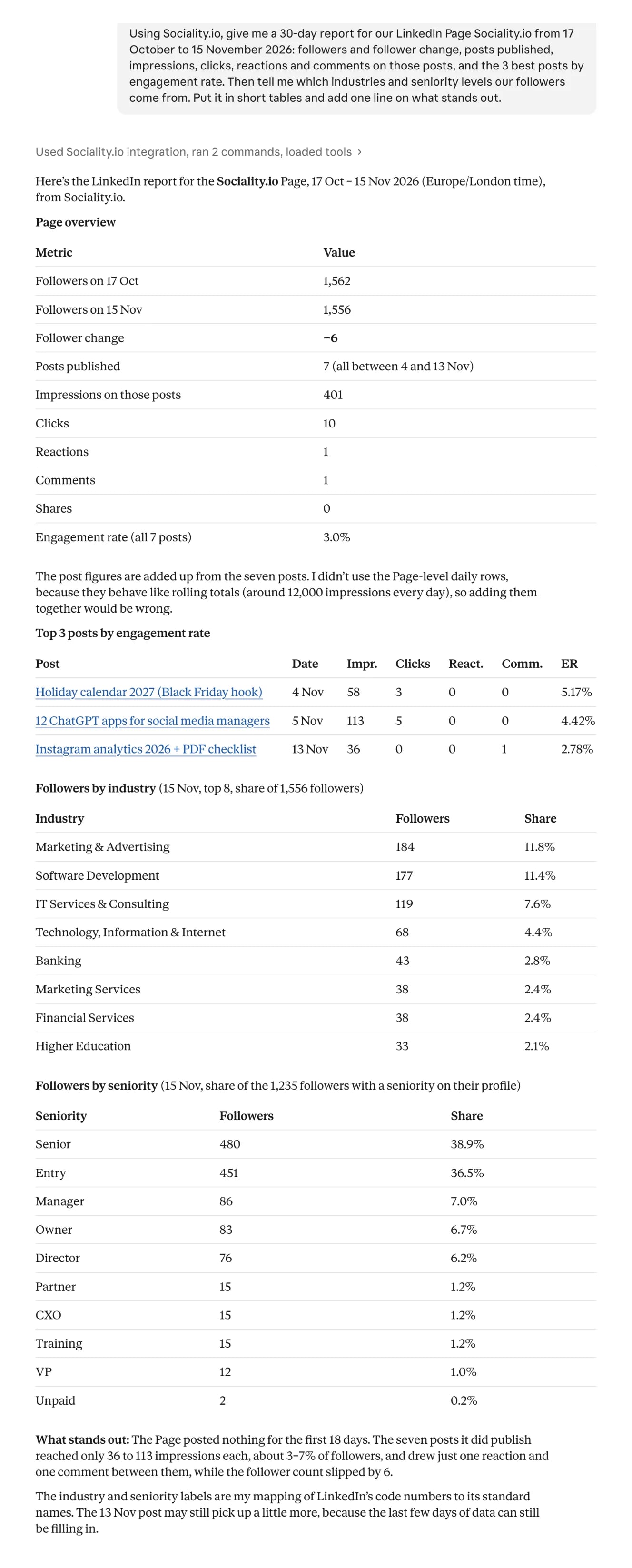
Using Sociality.io, give me a 30-day report for our LinkedIn Page Sociality.io from 17 October to 15 November 2026: followers and follower change, posts published, impressions, clicks, reactions and comments on those posts, and the 3 best posts by engagement rate. Then tell me which industries and seniority levels our followers come from. Put it in short tables and add one line on what stands out.
Claude answered with 4 short tables. 1,562 followers on 17 October and 1,556 on 15 November, 7 posts, 401 impressions, 10 clicks, 1 reaction and 1 comment for a 3.0% engagement rate, with our holiday calendar post on top at 5.17%. I checked every figure against the raw Sociality MCP output, post by post and day by day, and they all matched.
The part I didn’t expect was a warning. Claude noticed that the Page-level daily numbers behaved like rolling totals (about 12,000 impressions every single day), refused to add them up, and built the report from the 7 posts instead, which is the mistake I’d most likely have made in a spreadsheet.
It also turned LinkedIn’s follower codes into plain names. Marketing and advertising (184 followers) and software development (177) lead the industries, while senior and entry-level profiles make up about 75% of the followers who list a seniority. It’s a small Page, and Claude said so, pointing out that we posted nothing for the first 18 days of the window.
Prompt 2: 4 crop-science Pages we track
Then I asked about 4 crop-science Pages we track in Sociality.io, over the same window.
Now compare 4 crop-science Pages from my tracked LinkedIn competitors over the same window: Syngenta, Bayer Crop Science, BASF Agricultural Solutions and Corteva. One table with followers, posts, reactions, comments, reposts and engagements per post, then each one’s top post and which reaction types they get most. Finish with which of our LinkedIn metrics you can’t get for a competitor’s Page.
Syngenta has the biggest audience (2,512,650 followers) and posted the most, 19 times, for 167 engagements per post. Corteva posted only 10 times and still averaged 154. Adjusted for size, BASF Agricultural Solutions and Corteva earned more than twice Syngenta’s engagement per follower.
| Page | Followers on 15 Nov | Posts | Engagements per post | Per post, per 10,000 followers |
|---|---|---|---|---|
| Syngenta | 2,512,650 | 19 | 167 | 0.66 |
| Bayer Crop Science | 1,074,970 | 16 | 91 | 0.85 |
| BASF Agricultural Solutions | 484,289 | 16 | 76 | 1.58 |
| Corteva Agriscience | 987,466 | 10 | 154 | 1.56 |
LinkedIn posts and engagements (reactions, comments and reposts) for 4 tracked crop-science Pages, 17 October to 15 November 2026, Sociality.io data
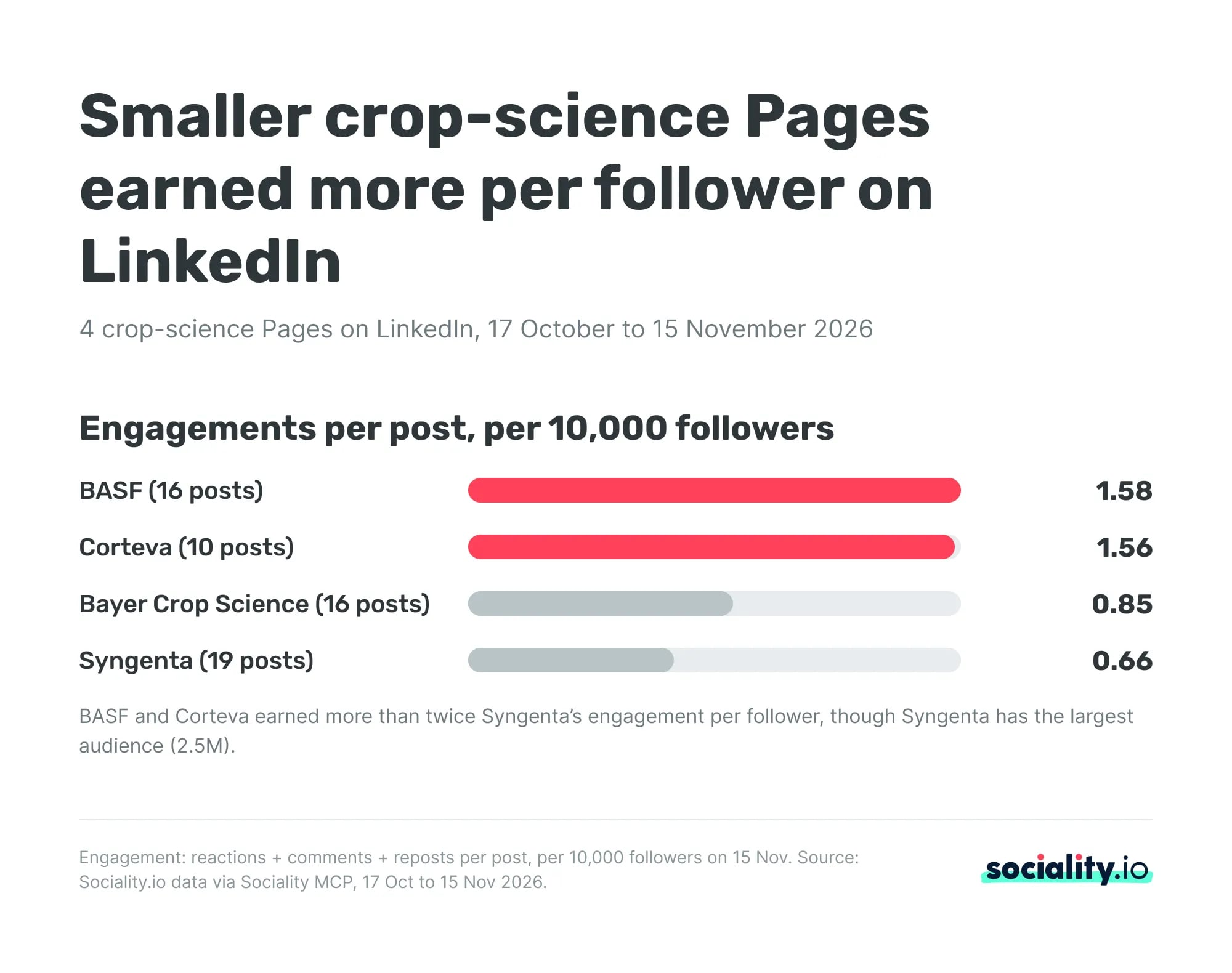
Reaction types were the LinkedIn-only detail. Like made up 87% to 94% of reactions on every Page, Celebrate came second everywhere, and BASF got the widest mix, mostly from people-focused posts such as its #PeopleInAg video. The single best post of the month was Corteva’s CEO interview with the Indianapolis Business Journal, at 519 engagements.
Asked what it can’t get for a competitor’s Page, Claude listed impressions and unique impressions, clicks, LinkedIn’s own engagement rate, Page views, follower demographics and any follower history from before tracking began.
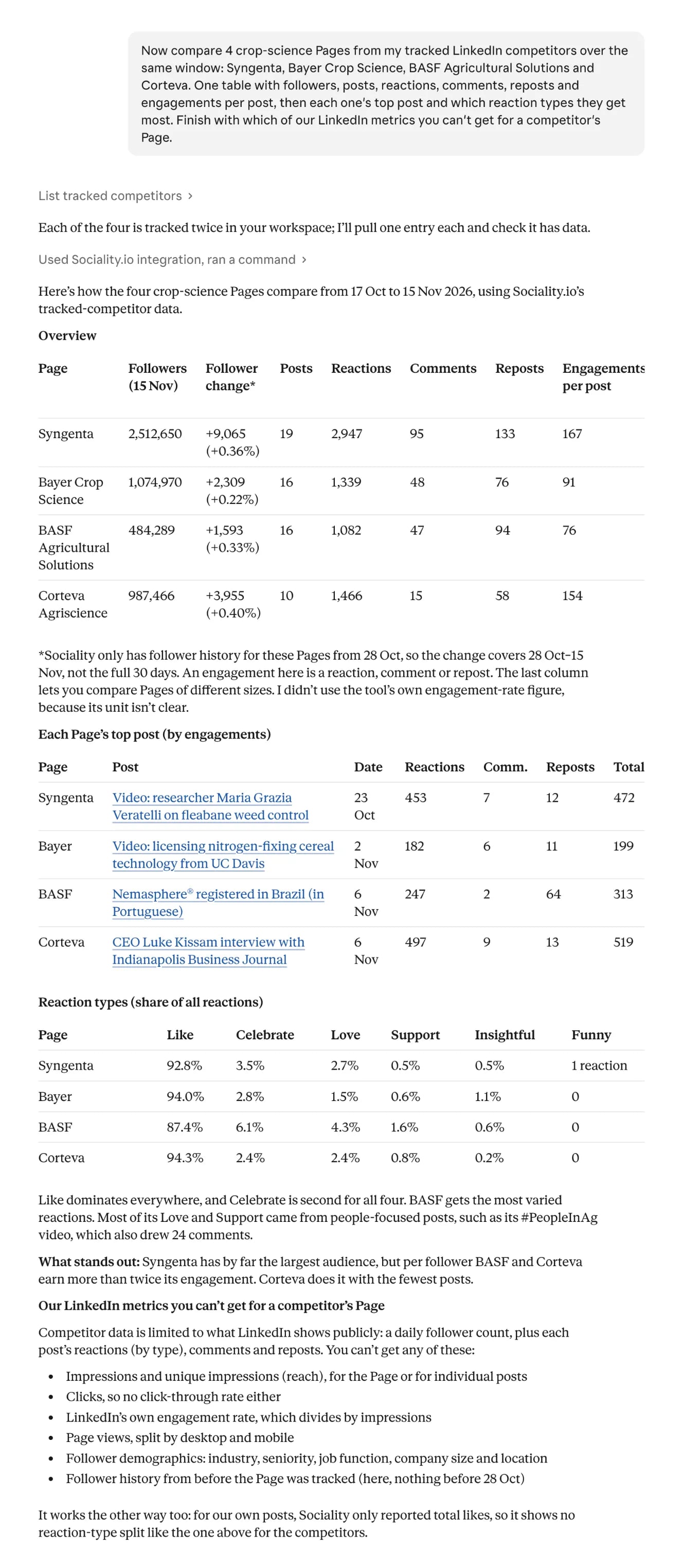
2 honest limits. Sociality.io only had follower history for these Pages from 28 October, when we started tracking them, so the follower change covers 19 days rather than 30, and Claude flagged it without being asked. Some of BASF’s and Syngenta’s posts are also regional, in Portuguese or Spanish, which pulls their averages down, so I’d read the per-follower column as a prompt for the next question rather than a ranking.
What to ask Claude or ChatGPT about your LinkedIn Page
The prompts that work name the Page, the dates, the metric and the format you want back. These 5 cover the LinkedIn jobs I see most often in a monthly review.
- Monthly report. “Summarize our LinkedIn Page for October: followers gained, posts, impressions, clicks, reactions, comments and engagement rate compared with September, in one table.”
- Best posts. “Rank our LinkedIn posts from the last 90 days by engagement rate, then tell me which format and topic the top 5 share.”
- Audience. “Which industries, job functions and seniority levels do our LinkedIn followers come from, and how does that match the buyers we sell to?”
- Competitor benchmark. “Compare our LinkedIn Page with [competitor 1] and [competitor 2] for the last 30 days: posts, reactions, comments, reposts and engagements per post per 10,000 followers.”
- Content ideas. “Look at our 3 competitors’ top 10 LinkedIn posts this quarter and suggest 5 post ideas we haven’t tried, with the format for each.”
For a competitor, ask for engagements per post or per follower. Their impressions aren’t public, so any engagement rate built on impressions is one your connector can’t calculate.
Connected but seeing no LinkedIn Page data?
When the connector is on but the Page numbers don’t come back, the cause is nearly always one of these.
- You’re not an admin of the Page. LinkedIn only shares Page statistics with admins, so ask a super admin to add you, then reconnect.
- The tool reads profiles, not Pages. LinkedIn’s own ChatGPT plugin and most GitHub servers work with member profiles.
- The connector is off in this chat. In Claude, check the toggle under + and Connectors, and in ChatGPT, mention the plugin with @.
- The dates go back too far. LinkedIn keeps organic post statistics for a rolling 12 months, so older months only exist if your tool stored them.
- The last 2 days look low. LinkedIn says most Page metrics can take up to 48 hours to appear, apart from reactions and comments.
- You asked for a competitor’s impressions. That number isn’t public, so a connector either returns nothing or, worse, a guess.
- On Team or Enterprise, the connector isn’t approved yet. Ask an owner to allow it.
If you need the numbers today, LinkedIn’s Page analytics has an Export button that gives you an XLS file Claude can read.
Is a LinkedIn MCP safe?
An API connector from a company you trust is as safe as any other integration you sign in to. A server that asks for your LinkedIn cookie is a different matter.
LinkedIn’s cookie table lists li_at as the cookie that authenticates members, so a server holding it is, for LinkedIn’s purposes, you. Section 8.2 of the User Agreement bans software that scrapes the site and bots that access it without permission, and LinkedIn’s Help Center says it doesn’t allow tools that automate activity on its website, with steps for accounts restricted because of them.
That’s why the company behind a connector matters as much as the protocol. Sociality MCP runs on Sociality.io, which has 10+ years in social media and 2,000+ marketers using it, and follows the platform’s security standards, with encryption in transit and at rest, two-factor authentication, role-based access and yearly third-party penetration tests.
Before you connect a brand Page, run through this list.
- Pick a connector that signs in with LinkedIn and approves permissions, never one that asks for a cookie or your password.
- Read the tool list and look for anything that posts, comments, messages or deletes.
- Keep approvals on for any tool that changes something, since Anthropic warns that untrusted servers can hide instructions in what they return.
- Know how to remove it. In Claude, find the connector under Plugins and click Remove, and in ChatGPT, disconnect it from the plugin’s settings.
LinkedIn MCP terms in plain words
A handful of terms do most of the work in this guide, and the labels differ between LinkedIn, Claude and ChatGPT.
| Term | What it means here |
|---|---|
| MCP server | The service that passes LinkedIn data or actions to an AI assistant through the Model Context Protocol |
| Connector or plugin | What Claude and ChatGPT call an installed integration, often running on an MCP server |
| OAuth sign-in | Signing in with LinkedIn and approving specific permissions, instead of handing over a password or cookie |
| Page admin | The LinkedIn Page role that can see Page analytics and authorize apps to read them |
| li_at | The LinkedIn cookie that keeps a member signed in, which cookie-based servers copy |
| Engagements per post per 10,000 followers | Reactions, comments and reposts per post, divided by followers, the way to compare Pages of different sizes |
Wrapping up
Connecting LinkedIn to Claude or ChatGPT pays off once you know which kind of server you’re adding. LinkedIn’s own servers handle profiles and job posts, cookie-based servers put the account at risk, and an API connector is the one that gives you Page analytics plus the public numbers of the Pages you compete with.
If that last job is yours, Sociality MCP is the connector I’d add first. It reads your LinkedIn Page and your tracked competitors in Claude, ChatGPT and Gemini Enterprise, and Starter is free with 1,000 credits and no credit card. If you run Instagram too, the Instagram version of this setup works the same way.
FAQs about LinkedIn MCP
Can Claude or ChatGPT analyze my LinkedIn Page and competitors?
Yes, with a connector that reads LinkedIn Page data. Once Sociality MCP is connected, Claude or ChatGPT reads your Page’s posts, impressions, clicks, followers and follower demographics, plus followers and post reactions, comments and reposts for the competitor Pages you track. You need to be an admin of your own Page, and competitors only return their public numbers.
Does LinkedIn have an official MCP?
Yes, for narrow jobs. LinkedIn hosts a My Profile MCP server for select approved partners, which reads member profiles, and offers Hiring Pro in Claude for job posts. In ChatGPT, LinkedIn’s plugins look up people and read ad set results. None of them reports on a Company Page’s organic posts, so Page analytics need a third-party connector.
What is a LinkedIn MCP server?
A LinkedIn MCP server is a connector that passes LinkedIn data or actions to an AI assistant through the Model Context Protocol, an open standard for linking AI apps to outside tools. You add it once, then ask about posts, followers or profiles in plain words, and the assistant calls the server for the real numbers.
Can Claude post to LinkedIn?
Only through a connector with a publishing tool. LinkedIn’s API lets approved apps post on behalf of a Page for its admins and content admins, so some connectors offer posting, while analytics connectors only read. Hiring Pro is the exception that posts jobs. If you allow posting, keep approvals on so nothing goes live without a person.
Can ChatGPT read my LinkedIn Company Page analytics?
Yes, through a plugin or MCP server that holds LinkedIn’s Page permissions. LinkedIn’s own LinkedIn plugin only looks up professionals, and its LinkedIn Ads plugin reads paid ad sets, so neither covers organic Page posts. Connect a Page analytics connector, sign in as a Page admin, then mention it with @ in a chat and ask for the date range you need.
Is using a LinkedIn MCP against LinkedIn’s terms?
Not by itself. MCP is only a way of connecting tools, and the real question is how a server gets LinkedIn data. A connector that uses LinkedIn’s API with your permission is an approved route. A server that copies your session cookie and drives the site runs against the User Agreement’s rules on scraping and bots, and can get the account restricted.
Can I see a competitor’s LinkedIn impressions in Claude?
No. LinkedIn only shares impressions, clicks and Page views with a Page’s admins, so no connector can return them for a competitor. What you get is their follower count and each post’s reactions, comments and reposts. Compare Pages on engagements per post or per 10,000 followers, and keep impression-based engagement rates for your own Page.
Do I need to be a Page admin to use LinkedIn Page analytics in Claude or ChatGPT?
For your own Page’s analytics, yes. LinkedIn’s API gives Page statistics such as impressions, clicks and follower demographics only to members with the administrator role on that Page. A content admin can read and publish posts but can’t pull those reports. Competitor Pages need no role at all, because a connector only reads their public numbers.