When you open YouTube Studio and stare at a dashboard full of numbers, it can feel a little like reading tea leaves with autoplay turned on.
Views rise, then vanish, and watch time looks solid while subscribers stall; CTR says “great,” yet conversions don’t budge. You’re not alone. YouTube’s CEO said in January 2026 that Shorts alone now average 200 billion daily views, so there is more to measure than ever, and more ways to misread it.
Learn to read the dashboard properly and you stop guessing and start predicting. The metrics behind every view show why someone clicked, how long they stayed and when they drifted away.
This guide covers where to find your data, what each tab means in the Studio YouTube has been rolling out since July 2026, how views are counted now, and how to turn the numbers into a weekly routine.
Key takeaways (TL;DR)
- YouTube Analytics has seven tabs: Overview, Content, Reach, Engagement, Audience, Revenue and Trends, and which ones you see depends on whether you are looking at the channel or at a single video.
- Since 24 August 2026 YouTube counts a view the moment a video starts to play in every format, while average view duration is still calculated from engaged views.
- YouTube says half of all channels and videos have an impressions CTR between 2% and 10%, so judge a video against your own history, not a universal target.
- Key moments for audience retention compares a video with your 10 latest videos of similar length and flags intros, top moments, spikes and dips, with data ready after one to two days.
- Ask Studio, the AI assistant inside YouTube Studio on desktop, can help you analyze your performance if the button appears in your Studio.
How to access YouTube analytics
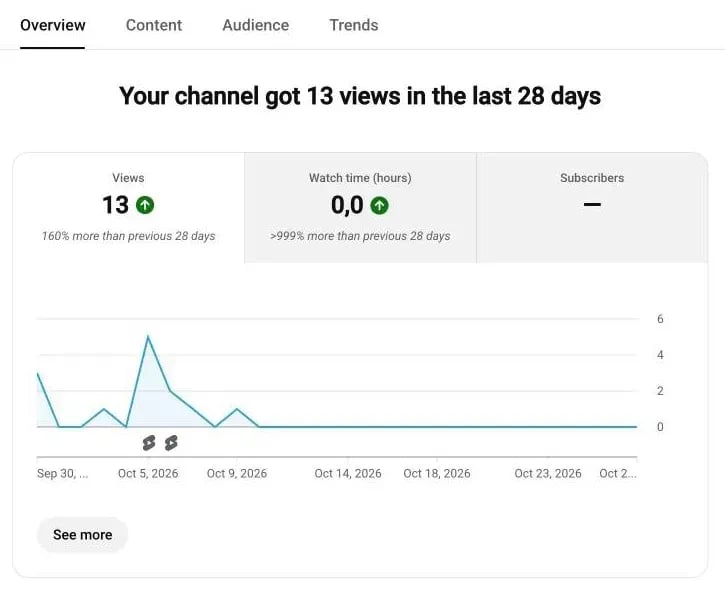
Where do you actually find all this data? Everything lives inside YouTube Studio, the command center for your content, on desktop and on mobile. YouTube also says it has been gradually rolling out an updated Studio experience since July 2026, so your Analytics page may look a little different from the screenshots below.
On desktop: The full analytics dashboard
- Go to YouTube Studio at studio.youtube.com.
- In the left menu, click Analytics.
- You land on the Overview tab by default.
- Move to the tab that fits your question: Content for the whole channel, Reach and Engagement for a single video, Audience for either, and Revenue if you’re in the YouTube Partner Program.
- Click Advanced Mode when you need comparisons, filters or exports.
Advanced Mode is where most marketers spend their time when they need to explain the “why” behind a trend. It lets you add a comparison, filter, break a report down, pick the metrics you want, save up to 50 reports and export the current view.
On mobile: YouTube Studio app
The YouTube Studio app for iOS and Android carries an Analytics section too, in a simpler layout that works for a quick check between meetings or campaign runs. If you manage several brands or channels, it keeps you updated without opening a laptop, though I’d still use desktop for exports and detailed filtering.
Advanced access: YouTube Analytics API
For teams that live in data, Google publishes two APIs. The YouTube Analytics API runs targeted queries for custom reports on demand, while the YouTube Reporting API retrieves bulk reports, one 24-hour period at a time, for high-volume use.
With either one you can:
- Build custom dashboards or connect to BI tools
- Combine YouTube data with performance metrics from other social platforms
- Export metrics such as views, watch time and traffic sources on a schedule
If you manage multi-channel campaigns or send weekly executive reports, API-level access means you look at the same data source every week. Google also keeps a revision history of metric definition changes, which is worth a look before you compare numbers across the August 2026 change to how a view is defined.
Data thresholds and timing
YouTube Analytics isn’t instant magic, and there is no single delay for every report. What YouTube documents:
- Key metrics such as impressions and views are available within a few hours of publishing.
- The audience retention report typically takes one to two days to process.
- Realtime shows early performance and lets you compare a video’s first 60 minutes with its first 48 hours.
- Revenue is an estimate until YouTube finalizes it, which typically happens between the 7th and 12th day of the following month.
Small channels and narrow filters sometimes return a “Not enough data” message instead of numbers. YouTube suggests extending the date range beyond 30 days or removing filters. To compare apples to apples, use the same date range for every video you compare, and track metrics at both video and channel level.
Beyond Studio: exports and external tools
Native analytics show you what’s happening inside YouTube, but marketing rarely lives on a single platform. From Advanced Mode you can export the current view, and YouTube limits downloaded reports to 500 rows, so larger pulls go through the Reporting API. When you need YouTube next to Instagram, TikTok or LinkedIn in one place, a social media analytics tool saves you the tab-hopping. For the other networks in that report, see our guides to LinkedIn analytics, TikTok analytics and the wider social media analytics picture.
YouTube analytics: Core tabs and structure
YouTube’s help page lists seven tabs in Studio’s Analytics section: Overview, Content, Reach, Engagement, Audience, Revenue and Trends. Which ones you see depends on the level: Content and Trends belong to the channel, Reach and Engagement to a single video, and Overview, Audience and Revenue work for both. Think of them as chapters in your marketing report: awareness, interaction, loyalty and monetization.
Overview
Overview is your quick health check. It shows views, watch time and subscribers over your selected date range, plus estimated revenue if you’re in the Partner Program, so a spike or dip shows up right away and you can click any data point to go deeper. It is also where YouTube places reports such as Realtime and Typical performance, which compare recent numbers with what is normal for your channel.
Content
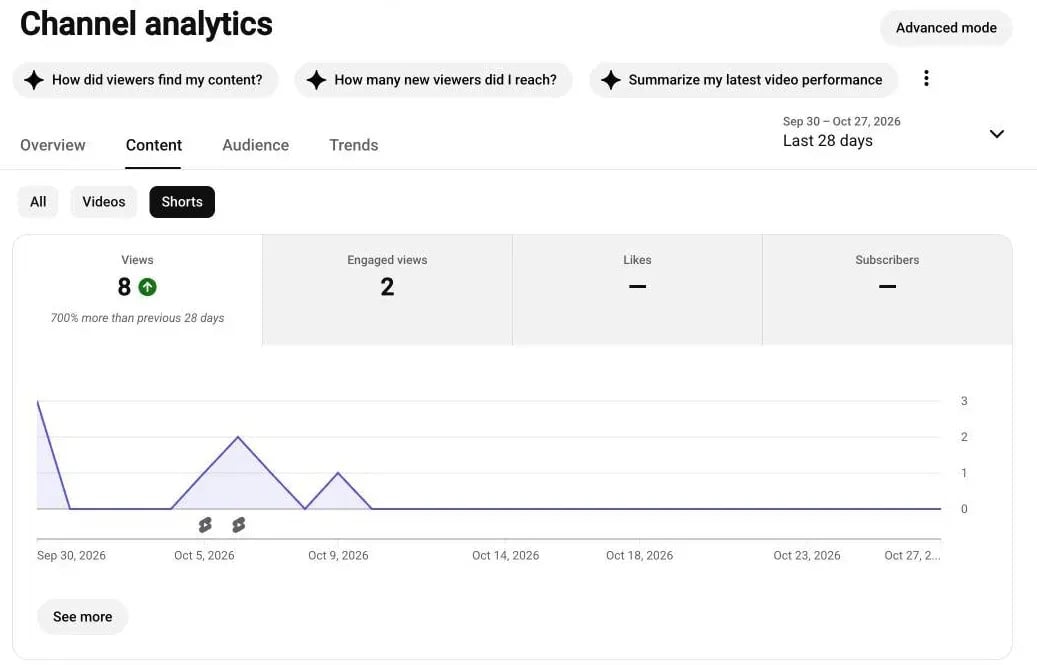
Content is the channel-level tab. Its “How viewers found your content” card splits views by source: browse features, the Shorts feed, suggested videos, YouTube search, channel pages, external sites and others (source). A filter at the top switches between All, Videos and Shorts, and the key card shows views and engaged views. It is the quickest way to see which discovery path your channel leans on before you open a single video’s Reach tab.
Reach
Reach tells you how viewers discover a video. Its key card shows impressions, impressions click-through rate (CTR), views and unique viewers, and a “How viewers find this video” card breaks down traffic sources. This is where the funnel begins: impressions show how many times your thumbnail was shown, and CTR shows how often viewers then watched. If your impressions rise but CTR falls, your thumbnails or titles might need fine-tuning.
Engagement
Engagement goes beyond clicks and measures attention. Its key card shows watch time, average view duration and engaged views, and the audience retention curve sits on a video’s Overview and Engagement tabs. A smooth curve suggests the pacing is working; a steep drop right after the start suggests the opening isn’t delivering what the thumbnail promised. Marketers often focus too much on reach, but engagement is what tells you about content quality.
Audience
Audience reveals who’s watching. Its monthly audience figure counts the unique viewers of the last 28 days and splits them into new, casual and regular viewers (source). You’ll also find subscribers, returning viewers and demographics such as age, gender and geography, plus When your viewers are on YouTube, a chart of when your viewers are online across YouTube in the last 28 days. That one chart can redefine your posting strategy: if your viewers peak in the evening, publish shortly before it. For global brands, the geography data helps localize campaigns and captions.
Revenue
Revenue is where organic strategy meets business results, and it appears for channels in the YouTube Partner Program. It tracks estimated revenue, CPM (what advertisers pay per 1,000 ad impressions), RPM (what you earn per 1,000 engaged views, across ads, memberships, Premium and Super Chat) and monetized playbacks (source). Treat the numbers as estimates until YouTube finalizes them, which typically happens between the 7th and 12th day of the following month.
Trends
Trends is the channel-level tab for what viewers across YouTube are searching for. It offers top searches, breakout videos, recent videos and content gaps for Shorts, and you can search a topic or save a search term. Treat it as a source of ideas: some of its insights are limited to certain countries, languages and devices. Think of it as SEO meets creative brainstorming, directly inside YouTube.
Read together, the tabs tell one story: Reach brings viewers in, Engagement keeps them watching, Audience tells you who they are, and Revenue shows what that attention is worth. Once you read those layers side by side instead of in isolation, your reports stop listing numbers and start explaining them.
Key YouTube metrics and what they really mean (Channel and video level)
Let’s be honest, YouTube Analytics can look overwhelming at first glance. There are dozens of numbers, percentages and graphs blinking at you, but once you know which metrics to focus on, the noise turns into a narrative.
I like to group YouTube metrics into five main categories: Reach, Engagement, Retention, Audience, and Monetization. Together, they tell you how people find your content, why they stay, and what impact that attention has on your business goals.
A. Reach and discovery metrics
These numbers show how people find your videos.
Impressions: How many times your thumbnails were shown to viewers on YouTube. A thumbnail counts only when it is visible for more than a second with at least half of it on screen, and views from external sites, the mobile web and YouTube Kids aren’t included (source). Think of impressions as the “visibility currency” of YouTube.
Impressions click-through rate (CTR): How often viewers watched a video after seeing its thumbnail. YouTube says half of all channels and videos have a CTR between 2% and 10%, and it is a typical range rather than a target. CTR also tends to fall as a video reaches more people, so it can drop while the video does better (source). Thumbnails and titles drive this number, not the video itself.
Views: The number of legitimate views your videos received, counted the moment playback starts.
Unique viewers: The estimated number of different people who watched your content in the selected date range. YouTube counts the same person once across devices and includes signed-in and signed-out viewing (source), so it gauges reach better than total views do.
Traffic sources: Where your views come from: browse features, the Shorts feed, suggested videos, YouTube search, channel pages and external sites, plus notifications and playlists for videos. If one source dominates, your channel depends on a single discovery path, which makes it fragile.
Impressions and how they led to watch time: The report that follows a thumbnail impression through to views and watch time, the conversion most marketers forget. It’s not enough that people click; you need them to stay. Pair CTR with average view duration to see how well clicks turn into watch time.
Views, engaged views and the counting changes of 2025 and 2026
YouTube has changed what counts as a view twice since early 2025, and that matters whenever you compare periods.
- 31 March 2025, Shorts: views count every time a Short starts to play or replays, with no minimum watch time. The original metric stays available as engaged views in Advanced Mode.
- 24 August 2026, all formats: views are counted the moment a video starts to play in Shorts, long-form videos and live streams. YouTube’s announcement says creators will likely see total view counts rise faster from that date.
Engaged views, meaning views where the viewer stayed past the initial seconds, still sit behind the quality metrics: average view duration, average percentage viewed and unique viewers are calculated from them, and YouTube says CTR and retention are calculated the same way as before. Partner Program earnings and eligibility are unchanged. Because the change applies going forward, mark 24 August 2026 on your charts and don’t read the step up in views as growth.
B. Engagement and retention metrics
Engagement is what separates curiosity from loyalty.
Watch time (hours or minutes): The total amount of time viewers have watched your videos.
Average view duration: The average minutes watched among those who stayed to watch, calculated from engaged views. On a 10-minute video, a 3:20 average means a third is being watched, so test a tighter edit.
Average percentage viewed: The average share of a video watched among those who stayed to watch. High numbers point to strong pacing; low numbers point to drop-offs or slow openings. YouTube publishes no target for it, so compare videos of similar length on your own channel.
Audience retention curves: A flat line means viewers are watching that part from start to finish, and gradual declines are normal. A sudden drop right at the start often signals an intro that takes too long to get to the point.
End-screen element click rate: Measures how effectively your end screens drive action. A low rate usually means the call to action is unclear or the suggested video isn’t relevant.
Card click-through rate: Similar idea, but for mid-video prompts. Cards perform best when they naturally follow what the viewer just saw, like offering a deeper dive instead of a detour.
Engagement actions: Likes, comments and shares. They’re the emotional signals in your analytics, and a share in particular means a viewer thought the video was worth passing on. Add them up, divide by views and multiply by 100 to calculate engagement rate for a video.
Subscriber growth: Your net change in subscribers for a given period. If certain videos drive more subscriptions, analyze their structure and tone. Our guide to growing your subscribers on YouTube covers the content types that attract them.
Key moments for audience retention
The retention curve becomes more useful once you know what YouTube highlights on it. The key moments report exists at video level only, on a video’s Overview or Engagement tab, and marks four kinds of moments:
- Intros: the share of viewers still watching after the first 30 seconds. A typical intro is about 30 seconds long, and videos with at least half of the audience still watching at that mark are listed as above typical.
- Top moments: moments where almost no one dropped off.
- Spikes: moments that were rewatched or shared.
- Dips: moments where viewers abandoned or skipped.
Click See more to compare the video with your typical retention, which YouTube bases on your 10 latest videos of similar length. Retention data typically takes one to two days to process, so give a new upload that long before you judge it.
C. Audience and demographic insights
This section helps you move from broadcasting to connecting.
Returning vs. new viewers: Returning viewers are your brand advocates; new viewers are your growth engine. The monthly audience view goes a step further and splits viewers into new, casual (watching at least once a month for one to five months of the past year) and regular (at least once a month for more than six months) (source).
Viewer demographics: Age, gender and region. These numbers matter when aligning creative tone or ad targeting.
Geography: Your top countries and regions. For marketers, this can influence language choices, subtitles or even campaign timing.
Device types: YouTube reports viewership across devices such as phones, computers and TVs. Check your own split before you design thumbnails and titles: if most of your watch time comes from phones, vertical-friendly framing and concise visuals matter.
When your viewers are on YouTube: This chart shows when your viewers are online across YouTube in the last 28 days, which makes it a good starting point for scheduling. Publishing shortly before a busy window gives a video time to gather early views.
Top languages and caption use: For global channels, tracking subtitle usage reveals how international your reach really is. Captions also make a video accessible to more people.
D. Monetization and revenue metrics
When you cross the threshold for YouTube’s Partner Program, this is where business meets creativity.
Estimated revenue: Your projected earnings from ads, memberships and other sources.
CPM (cost per thousand impressions): What advertisers pay for 1,000 ad impressions. It varies by niche and region and doesn’t equal what you earn.
RPM (revenue per thousand views): What you earn per 1,000 engaged views, across ads, memberships, Premium and Super Chat. RPM is a clearer reflection of profitability than CPM (source).
Monetized playbacks: How many times your video was watched with ads. If this rate drops, it might mean ad inventory or eligibility changes.
Ad types: Skippable, non-skippable, bumper, overlay or display ads. Each one affects viewer experience and watch time differently.
YouTube Premium revenue: Earnings from subscribers who watch your videos through Premium rather than ads.
Memberships and Super Chat: If enabled, these add layers of community-driven monetization beyond ads.
E. Other useful metrics
Views from subscribers vs. non-subscribers: High subscriber-driven views mean loyalty; high non-subscriber views signal strong discoverability. The goal is a balance between the two.
Watch time from subscribers: Often correlates with engagement quality. Loyal viewers watch longer, comment more and share more.
Top playlists: Playlists extend session time. If certain playlists outperform, feature them prominently on your channel homepage.
External referrers: Websites or social media platforms driving traffic to your videos. Embeds from blogs or LinkedIn posts can quietly drive long-tail traffic.
Cards and end-screen drop-off: Measure whether interactive elements distract or convert. Too many pop-ups can lead to exits instead of clicks.
Once you understand these metrics, your dashboard becomes a strategy board. You stop reacting to views and start recognizing patterns: why one format outperforms another, why certain hooks retain attention, and when your storytelling rhythm pays off.
How to interpret metrics (And avoid common mistakes)
Once you understand what the numbers mean, the next step is learning to read them right. Metrics tell stories, but only if you interpret them in context. Too often, marketers chase spikes that don’t matter or panic over normal fluctuations. Let’s fix that.
High CTR, low retention
An 8% CTR looks impressive until you realize viewers only watched 30% of the video. That means your thumbnail worked, but the video didn’t deliver on its promise.
To fix it, make sure your thumbnail reflects real value and that the opening delivers it fast. High CTR with strong retention is what sustainable growth looks like.
Steady impressions, weak views
If impressions stay high but views flatline, your content’s being seen by the wrong audience. Check traffic sources and top geographies. If you’re surfacing in Browse but not Search, or in regions that don’t fit your language, your metadata or topic alignment might need refining.
High watch time + Low engagement = Content fatigue
If your watch time stays steady but likes, comments or shares dip, viewers may be watching passively. That’s a sign your format has grown predictable. Add variation (new editing styles, guest appearances or shorter cuts) to refresh interest.
CTR declines may signal a thumbnail burnout
Even strong channels face visual fatigue. Thumbnails lose impact when they start blending in, so review them quarterly and refresh the visuals on your top evergreen videos. Before you redo one, check whether CTR fell simply because impressions grew: YouTube Help explains that CTR can decrease as a video reaches a wider audience. A high CTR paired with low watch time points to a mismatch, not to performance.
Audience dips: not always a problem
Seasonality and normal variation create natural waves in traffic. A dip doesn’t mean decline; it means it’s time to zoom out. Compare month over month, not week to week, and use Overview’s Typical performance report to separate a real dip from noise. Patterns matter more than peaks.
Mixing Shorts with long-form data
Shorts are great for visibility, long-form for loyalty. Their analytics don’t mix well, so always analyze them separately: Shorts metrics skew averages, and retention percentages mean different things when your video is 30 seconds versus 10 minutes. Length alone no longer separates the two, because square or vertical videos up to three minutes count as Shorts, so filter by format rather than by duration.
Ignoring retention curves
Retention curves are your creative truth-teller. They show you exactly where viewers leave. YouTube says a typical intro is about 30 seconds and lists a video as above typical when at least half of its audience is still watching at that mark (source), so tighten your intros, raise the pacing and use visuals early. If you see a retention spike, people rewatched that part. Study it: it’s what they found valuable or entertaining.
Overreacting to one video
A viral video or an underperformer doesn’t define your channel, and even high performers taper off. Look for patterns across videos before making strategic changes. Weekly data is noise; monthly data is signal.
Forgetting to back up data
Studio exports stop at 500 rows, so save the numbers you’ll need for quarterly comparisons, either through the Reporting API or in a spreadsheet you control. Historical data is what turns intuition into prediction.
When you interpret metrics with curiosity instead of panic, analytics stop being overwhelming; they start becoming creative fuel. Every line in your dashboard is a lesson in what your audience values most.
How to use YouTube analytics to improve and optimize performance
Now that you know what every metric means, it’s time to put them to work. Translate patterns into action consistently and your YouTube channel becomes less about luck and more about learned rhythm.
Find your top-performing videos and reverse-engineer success
Start by identifying which videos perform best across multiple metrics: CTR, watch time and engagement. Don’t just look at views; check if people actually stayed and interacted.
When you find your top performers, ask:
- Was the intro quicker or more direct?
- Did you use a specific keyword or visual pattern in the title?
- Was the pacing tighter?
- Did comments mention clarity, humor or visuals?
Make a habit of listing your top five videos every month and writing down what they have in common. That’s your creative blueprint.
If you notice a spike in suggested video traffic, analyze which video(s) you were paired with. You might find a genre, sound or format that the algorithm associates with your audience’s interests. Creating follow-ups or sequels in that same tone can amplify reach.
Analyze drop-offs to strengthen retention
YouTube gives you one of the most useful visual tools in social media analytics: the audience retention curve. Watch where people exit, not just how long they stay.
If viewers drop right after the intro, tighten it. If the curve dips at a long pause or transition, cut it shorter next time. And if there’s a spike halfway through, meaning people rewatched, that moment’s gold, so replicate that energy in future scripts.
YouTube publishes no target for average completion, so benchmark against typical retention, which compares a video with your 10 latest videos of similar length.
Optimize thumbnails and titles for clicks and honesty
The best thumbnails tell a story in one frame. They don’t need to scream; they just need to speak clearly. Keep text minimal, use contrast and avoid repeating the title.
When your CTR climbs but retention drops, it’s often a sign of clickbait tension: the title promised something the video didn’t deliver. Reframe your value proposition instead of overselling it. I’d take a modest CTR with strong watch time over a higher CTR with weak retention every time.
Refresh older thumbnails quarterly. A visual update can revive evergreen videos that still rank in search but have slowed down in discovery.
Use traffic sources to build a stronger discovery loop
Open Content for the whole channel, or Reach on a single video, and check your top traffic sources:
- YouTube search shows how people find you organically. Study the queries here for SEO clues.
- Suggested videos indicate algorithmic affinity: your content fits into a watch cluster.
- External includes embeds, blog links and social shares, which are great for measuring campaign impact.
If Suggested is growing faster than Search, your storytelling and retention may be strong. If External dominates, you might be relying too much on off-platform promotion; try optimizing your metadata and hooks to bring viewers in directly from YouTube instead.
Post when your audience is actually watching
In the Audience tab, find When your viewers are on YouTube, which shows when your viewers are online across YouTube in the last 28 days. This is your scheduling compass.
If your viewers are most active around 7 p.m. local time, try publishing an hour earlier to give a video time to gather views before peak hours. Test it for two weeks, then compare average views and engagement.
And remember that YouTube’s audience is global. If you have viewers in several regions, check whether alternating upload times helps each one.
Build playlists and internal links that guide viewers
Don’t let your audience leave after one video. Use end screens, cards and playlists to build internal traffic loops. Group videos by intent (“How to,” “Behind the scenes,” “Campaign breakdowns”) so viewers always have a next step.
Playlists also extend session time, since a viewer who finishes one video lands on the next.
Experiment with formats and track reactions
If your analytics show consistent performance but no growth, the format might be stale. Test new angles: shorter cuts, visual explainers, collaborations or Shorts. Each experiment gives you new data to learn from.
Track Shorts and long-form separately and compare what each does for your subscribers, since a format that attracts views doesn’t always turn them into loyal viewers. If the data backs it, pair the two: Shorts to attract, long-form to retain.
Turn insights into weekly routines
Analytics only help when you make them a habit. Here’s a cadence many marketing teams use:
- Weekly: Check CTR, retention and audience activity.
- Monthly: Compare top videos, traffic sources and subscriber growth.
- Quarterly: Audit playlists, re-optimize thumbnails and evaluate format performance.
This rhythm keeps you close to the data without getting lost in it. So yes, analytics tell stories, but only if you keep listening. Read your data weekly and act on it consistently, and content decisions stop being guesses and start being data-driven instincts.
Advanced analytics and pro tips
Once you’ve mastered the basics (CTR, retention, watch time), it’s time to play in the deeper end of YouTube analytics. This is where marketers stop “checking metrics” and start engineering growth. The data you already have can forecast trends, uncover audience patterns and guide creative strategy before a single second of video is shot.
1. Watch behavior over time: new, casual and regular viewers
Not all viewers behave the same way, and not all attention lasts equally. The Audience tab already groups your viewers by how often they come back: new, casual (at least once a month for one to five months of the past year) and regular (at least once a month for more than six months). Watching those groups over time shows whether you’re building an audience or only renting attention.
Here’s what you might discover:
- A spike from one viral video can fill the new-viewer group without ever feeding the regular one.
- Educational content might turn more new viewers into casual and regular ones than entertainment does.
- Seasonal traffic (for example, product launch months) could yield temporary spikes but weak retention later.
Use the pattern to decide where to invest creative energy and ad budgets next quarter.
2. Custom dashboards and calculated metrics
Advanced Mode is powerful, but it’s still limited. You can export the current view or pull the data through the YouTube Analytics API to build custom dashboards.
Calculated metrics, like “watch time per impression” or “engagement per 1,000 views,” reveal far more than single data points. For example:
- Watch time per impression = how efficiently thumbnails and titles translate into real viewing time.
- Engagement per 1,000 views = a better measure of community strength than total likes.
Once you combine these calculated KPIs with trend lines, you’ll start predicting performance instead of just measuring it.
3. Attribution modeling: the path to conversion
YouTube is often the first touchpoint, not the last. Viewers might discover your brand through a tutorial, then convert later via a retargeting ad or your website. Attribution modeling connects those dots.
When paired with Google Analytics or your CRM, you can map where YouTube fits in your funnel: awareness, engagement or conversion.
- First-touch attribution: YouTube brings the audience in.
- Last-touch attribution: A YouTube video directly drives a click, lead, or sale.
- Multi-touch attribution: YouTube contributes to a broader decision journey alongside other channels.
Marketers who report with this clarity can prove ROI, not just reach.
4. Predictive insights and forecasting
Patterns in your analytics can be used to forecast results. If your channel grows 10% month over month in watch time, and RPM (revenue per 1,000 engaged views) holds steady, you can roughly project next quarter’s revenue.
You can also layer in search trends from the Trends tab to anticipate audience demand. If search interest in a topic grows week over week, get your content out early.
5. Audience clustering and segmentation
Inside the Audience tab, metrics like returning viewers, active times, and geography can be used to segment your audience by behavior rather than demographics.
For example:
- Loyal core: Watches multiple videos weekly, drives comments, and stays till the end.
- Casual explorers: Arrive via Suggested videos but rarely subscribe.
- Niche fans: Engage with specific topics or series only.
Each cluster needs different content frequency and tone. Loyal fans thrive on series and updates; explorers prefer short, high-impact content that’s easy to binge; niche fans respond to depth and detail.
Understanding these clusters lets you tailor creative and community-building tactics (playlists, membership perks and comment interactions) to each group.
6. Region and language splits
If your top territories change (say your viewership from Turkey or Brazil doubles), you may need new subtitles, voiceovers or culturally relevant thumbnails. Compare views and watch time by region before and after a localization change to see whether it paid off.
7. Using experiments to validate strategy
Structured testing is how you stay ahead of changes in the platform and in audience taste.
Run small, structured experiments:
- Change your video hook style for one month (question vs. bold statement).
- Test video length (5-min vs. 10-min) for identical topics.
- Vary posting days (weekday vs. weekend).
Compare performance using consistent metrics: CTR, watch time and retention. After a handful of tests, you’ll have a blueprint backed by real audience data.
8. Integrate off-platform data for the full picture
YouTube doesn’t live in isolation. Pair your analytics with website conversions, newsletter sign-ups, or e-commerce data. The combination reveals intent beyond views.
For instance:
- A tutorial might show modest CTR but high assisted conversions via your website.
- A thought-leadership video might boost branded search traffic.
- A campaign recap might not rack up views, but increases average watch time and subscriber loyalty.
When you measure across platforms, you stop optimizing for metrics and start optimizing for outcomes.
9. Automate reporting and insight generation
Marketers spend too much time collecting data and not enough time interpreting it. The YouTube Reporting API delivers bulk reports every day, so you can load them into a spreadsheet or BI tool and let the collection happen on its own.
In that tool, set alerts for:
- CTR dropping below your threshold
- Sudden dips in audience retention
- Engagement rate changes after uploads
Automation turns analytics into an early warning system, so you can act before performance declines.
10. Use analytics as creative fuel
This might sound counterintuitive, but creativity thrives on data. Used well, YouTube analytics sharpens your instinct.
When you know which topics hold attention, which hooks drive replays and which formats spark comments, your creative process becomes focused without losing imagination. It’s the bridge between art and algorithm.
The best marketers listen to their analytics: each curve, spike and CTR shift tells them something about how people think, scroll and choose to spend their time.
Ask AI about your YouTube analytics
Reading the dashboard is one way in. The other is asking questions in plain language, and there are two routes: the assistant YouTube built into Studio, and an AI assistant you connect to your accounts yourself.
Ask Studio, YouTube’s assistant inside Studio
Ask Studio is an AI creative partner built into YouTube Studio that helps you brainstorm video ideas, get channel insights and analyze your performance. It is available to most creators globally, but only in a desktop browser, and if you don’t see Ask Studio in the top corner of Studio, you don’t have access yet. It isn’t offered to Official Artist Channels, Made for Kids channels or creators under 18. YouTube warns that responses may vary in quality and accuracy and that conversations are saved for up to 30 days, so treat its answers as a starting point and check the numbers in the reports themselves. YouTube also points creators who want to brainstorm ideas to Ask Studio now that it is gradually deprecating the Inspiration tab, a process that began in August 2026.
Ask ChatGPT or Claude with Sociality MCP
If you’d rather ask than open a report, I’d use the assistant for comparisons and summaries and keep Studio for diagnosis, since impressions, CTR and retention curves live in Studio.
Sociality MCP connects your social accounts to ChatGPT, Claude or Gemini, so you can ask about YouTube in plain language and get answers from your Sociality.io data. For example:
What are the most viewed videos of Redbull on YouTube in the last 30 days and what do they have in common?
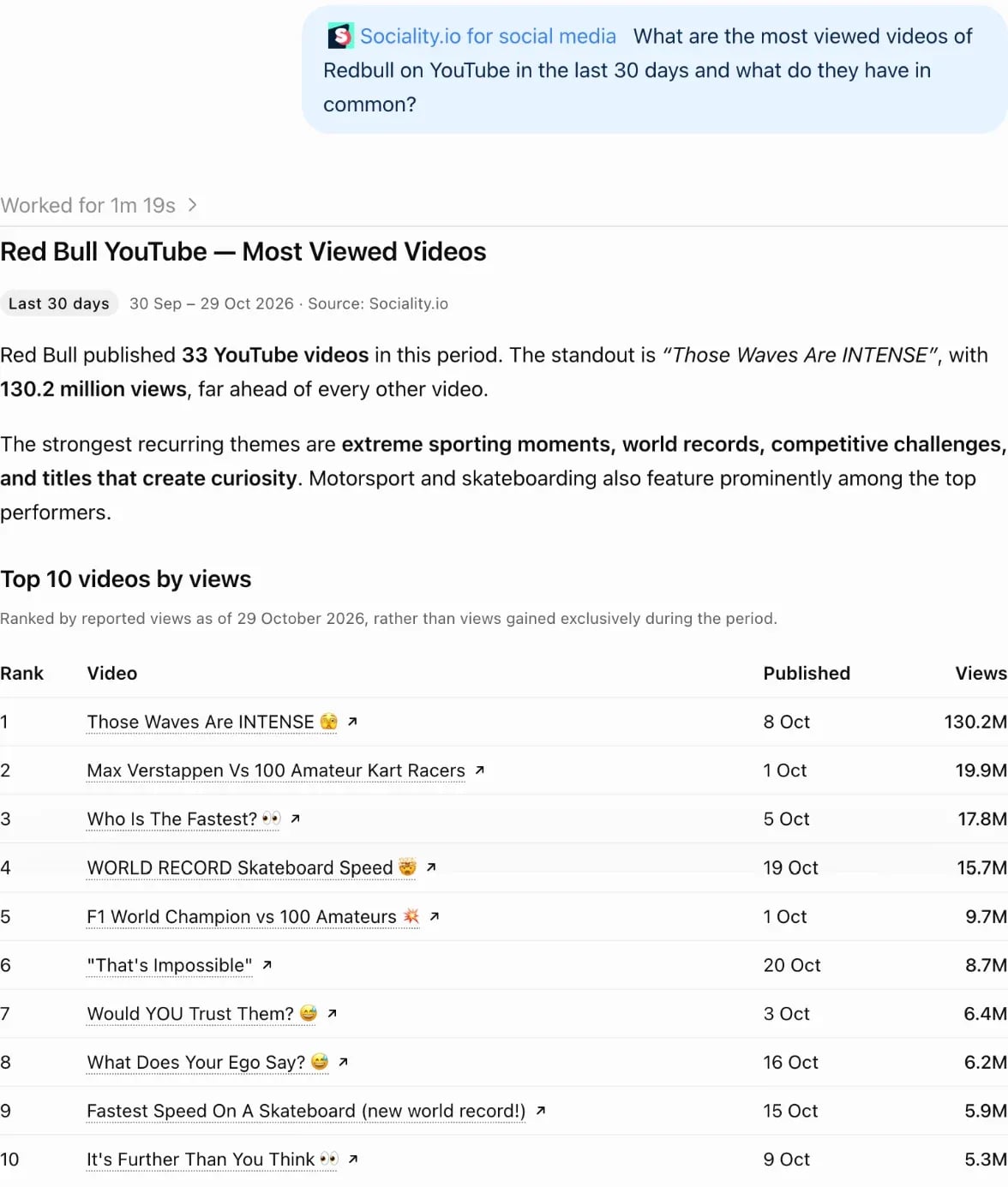
The answer ranks the videos by views and names the themes they share, so your next video brief starts from what already works.
Connect Sociality MCPFree to start: 1,000 credits, no credit card.
What to watch next
Two things are still moving, and each deserves a note in your reporting calendar. The first is the Studio redesign: in September 2026 YouTube announced new Insights and Research destinations that help you understand past video performance and find outlier videos, while its help pages still describe seven tabs (Overview, Content, Reach, Engagement, Audience, Revenue and Trends), so expect labels and layouts to differ between accounts for a while.
The second is metric definitions. YouTube’s developer revision history is where changes such as the 27 August 2026 update to how views and engaged views are defined appear first, and it is the place to check when an API-fed dashboard suddenly jumps.
YouTube analytics glossary
| Term | Definition | Why it matters / How to act |
|---|---|---|
| Impressions | Times your thumbnail was shown on YouTube, counted when it is visible for more than a second with at least half on screen. | Low CTR with high impressions: test a new title or thumbnail with stronger contrast. |
| CTR (Click-Through Rate) | How often viewers watched a video after seeing its thumbnail. | Pair CTR with average view duration and retention; high CTR with low retention means the promise and the video don’t match, so tighten the opening. |
| Views | Counted the moment a video starts to play, in every format since 24 August 2026. | Mark the change date on your reports and judge quality with engaged-view metrics. |
| Engaged views | Views where the viewer stayed past the initial seconds, not counting loops. | The base for average view duration, average percentage viewed and unique viewers. |
| Unique viewers | Estimated number of different viewers in a date range, across devices and signed-in and signed-out viewing. | Gauges true reach; combine with subscribers gained to judge acquisition efficiency. |
| Watch time | Total time viewers spent watching your videos. | Build series and playlists to extend session time. |
| AVD (Average View Duration) | Average minutes watched among those who stayed to watch. | Raise it by front-loading value, tightening edits and adding pattern interrupts. |
| APV (Average Percentage Viewed) | Average share of a video watched among those who stayed to watch. | YouTube publishes no target; compare videos of similar length and topic on your own channel. |
| Retention curve | Graph of how much of a video viewers keep watching over time. | Find drop-off moments, rewrite hooks and repeat what causes spikes. |
| Key moments | Retention report that highlights intros, top moments, spikes and dips. | Fix dips first and copy what creates spikes; compare with your typical retention. |
| Traffic sources | Where views originate (browse, Shorts feed, suggested videos, search, channel pages, external). | Balance Search (intent) with Suggested (discovery); tailor metadata and end screens. |
| Impressions and how they led to watch time | How well thumbnail impressions turn into views and minutes watched. | A check on thumbnail honesty and pacing; optimize until CTR and AVD rise together. |
| New, casual and regular viewers | Monthly audience split by how often viewers return. | Create series for regular viewers; use Shorts and high-intent keywords for new ones. |
| Subscriber growth | Net subscribers over time or by video. | Study the videos that drive subscribers; reuse their structure, topic and calls to action. |
| Monetized playbacks | Times a video was watched with ads. | Monitor alongside RPM; check eligibility and ad-friendliness if the rate drops. |
| CPM | What an advertiser pays for 1,000 ad impressions. | Context for niche value; it doesn’t equal your earnings, so use RPM for that. |
| RPM | What you earn per 1,000 engaged views. | Best profitability gauge; raise it with longer watch time, back catalog and end-screen flow. |
| End-screen CTR | Share of clicks on end-screen elements. | Keep to one or two focused calls to action; align the next video with the last topic. |
| Card CTR | Share of clicks on cards during a video. | Trigger cards at natural curiosity peaks and avoid early clutter. |
| Shorts vs. long-form | Square or vertical videos up to three minutes count as Shorts; other videos are long-form. | Use Shorts for reach and long-form to convert; analyze them separately to avoid skewed averages. |
| Trends tab | Channel-level view of what viewers across YouTube search for, including content gaps for Shorts. | Prioritize topics with high audience interest and few results; schedule quickly. |
| External referrers | Off-YouTube sources (sites, social networks, embeds). | Track campaigns with UTM parameters; point embeds to playlists to chain videos. |
| Playlists | Curated video groups that play in sequence. | Increase session time; theme by intent stage (how-to, reviews, case studies). |
Wrapping up: Turning data into growth
Good YouTube analytics work means listening to your audience through data. Every impression, click and second watched is feedback, showing you what resonates and what fades.
So before your next upload, open your analytics and ask:
- What made people stay last time?
- When did they tune out?
- What sparked the most conversation?
Then act on it. Adjust, refine, test again. Growth on YouTube is earned through attention, iteration and understanding, and that’s the difference between channels that post videos and brands that build momentum.
FAQs about YouTube analytics
Can I ask ChatGPT or Claude about my YouTube analytics?
Yes. Sociality MCP connects your YouTube channel, along with your other social accounts, to ChatGPT, Claude or Gemini, so you can ask about channel stats and recent video performance in plain language. For impressions, CTR and retention curves, YouTube Studio is still the source, and Sociality.io is the option when you want YouTube reported next to your other channels in one place.
How do I use YouTube analytics?
Open YouTube Studio, select Analytics from the left menu and start on the Overview tab. Use Content for channel-level questions, Reach and Engagement to understand a single video, Audience to see who watches and Revenue if you are in the Partner Program. Open Advanced Mode when you need comparisons, filters or exports.
How often does YouTube analytics update?
It depends on the report. YouTube says key metrics such as impressions and views are available within a few hours of publishing, the audience retention report typically takes one to two days, and Realtime compares a video’s first 60 minutes with its first 48 hours. Revenue is estimated first, with finalized earnings typically appearing between the 7th and 12th day of the following month.
What are unique viewers on YouTube?
Unique viewers is YouTube’s estimate of how many different people watched your content in the selected date range. It counts the same person once even if they watch on several devices, and it includes both signed-in and signed-out viewing. You can see it on the Reach tab and in Advanced Mode, where it is available for ranges of up to 90 days.
What is a good click-through rate on YouTube?
YouTube says half of all channels and videos have an impressions CTR between 2% and 10%, and it doesn’t set a target. CTR often falls as a video reaches more people, so compare each video with your own history and read watch time next to it. A high CTR with low retention means the thumbnail promised more than the video delivered.
How does YouTube count views now?
Since 24 August 2026, YouTube counts a view the moment a video starts to play in every format: Shorts, long-form videos and live streams. Partner Program earnings still rely on engaged views, and average view duration is still calculated from engaged views. Expect public view counts to rise faster from that date, and mark it on your charts.
When is the best time to post on YouTube?
Check When your viewers are on YouTube in the Audience tab. It shows when your viewers were online across YouTube during the last 28 days. Publish shortly before the busiest window so the video has time to gather early views, then compare results over two weeks before you change your schedule for good.
What’s the difference between views and impressions?
Impressions count how many times your thumbnail was shown, and YouTube registers one only when the thumbnail is visible for more than a second with at least half of it on screen. Views count videos that actually started playing. CTR is the share of impressions that turned into views, which is why the two numbers belong together.