



What is social media competitor analysis? A practical guide for 2026
Summarize this article via
A social media competitor analysis is a structured look at what the brands you compete with are publishing, how often they publish it, and how their audiences respond. Done properly it tells you two things. Where they are beating you, and where the gap is wide enough that you could walk into it this quarter.
We have run a lot of these, and the honest version is that the analysis is not the hard part. Pulling the numbers is. Platforms have spent the last few years closing the doors that made competitor research easy, and most guides on this subject still describe a world where CrowdTangle exists.
Below is the whole process, the metrics actually worth comparing, what you can still pull for free in 2026, and how to hand the repetitive half of it to an AI assistant.
The short version
- A competitor analysis compares the public activity of 3 to 5 rival accounts over a fixed window, on the same metrics, calculated the same way for each.
- Quantitative research tells you whether something worked. Qualitative research tells you why. Most teams only ever do the first one.
- CrowdTangle, the free tool social teams leaned on to watch competitor Pages, has not been available since 14 August 2024.
- LinkedIn went the other way. A free Company Page still tracks 1 competitor, and a Premium Company Page tracks up to 9.
- 59.5% of the marketers in our 2026 AI survey already use AI for analytics and reporting, which is exactly where competitor work is most repetitive.
What is a social media competitor analysis and why do you need it?
A social media competitor analysis is a repeatable review of the public social media activity of the brands you compete with, covering what they post, how often, how their audience reacts, and how they handle the people who complain. It is not a one-off audit. The value sits in running it the same way twice, so you can see what moved.
The reason to bother is narrower than most articles make it sound. You are not trying to copy anyone. You are looking for the things their audience clearly rewards that you are not doing, and the things every brand in your category does badly, because nobody has claimed that ground yet.
Types of competitors
You will have direct and indirect competitors. Direct competitors sell what you sell to the people you sell to. Indirect competitors solve the same problem with a different product, so they take the budget without ever showing up on your sales team’s radar.
On social there is a third group worth naming, and it is the one people skip. Attention competitors are the accounts your audience actually follows in your category, including creators, publishers and communities that sell nothing at all. They are not after your revenue. They are after the 3 seconds you need in the feed, and they are usually much better at getting them.
Research both types at the start, as a competitor and as a prospective customer. What did you like, what felt missing, and what would you want that neither of them offers? Write the answers down while you are still an outsider, because you only get one look with fresh eyes and you will never get it back.
To find competitors you do not already know, search your main keywords in Google and Bing, look at who keeps appearing, and split them into direct and indirect. Then ask yourself the following questions.
- Who are my competitors?
- What is their main keyword?
- What products/services do they offer?
- What is their strategy?
- What are their strengths and weaknesses?
- What are my opportunities as a competitor?
- Is there a powerful platform they are using that I should, too?
Add any other brand-related questions that would be useful to you. The point is to leave this step with a list you can defend, not the longest list you could build.
What to look at on your competitors’ profiles
Competitor analysis is broad. There is their website, their pricing, their positioning, their ads. We are staying on the social side here, because it is the part you can see in full without buying anything or talking to their sales team.
What you are reading for is their messaging and the formats they lean on. Images, carousels, short video, long captions, links out. Work out which ones perform for them, then work out whether that is the format winning or the topic winning. Those two get confused constantly, and only one of them transfers to your account.
Related reading. How to track and analyze competitors’ social media content strategy.
To find which platforms a competitor is actually active on, start at the bottom of their website where the social links usually sit, then check each one for a recent post. Plenty of brands still link to an account nobody has touched in 2 years, and that is a finding in itself.
If you would rather start from the tooling, our roundup of social media competitor analysis tools covers what each one actually pulls.
Qualitative and quantitative competitor research
Every competitor analysis splits into two kinds of research, and the searches that bring people to this page suggest the difference is not as obvious as it sounds. Quantitative research counts things. Qualitative research reads things.
Quantitative is follower counts, post counts, likes, comments, shares, saves and engagement rate. It is countable, it is comparable across accounts, and it is the half almost everyone means when they say they did a competitor analysis. It answers whether something worked.
Qualitative is the reading. The tone of their captions, the 3 themes they keep returning to, who appears in their photos and who never does, whether their community manager sounds like a person or a macro. It answers why something worked, and that is the half you can act on.
Take one competitor post and run both. The quantitative finding is that the carousel about ingredient sourcing pulled far more comments than anything else they posted that month. The qualitative finding is that almost every one of those comments was a question rather than a compliment, which means the post did not explain the thing it set out to explain. Same post, two conclusions, and only the second one tells you what to publish next.
Run only the quantitative half and you end up with a spreadsheet that says they are doing better, without saying what to change. Run only the qualitative half and you end up with opinions.
Analyze the competitors’ activity
To see how active a competitor’s pages really are, follow them and let the notifications do the work for a couple of weeks. Track how often they post and the times they choose, then compare that against when their posts actually earn engagement. The two frequently do not match, and that gap is one of the cheapest openings you will find. Cadence is also the clearest public signal of how big their team is.
For the wider conversation happening around them, a social listening setup picks up what people say when the brand is not tagged. Our list of social media listening tools covers the options.
Check their responsiveness
How a brand talks to the people in its comments is the thing competitors most often leave uncovered, and auditing it costs nothing. Sample 20 recent comments on each account. Count how many got a reply, how quickly, and whether the reply reads as written or pasted.
While you are in there, read what the complaints are actually about. Recurring complaints across a competitor’s comments are a product brief somebody handed you for free. If 3 of their last 10 negative comments are about delivery times and you are faster, that is a post, not a line in a spreadsheet. It is also the cheapest way to avoid collecting the same negative comments yourself.
Think of it this way. Your followers read the replies as closely as they read the comments. Answering an unhappy customer in public, politely, with an explanation or an apology, gets read by everyone who scrolls past. Ignoring them gets read too. Some social media managers still treat silence as a strategy for negative comments, and it is visible.
So if a competitor consistently fails to answer, take the opposite position and make it obvious.
The metrics worth comparing
Comparing the wrong numbers is how competitor analysis turns into busywork. These are the 7 that survive contact with a real reporting cycle.
| Metric | What it tells you | Where you get it |
|---|---|---|
| Follower growth rate | Whether the audience is actually growing, rather than how big it already is | Public follower counts, recorded on the same day each month |
| Posting frequency | How much content their team can realistically produce | Count posts per week on each profile |
| Engagement rate per post | Whether the content lands, independent of audience size | Interactions divided by followers, or by reach where you have it |
| Format mix | Which formats they are betting on this quarter | Tag their last 30 posts by format and total them |
| Top posts | What their audience rewards, as opposed to what the brand wants to talk about | Sort their recent posts by interactions |
| Response rate and time | How much of their community management is real | Sample 20 comments and check which ones got replies |
| Share of voice | How much of the category conversation belongs to them | Social listening across brand mentions |
One rule matters more than the list itself. Calculate engagement rate the same way for every account, including your own. Interactions over followers and interactions over reach give different answers, and mixing the two produces a comparison that looks rigorous and means nothing.
How to run a social media competitor analysis, step by step
The process runs to 5 steps, and the first 2 are where most analyses quietly go wrong.
- Pick 3 to 5 competitors and write down why each one qualifies. A rival your sales team keeps losing to belongs on the list. A brand you admire does not, unless it competes for the same audience.
- Fix the window and the metric set before you look at anything. 30 or 90 days, the same dates for every account, the same metrics calculated the same way. Deciding this afterwards is how you talk yourself into a flattering answer.
- Collect the numbers. By hand in a spreadsheet, or with a tool that pulls them for you. Both work in month 1. Only one of them survives month 6.
- Read the content. Go through the top 10 posts for each account and write one line on why each one worked. This is the qualitative half, and it is the half that gets skipped when the deadline is tight.
- Finish with 3 decisions and a date. Not 20 observations. Three things you will change, and the day you will run this again to find out whether they moved anything.
Here is what that looks like in practice. Say you run social for a mid-sized skincare brand. Your list is 2 direct rivals, 1 larger brand you are chasing, and 1 creator whose audience overlaps with yours almost completely. Same 30-day window for all 4. You find the larger brand posts half as often as you do and earns more per post, both rivals are leaning hard into short video, and the creator is doing the one thing none of the brands bother with, which is answering questions in the comments at length. Three decisions fall out of that on their own.
Where SWOT fits
SWOT gets bolted onto competitor analysis so often that it is worth saying what it is actually good for here. It is a summarizer, not a research method. You run it at the end, once per competitor, using the numbers and the reading you already have.
- Strengths. What they do that you measurably cannot match yet, such as a format they have mastered or a cadence you cannot staff.
- Weaknesses. The gaps you found in the comments, the formats they avoid, the platforms they have quietly abandoned.
- Opportunities. What nobody in the set is doing. Usually the most valuable cell and reliably the emptiest one.
- Threats. What they are clearly building towards, which you can read from what they have started posting in the last 60 days.
If a cell comes out empty, that is the finding. An empty Opportunities cell almost always means the competitor set is too narrow, not that the category is saturated.
Doing it manually or with a tool
There are 2 ways to do competitor research, by hand or with a tool that pulls the data for you. Which one suits you depends less on budget than on how often you intend to do it.
What the platforms still give you for free
This is the part that has changed most since this guide first went up. Competitor research used to run on free public data, and a good deal of that data has quietly been withdrawn.
The clearest case is CrowdTangle, which social teams and researchers used for years to watch competitor Pages on Facebook and Instagram. Meta’s own transparency center states that it has not been available since 14 August 2024, and points researchers to Meta Content Library and its API instead, which is a credentialed research product rather than something a social media manager can open on a Tuesday afternoon.
LinkedIn went the other way and built competitor tracking into Page analytics. A free Company Page can track 1 competitor, and a Premium Company Page raises that to 9, with a view of competitors’ trending original posts from the past 30 days, refreshed daily. If LinkedIn is a priority for you, we go deeper in our guide to competitor analysis on LinkedIn.
Everything else is manual observation. Follower counts, post counts, public interactions and comment threads are all visible on every platform, provided you are willing to count them yourself. Which is the entire argument for a spreadsheet, and eventually for a tool.
Doing it in a spreadsheet
To do it manually, open a spreadsheet, put one competitor per row and one metric per column, and fill it in on the same day every month. Our social media competitor analysis template is already laid out that way if you would rather not build one.
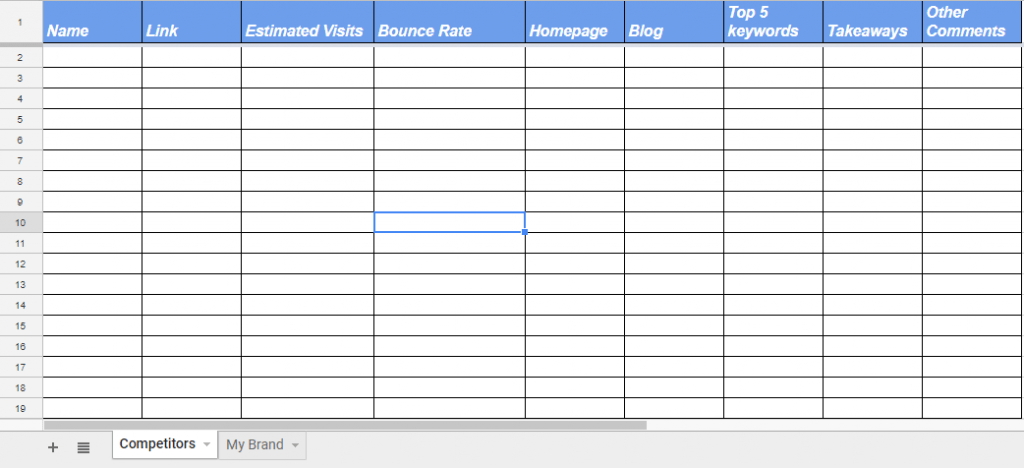
Manual works, and it keeps working right up to the point where you have 5 competitors across 4 platforms and 3 hours a month. Then it stops working, usually in the week you most need the numbers.
Using a competitor analysis tool
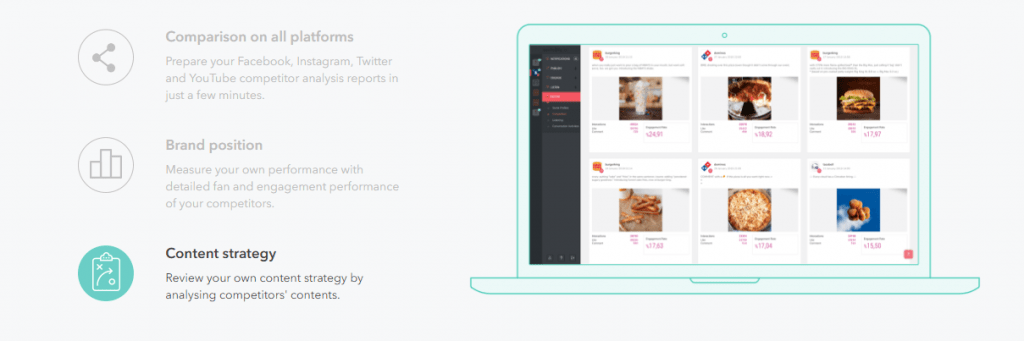
If you would rather not spend the afternoon counting, a social media management tool will pull most of it. Sociality.io’s competitor analysis module covers Facebook Pages, Instagram Business accounts and YouTube channels, compares up to 15 pages in a single report, and reads the last 100 posts from each one.
What you get back is follower trends, post volume, likes and comments, engagement rate and top posts, lined up against your own accounts. A newly added page takes roughly 45 minutes to populate, so add everyone the day before you plan to report rather than the morning of.
Suggested article. How to prepare an Instagram competitor analytics report in 5 minutes.
Either route gets you to the same answer. The tool just means you still have the energy left to act on it. You can start a 14-day trial and add your competitors before you decide.
How to use ChatGPT and AI assistants for competitor analysis
Google puts this question in its own People Also Ask box and almost nothing on page 1 answers it. Here is the honest version. A chat assistant is very good at the part of competitor analysis you dislike, which is reading 40 posts and spotting the pattern. It is no help with the part where somebody has to go and get the 40 posts.
Out of the box, ChatGPT, Claude and Gemini cannot see your competitors’ accounts. They reason well about whatever you paste in, which is why most people export a spreadsheet and paste it into a chat. That works, and it is the least enjoyable hour of the month.
The gap closes when the assistant can reach the data itself, which is what an MCP server is for. If the term is new, we have written up what a social media MCP server is.
The Sociality MCP server is that idea applied to social data. It exposes 4 tools, 2 of them built for this job. get_competitor_stats handles page-level comparison and get_competitor_posts handles post-level benchmarking, across Instagram, TikTok, LinkedIn, YouTube, X and Facebook. Connect it to ChatGPT, Claude or Gemini and the analysis becomes something you type. Compare our engagement rate against these 3 competitors over the last 30 days and tell me which formats they use that we do not.
It does not do the thinking. It removes the export step, which is what stops most teams running this monthly. For the wider workflow, see our guide to tracking social media analytics with AI and ChatGPT.
That is where the market is. In our 2026 AI in social media marketing report, 59.5% of the marketers we surveyed said they use AI for analytics and reporting, level with content ideation and ahead of everything else.
Social media competitor analysis FAQ