
How to connect Facebook to Claude comes down to adding a connector, an MCP server that sends you to Facebook to pick your Pages and approve access. Meta’s own MCP servers cover ads, developer apps and WhatsApp, so you’ll need a separate connector for organic Facebook Page insights.
I connected our own Facebook Page to write this, so the steps below show both assistants and the real Facebook screens you’ll click through. Then I put the connector to work on BMW, Mercedes-Benz and Porsche to show where public competitor data stops.
TL;DR: 3 facts before you connect Facebook
Meta sets the limits every Facebook connector works within, and 2 of them changed in the past year.
- Meta runs 3 remote MCP servers for ads, developer apps and WhatsApp, as of 26 November 2026.
- Across all API versions, Meta retired impressions and
page_fanson 15 November 2025. - Most Page Insights refresh every 24 hours, with 2 years of history and a minimum of 100 Page likes.
Can Claude connect to Facebook?
Yes, Claude can connect to Facebook, and you have 3 ways to get Page data into a chat.
- Add a directory connector such as Sociality MCP, which sends you to Facebook to sign in and pick the Pages you want to share.
- Add a third-party or open-source Facebook MCP server by URL.
- Upload an Insights CSV from Meta Business Suite.
Use the directory for reports you run regularly from a chat, a custom URL for specific tools, or a CSV for a single report. The directory setup also works for Instagram and YouTube.
Is there an official Facebook MCP?
As of 26 November 2026, organic Page insights and posts are outside the scope of Meta’s 3 remote MCP servers.
| Server | What it’s for | Reads your Page’s organic insights? |
|---|---|---|
| Meta Ads MCP | Campaign analysis and ad, campaign and catalog management | No |
| Meta Social Technologies MCP | Developer apps and integrations (beta, formerly Meta Developer Tools MCP) | No |
| WhatsApp Business Tools MCP | Tools for businesses on WhatsApp | No |
Pair Meta Ads MCP for campaign reporting with a Page connector for organic results. For the basics, see MCP for marketing.
What you need before you connect
Before you start, check 6 things on the Facebook, Sociality.io and assistant side, because a missing role is the usual reason a Page doesn’t show up.
- A Facebook profile with full control of the Page, directly or through a Business portfolio role, since Meta’s Insights API requires someone who can perform the
ANALYZEtask. - A Sociality.io workspace owner or admin role to connect accounts with Sociality MCP.
- A Page with at least 100 likes to return Insights.
- Claude connector access. Plugins has replaced Customize on Free, Pro, Max and Ultra, with Team from 30 November 2026 and Enterprise in the following weeks. Free users can add 1 custom connector. On Team or Enterprise, an Owner must enable connectors for the organization.
- ChatGPT plugin access, which you can check by looking for Install plugin or Connect on the Sociality.io listing under Plugins in your workspace.
- A Sociality.io plan slot per new Page. Connecting uses no credits.
How to connect Facebook to Claude
Add Sociality.io to Claude, then authorize your Pages from a chat.
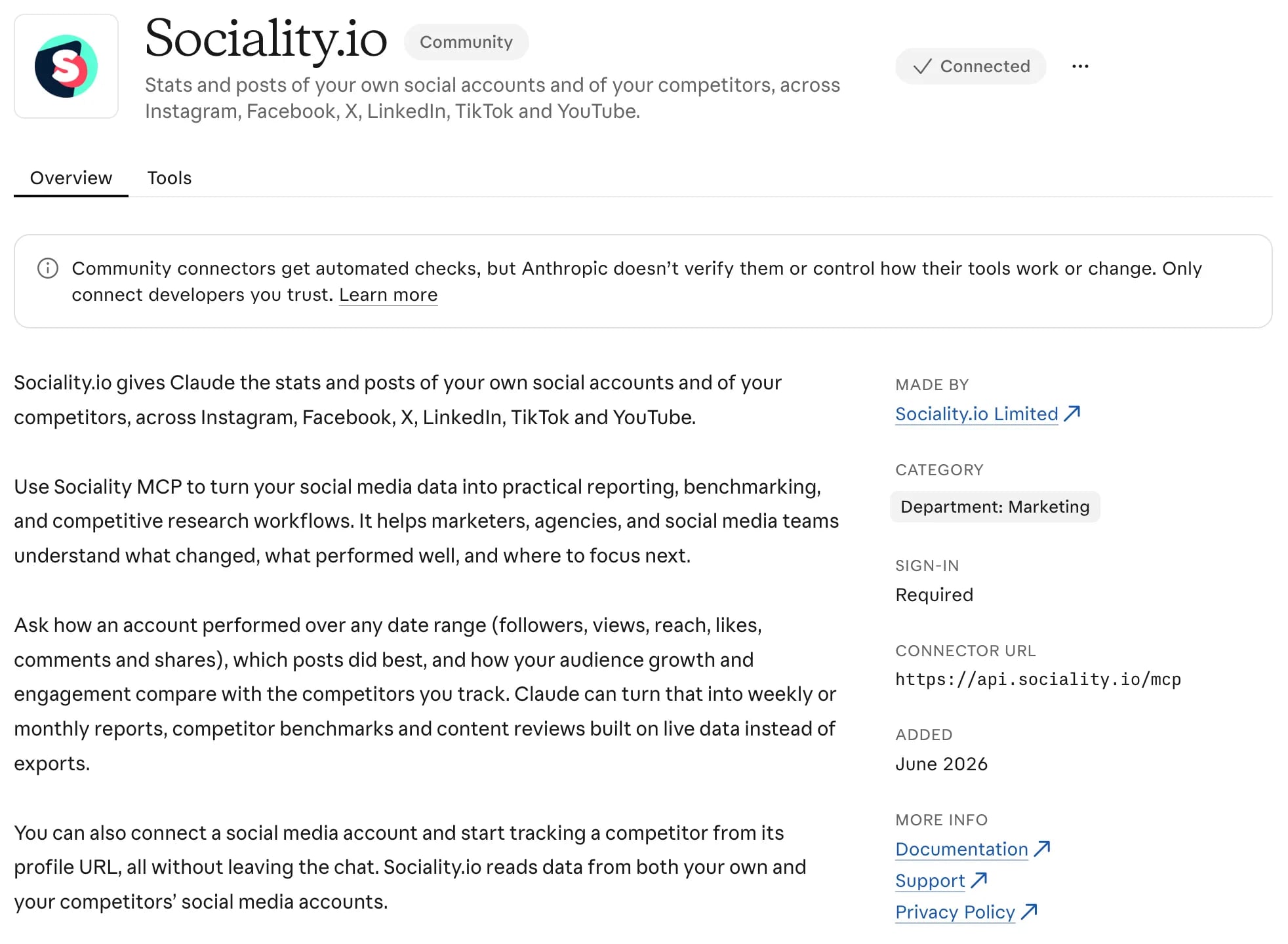
Step 1: add Sociality.io from Claude’s directory
Open Plugins in Claude’s sidebar, or Customize, which our Team account still showed on 27 November 2026. Find Sociality.io in Claude’s directory, select Connect and sign in. In a chat, switch it on under + > Connectors.
Step 2: ask Claude to connect your Facebook Page
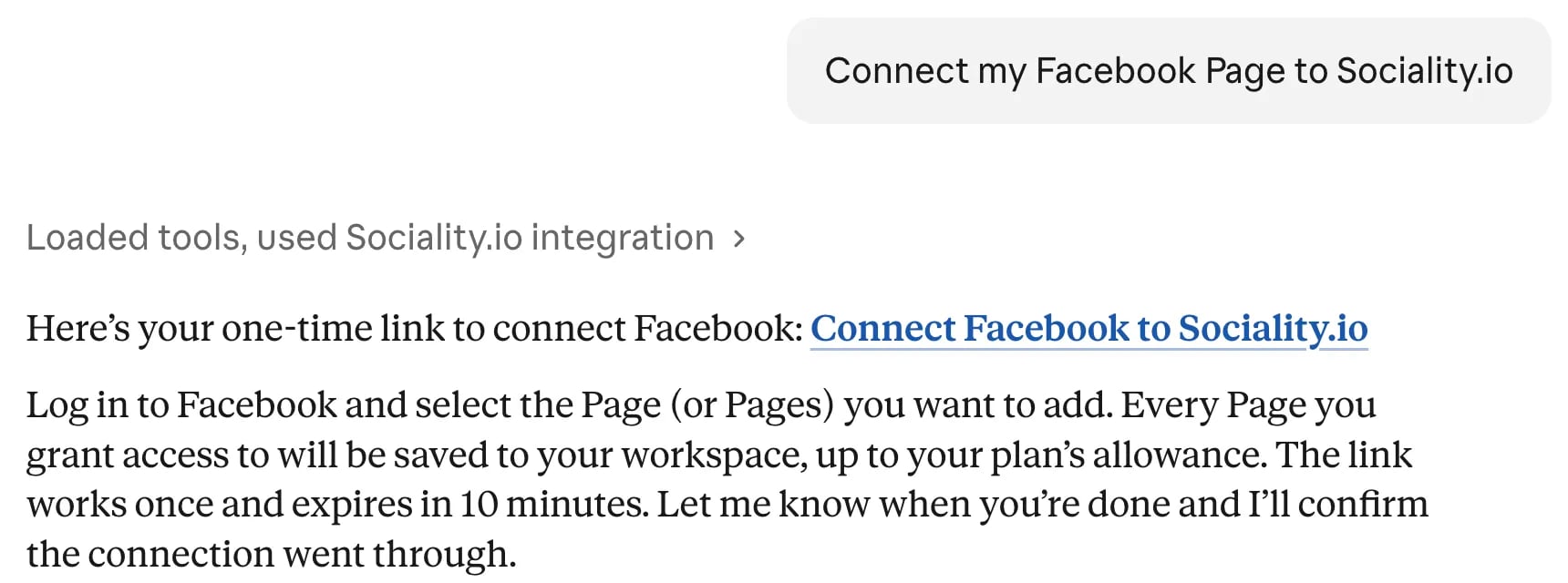
Ask Claude for a connection link in the same chat and select Allow once if it asks to run the tool.
Connect my Facebook Page to Sociality.io
Claude replies with “Connect Facebook to Sociality.io,” a one-time link that works once and expires in 10 minutes.
Step 3: choose your Pages and businesses
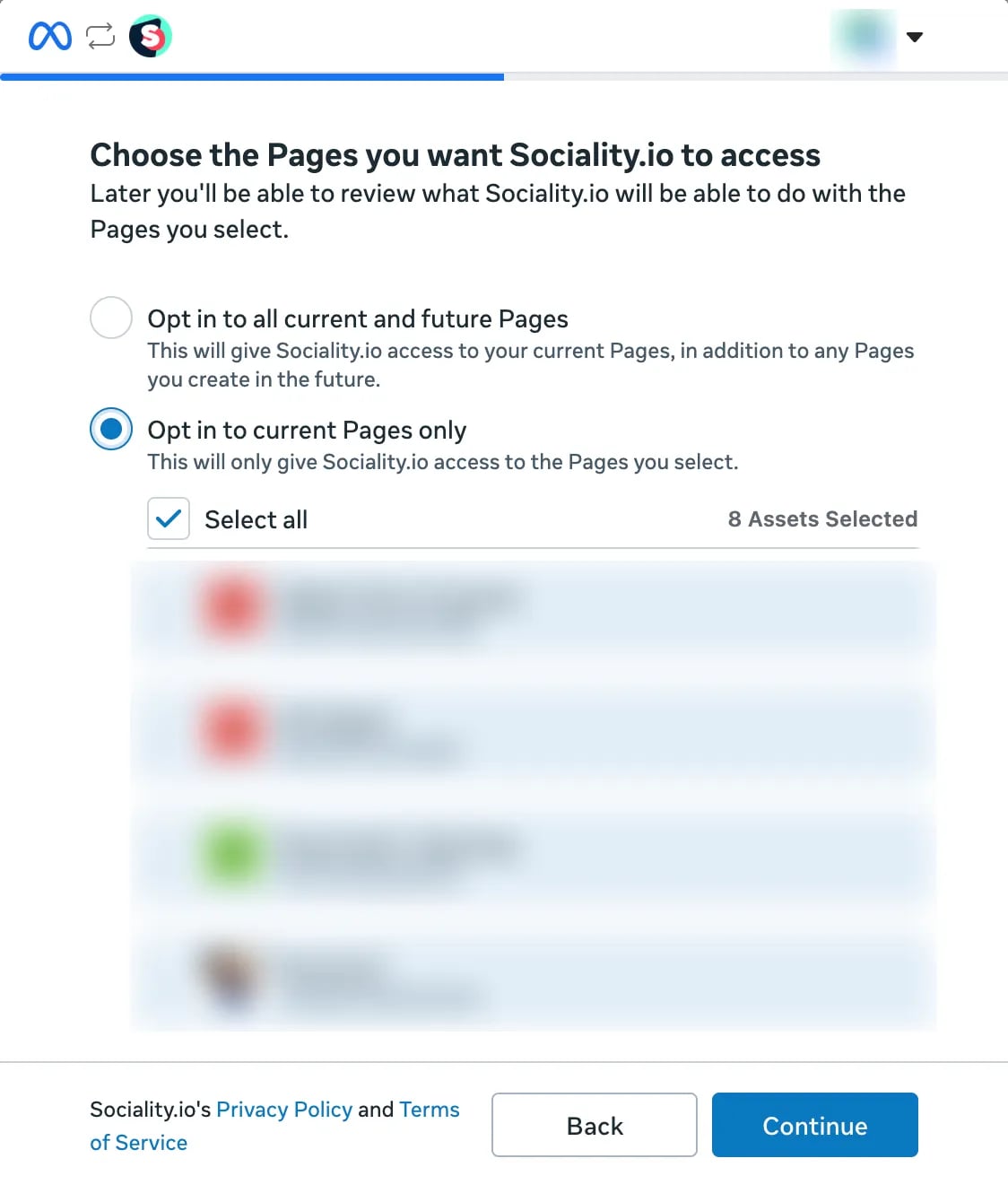
Open the link and Facebook asks whether to continue as you. If you’ve connected Sociality.io before, choose Edit settings rather than Continue, because that’s the only way to change the Page list.
“Opt in to all current and future Pages” includes Pages you add later, while “Opt in to current Pages only” lets you pick from those you manage now.
Untick any Page you don’t need. Every ticked Page goes into your Sociality.io workspace, so all 8 I left ticked were saved. You get the same 2 options for Businesses.
Step 4: review access and finish in Facebook
Review the 6 items Facebook lists, then click Save and Got it.
- Access your Page and App insights
- Manage your business
- Read content posted on the Page
- Manage accounts, settings, and webhooks, and access content enforcement data for a Page
- Read user content on your Page
- Show a list of the Pages you manage
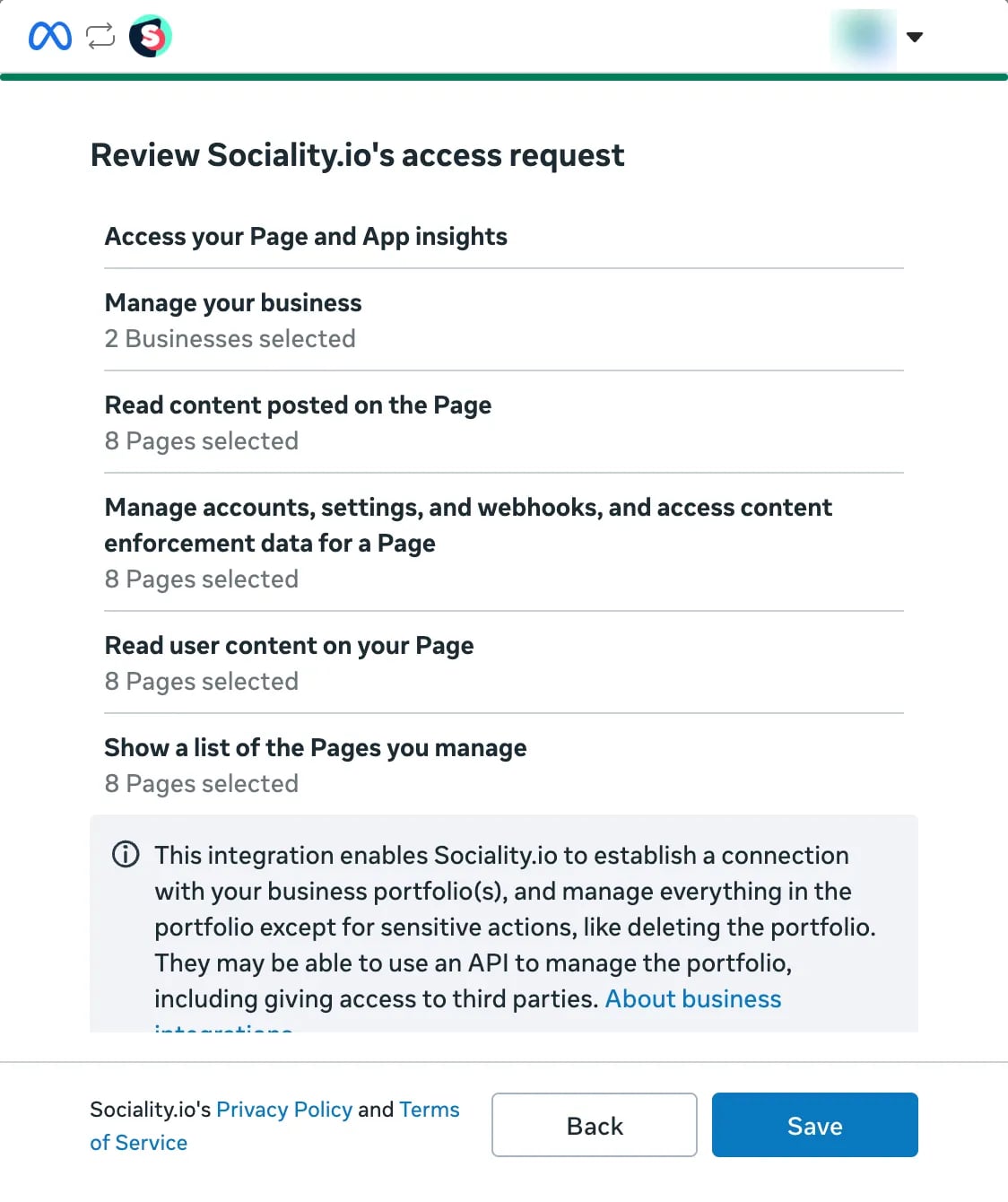
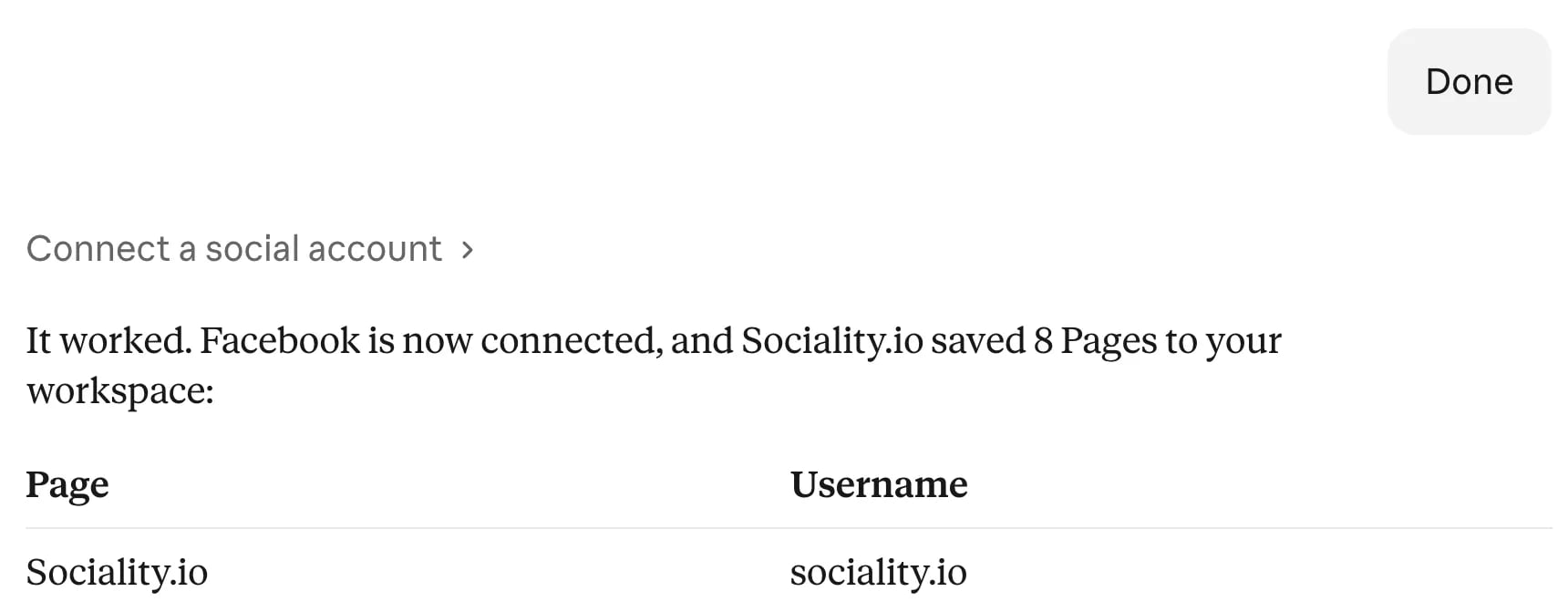
The connection registers after Got it sends you to Sociality.io’s “Accounts connected” page, which is your cue to tell Claude you’re done.
Step 5: let Claude confirm the connection
Say “Done” so Claude can check which Pages were saved. I said it before clicking Got it and saw “pending.” If you see that status, reopen the link if it’s still valid, or ask for a new one and finish the Facebook steps.
How to connect Facebook to ChatGPT
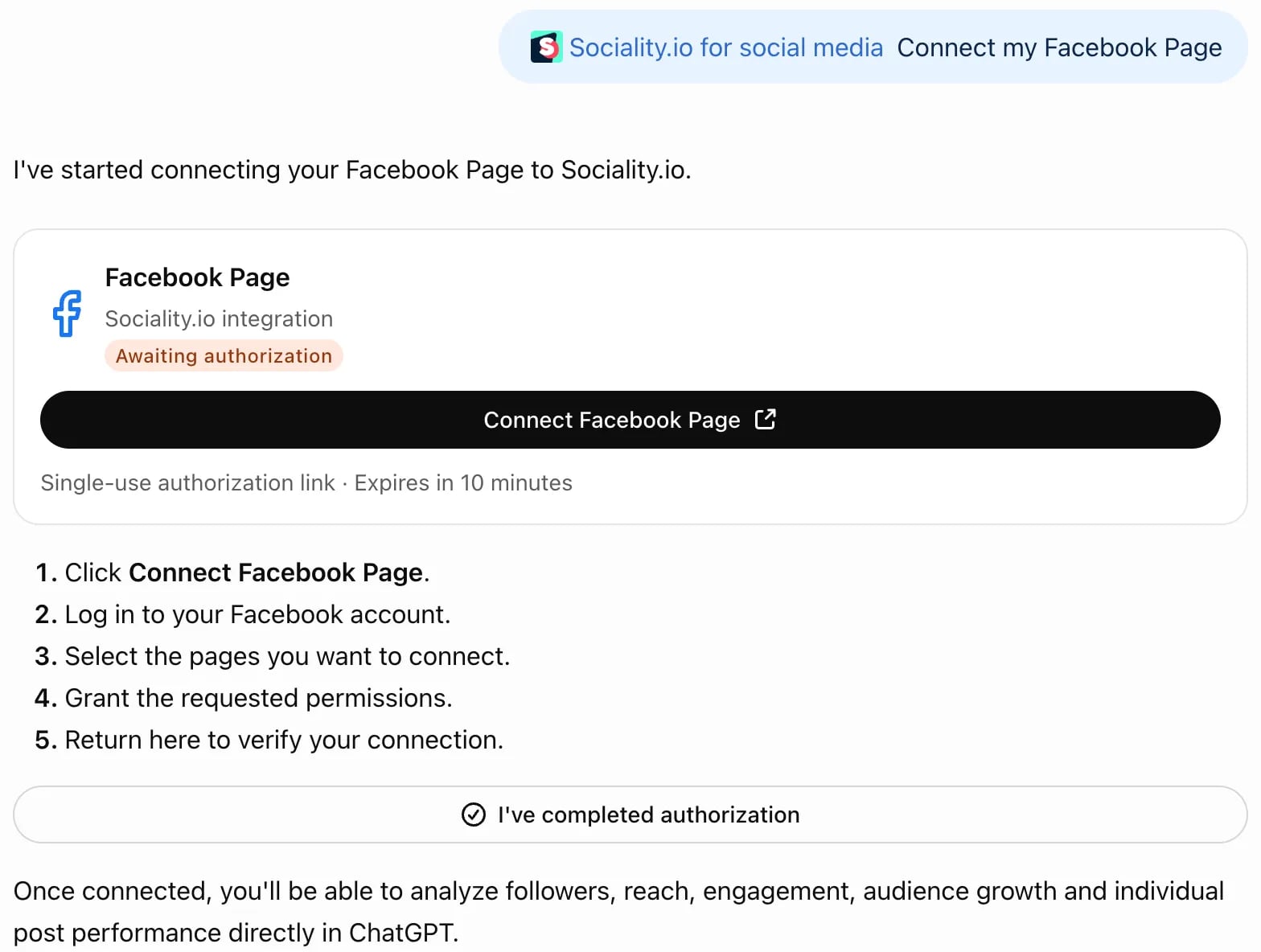
To connect Facebook to ChatGPT, find “Sociality.io for social media” under Plugins in the sidebar, select Install plugin if shown, then Connect if prompted, and sign in. Use @ to select it and ask to connect your Facebook Page.

ChatGPT shows a “Connect Facebook Page” card with “Awaiting authorization,” a single-use link that expires in 10 minutes, and an “I’ve completed authorization” button. Finish the same Facebook steps, then click it.
To disconnect in ChatGPT, go to Settings > Plugins > Sociality.io > Connected accounts or Connection > ••• > Disconnect.
Your Page vs a competitor’s: what Claude and ChatGPT can see
Sociality MCP reads your Page Insights and public follower and post data for competitors you track.
| Metric | Your Page (you connected it) | A competitor’s Page (public data) | Only in Meta Business Suite or Ads Manager |
|---|---|---|---|
| Followers | Follower count | Follower count over time (the only Page-level stat) | |
| Views and unique viewers | Both available | No | |
| Views from followers vs non-followers | Both available | No | |
| Organic vs ads views | Both available | No | Campaign-level results in Ads Manager |
| Video views | Video views and 30-second views | No | |
| Follower cities and countries | Follower counts by city and country | No | |
| Per-post reactions by type | Counts by reaction type | Like, love, haha, wow, sad and angry | |
| Comments and shares | Per-post counts | Per-post counts | |
| Engagement per post | Reactions, comments and shares combined | Same total, plus engagements per 1,000 followers | |
| Per-post views, reach and link clicks | Available | No |
On 15 November 2025, Meta replaced Page and post impressions with views, and page_fans with page_follows. Page views (page_media_view) count plays or displays, so you can’t compare today’s figures directly with older impression and fan reports. See our Facebook analytics guide for more.
I asked Claude about BMW, Mercedes-Benz and Porsche on Facebook
I compared 3 public Pages we track in Claude and ChatGPT through Sociality MCP on 27 November 2026. Sociality.io’s Facebook Page had about 4,300 followers and 170 views from 1 to 25 November, so I left benchmarking to the car brands.
Prompt 1: 3 Pages, 25 days of posts
I asked for medians so a big post couldn’t skew the comparison.
Using Sociality.io, compare the Facebook posts that BMW, Mercedes-Benz and Porsche published from 1 to 25 November 2026. For each brand, give the number of posts, the mix of post types, median engagements per post, median engagement rate and its top post. Show one table, then a 3-line verdict on which brand got the most out of each post.
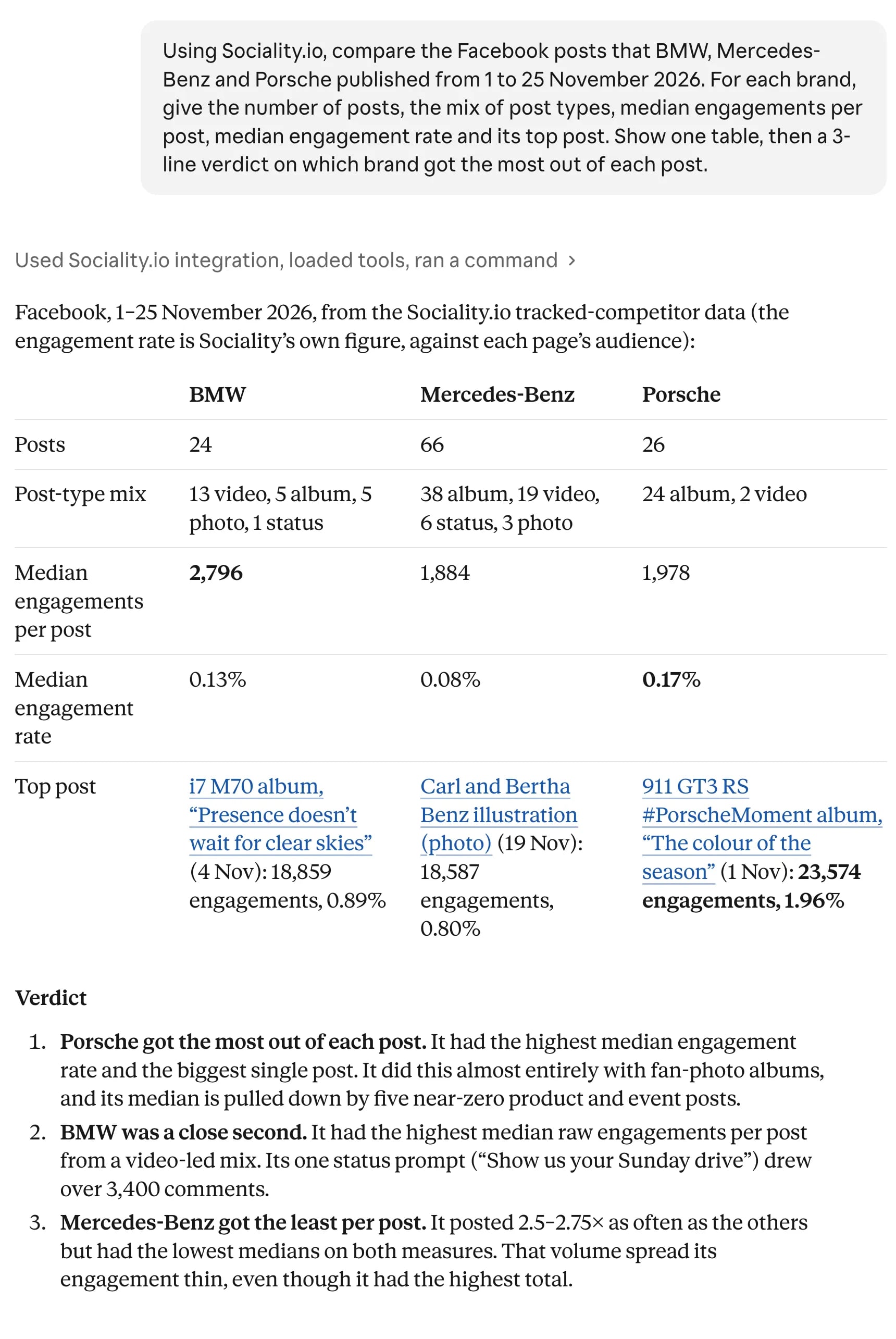
Claude ranked Porsche first, with BMW close behind and Mercedes-Benz last, using median engagements per 1,000 followers to judge which brand got the most out of each post. Each brand led on a different measure.
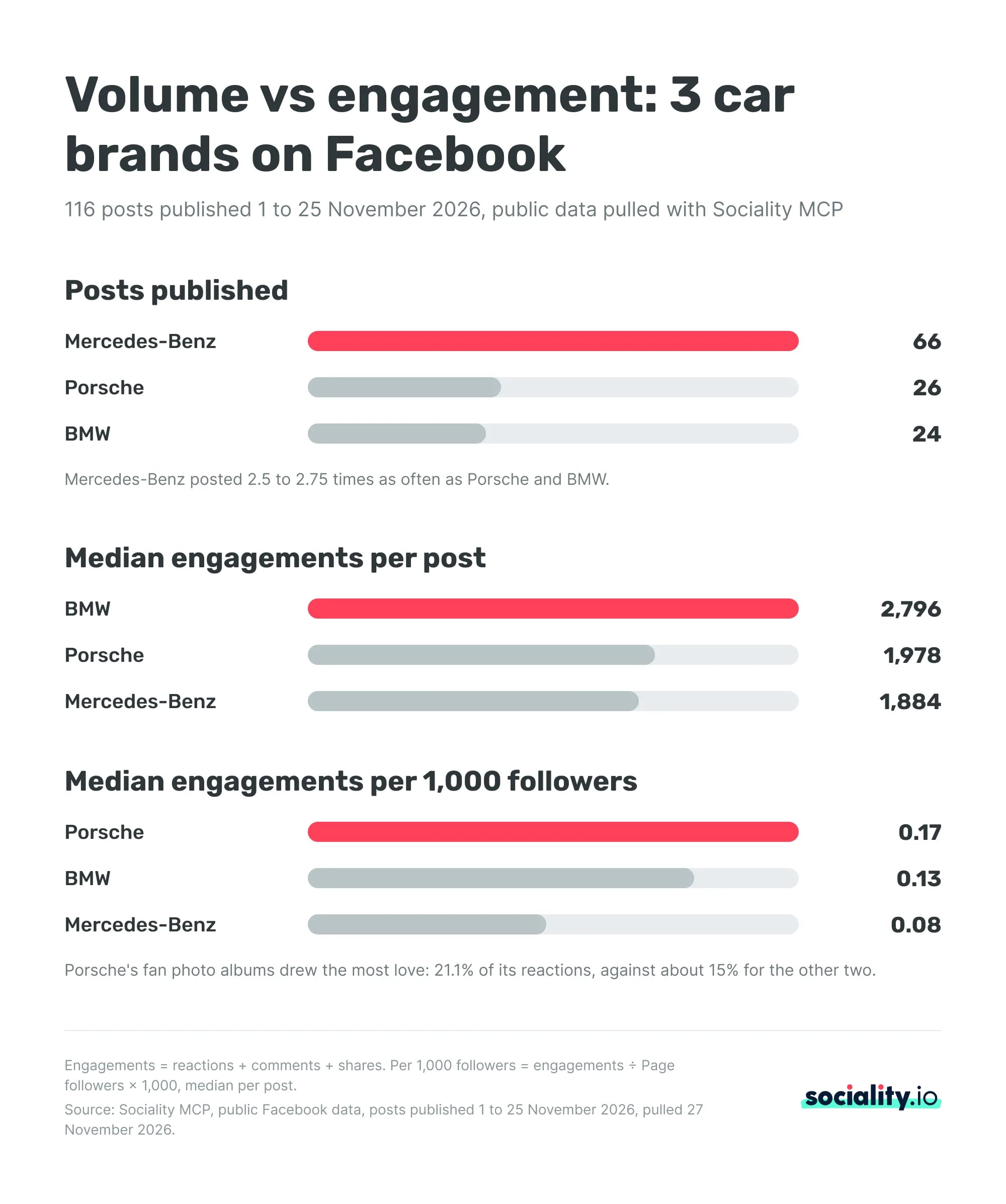
- BMW (about 21.3M followers) led with 2,796 median engagements per post and 0.13 per 1,000 followers across 24 posts (13 videos, 5 albums, 5 photos, 1 status). Its top post was the i7 M70 album “Presence doesn’t wait for clear skies” (4 November), with 18,859 engagements. Its lone status, “Show us your Sunday drive,” got over 3,400 comments.
- Mercedes-Benz (about 23.3M followers) posted 66 times (38 albums, 19 videos, 6 statuses, 3 photos), 2.5 to 2.75 times as often as its rivals, which gave it the highest total engagement. It ranked last on both medians, at 1,884 per post and 0.08 per 1,000 followers. A Carl and Bertha Benz illustration (photo, 19 November) led with 18,587 engagements.
- Porsche (about 12.0M followers) published 26 posts (24 albums, 2 videos), with a median of 1,978 engagements per post and the highest median per 1,000 followers at 0.17. Its 911 GT3 RS #PorscheMoment album “The colour of the season” (1 November) led the comparison with 23,574 engagements.
I ran the same prompt in ChatGPT, with the same Sociality.io data behind it.
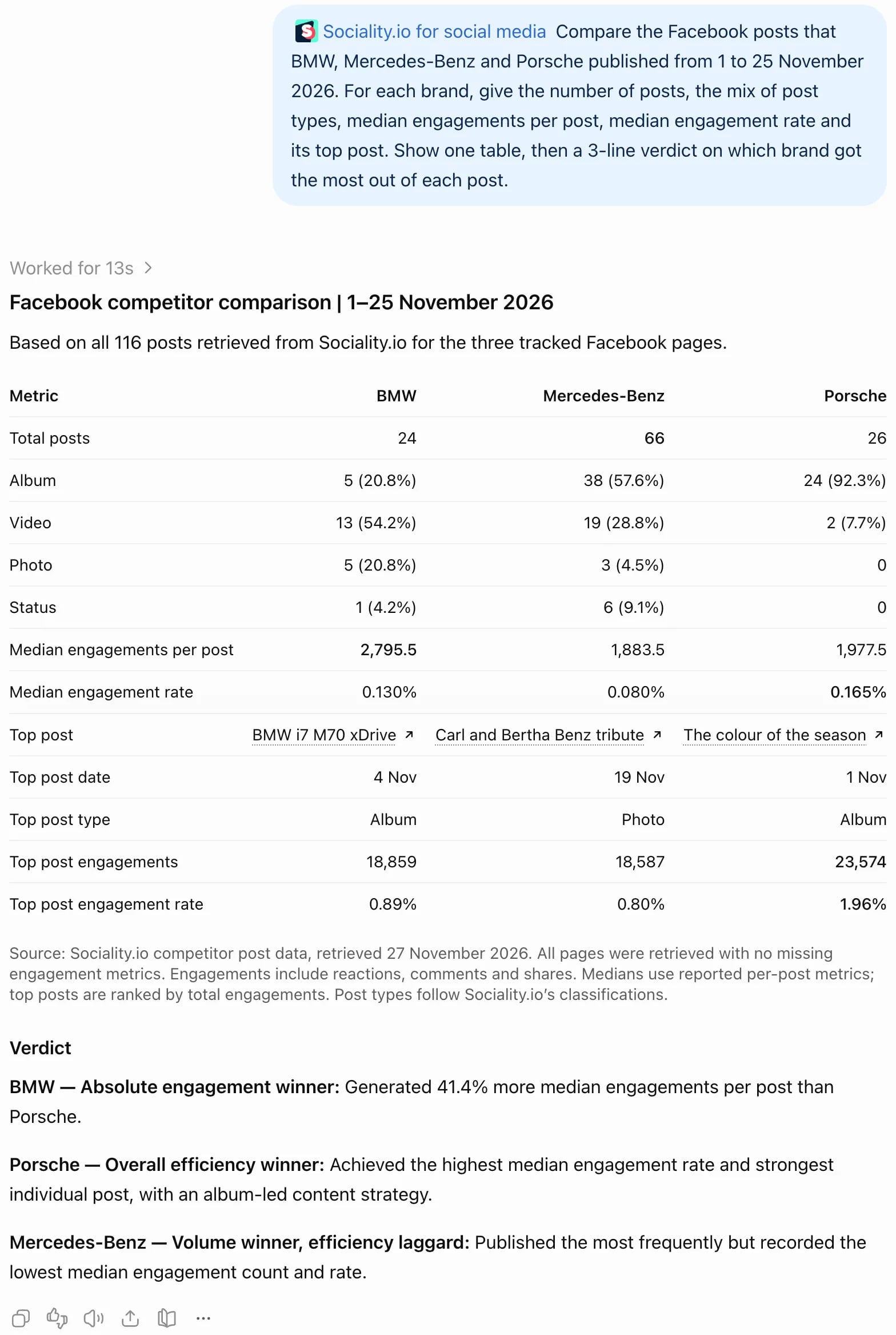
ChatGPT took 13 seconds and added post-type percentages. It returned the same medians unrounded (2,795.5, 1,883.5 and 1,977.5) and called BMW the “absolute engagement winner” (41.4% above Porsche on median engagements per post), with Porsche first on efficiency. Check both columns before adopting either verdict.
Prompt 2: the follow-up that earns its keep
I asked which posts earned the love.
Now break each brand’s reactions down by type. Which brand gets the highest share of love reactions, and which posts drove it?
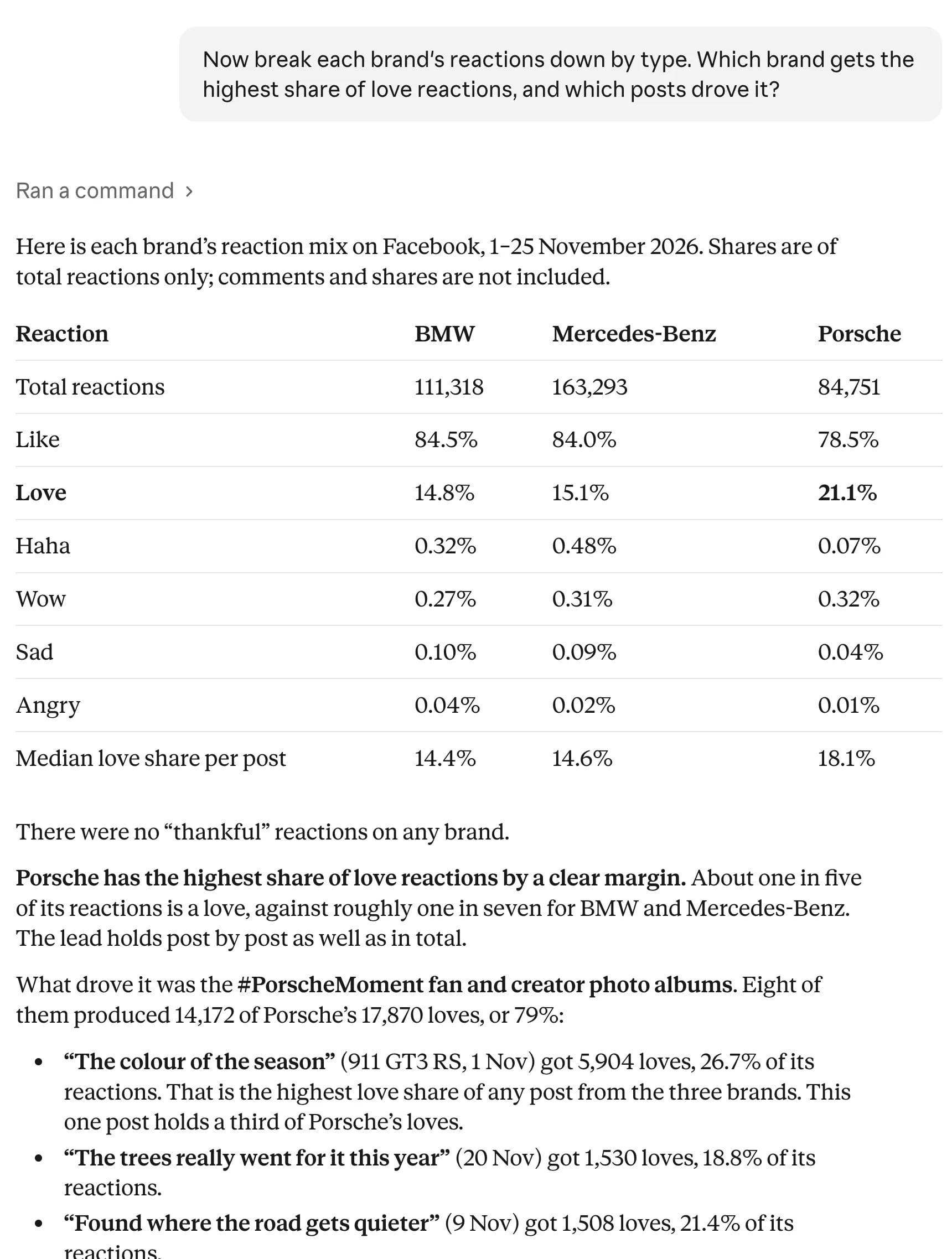
Porsche had the highest share of love reactions at 21.1%, followed by Mercedes-Benz at 15.1% and BMW at 14.8%, with median shares per post of 18.1%, 14.6% and 14.4% in that order. Likes made up 78.5%, 84.0% and 84.5%, respectively. Not one post got a “thankful” reaction.
Porsche’s 8 #PorscheMoment fan and creator albums drew 14,172 of Porsche’s 17,870 loves (79%). “The colour of the season” drew 5,904, about 1/3 of Porsche’s loves, and led all posts at 26.7% love. Black Week, accessories and watch posts sat near the bottom.
The Benz illustration drew 3,930 loves (23.0% of its reactions) and 657 of Mercedes-Benz’s 776 haha reactions. BMW’s loves were spread more evenly. Its i7 M70 album drew 2,954.
Early-November posts had more time to collect engagements than posts from 24 November because totals keep growing after publication. Both assistants printed the rate with a percent sign, but the unit is engagements per 1,000 followers. Reach, views and clicks stay with the Page owner, and competitor history starts when you begin tracking.
If you want to repeat the test on your own rivals, our Facebook competitor analysis method covers which numbers compare fairly.
What to ask Claude or ChatGPT about Facebook
The best questions name the Page, the dates and the metric, so the assistant doesn’t have to guess what “last month” means.
Your own Facebook Page
Your own Page gets the deeper numbers, so start with questions you’d bring to a content meeting.
- Which videos we published last month had the most 30-second views?
- Which cities have the most followers, and how many followers do we have in each city at the top of the list?
- How much of our Page’s viewing came from ads last month?
For a weekly report, ask for both audiences.
Show weekly views from followers and non-followers for our Facebook Page over the last 4 complete weeks. Flag the biggest change in non-follower views and give me the 2 weeks and counts behind it.
Competitors’ Facebook Pages
For competitors, stick to public posts and the reactions, comments and shares under them.
- Which competitor posts published last month got the most comments, and which of those posts asked readers to share something about themselves?
- For each competitor, which post type had the highest median engagement last month?
Sociality MCP connects your social accounts to ChatGPT, Claude or Gemini, so you can ask about Facebook in plain language and get answers from your Sociality.io data. For example:
What are the top engaged posts of Redbull on Facebook in the last 30 days and what do they have in common?
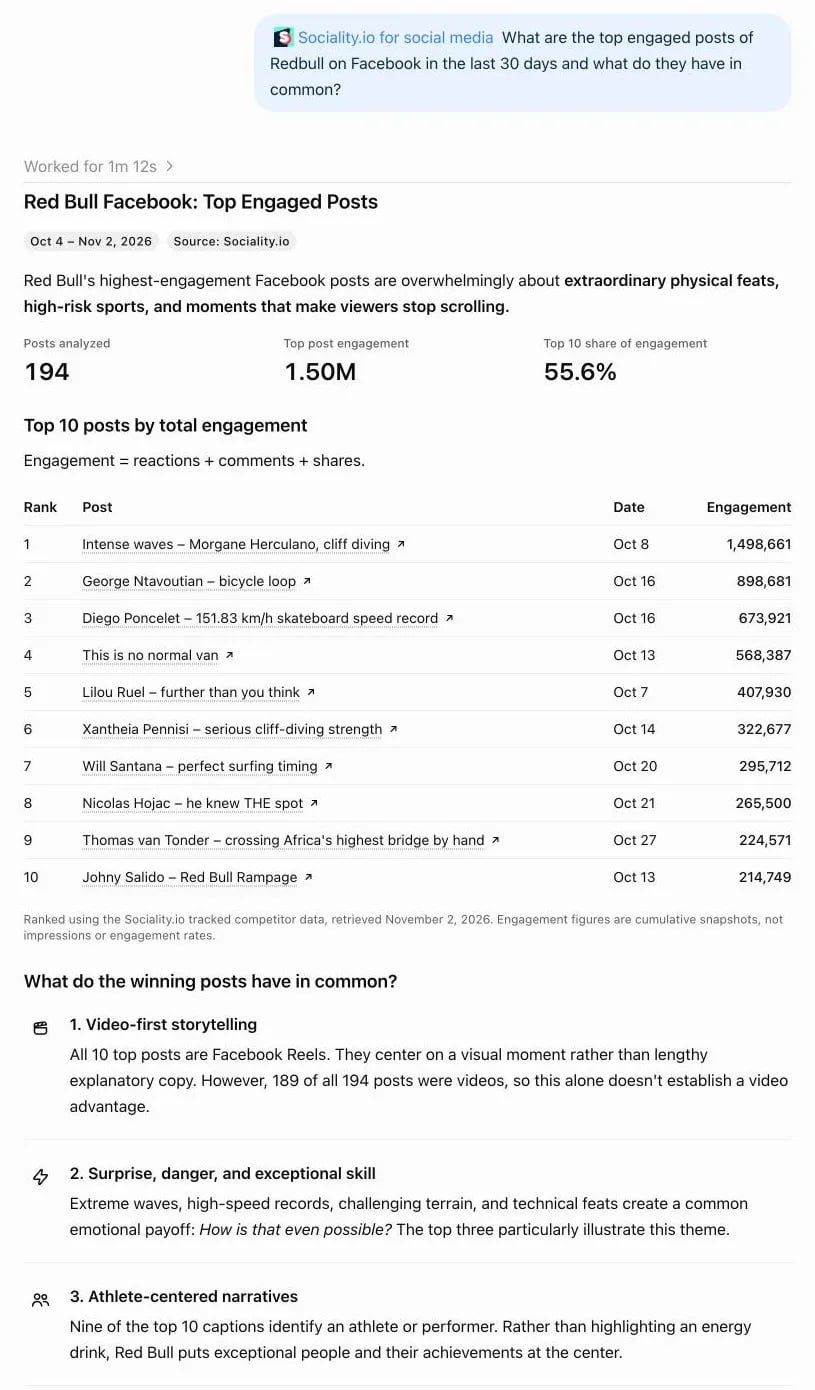
The answer ranks the posts by engagement and names what the best ones share, so you can benchmark a competitor's Facebook Page without opening it or exporting a spreadsheet.
Connect Sociality MCPFree to start: 1,000 credits, no credit card.
Other ways to get Facebook data into Claude or ChatGPT
Use a connector for reporting or upload an Insights CSV for a question you only need to answer once.
| Tool | What Facebook data | Assistants | Setup | Free option |
|---|---|---|---|---|
| Windsor.ai | Page Insights and publishing. Separate public competitor and Meta Ads sources. | Claude and ChatGPT | Claude directory or ChatGPT connection | 1 source, last 30 days |
| Porter Metrics | Facebook Insights with publishing and moderation actions | Claude and ChatGPT | Add the MCP server by custom URL | MCP included. Free keeps 15 days of chat data. |
| Metricool | Own Page analytics, planner and competitor benchmarks | Claude and ChatGPT | Use Metricool’s official connectors | Connectors on Free, with 5 competitor profiles |
| Composio | Page and Post Insights with publishing and comment tools | Claude and ChatGPT | Set up its hosted Facebook toolkit | Up to 10,000 calls a month |
| Zapier | Page Post Insights and publishing | Assistants with compatible MCP access | Connect the Facebook Pages MCP | Free MCP calls through 5 January 2027, then plan task rules |
| Meta Ads MCP or Pipeboard | Ads and campaign data only | Assistants with compatible MCP access | Use Meta’s official endpoint or Pipeboard’s hosted server | Pipeboard has a free plan |
| Meta Business Suite export | Page Insights snapshot, sometimes with extra columns | Claude and ChatGPT | Download Insights CSV and upload | Free export |
For servers beyond Facebook, see our social media MCP servers compared.
Connected but your Facebook Page is missing?
Most missing Pages come down to the Page list or a role, so work through these 6 checks in order.
- Reconnect, choose Edit settings and tick the missing Page before saving.
- Check that you have full control of the Page through your Facebook profile or your role in the Business portfolio that holds it.
- Replace a used or expired link. My link timed out mid-flow and Claude sent a fresh one. Each lasts 10 minutes.
- If you closed the tab before Got it, finish the authorization so Facebook sends you back to Sociality.io and clears the pending status.
- Page Insights stay empty below 100 likes.
- If numbers differ from Business Suite, check the metric and dates. Views replaced impressions, most Insights refresh every 24 hours, and history goes back 2 years.
Is it safe to connect Facebook to Claude or ChatGPT?
The safety of the connection depends on the Facebook access you grant and the tools the assistant can use. Facebook lists access to insights, Page and user content, your Page list, Page controls and business management. “Manage your business” goes beyond analytics. Facebook’s note says the integration can manage everything in the portfolio except sensitive actions, like deleting the portfolio, so have the client’s own admin authorize access.
Sociality MCP’s tools read published data, connect accounts and add competitors. They can’t publish, schedule, reply or delete, and the connection keeps your access token out of view.
Sociality.io also holds its own platform to enterprise-grade security standards, with a firewall, intrusion detection and DDoS protection around its cloud network, TLS in transit and encryption at rest, two-factor authentication, single sign-on for enterprise customers, role-based access and yearly third-party penetration tests. Our security page has the full list.
Revoke access in Facebook under Settings > Your Activity > Business Integrations. To remove the Page from your workspace and the plugin connection in your assistant, disconnect it in Sociality.io and go to Settings > Plugins.
On Claude’s consumer plans, chats used to improve models exclude raw connector content. Anthropic excludes commercial plan data from training by default. ChatGPT excludes app data from training by default on Business, Enterprise and Edu, and may use it on Free, Go, Plus and Pro if “Improve the model for everyone” is on.
Wrapping up 👋
Once you’ve connected the right Facebook Page, ask for a number you’d put in your next report. Use views and unique viewers for your own Page, and public reactions and comments to see which competitor posts got a response.
For a report that needs both, Sociality MCP is the connector I’d add first to ask about my Page and the competitors I track in the same chat. I’d start with last month’s posts and check the units before sharing the answer.
FAQs about connecting Facebook to Claude
Can I ask Claude or ChatGPT about my Facebook Page insights?
Yes. Once you’ve authorized the Page, ask either assistant for views, unique viewers, follower locations or video views for the dates you specify. Sociality.io is the best fit when you want your Page and the competitors you track in one place: see the metrics in the Sociality.io dashboard, or ask about the same Page in Claude or ChatGPT with Sociality MCP.
Is there an official Facebook MCP server?
No server on Meta’s list reads organic Page Insights or posts as of 26 November 2026. Its official servers cover ads, developer apps and WhatsApp. To ask Claude or ChatGPT about organic performance, add a Page connector or upload a Meta Business Suite CSV for the dates you need.
Does the Meta Ads MCP show organic Page data?
No. Use it to report on Meta campaigns. To include organic Facebook Page views or follower trends in the same report, pull those figures through a Page connector with Insights access or bring in a Meta Business Suite export. Give both sources the same date range.
Why can’t I find my Facebook Page when I connect it?
Check that the Page was selected. If it’s missing from the list, check that your Facebook profile or Business portfolio role gives you full control of the Page. Reconnect, choose Edit settings and tick it before saving. Click Got it and wait for “Accounts connected” before returning to the chat.
Can Claude see a competitor’s Facebook reach or views?
No. Facebook keeps reach and views available to the Page owner. For a competitor you track, Claude can compare public follower counts and post activity, including reactions by type, comments and shares. History starts when you track the Page, so ask which dates are available before requesting a comparison across months.
Can Claude read a Facebook post from a link?
Not reliably. Facebook’s robots.txt file disallows many AI crawlers, and even a link you can open on Facebook grants the assistant no access to Page Insights. Paste the post text into the chat for feedback on wording. For metrics, query a connected Page’s published post.
Do I need a paid Claude or ChatGPT plan?
Not for Claude. The steps for how to connect Facebook to Claude work on Claude Free, which supports directory connectors and lets you add 1 custom connector by URL. For ChatGPT, plugin access can vary, so check the Sociality.io listing in your workspace for the Install plugin or Connect option before you start. If the plugin is unavailable, upload a Meta Business Suite CSV to either assistant.
How do I disconnect Facebook from Claude or ChatGPT?
In Facebook, open Settings, then Your Activity, then Business Integrations, and remove Sociality.io to revoke its access. Disconnect the Page in Sociality.io too, so it leaves your workspace. In ChatGPT, open Plugins in Settings, select Sociality.io and choose Disconnect from the 3-dot menu under Connected accounts or Connection.