
How to connect X to Claude comes down to one connector, an MCP server that sends you to X to authorize an app for whichever account you’re signed in to.
X (formerly Twitter) runs its own MCP server, but it needs your developer app and pay-per-use API credits. I tested a directory connector in Claude and ChatGPT so you can see the actual X authorization screen, check which numbers you get for a competitor and follow the same comparison I ran on Nike, Pepsi and Taco Bell.
TL;DR: 3 facts before you connect X
X sets the terms for what a connector can retrieve.
- As of 27 November 2026, X’s hosted MCP server at api.x.com/mcp requires your own X developer app.
- X launched pay-per-use API pricing on 6 February 2026, with a standard charge of $0.005 per post read.
- Owner-only metrics such as link clicks and profile clicks are available through the API only for posts created within the last 30 days.
Can Claude connect to X?
Yes, and if you’re looking to connect Twitter to Claude, you have 3 routes.
- Add a directory connector such as Sociality MCP. It handles the connection and sends you to X to authorize your account.
- Add X’s own server or another X MCP server by URL, using your developer credentials.
- Export an X analytics CSV and upload the file to a chat.
Pick the directory route for recurring reports, the developer route to work directly with the API, or a CSV for a question about a fixed period. The same directory setup works for Facebook Pages and Instagram.
Is there an official X MCP server?
Yes. X’s hosted API MCP fetches posts, searches the full archive, looks up users and reads timelines and mentions. The similarly named docs server searches developer documentation, so giving Claude that URL won’t get you a brand’s posts.
| Option | What it does | What you need | Cost |
|---|---|---|---|
Hosted API at https://api.x.com/mcp | Calls X’s API from a compatible client | Your developer app and OAuth 2.0 PKCE, or an app-only bearer token for eligible reads | Prepaid X credits per resource returned |
| Docs MCP | Searches X’s developer docs | A compatible client and the docs URL | No post or user reads |
| Open-source xmcp | Turns X API operations into tools you run yourself | Your developer credentials and somewhere to run it | X API usage charges |
If you already maintain an X app, the hosted server gives you control over authentication and API spend. A user read costs $0.010, and eligible owned reads cost $0.001 when the signed-in user owns the developer app. For a client report, a directory connector saves you that setup. Our guide to MCP for marketing explains how assistants call these tools.
What you need before you connect
For the Sociality MCP route, you need the right logins and workspace access, with no X developer account or API keys.
- X login. Sign in to X as the account you want to connect. The browser session decides which account gets the authorization request.
- Workspace role. Only a Sociality.io workspace owner or admin can connect an account.
- Account slot. A new account uses your plan’s page allowance. Reconnecting an existing account refreshes its token.
- Claude access. Free, Pro, Max and Ultra have Plugins in the sidebar. Team gets it from 30 November 2026 and Enterprise in the following weeks. Until then, look under Customize. An organization owner enables connectors on Team and Enterprise. Free users can add 1 custom connector.
- ChatGPT access. Look for Plugins on web, desktop or mobile. On Free, Go, Plus and Pro, check your training preference before bringing client data into a chat. Business, Enterprise and Edu have a different default, covered below.
How to connect X to Claude
Start in Claude’s directory and keep the chat open while you authorize the account on X.
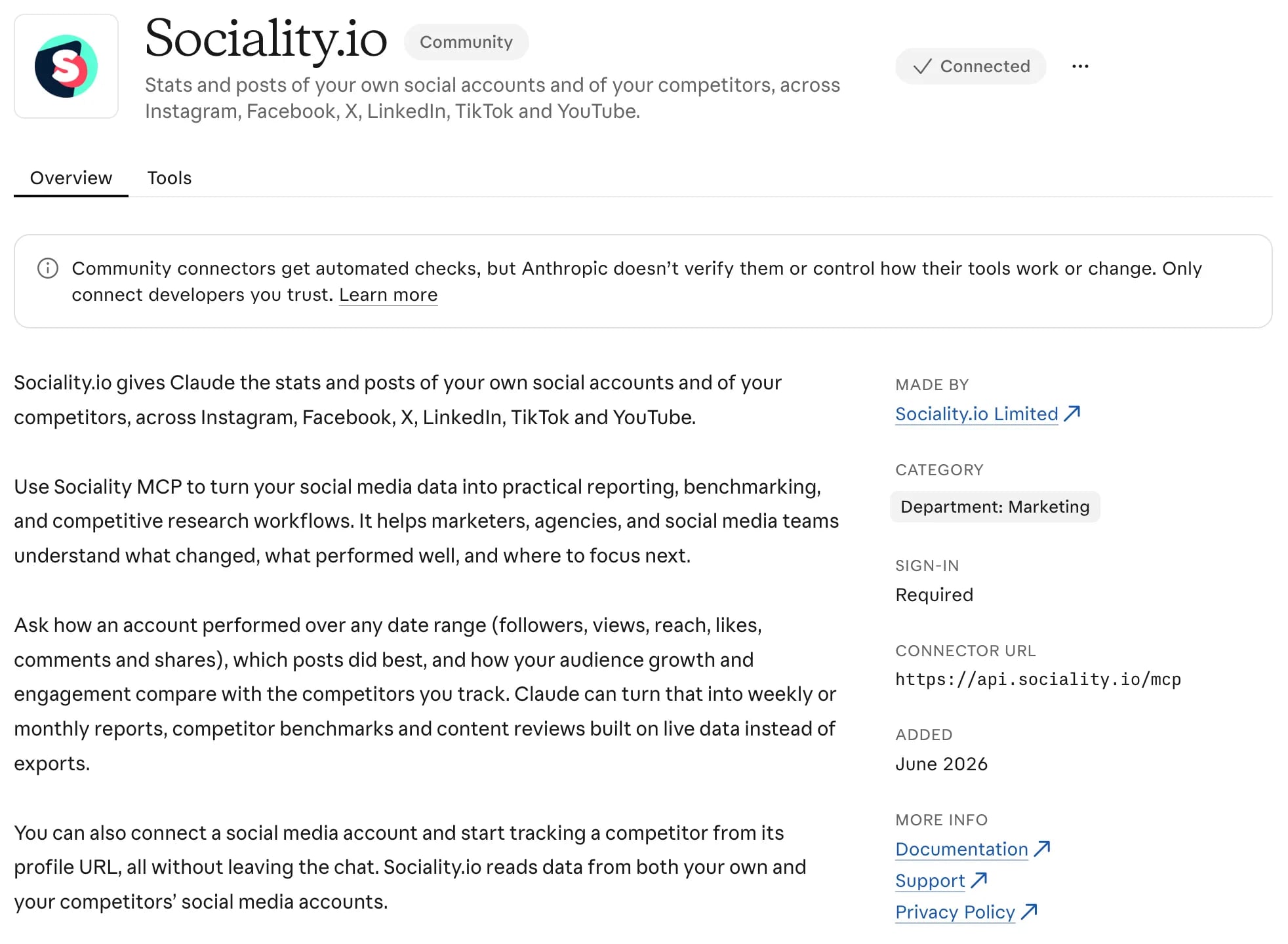
Step 1: add Sociality.io from the directory
Open Plugins or Customize, find the Sociality.io listing, select Connect and sign in. In the chat, switch Sociality.io on under + > Connectors. Claude may ask you to allow a tool once or always.
Step 2: ask for the connection link
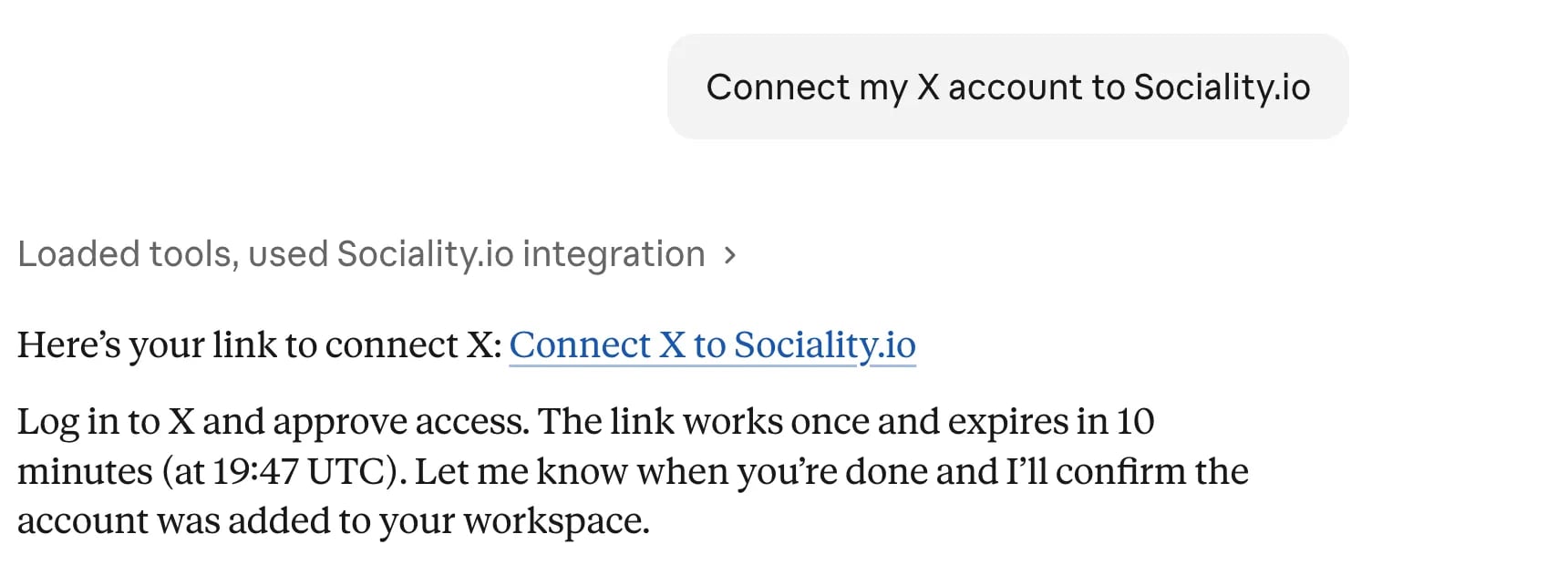
Give Claude this instruction in the chat where you enabled the connector.
Connect my X account to Sociality.io
Claude replies with a “Connect X to Sociality.io” link. It works once and expires in 10 minutes.
Step 3: authorize the app on X
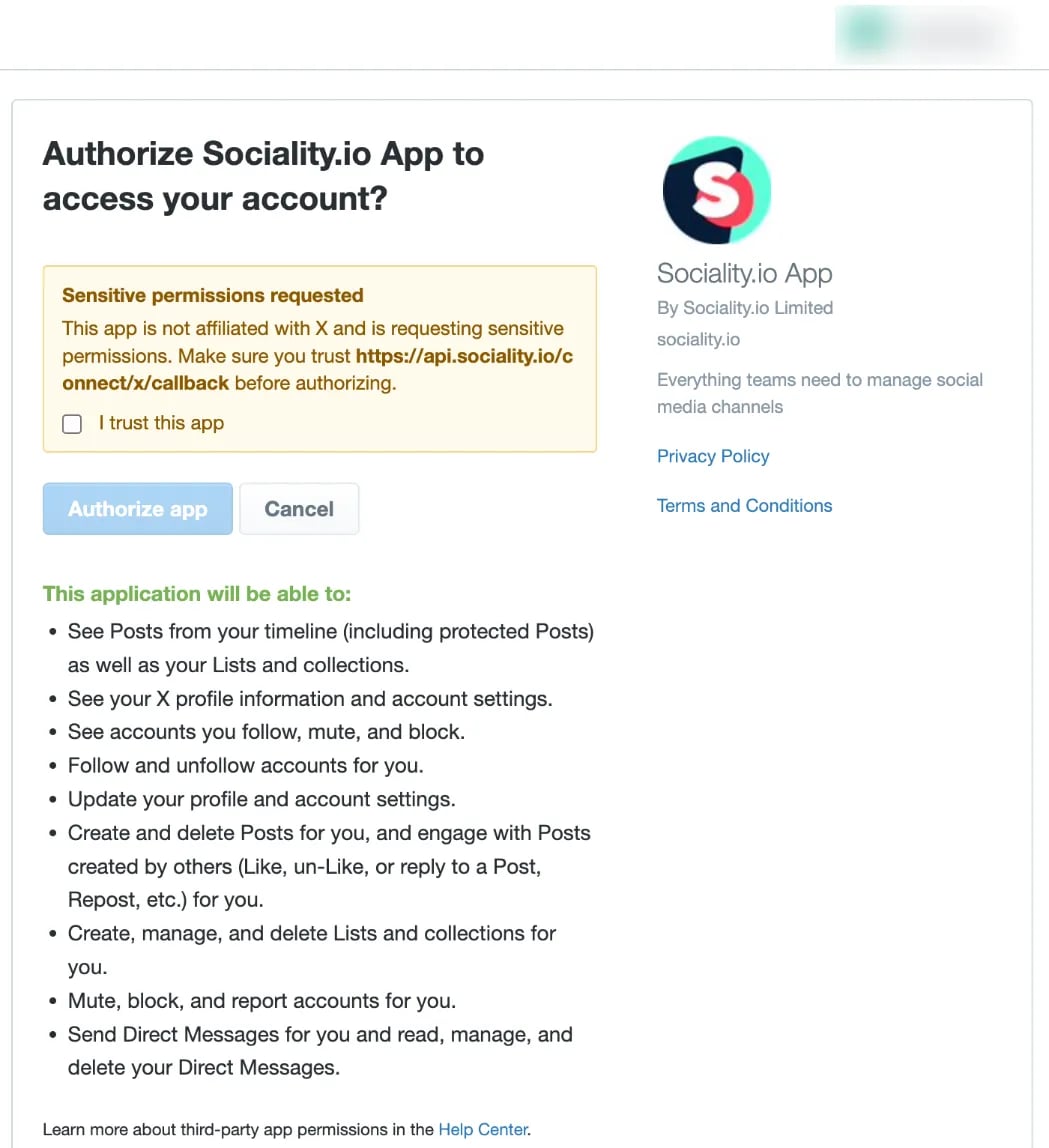
Open the link and check the account on “Authorize Sociality.io App to access your account?” Under “Sensitive permissions requested,” tick “I trust this app” to enable the grayed-out Authorize app button, then select it. The screen lists every permission the app asks for, and the safety section below explains what they cover.
Step 4: return to the conversation
X redirects you to Sociality.io’s “Accounts connected” page. It says, “You can close this page and go back to your conversation. Tell the assistant you are done.”
Step 5: confirm the handle
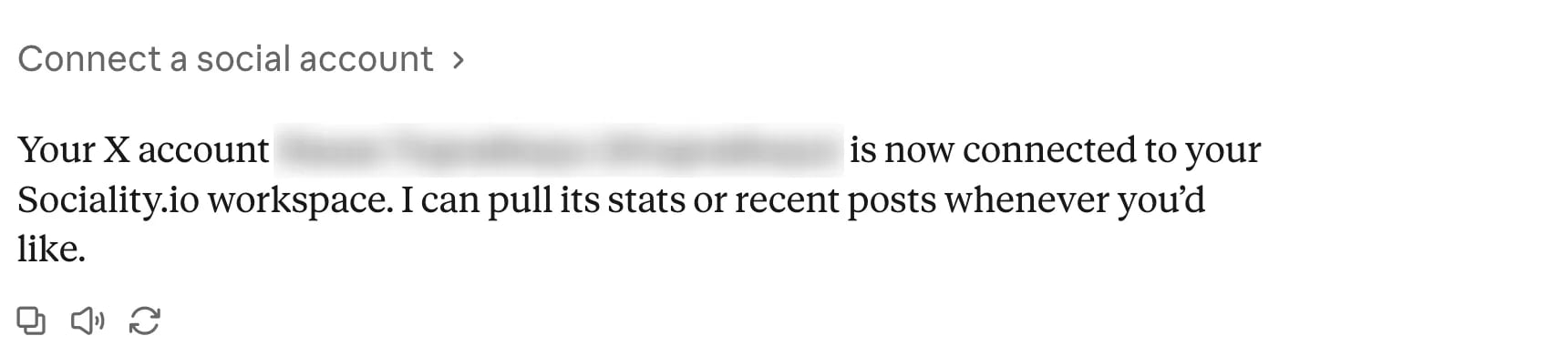
Say “Done” and Claude names the X account connected to your workspace. My browser was signed in to my personal X account, so that’s the one Claude confirmed. Check the handle before you close the tab.
How to connect X to ChatGPT
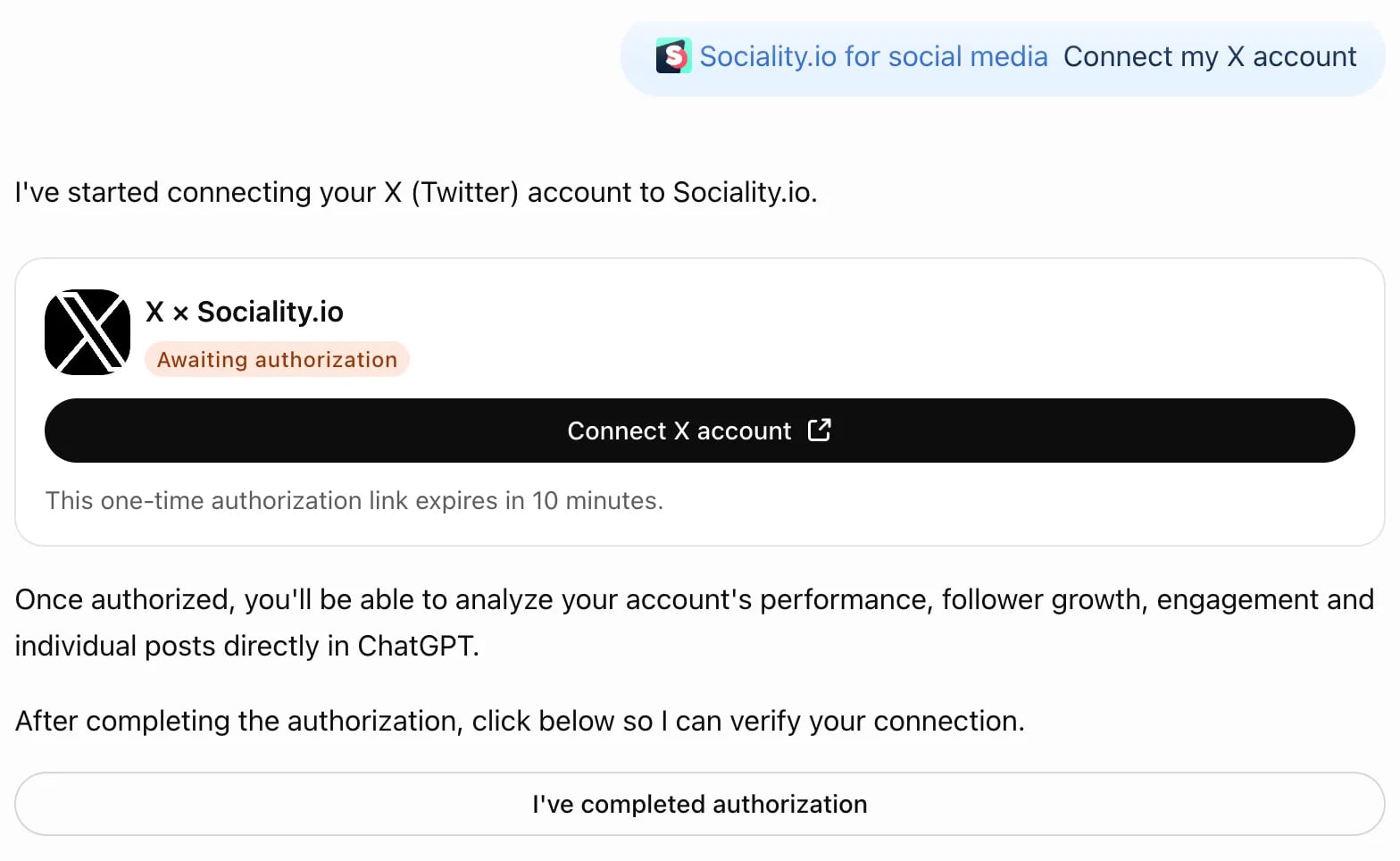
To connect X to ChatGPT, open Plugins, select “Sociality.io for social media,” choose Install plugin if shown and sign in when prompted. Type @ in a chat, select Sociality.io and ask it to connect your X account.

ChatGPT shows a “Connect X account” card marked “Awaiting authorization.” Its one-time link expires in 10 minutes. Follow it through the same X screens, return to the card and select “I’ve completed authorization.”
To disconnect the plugin account, open Settings > Plugins > Sociality.io > Connected accounts (or Connection) > ••• > Disconnect.
Your X account vs a competitor’s: what Claude and ChatGPT can see
Both assistants can compare public post performance through Sociality MCP, but account history and private clicks have different limits.
| Metric | Your account (you connected it) | A competitor (public data) | Only in X’s own analytics |
|---|---|---|---|
| Followers | Current count and history | Current count and history from tracking | |
| Following and listed counts | Counts over time | No series | |
| Posts and post types | Posts, post count over time, text, photo and video | Tracked posts and their types | |
| Likes, replies, reposts, quotes and bookmarks | Per post | Per accessible post | |
| Views | Per post | Per accessible post | |
| Engagement and engagement rate | Likes + reposts, rate per 1,000 followers | Same calculation | |
| Link clicks and profile clicks | Not in Sociality MCP’s X data | Private | Owner only. API access covers posts created in the last 30 days |
| Organic vs paid split | Combined views | Combined views | Owner only, with the same API window |
The gap is narrower than on Facebook because views are public for every accessible X post. Clicks and profile visits stay private. For those numbers, use your own X analytics, which requires X Premium.
I asked Claude about Nike, Pepsi and Taco Bell on X
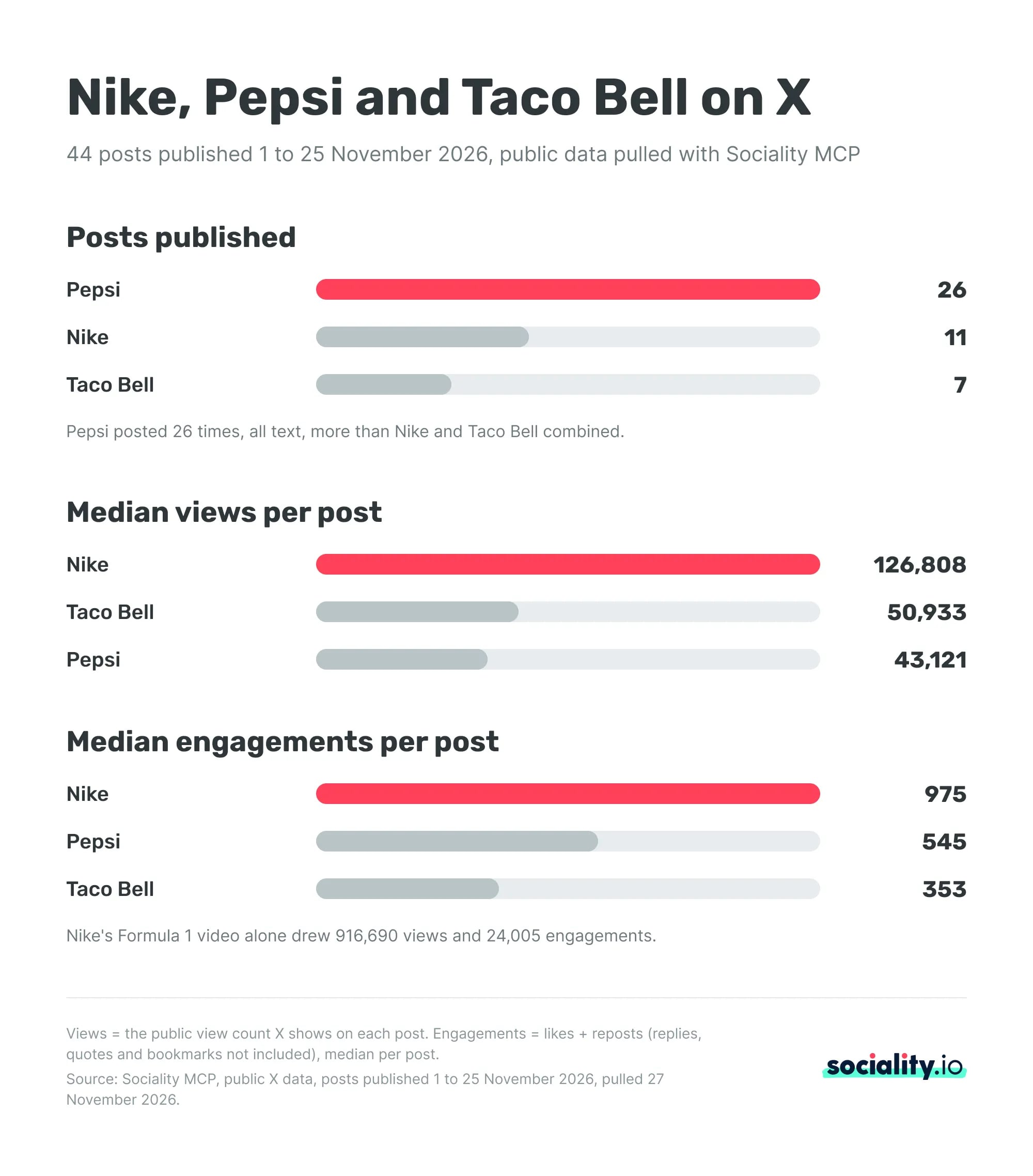
Nike led on typical views and engagements, but Pepsi led relative to its audience. I tested both assistants on 27 November 2026 using public accounts we track. Sociality.io had 336 X followers on 1 November, too small an account for a fair benchmark, so I gave the job to the brands.
Prompt 1: 3 brands, 25 days of posts
I asked for medians so Nike’s biggest video wouldn’t stand in for its typical post.
Using Sociality.io, compare the X posts that Nike, Pepsi and Taco Bell published from 1 to 25 November 2026. For each brand, give the number of posts, the mix of post types, median views per post, median engagements per post, median engagement rate and its top post. Show one table, then a 3-line verdict on which brand got the most out of each post.
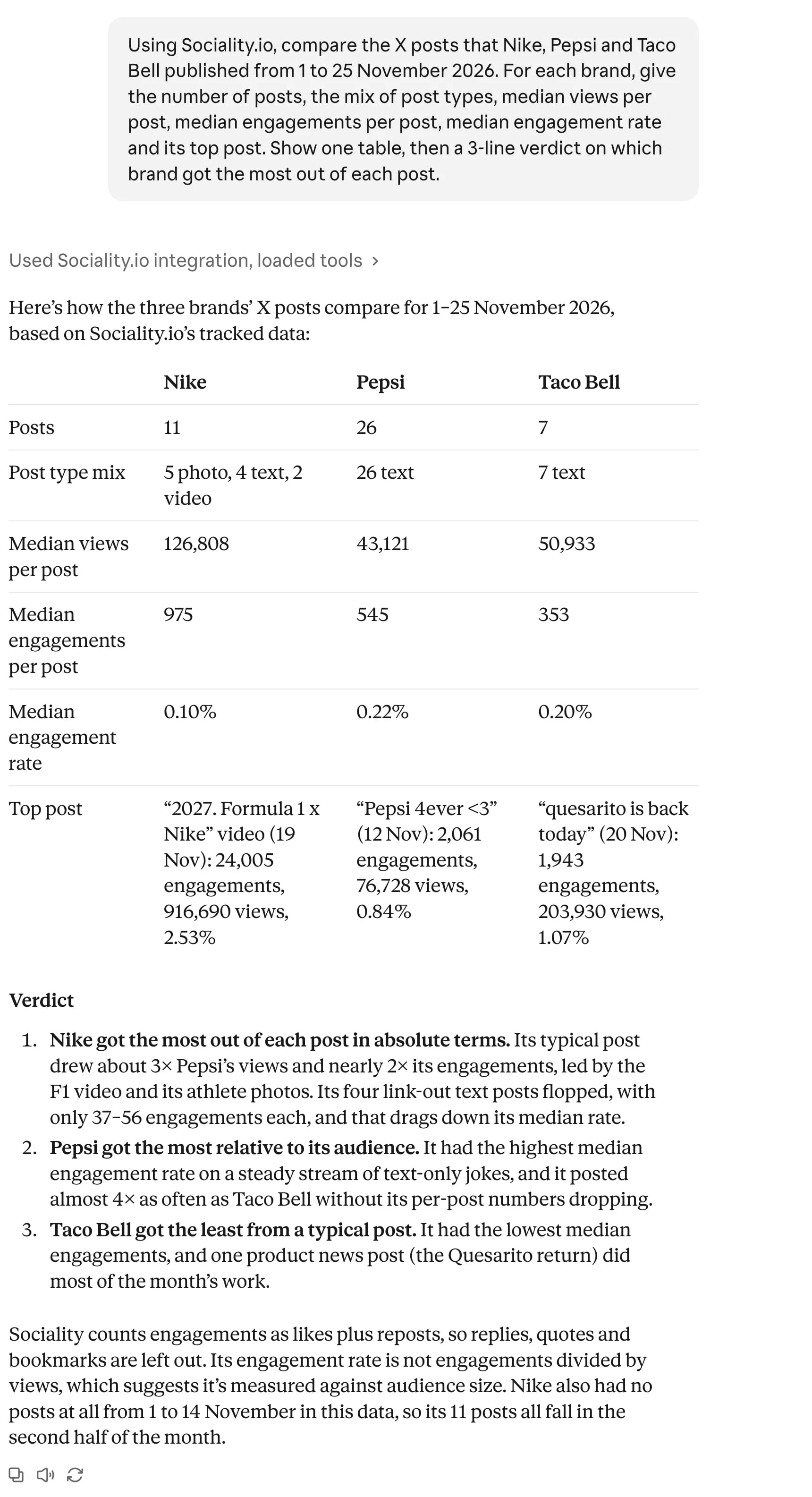
On 1 November, Nike had about 9.5M followers, Pepsi 2.5M and Taco Bell 1.8M. That changes how you read the results.
- Nike published 11 posts (5 photos, 4 text, 2 videos), all after 14 November. Its median post earned 126,808 views and 975 engagements, or 0.10 engagements per 1,000 followers at the median. The “2027. Formula 1 x Nike.” video on 19 November reached 916,690 views and 24,005 engagements.
- Pepsi published 26 text posts. Its medians were 43,121 views, 545 engagements and 0.22 engagements per 1,000 followers, the highest rate. “Pepsi 4ever <3” on 12 November led with 76,728 views and 2,061 engagements.
- Taco Bell’s 7 text posts had medians of 50,933 views, 353 engagements and 0.20 engagements per 1,000 followers. Its product announcement, “quesarito is back today,” earned 203,930 views and 1,943 engagements on 20 November.
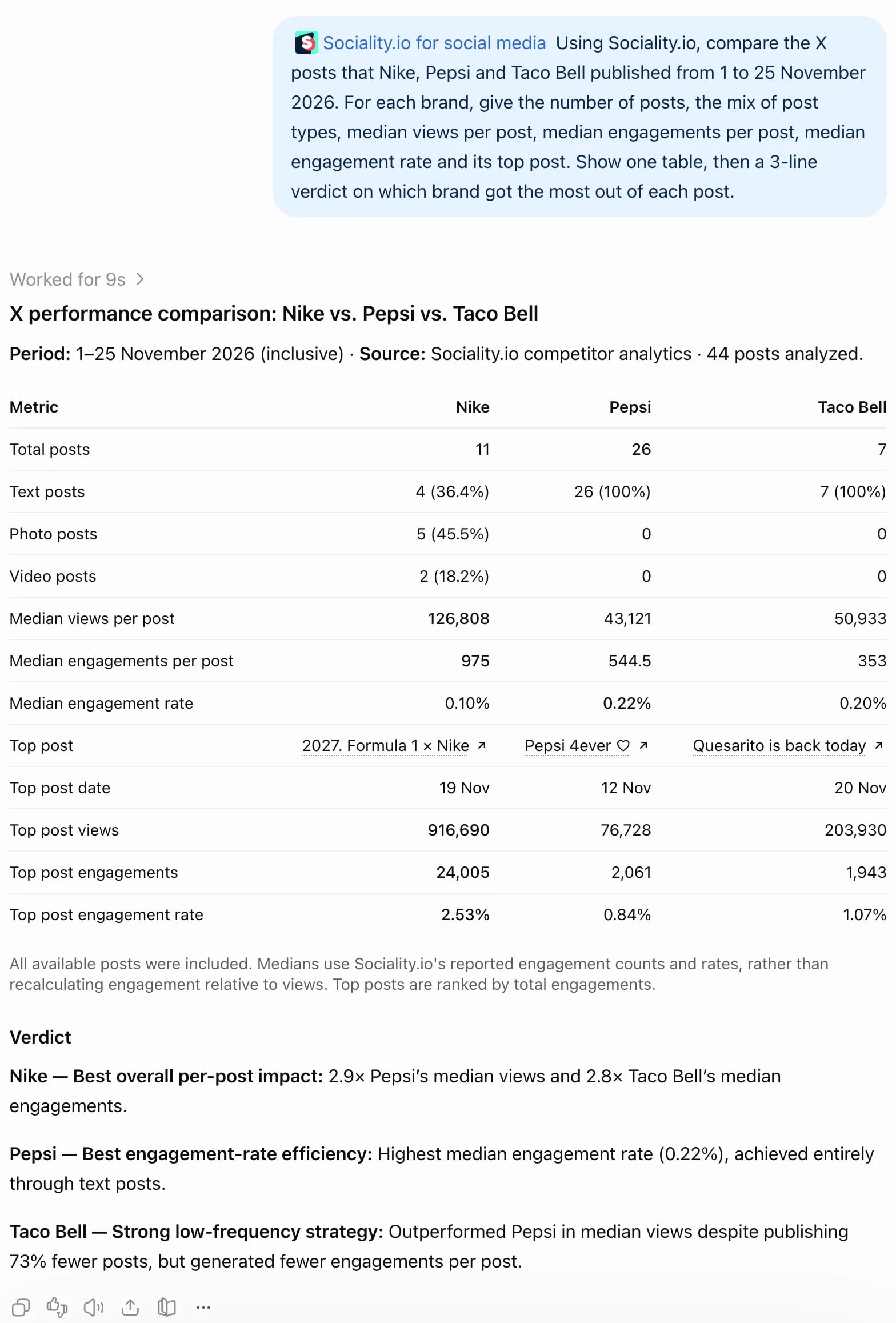
ChatGPT took 9 seconds and reported Pepsi’s unrounded median of 544.5 engagements. It highlighted Taco Bell beating Pepsi on median views with 73% fewer posts. Both assistants added a stray percent sign to the rate.
Prompt 2: which posts start conversations
To find conversation starters, I asked for replies separately because Sociality.io leaves them out of engagements.
Now find the posts that got the most replies compared with their likes. What did they have in common?
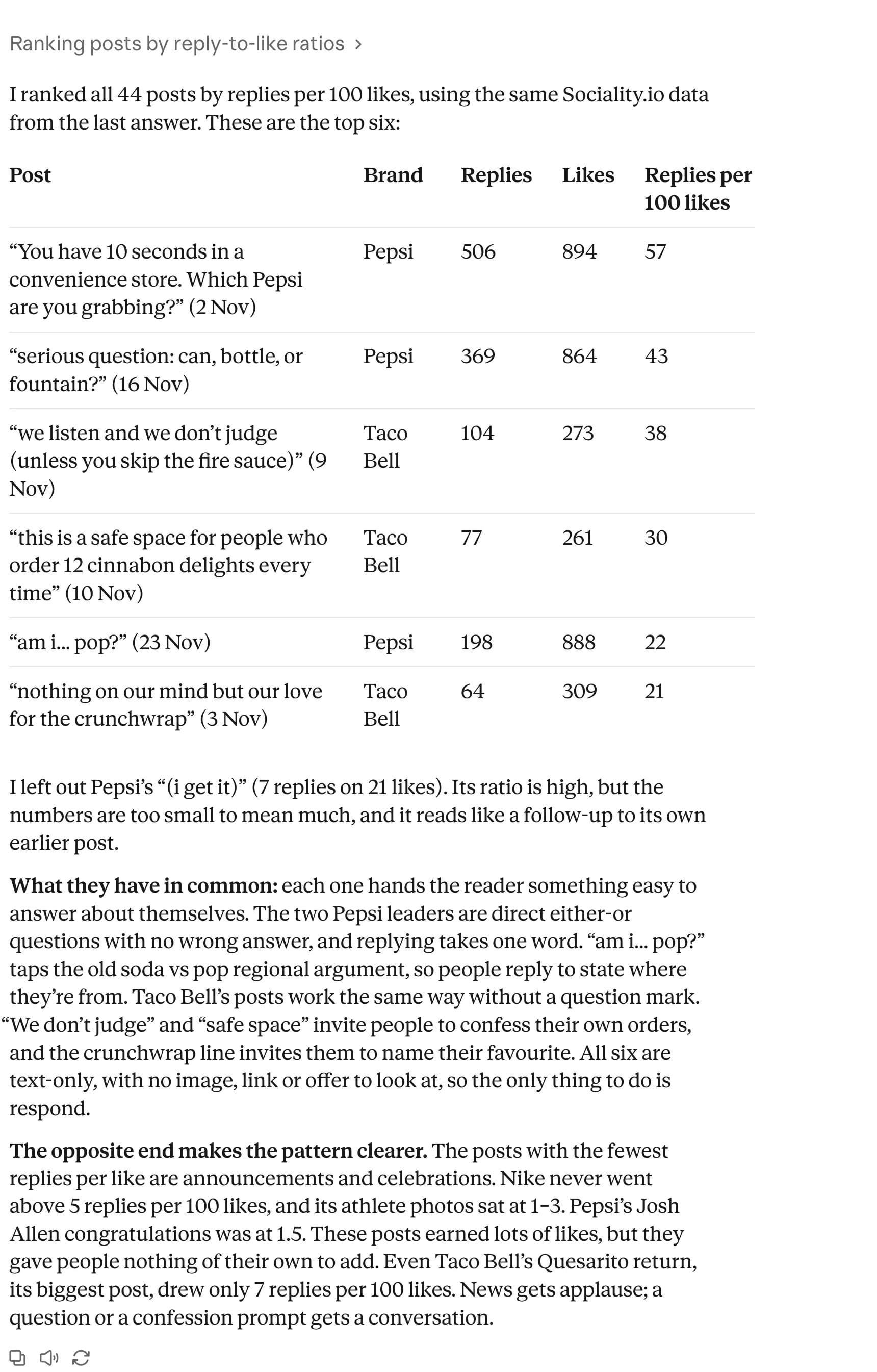
Claude ranked all 44 posts, and Pepsi’s convenience-store question on 2 November came out on top with 506 replies on 894 likes, or 57 replies per 100 likes. Its “can, bottle, or fountain?” question followed with 43.
Taco Bell’s fire sauce confession scored 38 and its Cinnabon Delights post 30, while Pepsi’s post about the soda vs pop argument scored 22.
All 5 were text posts without a link, image or offer. Readers could answer from personal experience. Nike’s athlete photos drew 1 to 3 replies per 100 likes, and Pepsi’s Josh Allen congratulations drew 1.5.
Prompt 3: the question the data can’t answer
I asked a traffic question to see where Claude would draw the line.
Which of these brands drove the most website clicks from X?
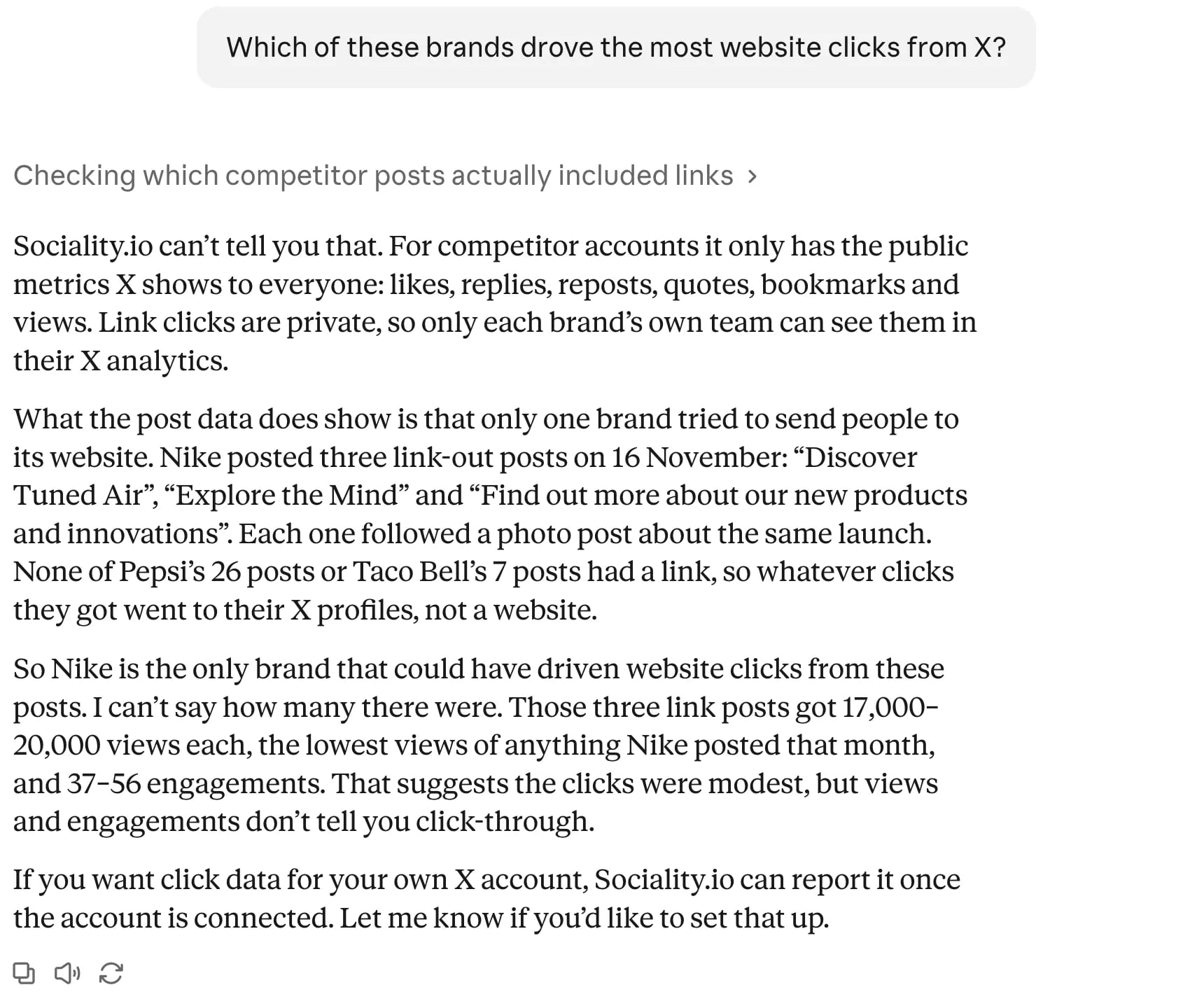
Claude couldn’t rank the brands. Only Nike included links, in 3 text posts on 16 November. Those posts got 17,000 to 20,000 views each and 37 to 56 engagements. Claude said that “suggests the clicks were modest,” but neither number tells you how many people followed a link.
Early-November posts had longer to accumulate views. Engagement leaves replies out, the rate is per 1,000 followers, clicks and profile visits stay private, and competitor history begins when tracking starts. Carry those limits into your next competitive analysis with AI.
What to ask Claude or ChatGPT about X
Ask for the account, period and metric you’d put in the client report.
Your own account
For a content review, start with the question that would change next week’s calendar.
Which of our text, photo and video posts had the highest median views last month? Show the post count for each format.
Add these follow-ups to make the answer more useful in a meeting.
- Which of our posts got people replying even when likes were low?
- How did our follower count change over the same period?
Competitors
For competitors, stick to public posts and the numbers under them.
- Which tracked brand earned the most reposts on a typical post?
- Which competitor questions got people talking about their own preferences?
- Does the ranking change if you compare engagements per 1,000 followers?
Other ways to get X data into Claude or ChatGPT
Choose the tool by what you need to report or publish.
| Tool | What X data | Assistants | Setup | Free option or price |
|---|---|---|---|---|
| X’s own MCP | Posts, search, users, timelines | Compatible MCP clients | Developer app and credentials | Pay per resource |
| Windsor.ai | Owned organic posts and profile counts, including impressions and clicks | Claude, ChatGPT | Own X developer credentials | Free for 1 source and 30 days. Paid from $19/month billed annually, plus X usage |
| Minter.io | Owned analytics from Minter reports | ChatGPT | Connect reports without an API key | 14-day trial |
| Supermetrics | Organic reporting, with quote-post gaps and possible null link clicks | Claude, ChatGPT | Supermetrics MCP | 14-day trial |
| Metricool | X analytics and competitors | Claude, ChatGPT | Metricool connector and X add-on | $10 per connected X account/month as an add-on |
| Composio | Post analytics, posting and recent search | Claude, ChatGPT | Managed X toolkit | Free entry plan. X charges may apply |
| Porter Metrics / Coupler.io | X Ads campaign reports only | Claude, ChatGPT | Connect X Ads via MCP | Check provider pricing |
| Postel | Drafting, scheduling and publishing | Claude | Connect X through Postel | $1 for 7 days, then from $29/month |
| X analytics CSV | Snapshot of up to 30 days and 3,000 posts | Claude, ChatGPT | Export and upload | Free export where your X account offers it |
Older tutorials lead to dead ends because Zapier retired its native Twitter integration and Make retired its native X app. For tools covering other networks too, see social media MCP servers compared.
Connected but something’s off?
Match what you’re seeing to the fix.
- Wrong X account? Switch accounts on x.com and ask for a new link. Authorization follows the browser login.
- Link expired or already used? It works once, for 10 minutes. When I opened an incomplete link, X said “This link is no longer valid,” and asking Claude for a new one fixed it.
- Authorize app grayed out? Tick “I trust this app” on X’s screen.
- Percent sign next to engagement rate? Label it “engagements per 1,000 followers.”
- Engagement differs from X analytics? Sociality.io counts likes plus reposts. X counts every interaction, including clicks.
- Competitor history looks short? Check when you started tracking the account. The latest 1 to 3 days may also be unavailable.
Is it safe to connect X to Claude or ChatGPT?
Review X’s permission list before you authorize, particularly for a client account. X identifies the app as “Sociality.io App, By Sociality.io Limited” and flags sensitive permissions. For agency work, use the client’s own X login and a workspace the client approves.
X says the app’s access could allow it to see protected timeline posts, lists, collections, profile settings and accounts you follow, mute or block. The list also covers following and unfollowing, editing settings, creating or deleting posts and lists, engaging with posts, muting, blocking or reporting accounts, and sending, reading, managing or deleting DMs.
Sociality MCP’s tools read published data, connect an account and add a competitor. They don’t publish, schedule, reply, follow, delete or read DMs. You can disconnect in Sociality.io, remove the plugin connection in ChatGPT Settings > Plugins, or revoke the app in X by opening Apps and sessions in your X settings, selecting Sociality.io App and choosing Revoke access.
On Claude consumer plans, chats used to improve models exclude raw connector content. Claude commercial plans exclude training by default. ChatGPT doesn’t train on app information by default on Business, Enterprise or Edu. On Free, Go, Plus and Pro, it may if “Improve the model for everyone” is on.
Sociality.io holds its own platform to enterprise-grade security standards, with a firewall, intrusion detection and DDoS protection around its cloud network, TLS in transit and encryption at rest, two-factor authentication, single sign-on for enterprise customers, role-based access and yearly third-party penetration tests. Our security page has the full list.
Wrapping up 👋
I’d add Sociality MCP first for a report that puts your own posts beside the competitors you track. Check the handle, pick a period everyone shares and ask for a median with the posts behind it.
Which brand won depends on the job you gave the posts. Nike led on typical views, Pepsi led on engagements relative to its audience, and a question about soda got people talking. For website traffic, even the most confident answer needs a number only the account owner can see.
FAQs about connecting X to Claude
Can I ask Claude or ChatGPT about my X analytics?
Yes. Once you authorize your X account, either assistant can retrieve your posts, follower history and public post metrics. Sociality.io is the best fit when you want your own account and tracked competitors in one place. Use the Sociality.io dashboard to review the accounts and Sociality MCP to ask questions in chat.
Is there an official X MCP server?
Yes. X hosts its API MCP at https://api.x.com/mcp. It can search the full archive, fetch posts and read timelines and mentions using your developer app. If you found a Twitter MCP result pointing to docs.x.com/mcp, that’s a separate service for searching developer documentation. It can’t retrieve the posts for your report.
Do I need X API keys or a paid X plan?
If you’re looking up how to connect X to Claude through Sociality MCP, you don’t need developer keys or X Premium for the connection. You need a workspace role that lets you add accounts and an available account slot. X’s own server requires developer credentials and API credits, while X’s own analytics page requires Premium.
Can Claude see a competitor’s X impressions or link clicks?
Claude can retrieve the public impression count for an accessible post through a connector. That count combines organic and promoted views. Link clicks and profile clicks are private to the owner, so a competitor’s views, likes and reposts can’t tell you how much website traffic the post generated.
Why doesn’t engagement match X’s own number?
Sociality.io adds likes and reposts to calculate X engagements. X analytics counts a wider set of interactions, including clicks, so the totals can differ for the same post. For a conversation report, request replies separately. For an audience-adjusted comparison, label the Sociality.io rate as engagements per 1,000 followers.
Can Claude read an X post from a link?
Sometimes an assistant can read a public post from its link, but neither Claude nor ChatGPT promises that pasting a URL will retrieve it. X’s terms require written consent for crawling. A link grants no access to private metrics. For a post comparison, use a connector that can fetch the underlying data.
Can I post to X from Claude?
Yes, with a tool that supports publishing. Postel can draft, schedule and publish X posts from Claude, and Composio includes posting in its X toolkit. Sociality MCP reads published data and handles account setup. If you ask it to publish a reply or schedule a post, it has no tool for that action.
How do I disconnect X from Claude or ChatGPT?
To withdraw X authorization, open Connected apps under Apps and sessions in X, choose Sociality.io App and select Revoke access. You can also disconnect the account in Sociality.io. To remove ChatGPT’s plugin connection, open Settings, select Plugins and Sociality.io, then find Disconnect in the menu beside the connected account.